Introduction
This manual provides detailed instructions for the Tatybo Wireless Gaming Headset (Model WT01). Designed for an immersive gaming experience, this headset features 7.1 surround sound, a 360° adjustable microphone, and versatile connectivity options including 2.4GHz USB, Type-C, Bluetooth 5.3, and a 3.5mm audio jack. It is compatible with a wide range of devices such as PS5, PS4, PC, Switch, laptops, Mac, and mobile phones.
Продукт бүттүview
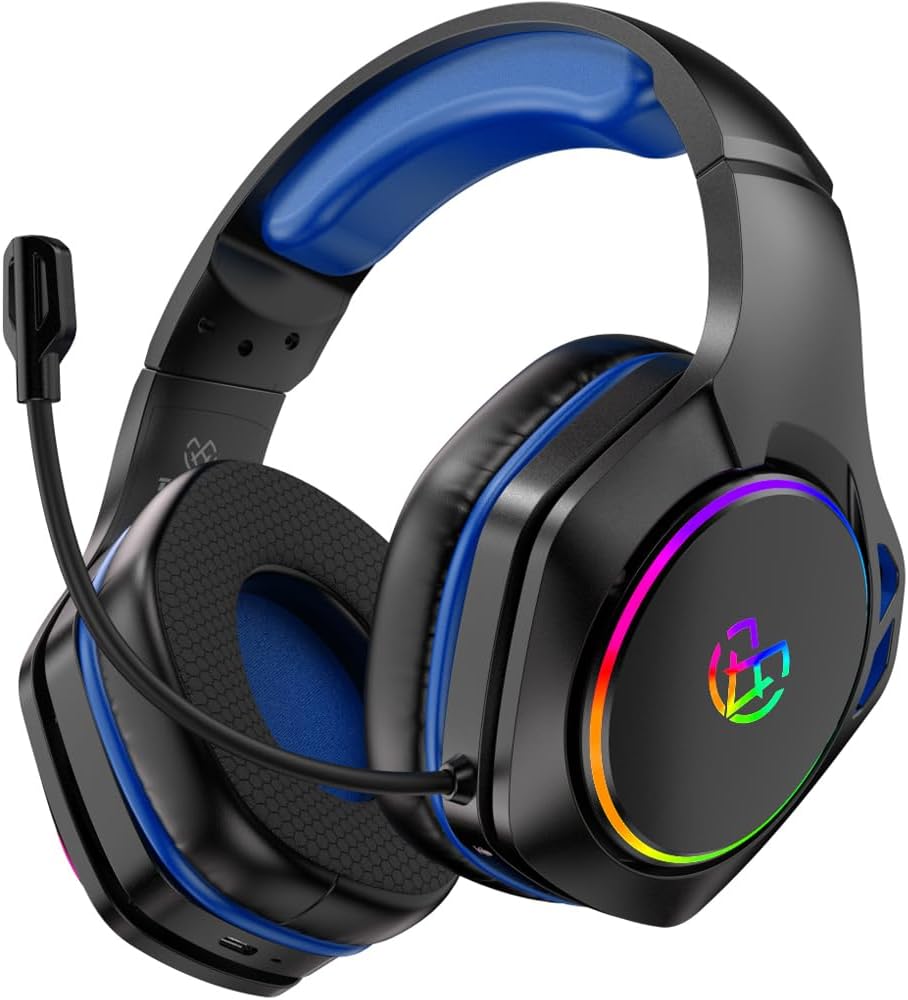
Image: The Tatybo Wireless Gaming Headset, featuring a blue headband and earcups, black exterior, an adjustable boom microphone, and colorful RGB lighting on the outer side of the earcups.
Пакеттин мазмуну:
- Tatybo Wireless Gaming Headset (WT01)
- 2.4GHz USB/Type-C Wireless Dongle
- USB заряддоо кабели
- 3.5 мм аудио кабель
- Колдонуучунун Колдонмосу (бул документ)
Гарнитура компоненттери:
- Жөнгө салынуучу баш боосу: Ыңгайлуу ылайыктуу үчүн.
- Кулакчындар: Over-ear design with breathable mesh cushions.
- Микрофон: 360° adjustable, noise-canceling boom microphone.
- Кубат баскычы: Located on one earcup.
- Үндү көзөмөлдөө: Wheel or buttons for audio adjustment.
- Микрофондун үнүн басуу баскычы: For quick muting.
- Заряддоо порту: Заряддоо үчүн USB-C порту.
- 3.5 мм аудио уячасы: Зымдуу туташуу үчүн.
- LED көрсөткүчтөрү: For power, charging, and connection status.
- RGB жарыктандыруу: Customizable lighting on earcups.
Жайгашуу
1. Гарнитураны заряддоо
- Connect the provided USB charging cable to the headset's USB-C charging port.
- Кабелдин экинчи учун USB кубат булагына туташтырыңыз (мисалы, компьютердин USB порту, дубал адаптери).
- The LED indicator will show charging status. A full charge typically takes approximately 3 hours, providing over 40 hours of playtime.
2. Connecting via 2.4GHz Wireless (USB/Type-C Dongle)
This mode offers ultra-low latency for optimal gaming performance on compatible devices.
- Insert the 2.4GHz USB or Type-C wireless dongle into an available port on your device (PC, PS5, PS4, Nintendo Switch in docked mode).
- Power on the headset by pressing and holding the Power button until the LED indicator lights up.
- The headset should automatically pair with the dongle. The LED indicator will show a stable light once connected.
- On your device, ensure the Tatybo headset is selected as the default audio input and output device in the sound settings.
3. Bluetooth 5.3 аркылуу туташуу
Ideal for mobile devices, laptops, Mac, and Nintendo Switch in handheld mode.
- Ensure the headset is powered off. Press and hold the Power button for approximately 5-7 seconds until the LED indicator flashes rapidly, indicating pairing mode.
- Түзмөгүңүздө Bluetooth иштетиңиз жана жеткиликтүү түзмөктөрдү издеңиз.
- Select "Tatybo WT01" (or similar name) from the list of found devices to pair.
- Once connected, the LED indicator on the headset will show a stable light.
4. Connecting via 3.5mm Audio Jack (Wired Mode)
For universal compatibility with any device featuring a 3.5mm audio port, or when battery is depleted.
- 3.5 мм аудио кабелдин бир учун гарнитуранын 3.5 мм аудио уячасына туташтырыңыз.
- Connect the other end of the cable to the 3.5mm audio port on your device (e.g., controller, PC, mobile phone).
- The headset will function in passive wired mode. The microphone may or may not be active depending on the device's 3.5mm port configuration.
Иштөө нускамалары
Күйгүзүү/өчүрүү
- Күйгүзүү: Кубат баскычын 2-3 секунд басып туруңуз.
- Өчүрүү: Кубат баскычын 3-5 секунд басып туруңуз.
Үндү көзөмөлдөө
Use the volume wheel or dedicated buttons on the earcup to adjust the audio output level.
Микрофонду колдонуу
- Позициялоо: Adjust the flexible boom microphone to a comfortable position near your mouth for optimal voice pickup.
- Үнсүз/Ачуу: Микрофонду күйгүзүү же өчүрүү үчүн кулакчындагы атайын микрофонду үнсүз кылуу баскычын басыңыз.
7.1 Айлана үн
The headset features 7.1 surround sound for an immersive audio experience. This feature is typically active when connected via 2.4GHz wireless or USB, providing enhanced directional audio cues in compatible games.
LED жарык башкаруу
The headset features RGB lighting on the earcups. To conserve battery life, you can typically turn off the LED lights by double-pressing the action button (often the power button or a dedicated LED control button).
Техникалык тейлөө
- Тазалоо: Гарнитураны тазалоо үчүн жумшак, кургак чүпүрөктү колдонуңуз. Катуу химиялык заттарды же абразивдүү материалдарды колдонуудан алыс болуңуз. Кулак жаздыкчалары үчүн жарнама менен акырын сүртүңүзamp чүпүрөк менен жууп, абада толугу менен кургатууга мүмкүнчүлүк бериңиз.
- Сактагыч: Гарнитураны күн нурунан жана экстремалдык температурадан алыс салкын, кургак жерде сактаңыз.
- Батареяга кам көрүү: Батареянын иштөө мөөнөтүн узартуу үчүн, гарнитураны бат-баттан толук зарядсыздандырбаңыз. Узак мөөнөткө колдонулбаса да, аны үзгүлтүксүз заряддаңыз.
Проблемаларды чечүү
- Үн жок:
- Гарнитура күйгүзүлгөнүн жана кубатталганын текшериңиз.
- Гарнитуранын жана туташкан түзмөгүңүздүн үн деңгээлин текшериңиз.
- Түзмөгүңүздүн үн жөндөөлөрүндө туура аудио чыгаруу түзмөгү тандалганын текшериңиз.
- If using 2.4GHz wireless, ensure the dongle is securely inserted and paired. Try re-pairing if necessary.
- If using Bluetooth, ensure the headset is paired and connected. Try unpairing and re-pairing.
- If using 3.5mm wired, ensure the cable is fully inserted into both the headset and the device.
- Микрофон иштебейт:
- Ensure the microphone is not muted (check the mute button on the headset).
- Түзмөгүңүздүн үн жөндөөлөрүндө туура аудио киргизүү түзмөгү тандалганын текшериңиз.
- Check microphone privacy settings on your operating system.
- Микрофондун штангасынын туура жайгашканын текшериңиз.
- Connection Issues (2.4GHz Wireless):
- Ensure the dongle is within range (typically up to 10 meters) and not obstructed by physical barriers or other wireless devices causing interference.
- Try plugging the dongle into a different USB/Type-C port.
- Reboot your device and the headset.
- Кыска батареянын иштөө мөөнөтү:
- Колдонуудан мурун гарнитура толук заряддалганын текшериңиз.
- Turn off RGB lighting if not needed, as it consumes battery power.
- Reduce volume levels, as higher volumes can drain the battery faster.
Техникалык шарттар
| Өзгөчөлүк | Деталь |
|---|---|
| Модель аты | WT01 |
| Бренд | Татыбо |
| Байланыш технологиясы | Wireless (2.4GHz USB/Type-C, Bluetooth 5.3), Wired (3.5mm Audio Jack) |
| Шайкеш түзмөктөр | Gaming Consoles (PS5, PS4, Switch), PCs, Laptops, Mac, Mobile Phones |
| Аудио драйвер түрү | Динамикалык драйвер |
| Үн өзгөчөлүктөрү | 7.1 Айлана үн |
| Микрофон | 360° Adjustable, Noise-Canceling |
| Батареянын иштөө мөөнөтү | 40+ hours (after 3-hour charge) |
| Жыштык диапазону | 20 Гц - 20 000 Гц |
| Наушник формасы | Ашыкча кулак |
| Элемент Салмагы | 1.19 фунт |
| Түс | Көк |
Кепилдик жана колдоо
Tatybo products are designed for reliability and performance. For warranty information, technical support, or any inquiries regarding your WT01 Wireless Gaming Headset, please refer to the contact information provided on the product packaging or visit the official Tatybo webсайт. Кепилдик дооматтар үчүн сатып алганыңыздын далилин сактаңыз.


