1. Киришүү
This manual provides detailed instructions for the proper use and maintenance of your BOBLOV A30 Mini Body Camera. Please read this manual thoroughly before operating the device to ensure optimal performance and longevity.

Image: The BOBLOV A30 Mini Body Camera shown with its various accessories, including the charging dock, extra battery, lanyard, bike mount, and clip.
2. Кутуда эмне бар
Upon opening your BOBLOV A30 Mini Body Camera package, you should find the following items:
- BOBLOV A30 Body Camera
- Эки (2) кайра заряддалуучу батарейка
- Dual-Slot Charging Dock
- USB кабели
- Bike Mount
- Lanyard
- Клип
- User Manual

Image: A visual representation of all items included in the BOBLOV A30 Mini Body Camera package, laid out neatly.
3. Орнотуу
3.1. Батареяны орнотуу жана заряддоо
- Insert a battery into the designated battery compartment on the camera. Ensure it clicks into place securely.
- To charge the batteries, place them into the dual-slot charging dock. Connect the charging dock to a power source using the provided USB cable. The indicator lights on the dock will show charging status.
- A full charge provides up to 7 hours of continuous 1080P recording or 6 hours of 4K recording per battery.
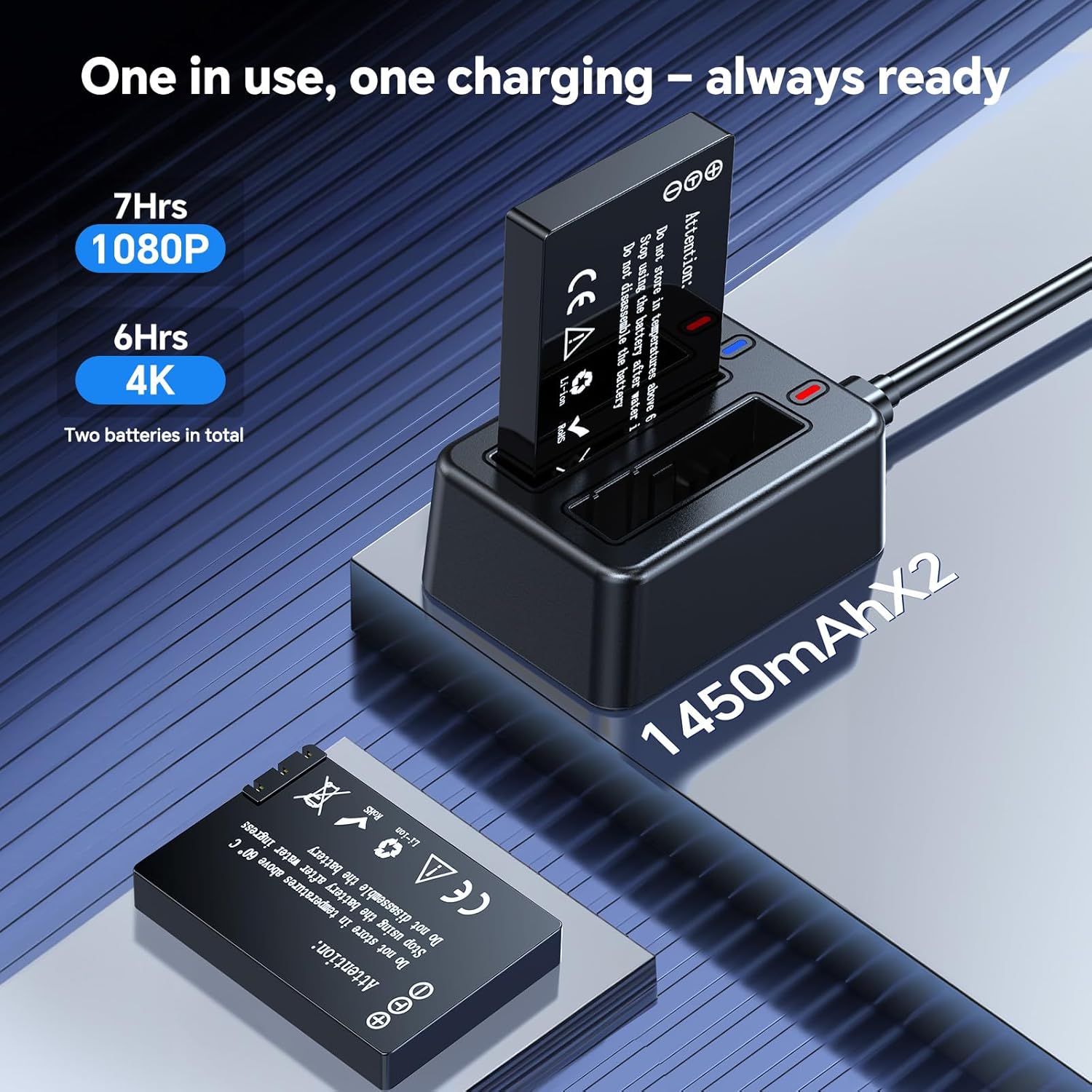
Image: The dual-slot charging dock with two batteries, one inserted and one ready for insertion, illustrating the charging process.
3.2. MicroSD картасын орнотуу
The camera supports external microSD cards for storage. Insert a compatible microSD card into the card slot on the camera. Ensure the card is correctly oriented before insertion.
4. Иштөө нускамалары
4.1. Күйгүзүү/өчүрүү
Press and hold the Power button to turn the camera on or off.
4.2. Видео жаздыруу
Once powered on, press the Record button to start video recording. Press it again to stop recording. The camera supports 4K Ultra HD resolution for detailed footage.

Image: A comparison showing the clarity of 4K resolution video captured by the BOBLOV A30 Mini Body Camera versus standard resolution.
4.3. 180° Rotatable Lens
The camera features a 180° rotatable lens, allowing you to adjust the shooting angle as needed. Simply rotate the lens manually to capture footage from various perspectives (forward, upward, downward).

Image: The BOBLOV A30 Mini Body Camera demonstrating its 180° rotatable lens, showing different angles of rotation.
4.4. Loop жаздыруу
Камера циклдик жаздырууну колдойт, ал автоматтык түрдө эң эски видеолордун үстүнөн жазатtage when the storage card is full. This ensures continuous recording without manual deletion of files.

Image: The BOBLOV A30 Mini Body Camera screen displaying recording information, with icons indicating loop recording and compatibility with Windows and Mac operating systems.
4.5. Монтаждоо параметрлери
The BOBLOV A30 offers flexible mounting options to suit various activities:
- Клип: Attach the camera to clothing, bags, or other surfaces.
- Лянард: Wear the camera around your neck for easy access.
- Велосипедге орнотуу: Securely attach the camera to bicycle handlebars for outdoor adventures.

Image: The BOBLOV A30 Mini Body Camera displayed with its clip, lanyard, and bike mount accessories, illustrating different ways to wear or attach the camera.

Сүрөт: Мисamples of the BOBLOV A30 Mini Body Camera being used during cycling, hiking, and for educational purposes, demonstrating its versatility.
4.6. Компьютерге туташуу
Connect the camera to your computer using the provided USB cable to transfer files. The camera is compatible with both Windows and Mac operating systems.
5. Техникалык тейлөө
5.1. Батареяга кам көрүү
To maximize battery life, avoid fully discharging the batteries frequently. Store batteries in a cool, dry place when not in use. Use only the provided charging dock and cable.
5.2. Сактагычты башкаруу
Regularly transfer important footage from the microSD card to a computer or external storage device. While loop recording prevents storage from filling up, backing up data is recommended.
5.3. Тазалоо
Камера корпусун тазалоо үчүн жумшак, кургак чүпүрөктү колдонуңуз. Линза үчүн, чийилип калбашы үчүн линзаны тазалоочу атайын чүпүрөктү жана эритмени колдонуңуз. Катуу химиялык заттарды же абразивдүү материалдарды колдонбоңуз.
6. Кыйынчылыктарды
- Камера күйбөй жатат: Ensure the battery is fully charged and correctly inserted. Try using the second battery.
- Жаздыруу маселелери: Check if the microSD card is properly inserted and has sufficient free space. Format the card if necessary (this will erase all data).
- Видеонун сапаты начар: Ensure the lens is clean and free from smudges. Check recording settings to confirm 4K resolution is selected.
- Computer not recognizing camera: Башка USB портун же кабелин колдонуп көрүңүз. Туташтырылганда камера күйүп турганын текшериңиз.
7. Техникалык шарттар
| Өзгөчөлүк | Деталь |
|---|---|
| Модель номери | A30 (A23) |
| Видео тартуунун резолюциясы | 4K |
| Фото сенсор технологиясы | CMOS |
| Айлануучу объектив | 180 градус |
| Battery Life (1080P) | Up to 7 hours (per battery) |
| Battery Life (4K) | Up to 6 hours (per battery) |
| Flash эс тутум түрү | Микро SD |
| Видео тартуу форматы | MOV |
| Screen Size | 1.3 дюйм |
| Байланыш технологиясы | USB |
| Элемент Салмагы | 9.9 унция |
| Түс | Кара |
8. Кепилдик жана колдоо
BOBLOV provides a 24-month product coverage for its supporters. For any technical assistance or inquiries, BOBLOV offers a quick response within 24 hours and lifetime technical support.
For further support or to visit the official store, please refer to the BOBLOV Store.

Image: BOBLOV brand information highlighting customer satisfaction, global reach, 24-month product coverage, and 24-hour technical support.


