1. Киришүү
The Sonim Zenith H100 is a compact and powerful 4G mobile Wi-Fi hotspot designed to provide reliable internet connectivity on the go. With impressive download and upload speeds, LTE Cat-13 capabilities, Wi-Fi 5 features, and a color screen, the H100 allows you to connect up to 32 devices simultaneously. This manual provides essential information for setting up, operating, maintaining, and troubleshooting your Sonim H100 hotspot.

Figure 1: Sonim Zenith H100 Mobile Wi-Fi Hotspot. The device features a clear display showing connection details and signal strength.
2. Кутуда эмне бар
Before you begin, please ensure all the following items are included in your package:
- Sonim Spot H100 4G мобилдик хотспот
- USB-C Cable
- Батарея
- Заряддагыч
- Quick Start Guide
3. Түзмөк бүттүview
Familiarize yourself with the physical components of your Sonim H100 hotspot.
3.1 Фронт View

Figure 2: Front of the H100, featuring the display screen.
The front of the device primarily features the color display, which provides real-time information about network status, battery level, and connected devices.
3.2 тарап View and Power Button
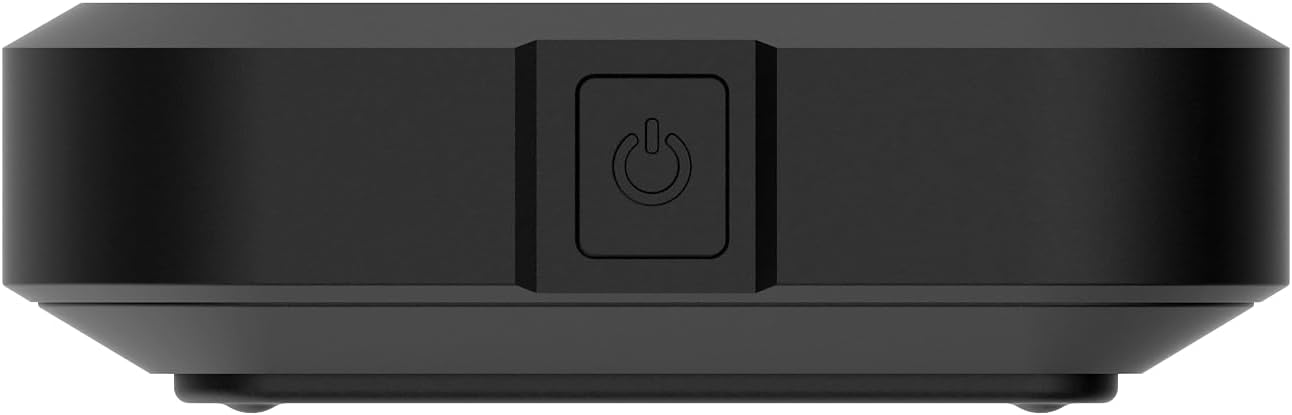
3-сүрөт: Каптал view of the H100, showing the power button.
The power button is located on the side of the device. Press and hold to power on or off. A short press can wake the screen or navigate menus.
3.3 Артка View

Figure 4: Back of the H100.
The back of the device features a removable cover, under which the battery and SIM card slot are located.
4. Орнотуу
4.1 Аппаратты заряддоо
Before first use, fully charge your Sonim H100. Connect the provided USB-C cable to the device's USB-C port and the other end to the charger. Plug the charger into a power outlet. The screen will indicate charging status.

Figure 5: USB-C charging port on the Sonim H100.
4.2 SIM картаны салуу
- Аппараттын өчүрүлгөнүн текшериңиз.
- Аппараттын арткы капкагын алып салыңыз.
- SIM картанын уячасын табыңыз.
- Carefully insert your activated 4G LTE SIM card into the slot, ensuring correct orientation.
- Арткы жапкычты ордуна коюңуз.
4.3 Күйгүзүү/өчүрүү
- Күйгүзүү үчүн: Press and hold the power button (refer to Figure 3) until the Sonim logo appears on the screen.
- Өчүрүү үчүн: Press and hold the power button until the power-off options appear on the screen, then select "Power Off".
5. Иштөө нускамалары
5.1 Connecting Devices to the Hotspot
The Sonim H100 broadcasts a Wi-Fi network that other devices can connect to.
- Ensure the H100 is powered on and has an active cellular connection.
- On your device (smartphone, laptop, tablet), open your Wi-Fi settings.
- Look for the Wi-Fi network name (SSID) displayed on the H100's screen.
- Select the H100's network and enter the Wi-Fi password (also displayed on the H100's screen).
- Түзмөгүңүз интернетке хотспот аркылуу туташып турушу керек.

Figure 6: H100 screen displaying connection information.
5.2 Managing Connections (Primary and Guest)
The H100 supports both a primary and a guest Wi-Fi network. This allows you to provide internet access to guests without sharing your main network password or access to your primary connected devices.
- Негизги тармак: Your main Wi-Fi network, typically with full access and higher priority.
- Коноктор тармагы: A separate Wi-Fi network with its own password, often with limited access or bandwidth, ideal for temporary users.
Navigate the H100's on-screen menu using the navigation button (often the power button or a dedicated navigation button) to view and manage settings for both networks.
5.3 Дисплейди колдонуу
The color display provides crucial information at a glance. Use the navigation button to cycle through different screens, which may include:
- Network status (4G LTE, signal strength)
- Батарея деңгээли
- Connected devices (Primary and Guest)
- Wi-Fi SSID and password
- Дайындардын колдонулушу
5.4 Тармак орнотуулары
Advanced network settings can typically be accessed via a web interface. Connect a device to the H100's Wi-Fi, then open a web browser and enter the IP address displayed on the H100's screen (e.g., 192.168.1.1). Log in using the default credentials (usually found in the Quick Start Guide or on a sticker inside the device) to configure settings such as:
- Changing Wi-Fi SSID and password
- Setting up security protocols
- Туташкан түзмөктөрдү башкаруу
- Микропрограмма жаңыртуулары
6. Техникалык тейлөө
6.1 Батареяга кам көрүү
- Аппаратты экстремалдык температурага тийгизүүдөн сактаңыз.
- Батареяны дайыма толук зарядсыздандырбаңыз. Ал 20% дан төмөн түшүп кете электе заряддаңыз.
- If storing the device for an extended period, charge the battery to about 50% and power off the device.
6.2 Тазалоо
Use a soft, dry, lint-free cloth to clean the device. Do not use liquid cleaners or aerosols directly on the device. Avoid getting moisture into any openings.
6.3 Программалык камсыздоо жаңыртуулары
Түзмөктүн программалык камсыздоосунун жаңыртууларын мезгил-мезгили менен текшерип туруңуз web interface. Updates can improve performance, add new features, and enhance security. Ensure the device is fully charged before performing any updates.
7. Кыйынчылыктарды
If you encounter issues with your Sonim H100, refer to the following common problems and solutions:
| Көйгөй | Мүмкүн чечим |
|---|---|
| Интернет байланышы жок |
|
| Wi-Fi'га туташпай жатат |
|
| Жай Интернет ылдамдыгы |
|
| Түзмөк күйбөй жатат |
|
8. Техникалык шарттар
Key technical specifications for the Sonim Zenith H100 Mobile Wi-Fi Hotspot:
| Өзгөчөлүк | Деталь |
|---|---|
| Бренд | Sonim |
| Модель аты | H100 |
| Модель номери | 04.F010.373100-000 |
| Байланыш технологиясы | Wi-Fi, LTE |
| Зымсыз байланыш стандарты | 802.11a/b/g/n/ac (Wi-Fi 5) |
| LTE категориясы | Cat-13 |
| Батарея сыйымдуулугу | 3400 мАч |
| Максималдуу туташкан түзмөктөр | 32ге чейин |
| Түс | Кара |
| Элемент Салмагы | 149 грамм |
| Өлчөмдөрү (L x W x Y) | 15 x 20 x 15 сантиметр |
| UPC | 096962278601 |
9. Кепилдик жана колдоо
9.1 Өндүрүүчүнүн кепилдиги
The Sonim Zenith H100 comes with a 2 жылдык өндүрүүчүнүн кепилдиги. Please retain your proof of purchase for warranty claims. The warranty covers defects in materials and workmanship under normal use. It does not cover damage caused by misuse, accidents, unauthorized modifications, or natural disasters.
9.2 Кардарларды колдоо
For technical assistance, warranty claims, or further inquiries, please contact Sonim customer support. Refer to the official Sonim website or the Quick Start Guide for the most up-to-date contact information.
Note: Information regarding spare parts availability and software updates guaranteed until dates is not available at this time.


