1. Киришүү
Сатып алганыңыз үчүн рахматasing the UPERFECT 15.6-inch 4K Portable Monitor. This device is designed to enhance your productivity and entertainment experience with its stunning 4K UHD resolution, vibrant color reproduction, and versatile connectivity. This manual provides essential information for proper setup, operation, and maintenance to ensure optimal performance and longevity of your monitor.

Figure 1: UPERFECT 15.6-inch 4K Portable Monitor
2. Пакеттин мазмуну
Сураныч, пакетте төмөнкү нерселерди текшериңиз:
- UPERFECT 15.6-inch 4K Portable Monitor
- Magnetic Protective Cover (doubles as a stand)
- USB Type-C to Type-C Cable (x2)
- HDMI to Mini HDMI Cable (x1)
- USB Type-A Power Adapter (PSE certified) (x1)
- Колдонуучунун Колдонмосу (бул документ)
Сүрөт 2: Камтылган аксессуарлар
3. Продукт бүтүп калдыview
Familiarize yourself with the monitor's components and ports.
3.1. Monitor Components
- Дисплей панели: 15.6-inch 4K UHD (3840x2160) IPS non-glare screen.
- Магниттик капкак: Protects the screen and functions as a multi-angle stand.
- Камтылган динамиктер: Two 8Ω 1W speakers for audio output.
- Башкаруу баскычтары: Power, Menu, Up, Down, Back buttons for OSD navigation.
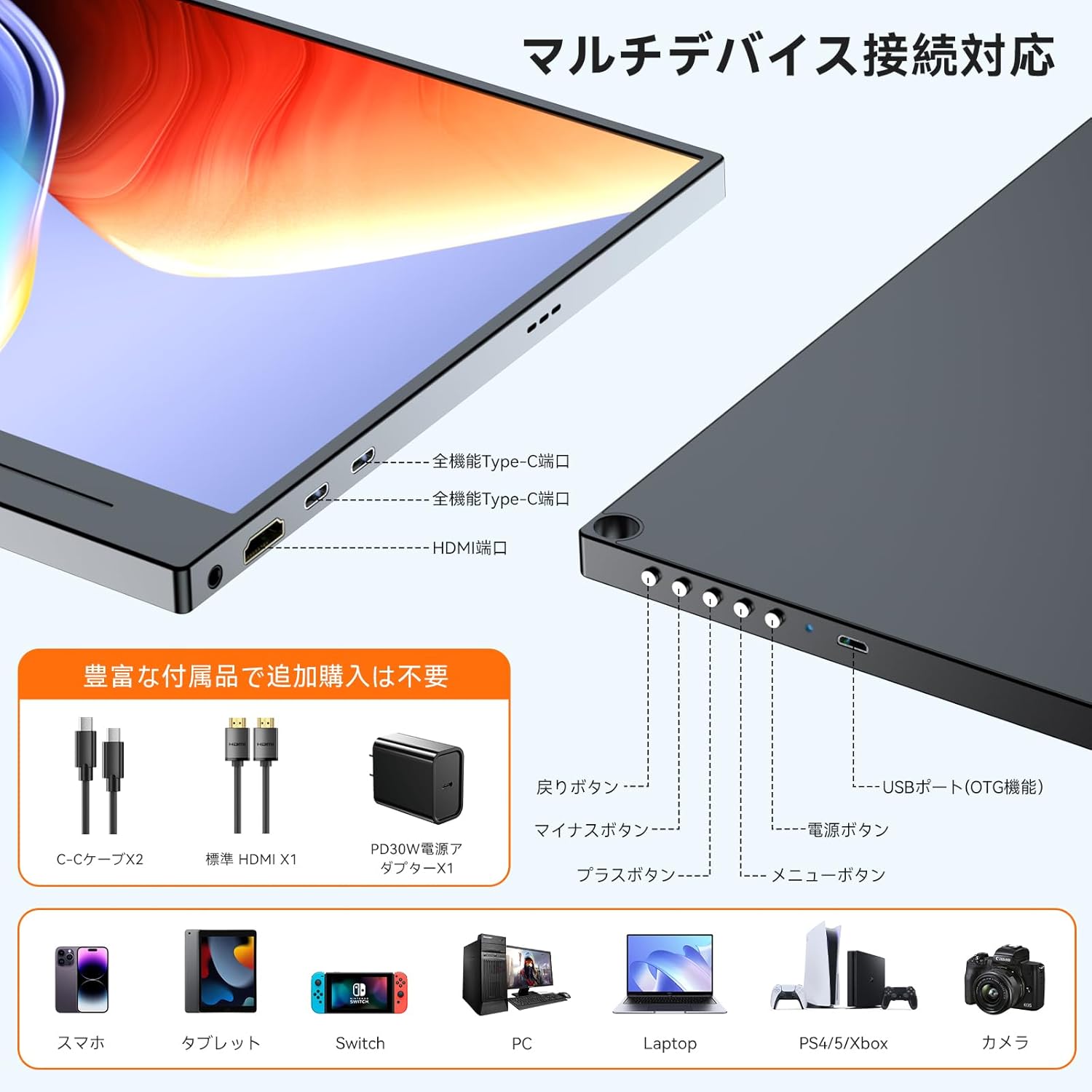
3.2. Порттор жана башкаруу элементтери

Figure 3: Ports and Controls Layout
- Full-function USB-C Ports (x2): For video signal, data transfer, and power delivery.
- Mini HDMI Port (x1): Видео сигнал киргизүү үчүн.
- USB-A Port (OTG function) (x1): For connecting peripherals like a keyboard or mouse.
- 3.5 мм аудио уяча (x1): Наушниктерди же тышкы динамиктерди туташтыруу үчүн.
- Кубат баскычы: Мониторду күйгүзөт/өчүрөт.
- Меню баскычы: Экрандагы дисплей (OSD) менюсуна кирет.
- Чабыттоо баскычтары (+/-): Used to navigate and adjust settings within the OSD menu.
- Артка баскычы: Returns to the previous OSD menu level.
4. Орнотуу
Follow these steps to set up your UPERFECT portable monitor.
4.1. Кубат булагына туташуу
The monitor can be powered via a USB-C connection from a compatible device or an external power adapter.
- USB-C аркылуу (бир кабелдик чечим): If your device (e.g., laptop, smartphone) has a full-function USB-C port (supporting DisplayPort Alternate Mode and Power Delivery), connect one end of the provided USB-C to USB-C cable to your device and the other end to one of the monitor's full-function USB-C ports. This single cable can provide both video signal and power. Note: If your device's USB-C port does not support sufficient power delivery, or if it's not Thunderbolt 3/4 compatible, you may need to connect an external power source.
- Тышкы кубат адаптери аркылуу: Connect the provided USB Type-A power adapter to a power outlet and then to one of the monitor's USB-C ports using a USB-C cable. This ensures stable power delivery, especially when using HDMI for video input or connecting power-intensive devices.
4.2. Түзмөктөргө туташуу
The monitor supports various devices through USB-C and HDMI connections.
- For Laptops/PCs (USB-C): Connect a USB-C to USB-C cable from your laptop's full-function USB-C port to the monitor. Ensure your laptop's USB-C port supports DisplayPort Alternate Mode.
- For Laptops/PCs (HDMI): Connect the provided HDMI to Mini HDMI cable from your laptop's HDMI port to the monitor's Mini HDMI port. You will also need to connect the monitor to a power source via USB-C.
- Смартфондор үчүн: Connect a USB-C to USB-C cable from your smartphone's full-function USB-C port to the monitor. Ensure your smartphone supports video output via USB-C (DisplayPort Alternate Mode).
- For Gaming Consoles (Nintendo Switch, PS4/PS5, Xbox): Connect the provided HDMI to Mini HDMI cable from your console's HDMI output to the monitor's Mini HDMI port. The monitor must also be powered via its USB-C port using the external power adapter.
- Камералар үчүн: Connect your camera via HDMI to Mini HDMI. Ensure the monitor is powered externally.

4-сүрөт: Көп түзмөктүн туташуусу
4.3. Using the Magnetic Protective Cover
The included magnetic cover not only protects your monitor but also serves as a versatile stand. Fold the cover into a triangular shape to prop up the monitor at various viewбурчтар.
5. Иштөө нускамалары
Learn how to operate your monitor and adjust its settings.
5.1. Күйгүзүү/өчүрүү
- Күйгүзүү: Press the Power button located on the side of the monitor.
- Өчүрүү: Press and hold the Power button for a few seconds until the screen turns off.
5.2. Экрандагы дисплей (OSD) менюсу
OSD менюсу ар кандай дисплей орнотууларын ыңгайлаштырууга мүмкүндүк берет.
- Менюга кирүү: OSD менюсун ачуу үчүн Меню баскычын басыңыз.
- Чабыттоо: Use the '+' and '-' buttons to move through menu options.
- Тандоо/Ырастоо: Опцияны тандоо же жөндөөнү ырастоо үчүн Меню баскычын кайра басыңыз.
- Чыгуу: Press the Back button to go back or exit the OSD menu.
5.3. Key Settings and Features
- Жарыктык/Контраст: Adjust these settings for optimal visibility in different lighting conditions. The monitor features 300 nits brightness and a 1300:1 contrast ratio.
- Түс жөндөөлөрү: Fine-tune color temperature, hue, and saturation. The monitor offers 100% sRGB color gamut for accurate color reproduction.
- HDR режими: Enable High Dynamic Range for enhanced visual depth and contrast in compatible content.
- Көк жарыкты азайтуу: Activate this feature to reduce eye strain during prolonged use.
- Киргизүү булагы: Manually select between USB-C and HDMI input if auto-detection is not desired.
- Аспект катышы: Adjust the display aspect ratio (e.g., 16:9).
- FreeSync: For compatible gaming setups, enable FreeSync to reduce screen tearing and stuttering.

Figure 5: 4K Resolution Detail

Figure 6: High Contrast Ratio

Figure 7: 100% sRGB Color Gamut

Figure 8: 3ms Response Time and FreeSync
5.4. Дисплей режимдери
Depending on your connected device, you can configure the display mode:
- Узартуу режими: Иш тактаңызды эки экранга тең кеңейтип, көбүрөөк жумуш мейкиндигин камсыз кылат.
- Кайталануу режими: Mirrors your primary display, showing the same content on both screens.
- Портреттик/Пейзаждык режим: The monitor supports both horizontal and vertical orientations. Settings for these modes are typically adjusted on the connected PC or device.

Figure 9: Portrait Mode Usage
6. Техникалык тейлөө
Туура кам көрүү мониторуңуздун иштөө мөөнөтүн узартат.
- Экранды тазалоо: Экранды жумшак, түксүз чүпүрөк менен акырын сүртүңүз. өжөр белгилери үчүн, бир аз гampчүпүрөккө суу же экранды тазалоо эритмеси. Катуу химиялык заттардан же абразивдүү материалдардан алыс болуңуз.
- Тазалоо Casing: Мониторду тазалоо үчүн жумшак, кургак чүпүрөктү колдонуңуз casing.
- Сактагыч: When not in use, store the monitor in its protective magnetic cover in a cool, dry place away from direct sunlight and extreme temperatures.
- Колдонуу: Мониторду түшүрүп алуудан же катуу соккуга кабылтуудан алыс болуңуз.
7. Кыйынчылыктарды
Эгер көйгөйлөргө туш болсоңуз, төмөнкү жалпы көйгөйлөрдү жана аларды чечүү жолдорун караңыз.
| Көйгөй | Мүмкүн себеп | Чечим |
|---|---|---|
| Дисплей жок/Сигнал жок |
|
|
| Screen flickering/Unstable display |
|
|
| No audio from speakers/headphones |
|
|
| Cannot connect keyboard/mouse via OTG |
|
|
8. Техникалык шарттар
Detailed technical specifications for the UPERFECT 15.6-inch 4K Portable Monitor.
| Өзгөчөлүк | Спецификация |
|---|---|
| Бренд | МЫКТЫ |
| Модель номери | 15.6-inch 4K Portable Monitor |
| Screen Size | 15.6 дюйм |
| Резолюция | 3840 x 2160 (4K UHD) |
| Панел түрү | IPS, Non-glare |
| Аспект катышы | 16:9 |
| Түс гаммасы | 100% sRGB |
| Контраст катышы | 1300:1 |
| Жарыктык | 300 нит |
| Жооп убактысы | 3ms |
| Жаңыртуу ылдамдыгы | 60Hz |
| Порттар | 2x Full-function USB-C, 1x Mini HDMI, 1x USB-A (OTG), 1x 3.5mm Audio Jack |
| VESA тоосу | 75 мм туура келет |
| Өлчөмдөрү (W x Y x D) | 355 x 225 x 11 мм |
| Салмагы | 932 г |
| Энергияны керектөө | 12.00 Вт |
9. Кепилдик жана колдоо
UPERFECT is committed to providing high-quality products and excellent customer service.
- Кепилдик мөөнөтү: Бул продукт менен келет 12 айлык кепилдик сатып алынган күндөн тартып.
- PSE Certification: The included power adapter is PSE certified, ensuring compliance with electrical appliance safety standards.
- Кардарларды колдоо: UPERFECT offers unlimited customer support. If you have any questions regarding product usage, or encounter any issues such as damage during shipping or defective accessories, please contact our support team. We aim to resolve issues within 12 hours.
- Байланыш маалыматы: Please refer to the contact details provided on the UPERFECT official website or your purchase platform for support.

Figure 10: UPERFECT Customer Support


