1. Киришүү
This manual provides essential instructions for the safe and effective use of your AGM H6 Rugged Smartphone. The AGM H6 is designed for durability, featuring IP68/IP69K waterproofing, 1.8m drop resistance, and 360° dust protection. It operates on Android 13 and is equipped with an Octa-Core T606 processor, 16GB RAM, 256GB ROM, and a 6.56-inch 90Hz HD+ touchscreen.

Image 1.1: Front, side, and rear view of the AGM H6 Rugged Smartphone.
2. Пакеттин мазмуну
Продукцияңыздын таңгагында бардык элементтер бар экенин текшериңиз:
- AGM H6 Smart Phone
- Кубаттуу адаптер
- USB кабели
3. Түзмөк бүттүview
Familiarize yourself with the physical components of your AGM H6 smartphone.

Сүрөт 3.1: Бүттүview of AGM H6 key features and specifications.
3.1. Физикалык баскычтар жана порттор
- Кубат баскычы: Located on the side, used to power on/off or wake/sleep the screen.
- Үн баскычтары: Медиа үнүнүн жана рингтон үнүнүн катуулугун тууралаңыз.
- Ыңгайлаштырылган баскыч: A dedicated button that can be programmed for quick access to specific applications or functions.
- USB-C порту: Заряддоо жана маалыматтарды өткөрүү үчүн.
- SIM/MicroSD карта слоту: Located on the side, for inserting SIM cards and a MicroSD card.
3.2. Камера системасы
- Арткы камера: 50MP primary lens with a 2MP macro lens.
- Алдыңкы камера: 8 МП селфи жана видео чалуулар үчүн.

Сүрөт 3.2: Детальдуу view of the AGM H6 camera specifications.
4. Баштапкы орнотуу
4.1. SIM жана MicroSD карталарын орнотуу
- Locate the SIM/MicroSD card slot on the side of the phone.
- Салгычты ачуу үчүн берилген SIM чыгаруучу куралды колдонуңуз.
- Carefully place your Nano-SIM cards and/or MicroSD card into the designated slots on the tray. Ensure correct orientation.
- Аспаптын корпусуна туура келгенче, лотокту акырын кайра телефонго түртүңүз.

Image 4.1: The 3-card slot for dual SIM and MicroSD expansion.
4.2. Аппаратты заряддоо
Before first use, fully charge your AGM H6. Connect the USB cable to the phone's USB-C port and the power adapter, then plug the adapter into a wall outlet.
4.3. Күйгүзүү жана баштапкы конфигурация
- Press and hold the Power button until the AGM logo appears.
- Тилиңизди тандоо, Wi-Fi тармагына туташуу жана Google аккаунтуңузду орнотуу үчүн экрандагы көрсөтмөлөрдү аткарыңыз.
- Configure fingerprint and face unlock for secure and swift access.
5. Иштөө нускамалары
5.1. Негизги навигация
- тийүү: Tap icons to open apps or select items.
- Серпүү: Экрандарды жылдыруу же алардын ортосунда багыт алуу үчүн манжаңызды экрандын үстүнөн жылдырыңыз.
- Чымчуу: Сүрөттөрдү чоңойтуу же кичирейтүү үчүн эки манжаңызды колдонуңуз web барактар.
5.2. Power On/Off/Restart
- Күйгүзүү: Кубат баскычын басып, кармап туруңуз.
- Өчүрүү/кайра күйгүзүү: Кубат баскычын кубат менюсу пайда болгонго чейин басып туруңуз, андан кийин "Өчүрүү" же "Кайра баштоо" тандаңыз.
5.3. Screen Lock and Unlock
The AGM H6 supports fingerprint and face recognition for secure unlocking.
- Манжа ачуу: Манжа издериңизди Орнотуулар > Коопсуздук > Манжа изи бөлүмүнө каттаңыз.
- Жүзүнөн ачуу: Жүздү таанууну Орнотуулар > Коопсуздук > Жүз менен таануу бөлүмүнө орнотуңуз.
5.4. Байланыш
- Wi-Fi: Жеткиликтүү тармактарга туташуу үчүн Жөндөөлөр > Тармак жана интернет > Wi-Fi бөлүмүнө өтүңүз.
- Bluetooth: Enable Bluetooth in Settings > Connected devices to pair with other devices.
- NFC: Тийбей туруп төлөмдөр жана тез жупташтыруу үчүн Жөндөөлөр > Туташкан түзмөктөр > Туташуу артыкчылыктары > NFC бөлүмүнөн NFC иштетиңиз.
- GPS: Жайгашкан жерди аныктоо кызматтары демейки боюнча навигация жана жайгашкан жерге негизделген колдонмолор үчүн иштетилген.
5.5. Камераны колдонуу
Сүрөттөрдү жана видеолорду тартуу үчүн Камера колдонмосун ачыңыз.
- Сүрөткө тартуу үчүн жапкычты басыңыз.
- Switch between photo, video, and macro modes.
- Use the front camera for selfies.
5.6. Ыңгайлаштырылган баскыч
The dedicated customizable button can be configured in Settings to launch a specific app or perform a quick action. Refer to the phone's settings for customization options.
6. Техникалык тейлөө
6.1. Аппаратыңызды тазалоо
Use a soft, lint-free cloth to clean the screen and body of the phone. Avoid harsh chemicals or abrasive materials. For waterproof cleaning, rinse with fresh water and dry thoroughly.
6.2. Water and Dust Resistance (IP68/IP69K)
The AGM H6 is rated IP68/IP69K for water and dust resistance. This means it can withstand immersion in water up to 1.5 meters for 30 minutes and is protected against high-pressure, high-temperature water jets and dust ingress. Ensure all ports are securely closed before exposing the phone to water or dust.
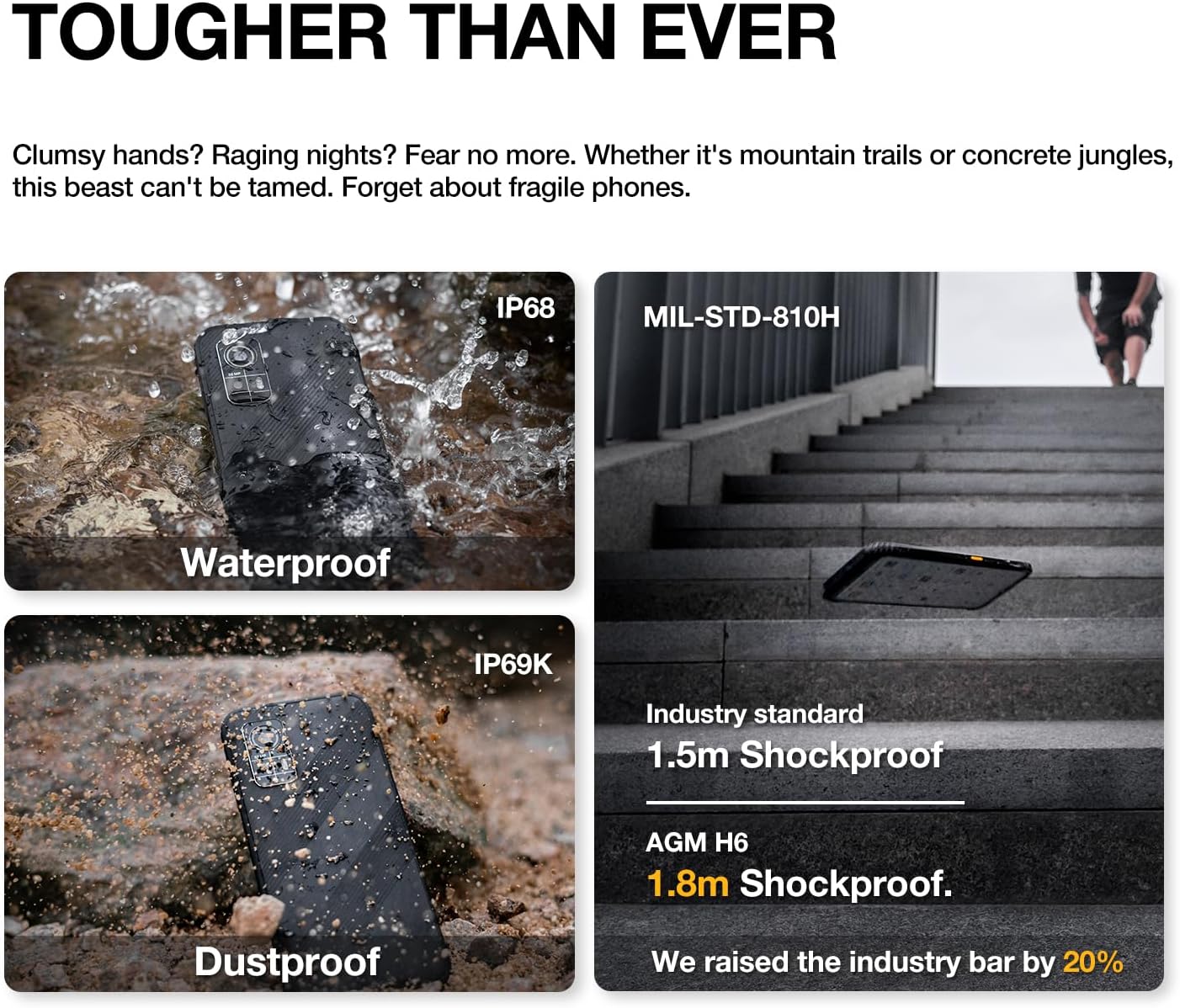
Image 6.1: The AGM H6's rugged features, including waterproof, dustproof, and shockproof ratings.
6.3. Drop Resistance
The phone is designed to withstand drops up to 1.8 meters. While rugged, extreme impacts can still cause damage. Handle with care.
6.4. Батареяга кам көрүү
- Телефонду экстремалдык температурага тийгизүүдөн сактаңыз.
- Берилген заряддагычты жана кабелди гана колдонуңуз.
- Батареяны үзгүлтүксүз толук зарядсыздандырбаңыз.

Image 6.2: Battery performance metrics for the 4900mAh battery.
6.5. Программалык камсыздоону жаңыртуу
Оптималдуу иштөөнү жана коопсуздукту камсыз кылуу үчүн программалык камсыздоонун жаңыртууларын үзгүлтүксүз текшерип жана орнотуп туруңуз. Орнотуулар > Система > Системаны жаңыртуу бөлүмүнө өтүңүз.
7. Кыйынчылыктарды
If you encounter issues with your AGM H6, refer to the following common solutions:
- Телефон күйбөй жатат: Батарея заряддалганын текшериңиз. Заряддоочуга кеминде 15 мүнөт туташып, анан кайра күйгүзүп көрүңүз.
- Колдонмолор бузулуп же катып жатат: Restart the phone. If the issue persists, clear the app's cache (Settings > Apps > [App Name] > Storage & cache > Clear cache).
- Тармак көйгөйлөрү (сигнал/чалуулар жок): Check if SIM card is properly inserted. Verify network settings in Settings > Network & internet > Mobile network. Contact your carrier if issues persist.
- Жай аткаруу: Close unused apps, clear cache, or consider a factory reset if performance significantly degrades over time (back up data first).
- Сенсордук экран жооп бербейт: Restart the phone. If unresponsive, force restart by holding the power button for an extended period (usually 10-15 seconds).
7.1. Заводдук абалга кайтаруу
Заводдук абалга кайтаруу телефонуңуздагы бардык маалыматтарды өчүрүп, аны баштапкы заводдук жөндөөлөрүнө кайтарат. Бул туруктуу программалык камсыздоо маселелерин чечет. Улантуудан мурун бардык маанилүү маалыматтардын камдык көчүрмөсүн жасаңыз.
- Орнотуулар > Система > Калыбына келтирүү параметрлерине өтүңүз.
- "Бардык дайындарды өчүрүү (заводдук абалга кайтаруу)" тандаңыз.
- Чечимиңизди ырастап, суралса, PIN/сырсөзүңүздү киргизиңиз.
8. Техникалык шарттар
Detailed technical specifications for the AGM H6 Rugged Smartphone:
| Өзгөчөлүк | Спецификация |
|---|---|
| Модель аты | H6 |
| Операция системасы | Android 13.0 |
| CPU модели | Unisoc T606 сегиз ядролуу (1.6 ГГц) |
| RAM эстутум орнотулган өлчөмү | 16 GB (8GB + 8GB Adaptive) |
| Эстутум сактоо сыйымдуулугу | 256 ГБ |
| Туруктуу экран дисплей өлчөмү | 6.56 дюймдук IPS HD+ |
| Жаңыртуу ылдамдыгы | 90 Гц |
| Арткы камера | 50MP Негизги + 2MP Макро |
| Алдыңкы камера | 8MP |
| Батарея кубаттуулугунун рейтинги | 4900 миллионamp Саат |
| Connectivity Technologies | Bluetooth, NFC, Wi-Fi, 4G Dual SIM |
| Өзгөчөлүктөр | Dual SIM, Expandable Memory, Rugged Body, Water Resistant, GPS, Fingerprint/Face Unlock, Customizable Button |
| Туруктуулук рейтингдери | IP68/IP69K Waterproof & Dustproof, 1.8m Drop Resistance (MIL-STD-810H compliant) |
| Элемент Салмагы | 8 унция (240 грамм) |
| Пакеттин өлчөмдөрү | 6.7 x 3.1 x 0.4 дюйм |
| Зымсыз оператордун шайкештиги | T-Mobile (GSM network) |

Image 8.1: Display features of the AGM H6.
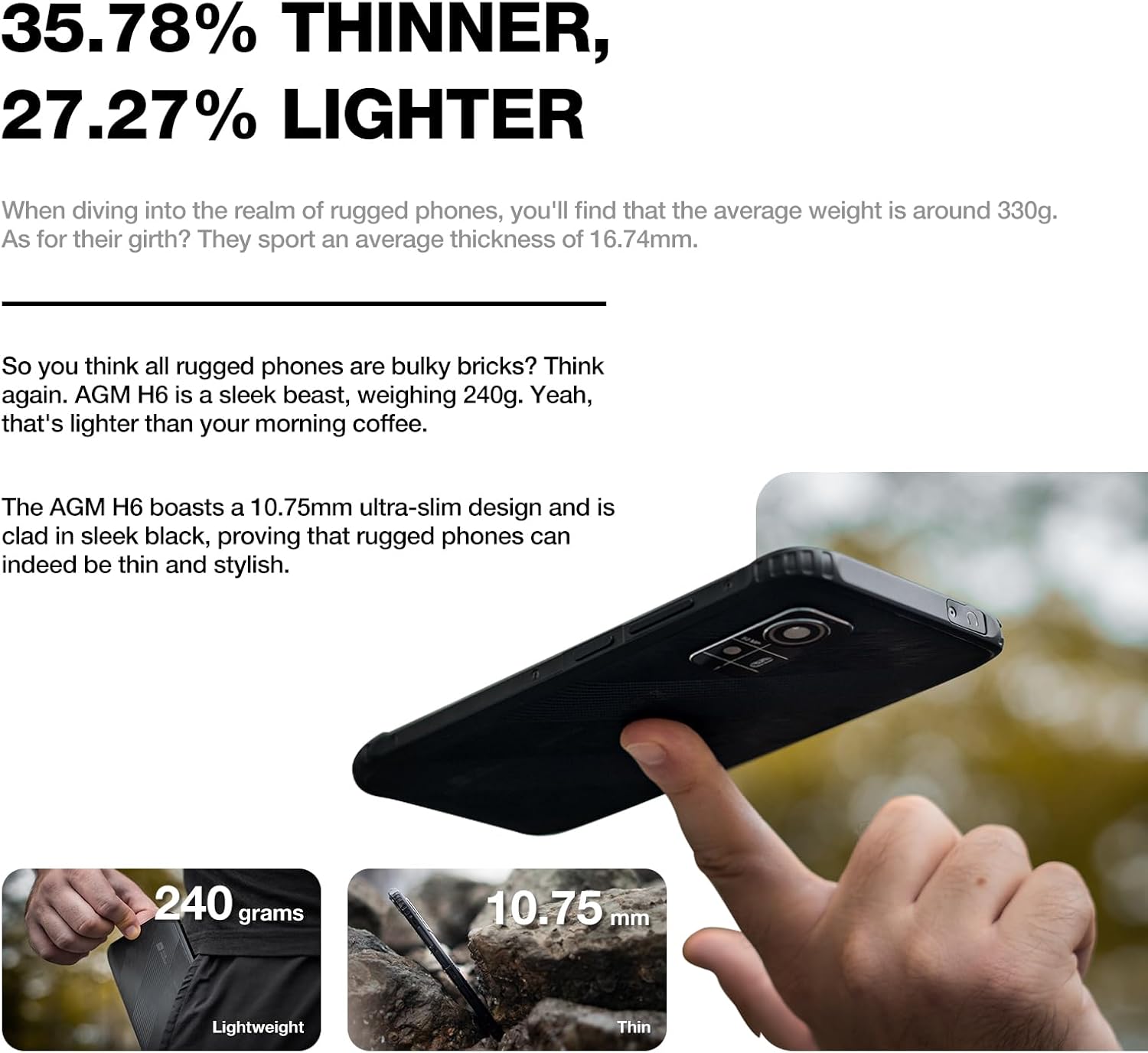
Image 8.2: Physical dimensions and weight comparison.
9. Кепилдик жана колдоо
Your AGM H6 smartphone is covered by a manufacturer's warranty. Please refer to the warranty card included in your package for specific terms and conditions.
For technical support, warranty claims, or further assistance, please visit the official AGM website or contact AGM customer service. You can find more information and support resources on the AGM Store on Amazon.


