1. Продукт бүтүп калдыview
The CATLINK PRO X is an advanced self-cleaning automatic cat litter box designed to simplify pet care for single or multiple cat households. It integrates smart technology for health monitoring, offers multiple cleaning modes, and prioritizes pet safety with various sensors.

Image: The CATLINK PRO X Automatic Cat Litter Box in grey, shown with a cat, litter liners, and a smartphone displaying the companion app.
2. Орнотуу жана алгачкы колдонуу
2.1 Пакеттен чыгаруу жана жайгаштыруу
- Бардык компоненттерди таңгактан кылдаттык менен алып салыңыз.
- Place the litter box on a flat, stable surface in a location accessible to your cat(s) and near a power outlet.
2.2 Кубат туташтыруу
- Connect the power adapter to the litter box and then plug it into a wall outlet.
- The unit will perform an initial self-check.
2.3 Таштандыларды толтуруу
- Ensure the waste drawer is empty and properly inserted.
- Fill the globe with clumping cat litter, ensuring it does not exceed the maximum fill line. The CATLINK PRO X is compatible with bentonite, mineral stone, and mixed litters.

Image: Illustration showing the CATLINK PRO X is compatible with bentonite, mineral stone, and mixed litters.
2.4 Колдонмо туташуу (милдеттүү эмес, бирок сунушталат)
- Download the CATLINK app from your smartphone's app store.
- Follow the in-app instructions to connect your device to the litter box via Wi-Fi. This enables remote control and health monitoring features.

Image: A hand holding a smartphone displaying the CATLINK app interface, showing various control and monitoring options for the litter box.
3. Иштөө режимдери жана функциялары
3.1 Self-Cleaning Modes
The CATLINK PRO X offers four automatic cleaning modes to suit your preferences:
- Авто режим: Automatically cleans after your cat exits the litter box.
- Таймер режими: Schedule cleaning cycles at specific times.
- Кол режими: Initiate a cleaning cycle manually via the control panel or app.
- Бош режим: Fully empties the globe for litter changes or deep cleaning.
3.2 Ден соолуктун мониторинги
The integrated health monitoring system tracks your cat's bathroom habits, weight, temperature, and humidity. Real-time updates and daily/weekly reports are sent to your smartphone via the CATLINK app, providing insights into your cat's well-being.

Image: A cat inside the litter box, with a smartphone displaying health data such as weight, frequency, and duration of use.
3.3 Multi-Cat Identification
The system can adapt to and identify multiple cats, providing individualized data for each pet based on weight sensing. This feature is ideal for households with more than one feline companion.

Image: Two cats, one inside the litter box and one outside, illustrating the multi-cat identification feature.
3.4 Алыстан башкаруу
Manage your litter box remotely using the CATLINK App. You can activate cleaning cycles, monitor waste levels, and receive alerts from anywhere with an internet connection.

Image: A person using the CATLINK app on a smartphone to control the litter box remotely, with the litter box and a cat in the background.
4. Коопсуздук өзгөчөлүктөрү
The CATLINK PRO X is equipped with multiple safety mechanisms to ensure your cat's well-being:
- Radar and Infrared Sensors: Detect the presence of a cat, automatically pausing cleaning cycles to prevent injuries.
- Pinch-Free Design: Engineered to eliminate pinch points during operation.
- Тартылуу күчү сенсорлору: Monitor weight changes, activating safety protocols if unexpected movement is detected.
- Айланадагы жарык: A soft ambient light helps older cats navigate the litter box at night.

Image: Diagram illustrating the various safety sensors within the CATLINK PRO X, including anti-pinch, infrared, motor blocked, and gravity sensors.
5. Техникалык тейлөө жана тазалоо
5.1 Жытты көзөмөлдөө
The litter box features a powerful carbon filter system that eliminates up to 90% of odors, contributing to a fresh home environment.
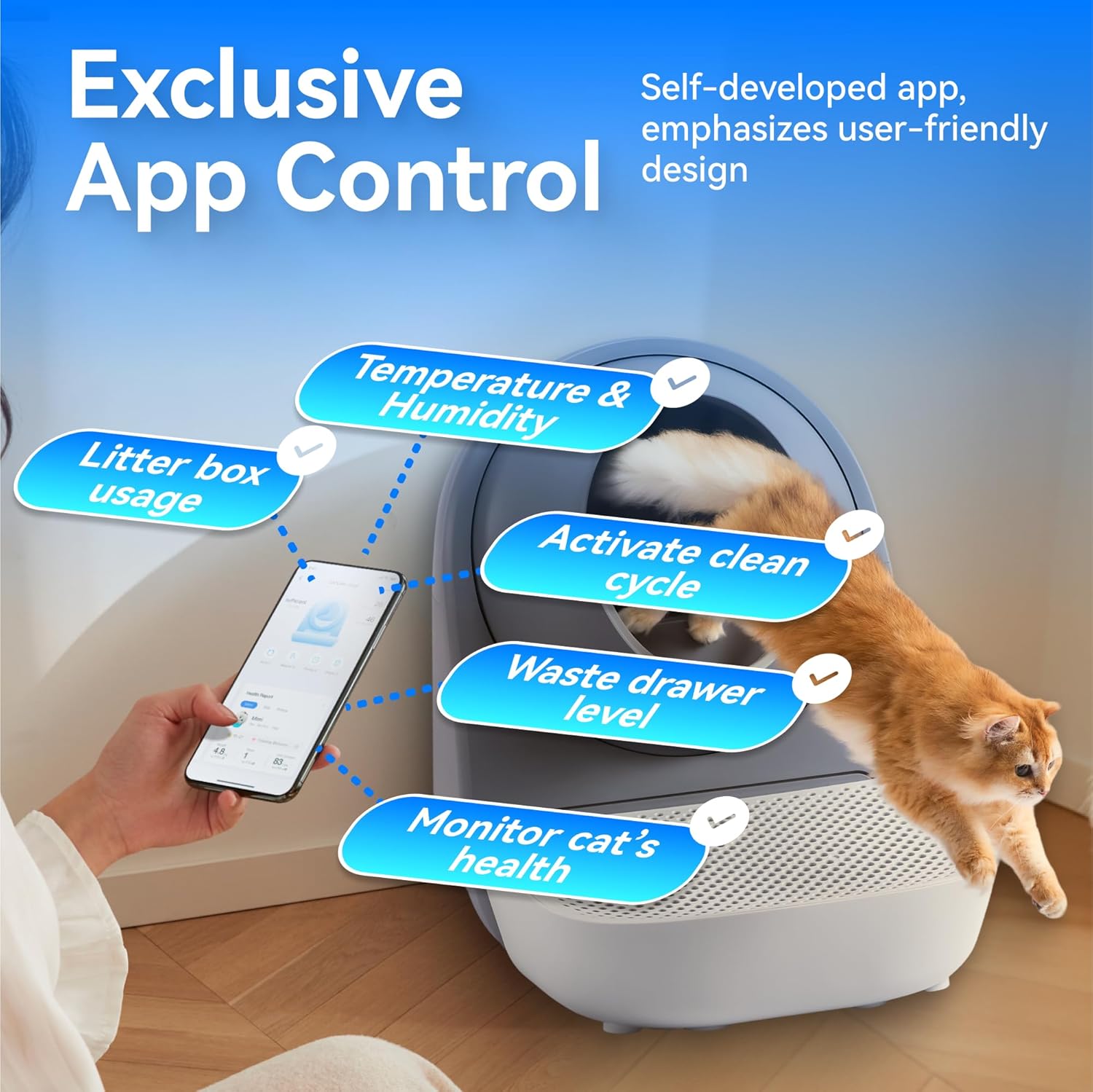
Image: Two cats near the litter box, with visual effects indicating odor elimination and a close-up of the carbon filter component.
5.2 Waste Bin Management
The large 13-liter waste bin can hold up to 7 days of waste for two cats or 14 days for one cat, reducing the frequency of emptying. The app will notify you when the waste bin is full.
5.3 Агрегатты тазалоо
The smooth, dust-resistant globe chamber is designed for easy cleaning. For thorough cleaning, the globe can be disassembled and washed. Ensure all components are completely dry before reassembly.
Video: A step-by-step tutorial demonstrating how to replace the globe liner of the CATLINK litter box, including disassembly and reassembly of the main components.
6. Продукттун спецификациялары
| Өзгөчөлүк | Спецификация |
|---|---|
| Бренд | CATLINK |
| Модель аты | PRO X (CL-06) |
| Өлчөмдөрү (LxWxH) | 23.62" x 23.62" x 27.95" |
| Элемент Салмагы | 22 фунт |
| Материал | Акрилонитрил бутадиен стирол (ABS) |
| Таштанды кутучасынын түрү | Автоматташтырылган өзүн-өзү тазалоочу таштанды кутусу |
| Таштанды урнасынын сыйымдуулугу | 13 литр |
| Палатанын сыйымдуулугу | 65 литр |
| Максаттуу аудитория | мышыктар |
7. Кыйынчылыктарды
If you encounter any issues with your CATLINK PRO X, please consider the following common solutions:
- Бирдик жооп бербейт: Электр шнурунун түзүлүшкө да, иштеп жаткан электр розеткасына да бекем сайылганын текшериңиз.
- Тазалоо циклинин үзгүлтүккө учурашы: Check if a cat is detected by the sensors. Remove any obstructions from the entry or inside the globe.
- Колдонмонун туташуу маселелери: Verify your Wi-Fi connection and ensure the litter box is within range of your router. Restarting both the litter box and your router may resolve the issue.
- Жыттын туруктуулугу: Replace the carbon filter regularly. Ensure the waste bin is emptied and cleaned as needed.
- Litter Sticking: Ensure you are using a high-quality clumping litter. Allow sufficient time for litter to clump before a cleaning cycle initiates.
For persistent issues not covered here, please refer to the comprehensive troubleshooting section in the full user manual or contact customer support.
8. Кепилдик жана колдоо
The CATLINK PRO X comes with a 1 жылдык кепилдик сатып алынган күндөн тартып, өндүрүштүн кемчиликтерин жана нормалдуу колдонууда бузулууларды камтыйт.
For any questions, technical assistance, or warranty claims, please contact CATLINK customer support. Our team is available 24/7 online to provide reliable support and ensure a seamless experience with your product.
Contact information can typically be found on the product packaging, the official CATLINK website, or within the CATLINK mobile application.


