Introduction
Сатып алганыңыз үчүн рахматasing the SEMIER SM-136 Cassette Player & Digital Converter. This versatile device allows you to play and record audio cassettes, play music from an SD card, and convert your cherished cassette tapes into digital MP3 files, either directly to an SD card or to your computer using the included software. Please read this manual carefully to ensure proper operation and to maximize your enjoyment of this product.
Кутуда эмне бар
- Cassette Recorder Converter x 1
- 16GB SD Card x 1
- USB Reader x 1
- Software CD-ROM x 1
- Колдонуучунун колдонмосу x 1
- Type-C Charging and Data Cable x 1

Сүрөт: Продукциянын таңгагына кирген бардык буюмдар.
Жайгашуу
Аппаратты кубаттандыруу
The SEMIER SM-136 can be powered by two methods:
- USB-C кабели: Connect the included USB-C cable to the device's USB-C port and the other end to a USB power adapter (not included) or a computer's USB port.
- АА Батареялар: Open the battery compartment on the back of the device and insert four (4) AA batteries (not included), ensuring correct polarity.
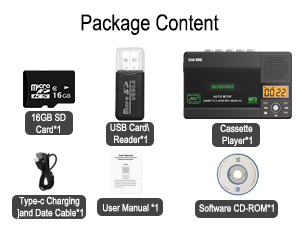
Image: Illustration of inserting AA batteries into the device.
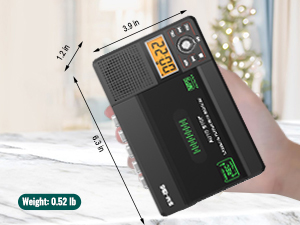
Image: Connecting the USB-C power cable to the device.
Inserting a Cassette Tape
Gently open the cassette compartment door. Insert your cassette tape with the open edge facing upwards and the tape side facing the device. Close the door firmly until it clicks.

Image: Proper insertion of a cassette tape into the player.
SD картаны салуу
Locate the SD card slot on the side of the device. Insert the included 16GB SD card (or another compatible SD card, up to 32GB) into the slot until it clicks into place. Ensure the card is inserted in the correct orientation.

Image: Proper insertion of an SD card into the device's dedicated slot.
Иштөө нускамалары
Кассеталарды ойнотуу
- Ensure a cassette tape is inserted.
- Slide the "TAPE/OFF/Micro SD" switch to the "TAPE" position.
- басыңыз ОЙНОО баскычы (►) ойнотууну баштоо үчүн.
- Үнүн колдонуп, үнүн жөндөңүз ТОМ баскыч.
- Ойнотууну токтотуу үчүн, басыңыз ТОКТОТ баскычы (■).
- колдонуу FWD (►►) жана REW (◄◄) buttons for fast-forward and rewind.
Playing Music from SD Card
- Ensure an SD card with MP3 files киргизилет.
- Slide the "TAPE/OFF/Micro SD" switch to the "Micro SD" position. The LCD display will show "SD" and the current track time.
- басыңыз ОЙНОО/ТЫНЫТТЫРУ баскычы (►⏺) ойнотууну баштоо же тындыруу үчүн басыңыз.
- колдонуу ПРЕВ (◄◄) жана КИЙИНКИ (►►) buttons to navigate between tracks.
- басыңыз РЕП button to repeat the current track or all tracks.
- басыңыз DEL button to delete the current track.
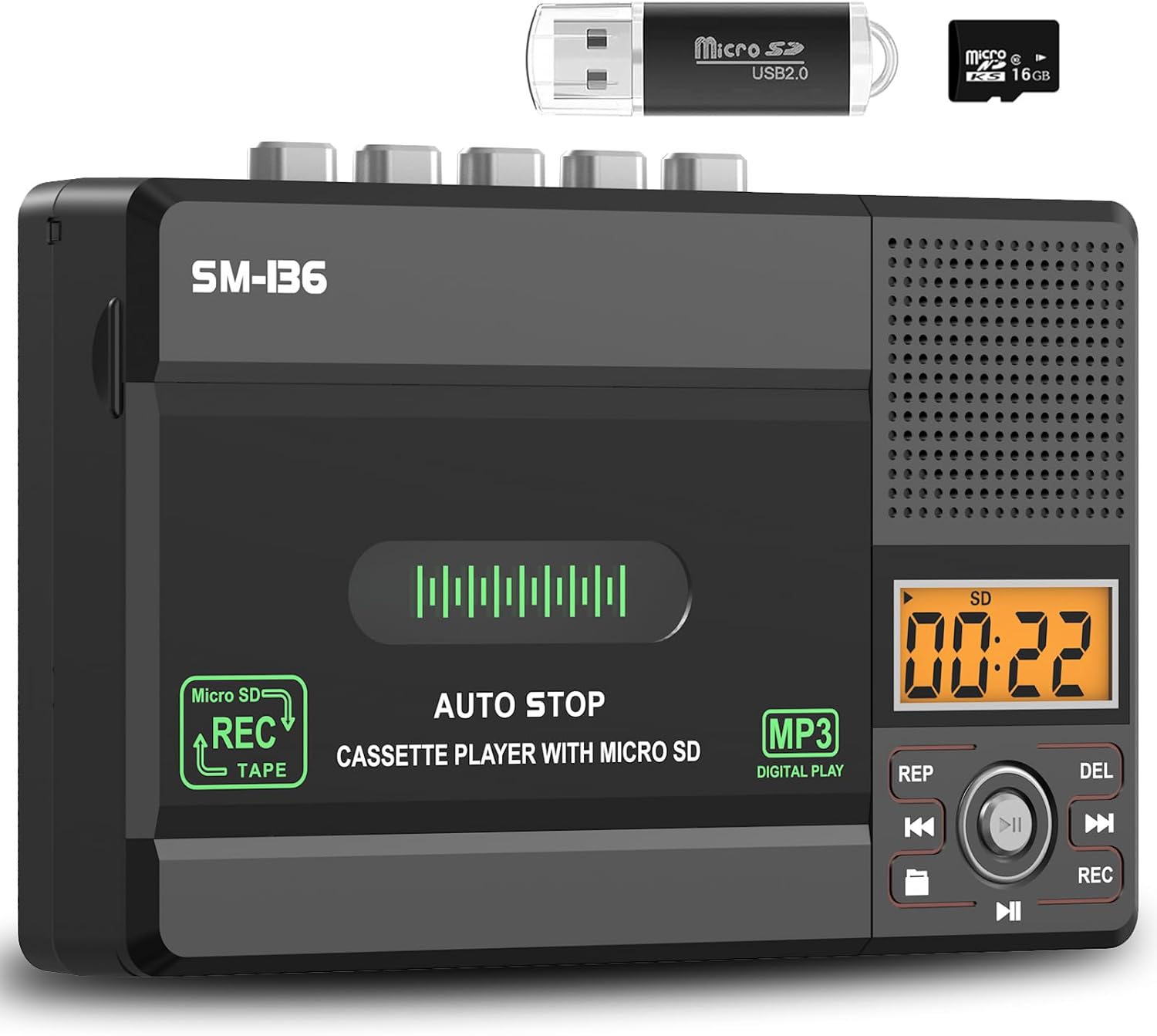
Сүрөт: бүттүview of the device's control panel and LCD screen.
Recording to Cassette Tape (from built-in microphone)
- Бош же жаздыра турган кассетаны салыңыз.
- Slide the "TAPE/OFF/Micro SD" switch to the "TAPE" position.
- басыңыз REC button (red button) to begin recording from the built-in microphone.
- Жазууну токтотуу үчүн, басыңыз ТОКТОТ баскычы (■).

Image: Demonstrates recording audio to a cassette tape using the built-in microphone.
Converting Cassette to MP3 (to SD Card)
This method allows direct conversion without a computer.
- Конвертациялагыңыз келген кассета лентасын салыңыз.
- Insert the 16GB SD card (or another compatible SD card) into the SD card slot.
- Slide the "TAPE/OFF/Micro SD" switch to the "TAPE" position.
- басыңыз ОЙНОО баскычы (►) on the cassette player.
- While the tape is playing, press and hold the REC button (red button) on the digital control panel until the LCD display shows "REC". This will start recording the cassette audio directly to the SD card as an MP3 file.
- Жазууну токтотуу үчүн, басыңыз REC баскычын кайра басыңыз же басыңыз ТОКТОТ баскычы (■) on the cassette player.
- The converted MP3 files will be saved on the SD card. You can then play them back on the device by switching to "Micro SD" mode or transfer them to a computer using the included USB reader.

Image: Visual steps for direct cassette to SD card MP3 conversion.
Converting Cassette to MP3 (to Computer via Audacity)
This method requires a computer and the included Audacity software.
- Install Audacity: Insert the included Software CD-ROM into your computer's CD drive and follow the installation instructions for Audacity. Alternatively, you can download the latest version of Audacity from its official webсайт.
- Түзмөктү туташтыруу: Connect the SEMIER SM-136 to your computer using the included USB-C data cable.
- Prepare Audacity: Open Audacity. Ensure the correct input device (usually "USB Audio CODEC" or similar) is selected in Audacity's audio settings.
- Жаздырууну баштоо: Insert the cassette tape you wish to convert into the player. Press the ОЙНОО баскычы (►) on the cassette player. Then, click the Жаздыруу button in Audacity to begin capturing the audio.
- Monitor and Stop: Monitor the audio levels in Audacity. Once the tape has finished playing, click the Токто button in Audacity and the ТОКТОТ баскычы (■) on the cassette player.
- Export MP3: In Audacity, you can edit the recorded audio (e.g., trim silence, remove noise). Once satisfied, go to File > Export > Export as MP3 to save your digital audio file.

Image: Illustrates connecting the device to a computer and using Audacity for digital conversion.
Техникалык тейлөө
- Тазалоо: Аппараттын сыртын тазалоо үчүн жумшак, кургак чүпүрөктү колдонуңуз. Суюк тазалагычтарды же абразивдүү материалдарды колдонбоңуз.
- Тасма башын тазалоо: Тасма баштарын мезгил-мезгили менен тазалап, роликтерди кебез таякча менен бир аз кысып туруңузampОптималдуу үн сапатын камсыз кылуу жана тасманын бузулушун алдын алуу үчүн изопропил спирти менен эритилсин.
- Сактагыч: Аппаратты түз күн нурунан жана экстремалдык температурадан алыс салкын, кургак жерде сактаңыз.
- Батареяны алып салуу: If the device will not be used for an extended period, remove the AA batteries to prevent leakage.
Проблемаларды чечүү
| Көйгөй | Мүмкүн себеп | Чечим |
|---|---|---|
| Түзмөк күйбөйт. | No power source; batteries dead or incorrectly inserted; USB-C cable not connected properly. | Check battery polarity and charge; ensure USB-C cable is securely connected to a working power source. |
| Кассетаны ойнотуу учурунда үн чыкпайт. | Volume too low; "TAPE/OFF/Micro SD" switch in wrong position; tape head dirty. | Increase volume; ensure switch is on "TAPE"; clean tape head. |
| Poor sound quality during playback/recording. | Dirty tape heads; worn-out tape; low battery power. | Clean tape heads; try a different tape; replace batteries or use USB-C power. |
| SD card not recognized or "No SD" message. | SD card incorrectly inserted; unsupported SD card format/size; faulty SD card. | Reinsert SD card; ensure it's formatted to FAT32 and is 32GB or less; try a different SD card. |
| SD картага жаздыруу мүмкүн эмес. | SD card full; SD card write-protected; incorrect recording procedure. | Жок кылуу files from SD card; check SD card's physical write-protect switch; follow "Converting Cassette to MP3 (to SD Card)" steps carefully. |
| Audacity not detecting device for conversion. | USB-C cable issue; incorrect audio input selected in Audacity; driver issue. | Try a different USB port/cable; ensure "USB Audio CODEC" is selected in Audacity; restart computer and device. |
Техникалык шарттар
- Модел: SM-136
- Функциялары: Cassette Player, Cassette Recorder (via Mic), SD Card MP3 Player, Cassette to MP3 Converter (to SD Card / PC)
- Кубат булагы: DC 5V (USB-C) or 4 x AA Batteries
- Динамиктин чыгышы: 2W
- Гарнитура уячасы: 3.5 мм стерео
- SD картаны колдоо: 32 ГБ чейин, FAT32 форматы
- Өлчөмдөрү: 6.3 x 3.9 x 1.2 дюйм (16 x 9.9 x 3 см)
- Салмагы: 0.52 фунт (0.24 кг)

Image: Detailed dimensions and weight of the product.
Кепилдик жана колдоо
SEMIER products are designed for reliability and performance. This product comes with a standard manufacturer's warranty. For detailed warranty information, technical support, or customer service inquiries, please refer to the contact information provided on the product packaging or visit the official SEMIER website. Our dedicated customer support team is available to assist you with any questions or concerns.
Сиз да зыярат кылсаңыз болот SEMIER Store on Amazon көбүрөөк маалымат жана колдоо булактары үчүн.


