1. Киришүү
The DEERC F16 Thunderbirds RC Plane is a 3-channel remote control aircraft designed for both beginners and experienced pilots. It features a realistic F16 Thunderbirds design with vibrant lights, a 6-axis gyro stabilization system for easy and stable flight, and durable EPP foam construction with a soft silicone nose for crash resistance. The plane operates on a 2.4GHz frequency, offering a long-range control distance and comes with two rechargeable batteries for extended flight times.
2. Коопсуздук маалыматы
- Сыртта гана колдонуу: This product is not intended for indoor use. Operate the aircraft only in open outdoor areas.
- Clear Environment: Ensure the flying area is clear of people, pets, trees, power lines, and other obstacles to prevent accidents.
- Чоңдордун көзөмөлү: Чоңдордун көзөмөлү сунушталат, айрыкча жаш колдонуучулар үчүн.
- Пропеллердин коопсуздугу: Keep fingers, hair, and loose clothing away from the propellers when the aircraft is powered on.
- Батарея менен иштөө: Follow all battery charging and handling instructions carefully to prevent fire or injury.
3. Пакеттин мазмуну
The DEERC F16 Thunderbirds RC Plane package includes the following items:
- F-16 Airplane (x1)
- 2.4GHz Controller (x1)
- Li-Po Battery (x2)
- Propeller Set (x1)
- Landing Gear Set (x1)
- USB кубаттагыч (x1)
- Колдонуучунун колдонмосу (x1)
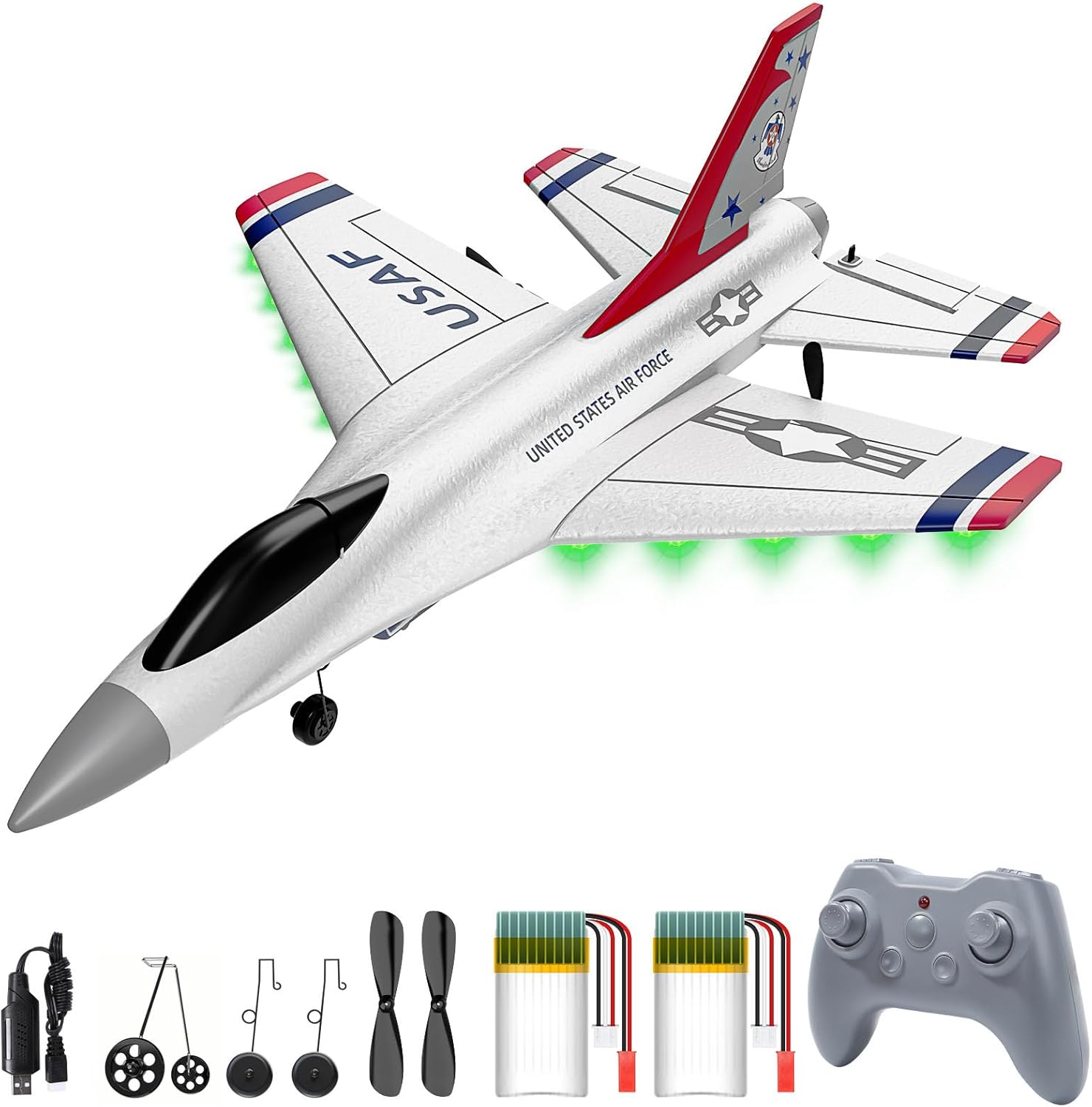
Сүрөт: The DEERC F16 Thunderbirds RC Plane shown with its remote control, two batteries, propellers, landing gear, and USB charger.
4. Ассамблея
The DEERC F16 Thunderbirds RC Plane is designed for quick and easy assembly. Simply snap the main components together as instructed in the included user manual. The tail fins and landing gear are designed to fit securely into designated slots on the aircraft body.
Эскертүү: The aircraft body is constructed from EPP foam. Handle with care during assembly to avoid damage.
5. Battery Charging & Installation
Charging the Li-Po Batteries
- Берилген USB кубаттагычты USB кубат булагына туташтырыңыз (мисалы, компьютер, USB дубал адаптери).
- Connect the Li-Po battery to the USB charger. The charger's indicator light will show the charging status.
- Толук заряддалгандан кийин, батареяны заряддагычтан ажыратыңыз.
- Маанилүү: Use only the provided proprietary USB charger for the Li-Po batteries.
Installing Batteries in the Aircraft
- Locate the battery compartment on the underside of the aircraft.
- Батарея уясынын капкагын ачыңыз.
- Carefully connect the charged Li-Po battery to the aircraft's power connector.
- Батареяны бөлүмдүн ичине коюп, капкакты бекем жабыңыз.
Алыстан башкаруу пультуна батареяларды орнотуу
- The remote control requires 4 AA batteries (not included).
- Пульттун артындагы батарея бөлүкчөсүн ачыңыз.
- Insert 4 fresh AA batteries, ensuring correct polarity (+/-).
- Батарея уясынын капкагын жабыңыз.
6. Remote Control Overview
The 2.4GHz remote control provides precise 3-channel control for the DEERC F16 Thunderbirds RC Plane. It features joysticks for throttle/rudder and elevator/aileron control, allowing for responsive and stable flight maneuvers. The controller also includes buttons for speed adjustments and performing rolls.

Сүрөт: An illustration of the DEERC F16 Thunderbirds RC Plane in flight, highlighting its 3-channel control capabilities, with an inset showing the remote control.
7. Орнотуу
- Күйгүзүү: First, turn on the aircraft by connecting its battery. Then, turn on the remote control.
- Байлоо: The aircraft and remote control should automatically bind. If binding fails, refer to the detailed instructions in the included user manual.
- Учуу алдында текшерүү: Before each flight, ensure all control surfaces (ailerons, rudder, elevator) move freely and correctly in response to remote control inputs. Check that the propellers are securely attached and undamaged.
8. Иштөө нускамалары
Takeoff Options
- Hand-Launch: Hold the aircraft firmly, apply full throttle, and gently toss it forward into the wind.
- Ground Taxi: With the landing gear attached, place the aircraft on a flat, open surface. Apply full throttle and steer as needed until it gains enough speed for takeoff.

Сүрөт: The DEERC F16 Thunderbirds RC Plane illustrating both hand-thrown and ground taxi takeoff methods.
Учууну башкаруу
- Муунткуч: Controls the speed and altitude.
- Руль: Controls yaw (left/right turning).
- Лифт: Controls pitch (up/down movement).
- Айлрондор: Controls roll (banking left/right).
- 6-октуу гироскоп: The integrated 6-axis gyro stabilization system provides enhanced stability, making it easier for beginners to fly and maintain control, even in windy conditions.

Сүрөт: The DEERC F16 Thunderbirds RC Plane taking off, with an inset showing the internal gyro flight control system.
Расмий продукт Videos
Видео: A demonstration of the DEERC 3CH F16 RC Plane in flight, showcasing its maneuverability and stability.
Видео: An official video highlighting the features and flight of the DEERC F16 Thunderbirds RC Plane.
9. Техникалык тейлөө
- Туруктуу курулуш: The aircraft is made from durable EPP foam and features a soft silicone nose, designed to withstand minor crashes and impacts.
- Пропеллерди алмаштыруу: In case of damage, replace propellers with the spare set provided in the package. Refer to the user manual for detailed replacement instructions.
- Тазалоо: Wipe the aircraft clean with a soft, dry cloth after use.
- Сактагыч: Store the aircraft and batteries in a cool, dry place away from direct sunlight and extreme temperatures.

Сүрөт: The DEERC F16 Thunderbirds RC Plane in flight, emphasizing its crash-resistant EPP foam and enhanced soft rubber nose.
10. Кыйынчылыктарды
- Көзөмөлдү жоготуу: Ensure the remote control batteries are fully charged and that the aircraft is within the specified operating range (up to 500ft). Avoid areas with strong electromagnetic interference.
- Aircraft Not Taking Off: Check that the propellers are spinning correctly and are undamaged. Ensure the battery is fully charged and properly connected. Verify that the control surfaces are in a neutral position.
- Damage to Nose Cone: While the aircraft is designed to be crash-resistant, repeated hard landings can cause wear or damage to the nose cone. Replacement parts may be available from the manufacturer.
- Туруксуз учуу: Recalibrate the gyro stabilization system as per the user manual. Ensure there are no strong winds exceeding the aircraft's recommended operating conditions.
11. Техникалык шарттар
- Продукциянын өлчөмдөрү: 9.7 x 3.15 x 13.48 дюйм
- Элемент Салмагы: 15.5 унция
- Модель номери: US4-F16-WT
- Өндүрүүчүнүн сунуштаган жашы: 0 - 12 жыл
- Алыстан башкаруу батареялары: 2 AA батарейка талап кылынат (кошулган)
- Өндүрүүчү: DEERC
12. Кепилдик жана колдоо
DEERC is committed to customer satisfaction. If you encounter any issues or are unhappy with your product for any reason, please do not hesitate to contact DEERC US customer service. They take full ownership and responsibility for the quality of their products and will assist in resolving your problem quickly and efficiently.


