Introduction
This user manual provides detailed instructions for the FREEWOLF T96 Smart Display Wireless Gaming Keyboard and Mouse Combo. This combo is designed for a seamless and responsive experience across various devices and applications, from gaming to office work.
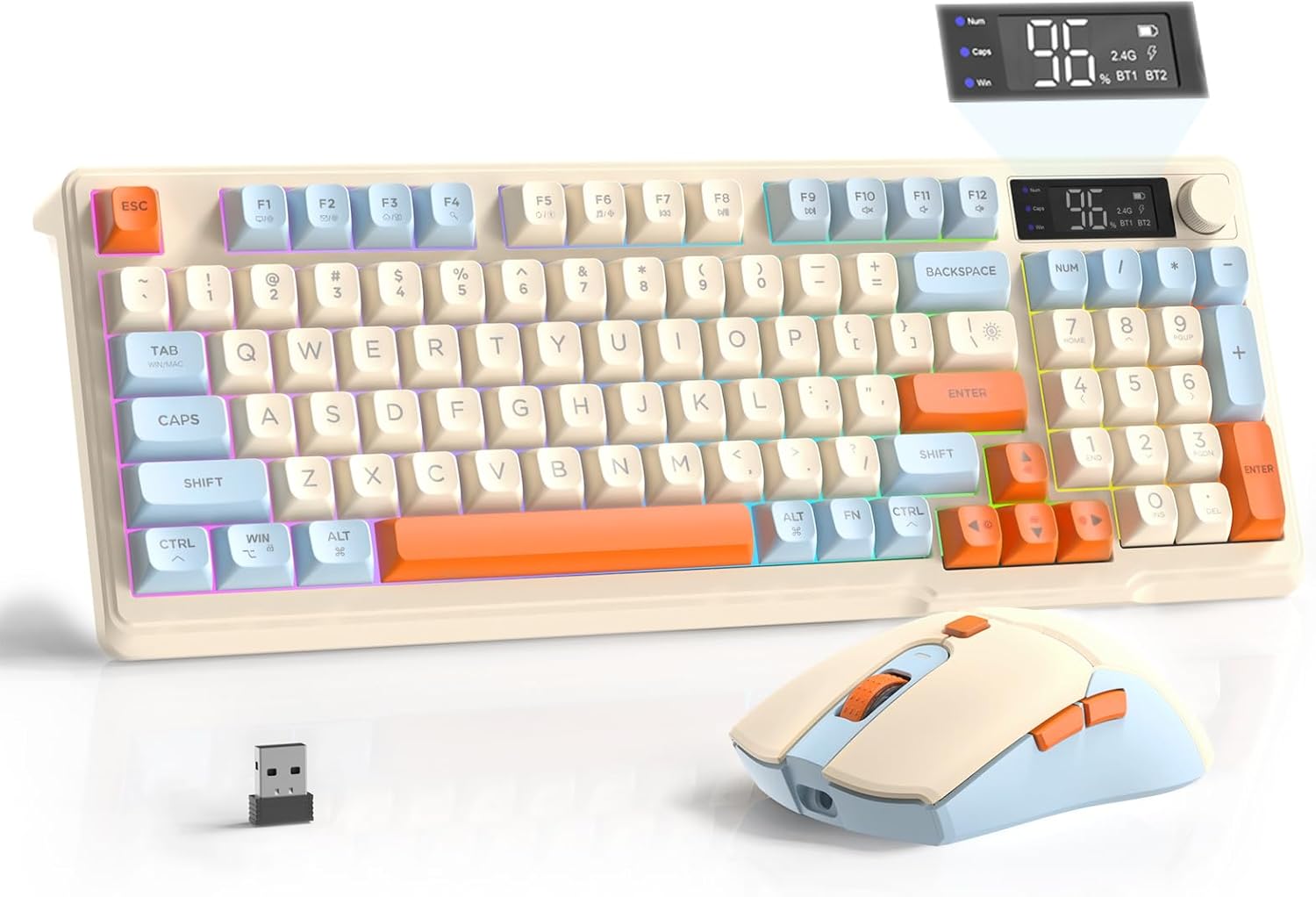
Image: The FREEWOLF T96 Wireless Gaming Keyboard and Mouse Combo, featuring the keyboard, mouse, and USB receiver.
Пакеттин мазмуну
Пакетте бардык буюмдар бар экенин текшериңиз:
- 1 x T96 Membrane Keyboard
- 1 x T96 Wireless Mouse
- 1 x USB-C кабели
- 1 x USB Receiver (stored in mouse bottom slot)
- 1 x User Manual
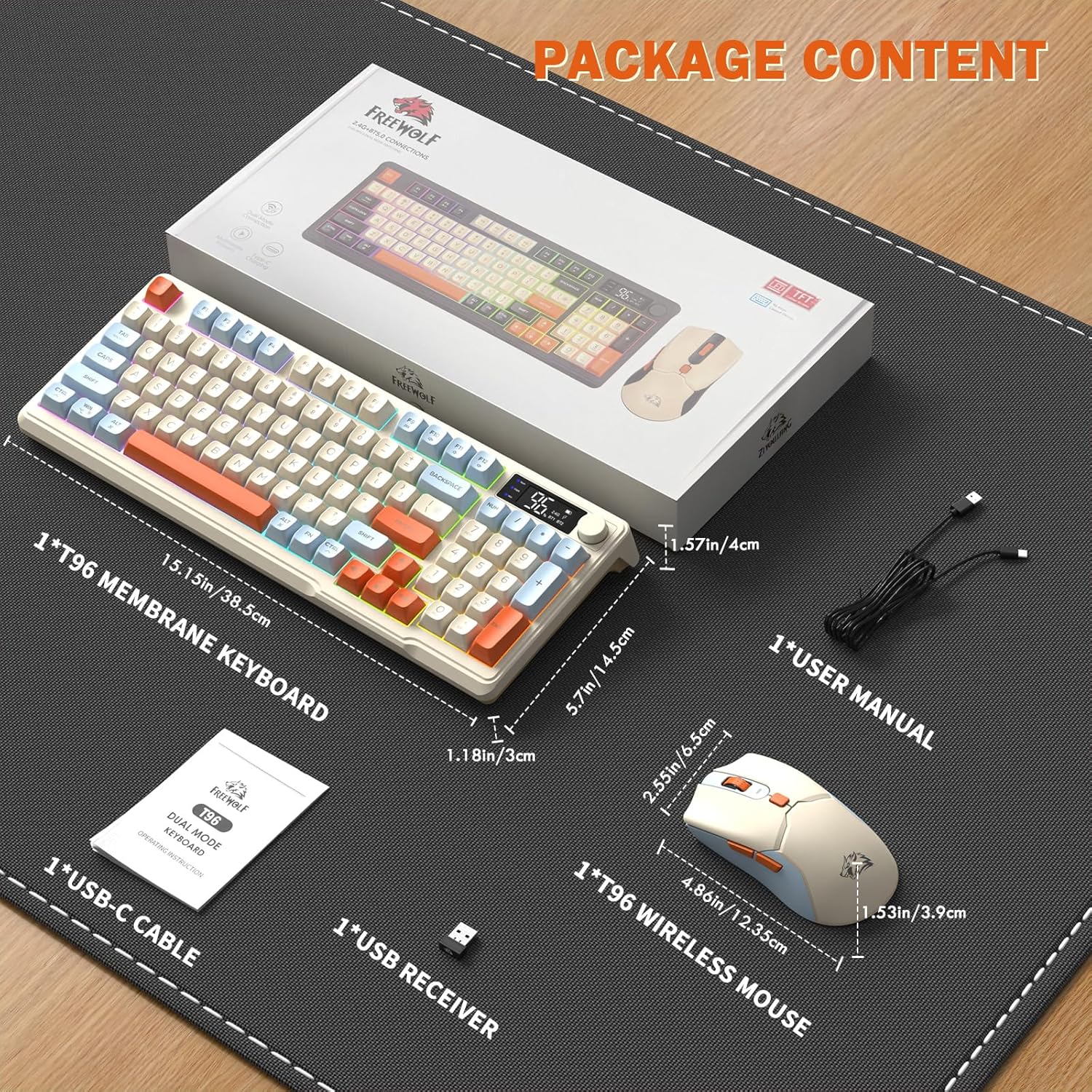
Image: A visual representation of the package contents, including the keyboard, mouse, USB-C cable, USB receiver, and user manual.
Жайгашуу
Туташуу параметрлери
The T96 combo supports dual-mode wireless connectivity:
- 2.4G зымсыз байланыш: Utilizes the included USB receiver for a stable, plug-and-play connection.
- Bluetooth Connections (BT1/BT2): Allows pairing with up to two Bluetooth-enabled devices, enabling seamless switching.
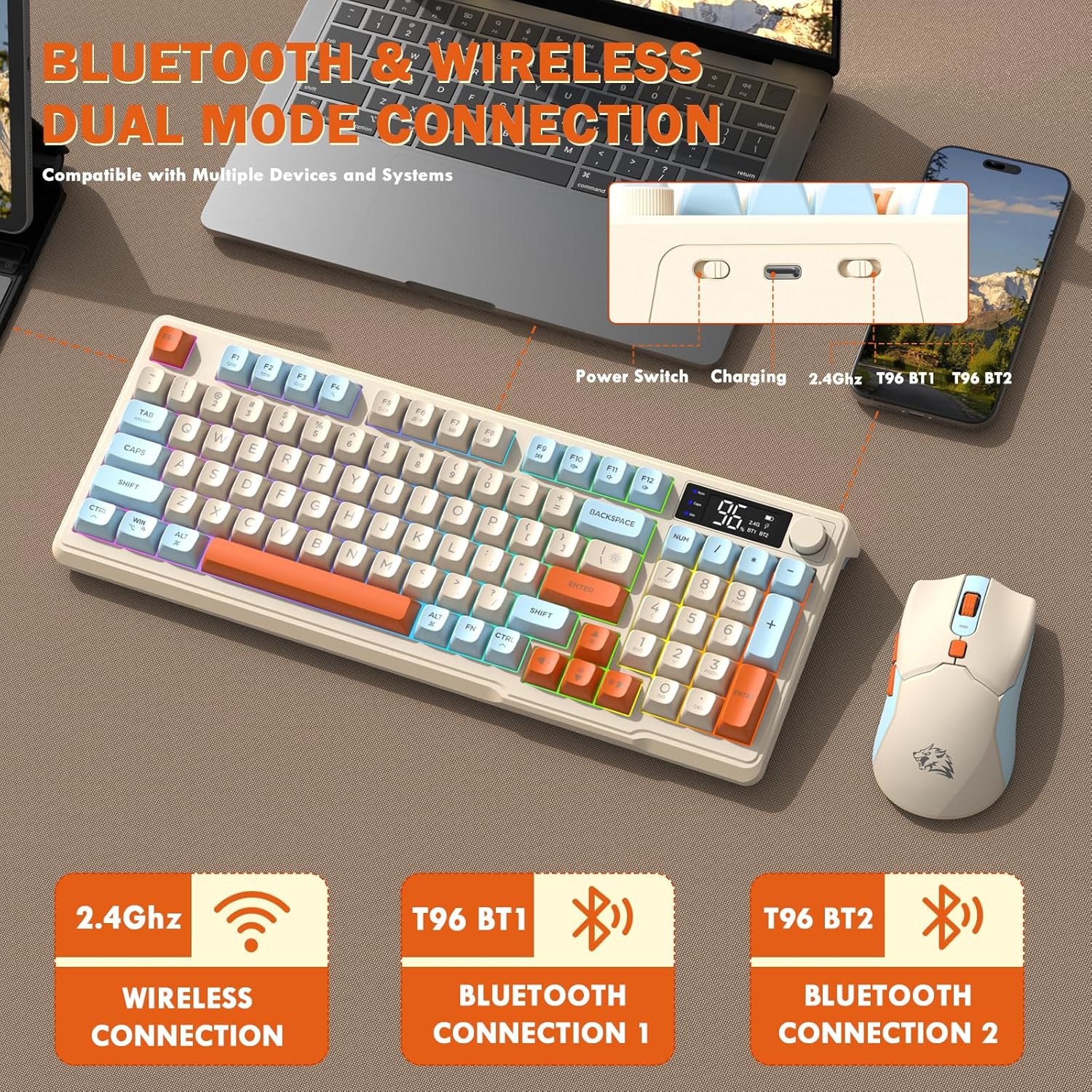
Image: Diagram illustrating the dual-mode connection options (2.4GHz, Bluetooth 1, Bluetooth 2) and the location of the power switch, charging port, and connection indicators on the keyboard.
Баштапкы орнотуу кадамдары
- Заряддоо түзмөктөрү: Before first use, fully charge both the keyboard and mouse using the provided USB-C cable. The keyboard has a 2000mAh battery, and the mouse has a 500mAh battery. The smart display on the keyboard will show charging progress.
- USB кабылдагычты табыңыз: The USB receiver for 2.4G wireless connection is stored in a slot on the bottom of the mouse. Remove it for use.
- Күйгүзүү: Клавиатура менен чычканды күйгүзүңүз, алардын тиешелүү кубат которгучтары.
- Connect via 2.4G Wireless:
- USB ресиверди компьютериңиздеги жеткиликтүү USB портуна салыңыз.
- Ensure the keyboard and mouse are set to 2.4G mode (indicated on the keyboard's smart display). They should connect automatically.
- Bluetooth аркылуу туташуу:
- Switch the keyboard and mouse to BT1 or BT2 mode.
- On your device (PC, laptop, tablet, smartphone), open Bluetooth settings.
- Издөө "T96 Keyboard" and "T96 Mouse" in the list of available devices and pair them.
- The smart display will indicate the active Bluetooth connection (BT1 or BT2).
Иштөө нускамалары
Баскычтоптун иштеши
The T96 keyboard features a 94-key compact layout with various functions to enhance your experience.
Smart Display Functions
The intelligent LED display provides real-time information:
- Батареянын абалы: Батареянын калган пайызын көрсөтөтtage.
- Туташуу режими: Indicates active connection (2.4G, BT1, BT2).
- Заряддоо процесси: Displays charging status when connected to power.
- Caps Lock/Num Lock/Win Lock Indicators: Shows status of these keys.
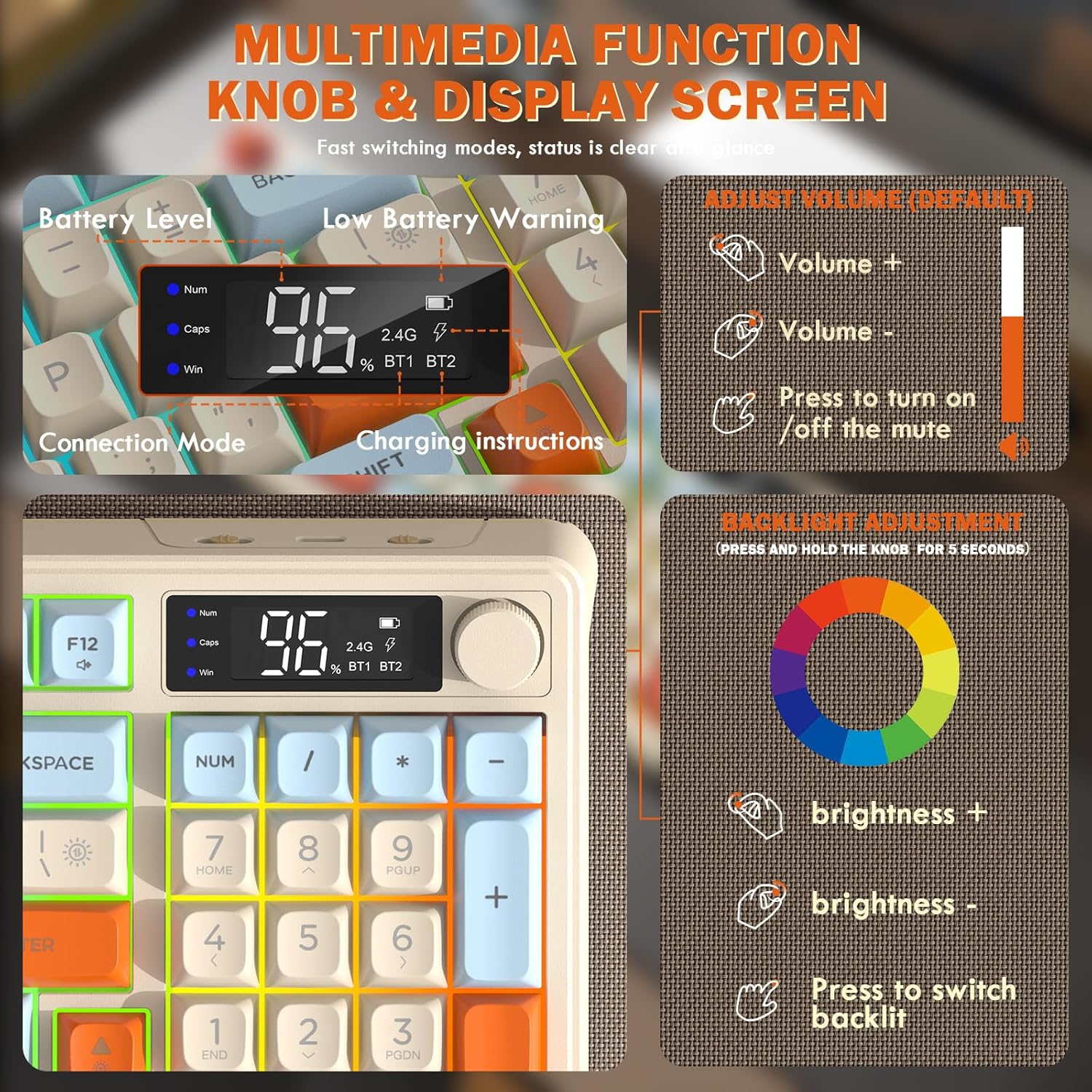
Image: Close-up of the keyboard's smart display showing battery level, connection mode, and charging instructions. Also details the multimedia knob's functions for volume and backlight control.
Мультимедиа башкаруу баскычы
Located on the top right of the keyboard, this knob offers quick control:
- Айлантуу: Adjusts system volume (clockwise for volume up, counter-clockwise for volume down).
- Пресс: Toggles mute on/off.
- Басыңыз жана кармап туруңуз (5 секунд): Activates backlight adjustment mode. Rotate to change brightness, press to switch light effects.
Multimedia Hotkeys (FN Combinations)
The keyboard includes 12 dedicated multimedia hotkeys accessible via the FN ачкыч:
- FN + F1-F12: Access various multimedia and system functions (e.g., media playback, volume, browser, email). Refer to keycap legends for specific functions.
Арткы жарыкты башкаруу
The keyboard features vibrant rainbow LED backlighting. Control it using the following combinations:
- FN + өйдө жебе: Арткы жарыктын жарыктыгын жогорулатыңыз.
- FN + Төмөн жебе: Арткы жарыктын жарыктыгын азайтыңыз.
- FN + Оңго жебе: Арткы жарыктын ылдамдыгын жогорулатыңыз.
- FN + Left Arrow: Жарыктын ылдамдыгын азайтыңыз.
- FN + \|: Switch between different lighting modes (e.g., always on, breathing, off).
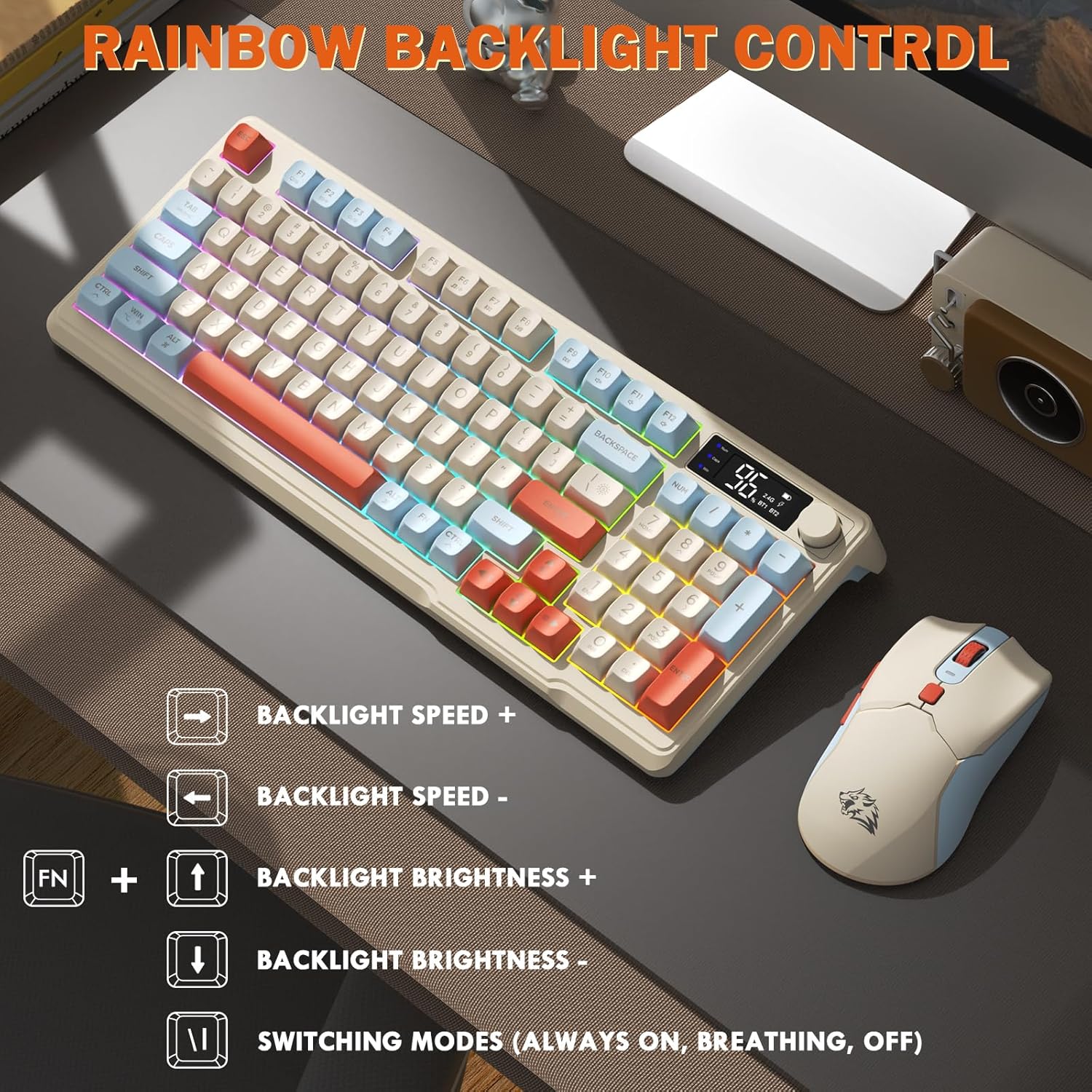
Image: Visual guide for controlling the rainbow LED backlight, showing key combinations for brightness, speed, and mode switching.
Anti-Ghosting
The keyboard supports 26-key rollover anti-ghosting technology, ensuring accurate registration of multiple simultaneous key presses, crucial for gaming.
Чычкан операциясы
The T96 gaming mouse is designed for precision and comfort.
DPI тууралоо
Adjust the mouse sensitivity (DPI) to suit your preference:
- басыңыз DPI баскычы (located behind the scroll wheel) to cycle through available DPI settings: 800 / 1600 / 2400 / 4000 DPI.
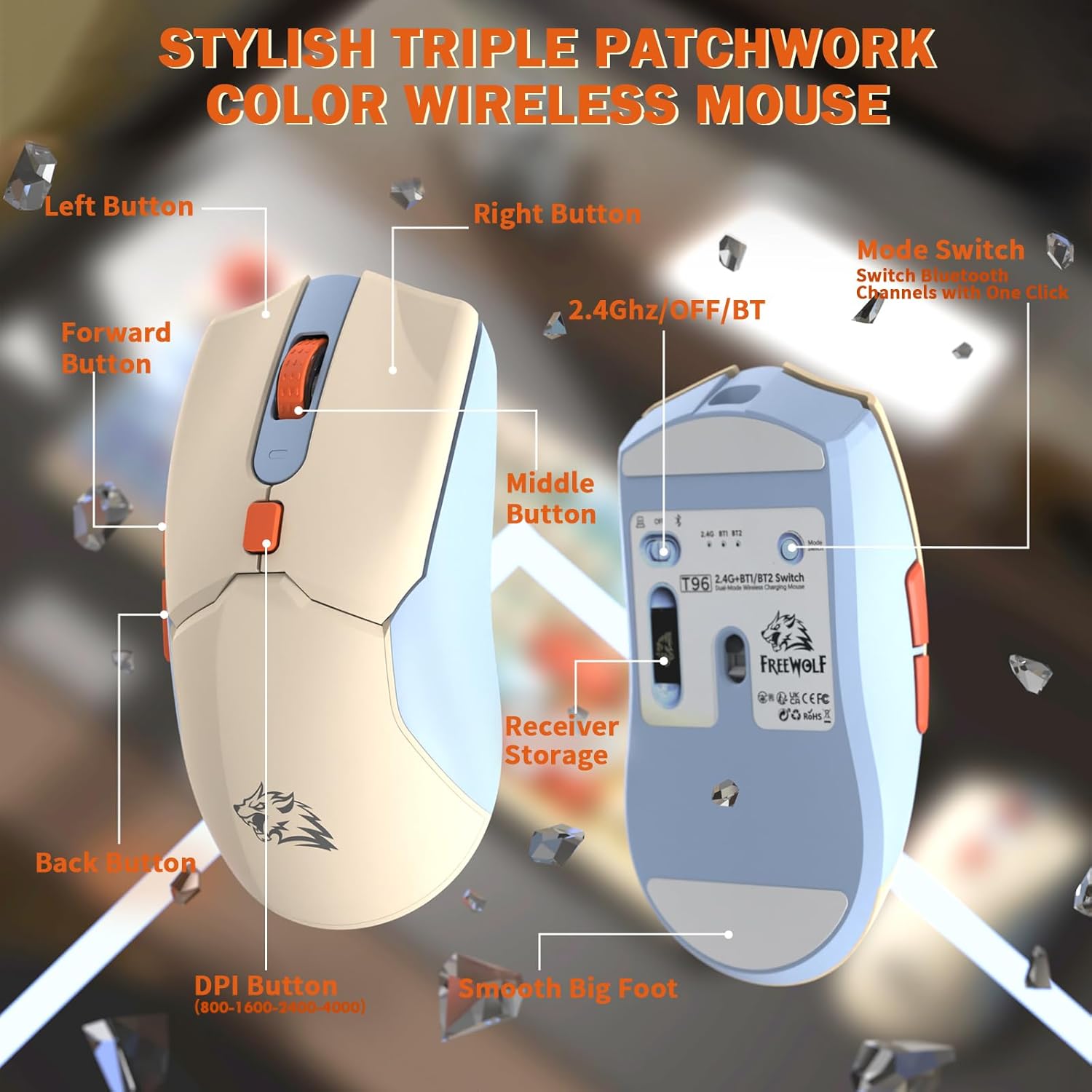
Сүрөт: деталдуу view of the T96 wireless mouse, highlighting its buttons (Left, Right, Middle, Forward, Back, DPI) and the receiver storage compartment on the bottom.
Программалануучу баскычтар
The mouse features six programmable buttons. Refer to specific software (if applicable, not mentioned in data) or operating system settings for customization options.
Шайлоо чендери
The mouse operates at different polling rates depending on the connection mode:
- Bluetooth (BT): 115Hz
- 2.4G зымсыз: 125Hz
Техникалык тейлөө
Тазалоо
- Баскычтоптун жана чычкандын беттерин тазалоо үчүн жумшак, кургак чүпүрөктү колдонуңуз.
- өжөр кир үчүн, бир аз гampчүпүрөктү суу же жумшак, абразивдүү тазалагыч менен жууп салыңыз.
- Катуу химиялык заттарды, эриткичтерди же абразивдүү материалдарды колдонуудан алыс болуңуз, анткени алар жасалгага зыян келтириши мүмкүн.
- Түзмөктөрдү сууга же башка суюктукка салбаңыз.
Батареяга кам көрүү
Батареянын иштөө мөөнөтүн жана иштешин жогорулатуу үчүн:
- Recharge the devices when the low battery indicator appears on the keyboard's smart display.
- Батареяны бат-баттан толук түгөтүп коюудан алыс болуңуз.
- Аппараттарды узак убакыт бою колдонбогондо салкын, кургак жерде сактаңыз.
- The devices feature smart power-saving modes: the keyboard enters sleep mode after 3 minutes of inactivity, and the mouse after 2 minutes. They wake instantly upon touch.

Image: Illustration showing the 2000mAh battery capacity of the keyboard and 500mAh battery capacity of the mouse, emphasizing long-lasting power.
Проблемаларды чечүү
If you encounter issues with your T96 combo, refer to the following common solutions:
| Көйгөй | Мүмкүн себеп | Чечим |
|---|---|---|
| Баскычтоп/чычкан жооп бербей жатат | Low battery; Incorrect connection mode; USB receiver not connected (2.4G); Bluetooth not paired. |
|
| Кечигип же үзгүлтүктүү байланыш | Тоскоолдук; Кабыл алгычтан/түзмөктөн алыстык; Батареянын заряды аз. |
|
| Арткы жарык иштебей жатат же күңүрт эмес | Backlight turned off; Brightness set too low; Low battery. |
|
| Mouse DPI not changing | DPI button not pressed correctly. |
|
Техникалык шарттар
| Өзгөчөлүк | Деталь |
|---|---|
| Бренд | FREEWOLF |
| Модел | T96 |
| Байланыш технологиясы | 2.4Ghz Wireless, Bluetooth (BT1, BT2) |
| Баскычтоптун түрү | Membrane, 94-Key Compact Layout |
| Баскыч капкактары | PBT Triple-Tone Spherical Keycaps |
| Арткы жарык | Rainbow LED Backlight |
| Anti-Ghosting | 26-Кайрылуу |
| Клавиатуранын батареясынын сыйымдуулугу | 2000mAh |
| Чычкан DPI | 800 / 1600 / 2400 / 4000 DPI (Adjustable) |
| Mouse Polling Rate (BT) | 115Hz |
| Mouse Polling Rate (2.4G) | 125Hz |
| Чычкандын батареясынын сыйымдуулугу | 500mAh |
| Шайкеш түзмөктөр | Ноутбук, оюн консолу, компьютер, планшет, смартфон |
| Операциялык системалар | Windows, macOS, Linux, iOS, Android |
| Элемент Салмагы | 2.12 фунт (болжол менен 0.96 кг) |
| Пакеттин өлчөмдөрү | 16.26 x 8.78 x 1.85 дюйм (болжол менен 41.3 x 22.3 x 4.7 см) |
Кепилдик жана колдоо
Продукциянын кепилдиги жана кардарларды колдоо боюнча маалымат жеткиликтүү маалыматтарда берилген эмес. Сураныч, продукциянын таңгагына же өндүрүүчүнүн расмий өкүлүнө кайрылыңыз. webкепилдик камтуу жөнүндө чоо-жайы жана жардам үчүн кардарларды тейлөө менен кантип байланышуу үчүн сайт.


