1. Киришүү
This manual provides essential information for setting up, operating, and maintaining your Element 43-inch Frameless 4K UHD HDR XUMO TV. Please read it thoroughly before using your television to ensure proper functionality and safety.
The Element XUMO TV offers a breathtaking viewing experience with its 4K Ultra HD resolution, delivering clear and detailed images. Enhanced color and contrast are provided by Dolby Vision and HDR technology, ensuring an immersive experience even in dark scenes. Dolby Audio contributes to superior sound quality for movies and games. A 120Hz effective refresh rate ensures smooth motion during fast-paced content.

Сүрөт 1.1: Алдыңкы view of the Element 43" XUMO TV.
2. Кутуда эмне бар
Сураныч, бардык буюмдар бар экенине ынануу үчүн пакетиңиздин мазмунун текшериңиз:
- 1 Element Xumo TV 43"
- 1 Xumo TV remote control (batteries included)
- 1 Ыкчам баштоо колдонмосу
- 1 TV stand + hardware
3. Орнотуу
3.1 Пакеттен чыгаруу
- Carefully remove the TV from its packaging. It is recommended to have two people for this step due to the size and weight of the television.
- Сыналгы экранын сызып кетпеши үчүн жумшак, тегиз бетке ылдый каратып кой.
- Бардык коргоочу пленкаларды жана таңгактоочу материалдарды алып салыңыз.
3.2 Стендди бекитүү
Телевизордун станогун бекитүү үчүн:
- Сол жана оң буттардын кыймылын аныктагыла.
- Ар бир тирөөч бутун телевизордун түбүндөгү тиешелүү бурама тешиктерине тегиздеңиз.
- Secure the stand legs using the provided hardware (screws). Do not overtighten.
- Сыналгыны этияттык менен тик абалына туруктуу, түз жерде көтөрүңүз.
3.3 Перифериялык түзүлүштөрдү туташтыруу
Connect your external devices (e.g., cable box, gaming console, Blu-ray player) to the appropriate ports on the back of the TV. Refer to the Quick Start Guide for port locations.
3.4 Баштапкы күйгүзүү
- Электр шнурду сыналгыга, андан кийин розеткага сайыңыз.
- Алыстан башкаруу пультундагы же сыналгыдагы кубат баскычын басыңыз.
- Follow the on-screen instructions to complete the initial setup, including network connection and channel scanning.
4. Иштөө нускамалары
4.1 Алыстан башкаруу функциялары
The included XUMO TV remote control allows you to navigate the TV's features. It includes an advanced voice remote function for easy content search.
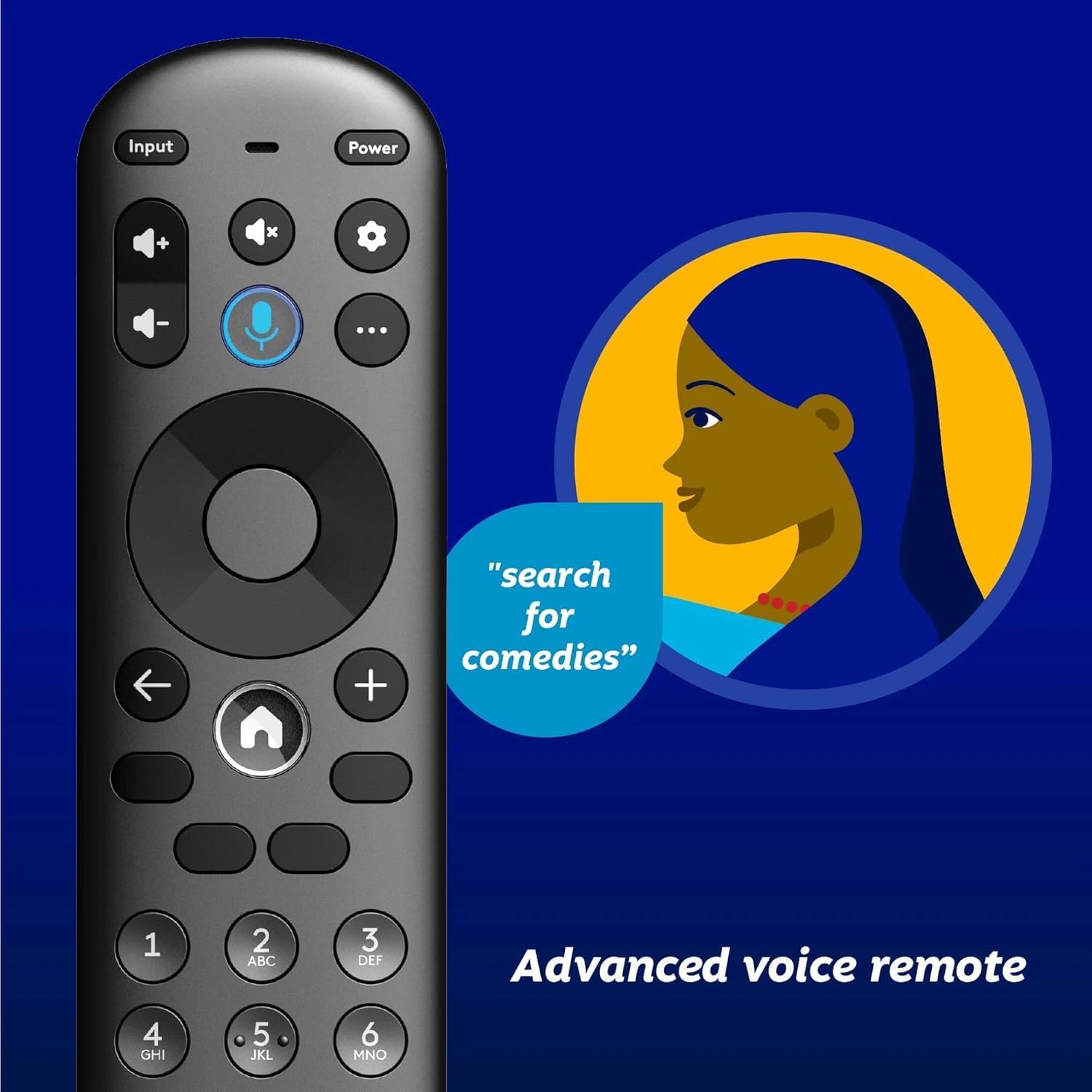
Image 4.1: Element XUMO TV advanced voice remote control.
- Күч: Телевизорду күйгүзөт же өчүрөт.
- Киргизүү: Киргизүү булагын (HDMI, AV ж.б.) тандайт.
- Үн баскычы: Activates voice commands for searching content or controlling the TV.
- Навигация аянтчасы: Менюлар боюнча жылдыруу жана параметрлерди тандоо үчүн колдонулат.
- Үй баскычы: Returns to the XUMO TV home screen.
- Көлөм +/-: Үн деңгээлин тууралайт.
- Канал +/-: Телеканалдарды өзгөртөт.
4.2 Smart TV Features (XUMO)
Your Element TV features a built-in XUMO TV experience, providing access to over 250 pre-loaded apps and streaming services.

Image 4.2: XUMO TV smart interface with streaming applications.
- Агымдуу колдонмолор: Access thousands of movies, TV shows, and music from platforms like Netflix, YouTube, Disney+, Prime Video, Peacock, and more.
- Түз каналдар: Explore over 750 free live channels, including news, sports, and kids' programming, from Xumo Play, Tubi, Pluto TV, and others.
- Жекелештирилген мазмун: The XUMO interface is designed to help you stream easily, bringing together content in one simple view.
4.3 Байланыш
- Wi-Fi: Интернетке кирүү жана агым үчүн үйүңүздөгү зымсыз тармакка туташыңыз.
- Bluetooth: Easily pair your TV with compatible Bluetooth devices such as speakers, headphones, or game controllers.
- Apple AirPlay жана Үй: Mirror your smartphone, iPad, or Mac screen to the TV, stream media, and control your TV directly from Apple devices.
5. Техникалык тейлөө
5.1 Экранды тазалоо
- Телевизорду өчүрүп, розеткадан сууруп алыңыз.
- Gently wipe the screen with a soft, dry, lint-free cloth.
- өжөр белгилери үчүн, жеңил гampчүпүрөккө суу же атайын экран тазалагыч (экранга түздөн-түз чачпаңыз).
- Avoid using harsh chemicals, abrasives, or alcohol-based cleaners.
5.2 Жалпы кам көрүү
- Телевизорду күн нурунан, жылуулук булактарынан жана ашыкча чаңдан алыс кармаңыз.
- Ашыкча ысып кетүүдөн сактануу үчүн телевизордун айланасын туура желдетүүнү камсыз кылыңыз.
- Телевизордун үстүнө оор буюмдарды койбоңуз.
6. Кыйынчылыктарды
Телевизоруңузда көйгөйлөргө туш болсоңуз, төмөнкү жалпы көйгөйлөрдү жана аларды чечүү жолдорун караңыз:
- Кубат жок:
- Кубат шнуру телевизорго да, иштеп жаткан электр розеткасына да бекем сайылганын текшериңиз.
- Розетка иштеп жатканын башка түзмөктү сайып текшериңиз.
- Жөн гана пульттун эмес, сыналгыдагы кубат баскычын басып көрүңүз.
- Сүрөт жок, бирок үнү бар:
- Туура киргизүү булагы тандалганын текшериңиз (мисалы, HDMI 1, AV).
- Сыналгы менен тышкы түзмөктөрдүн ортосундагы бардык кабелдик байланыштарды текшериңиз.
- Сыналгыны жана бардык туташкан түзмөктөрдү өчүрүп күйгүзүңүз.
- Үн жок, бирок сүрөтү бар:
- Үн деңгээлин текшерип, сыналгынын үнү өчүрүлбөгөнүн текшериңиз.
- Эгер тышкы динамиктерди колдонсоңуз, алардын туура туташып, күйгүзүлгөнүн текшериңиз.
- Сыналгы менюсунда аудио чыгаруу орнотууларын текшериңиз.
- Алыстан башкаруу иштебейт:
- Пульттагы батарейкаларды алмаштырыңыз.
- Пульт менен сыналгынын IR сенсорунун ортосунда эч кандай тоскоолдуктар жок экенин текшериңиз.
- Re-pair the remote if it's a Bluetooth remote (refer to the Quick Start Guide for pairing instructions).
- Тармакка туташуу маселелери:
- Wi-Fi роутериңизди жана модемиңизди өчүрүп күйгүзүңүз.
- Check the Wi-Fi settings on the TV to ensure it's connected to the correct network.
- If possible, try connecting the TV to the internet via an Ethernet cable.
7. Техникалык шарттар
Key technical specifications for the Element 43" Frameless 4K UHD HDR XUMO TV:
| Өзгөчөлүк | Description |
|---|---|
| Бренд аты | Элемент |
| Модель аты | Элемент 2023 |
| Screen Size | 43 дюйм (110 см) |
| Дисплей технологиясы | LED |
| Резолюция | 4K Ultra HD |
| Өзгөчөлүктөр | 4K High Definition, HDR (High Dynamic Range), Vibrant Colors, 60 Hz, Dolby Vision, HDR10+ |
| Натыйжалуу жаңыртуу ылдамдыгы | 120Hz |
| Аудио технологиясы | Dolby Audio |
| Колдоого алынган Интернет кызматтары | Netflix, Prime Video, Max, Disney Plus, YouTube TV, Paramount+, Apple TV+, Crunchyroll, Xumo Play, Tubi, Pluto TV |
| Байланыш технологиясы | Wired, Wireless (Wi-Fi, Bluetooth, Apple AirPlay) |
| Аспект катышы | 16:9 |
| Элемент Салмагы | 22 фунт |
| Продукциянын өлчөмдөрү | 3.3 x 37 x 225 дюйм |
7.1 Сүрөттүн сапаты

Image 7.1: Dolby Vision technology enhances highlights and darks for superior contrast.

Image 7.2: 120Hz Effective Refresh Rate for smooth motion.

Image 7.3: 4K resolution delivers vivid colors and remarkable detail.
8. Кепилдик жана колдоо
This product is an Amazon Renewed item. Amazon Renewed products are backed by the Amazon Renewed Guarantee. This means your purchase is eligible for a replacement or refund within 90 days of receipt if it does not work as expected.
For specific warranty details or support inquiries, please refer to the documentation provided with your Amazon Renewed purchase or visit the Amazon Renewed support page.


