1. Киришүү
This manual provides essential instructions for the safe and efficient operation, maintenance, and troubleshooting of your DREAME L50 Ultra Robot Vacuum and Mop. Please read this manual thoroughly before using the product and retain it for future reference.
2. Коопсуздук маалыматы
To reduce the risk of injury or damage, read and follow all safety precautions when setting up, using, and maintaining your robot. This appliance can be used by children aged 8 years and above and persons with reduced physical, sensory or mental capabilities or lack of experience and knowledge if they have been given supervision or instruction concerning use of the appliance in a safe way and understand the hazards involved. Children shall not play with the appliance. Cleaning and user maintenance shall not be made by children without supervision.
- Биринчи колдонуудан мурун роботтун толук заряддалганын текшериңиз.
- Роботту нымдуу чөйрөдө же сууга жакын жерде колдонбоңуз.
- Remove loose cables, small objects, and fragile items from the floor before cleaning.
- Чачты, кенен кийимдерди, манжаларды жана дененин бардык бөлүктөрүн тешиктерден жана кыймылдуу бөлүктөрдөн алыс кармаңыз.
- Do not operate the robot in areas where there are open flames or explosive materials.
- Өндүрүүчү көрсөткөн кубат адаптерин жана кубаттоочу докту гана колдонуңуз.
- Do not use the robot to pick up large debris, broken glass, or corrosive liquids.
3. Пакеттин мазмуну
Verify that all items are present and in good condition upon unboxing.

Сүрөт: All components included in the DREAME L50 Ultra package. This includes the robot vacuum, base station, various brushes, mop pads, cleaning solution, and documentation.
- Робот чаң соргуч x1
- Базалык станция x1
- Негизги щетка (алдын ала орнотулган) x1
- Щетка коргоочусу (алдын ала орнотулган) x1
- Каптал щетка (алдын ала орнотулган) x1
- Scale Inhibitor (pre-installed) x1
- Dust Bags (pre-installed) x2
- Mop Pad Holders x2
- Mop Pads x2
- Чаң кутучасы (алдын ала орнотулган, чыпкасы менен кошо) x1
- 200 мл тазалоочу эритме x1
- Базалык станция Рamp Кеңейтүү x1
- X1
- Колдонуучунун колдонмосу x1
4. Продукт бүтүп калдыview
The DREAME L50 Ultra is an advanced robot vacuum and mop designed for comprehensive floor cleaning. It features powerful suction, intelligent navigation, and an all-in-one PowerDock for automated maintenance.

Сүрөт: The DREAME L50 Ultra robot vacuum docked with its white base station, alongside a smartphone displaying the companion app icon.
Негизги өзгөчөлүктөрү:
- 19,500Pa Vormax соргуч: Powerful suction for effective debris pickup.
- HyperStream эки щеткасынын түйүндөрүн чечүү ыкмасы: Bristled rubber brush and TPU rubber brush for efficient hair removal and tangle prevention.
- ProLeap System: Retractable legs for seamless crossing over door tracks and thresholds up to 6cm.
- AI Action and 3D Structured Light: Precise obstacle avoidance for over 180 types of objects.
- Dual Flex Arm Technology: Extendable side brush and mop for comprehensive edge-to-corner cleaning.
- All-in-One PowerDock: Features auto-empty (up to 100 days), hot water mop self-cleaning, hot air drying, auto solution refilling, and auto water tank refilling.
- Customizable Carpet Cleaning: 5 modes via the Dreamehome App for tailored carpet care.
- On-Demand Voice Control: Compatible with Alexa, Siri, and Google Assistant.
5. Орнотуу
5.1 Кутудан чыгаруу жана баштапкы жайгаштыруу
Carefully remove all components from the packaging. Place the base station on a hard, level surface against a wall, ensuring there is adequate clearance around it (at least 0.5m on both sides and 1.5m in front). Connect the power cable to the base station and plug it into a power outlet.
Видео: A user unboxes the DREAME L50 Ultra, showing the components and initial setup of the robot and its base station. This video demonstrates the physical setup process.
5.2 Колдонмону орнотуу жана туташуу
Download the "Dreamehome" app from your smartphone's app store. Follow the in-app instructions to connect your DREAME L50 Ultra to your home Wi-Fi network. This process typically involves scanning a QR code on the robot and following prompts for network selection.
5.3 Filling Water Tanks and Solution
Open the top cover of the base station to access the clean water tank and cleaning solution compartment. Fill the clean water tank with tap water and the solution compartment with the provided DREAME cleaning solution. Ensure both are securely closed before operation.
6. Операция
6.1 Тазалоону баштоо жана токтотуу
- Баштоо: Press the power button on the robot or tap "Clean" in the Dreamehome app.
- Тыныгуу: Press the power button during cleaning or tap "Pause" in the app.
- Резюме: Press the power button or tap "Resume" in the app.
- Докко кайтуу: Press the home button on the robot or tap "Dock" in the app.
6.2 Тазалоо режимдери
The Dreamehome app allows you to select various cleaning modes:
- Вакуум гана: Бардык полдордо кургак калдыктар үчүн.
- Швабра гана: For wet cleaning on hard floors.
- Чаң соргуч: Бир убакта чаң соргуч жана сүртүү.
- Ыңгайлаштырылган тазалоо: Define specific areas or rooms for cleaning with adjustable settings.
6.3 Scheduled Cleaning
Set up recurring cleaning tasks through the Dreamehome app. You can specify start times, frequency (daily, weekly, custom), and cleaning parameters for the entire area or specific rooms.
Видео: This video demonstrates how to set up scheduled cleaning tasks using the Dreamehome app, allowing the robot vacuum to clean automatically at predefined times.
6.4 Obstacle Avoidance and Dynamic Cleaning
The DREAME L50 Ultra utilizes AI Action and 3D structured light for precise obstacle avoidance. It can detect and navigate around over 180 types of objects, including shoes, furniture, and cables.

Сүрөт: A DREAME L50 Ultra robot vacuum navigating around various obstacles like a teddy bear, slippers, and cables, illustrating its smart obstacle detection capabilities.
Enable "Dynamic Obstacle Area Cleaning" in the app settings to allow the robot to remember skipped areas due to dynamic obstacles (like pets or people) and clean them later.
Видео: This video highlights the Dynamic Replenishment Sweeping Technology, showing how the robot avoids dynamic obstacles and then returns to clean those areas.
6.5 Четтерди жана бурчтарды тазалоо
The Dual Flex Arm technology with an extendable side brush and mop ensures thorough cleaning of corners and tight spots. Activate "AI-driven SideReach" and "AI-driven MopExtend" in the app settings for enhanced coverage.

Сүрөт: A DREAME L50 Ultra robot vacuum cleaning along a wall and corner, demonstrating its ability to reach tight spaces with its extendable components.
Видео: This video illustrates the DREAME robot's corner and edge cleaning feature, showing how it extends its brush and mop to clean along walls and around furniture legs.
6.6 Carpet Cleaning Strategies
Customize carpet cleaning through the Dreamehome app with 5 available modes:
- Removable Mops: Detach mop pads to maintain dry carpets.
- Liftable Mops: Mops lift for low-pile carpets.
- Complete Carpet Avoidance: Robot avoids all carpets.
- Intensive Carpet Cleaning: Vacuums carpets twice for deeper cleaning.
- Сорууну күчөтүү: Increases suction power on carpets.
6.7 Үн менен башкаруу
Manage your cleaning routine using voice commands with Alexa, Siri, or Google Assistant. Link your DREAME L50 Ultra to your preferred voice assistant through the Dreamehome app.
7. Техникалык тейлөө
Regular maintenance ensures optimal performance and longevity of your DREAME L50 Ultra.
7.1 All-in-One PowerDock Maintenance
- Автоматтык түрдө бошотуу: The dock automatically empties the robot's dustbin for up to 100 days. Replace the dust bag in the dock when full.
- Mop Self-Cleaning: Mop pads are automatically rinsed with 167°F hot water.
- Ысык аба менен кургатуу: Mop pads are dried with hot air to prevent odors and mildew.
- Solution & Water Refilling: The dock automatically refills the robot's water tank and cleaning solution.
- Base Station Cleaning: The AceClean DryBoard system helps prevent dirt buildup in the washboard area. Periodically check and clean the washboard filter.
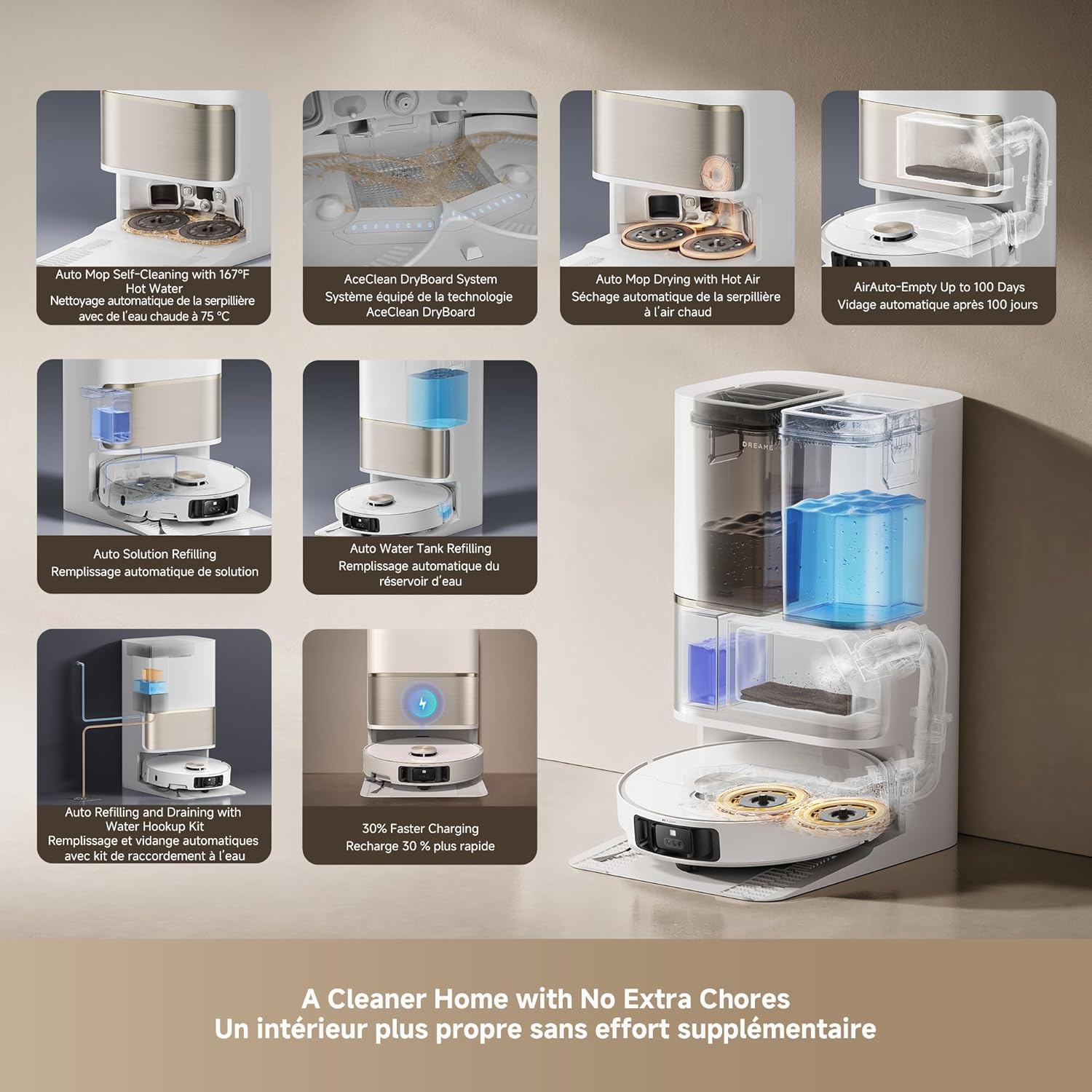
Сүрөт: An infographic detailing the various automated functions of the DREAME L50 Ultra's PowerDock, including auto-empty, mop self-cleaning, hot air drying, and water/solution refilling.
7.2 Robot Vacuum Component Cleaning
- контейнери: Empty the robot's internal dustbin regularly, especially if not using the auto-empty feature.
- Негизги щетка: Remove the main brush and clean any tangled hair or debris. The HyperStream Detangling DuoBrush is designed to minimize tangles.
- Каптал щетка: Check for and remove any tangled hair or debris from the side brush.
- Чыпкалар: Clean the dustbin filter periodically by tapping out debris. Replace as needed.
- Сенсорлор: Бардык сенсорлорду (жар сенсорлору, дубал сенсорлору, кубаттоочу контакттар) таза, кургак чүпүрөк менен сүртүп, жакшы иштешин камсыз кылыңыз.
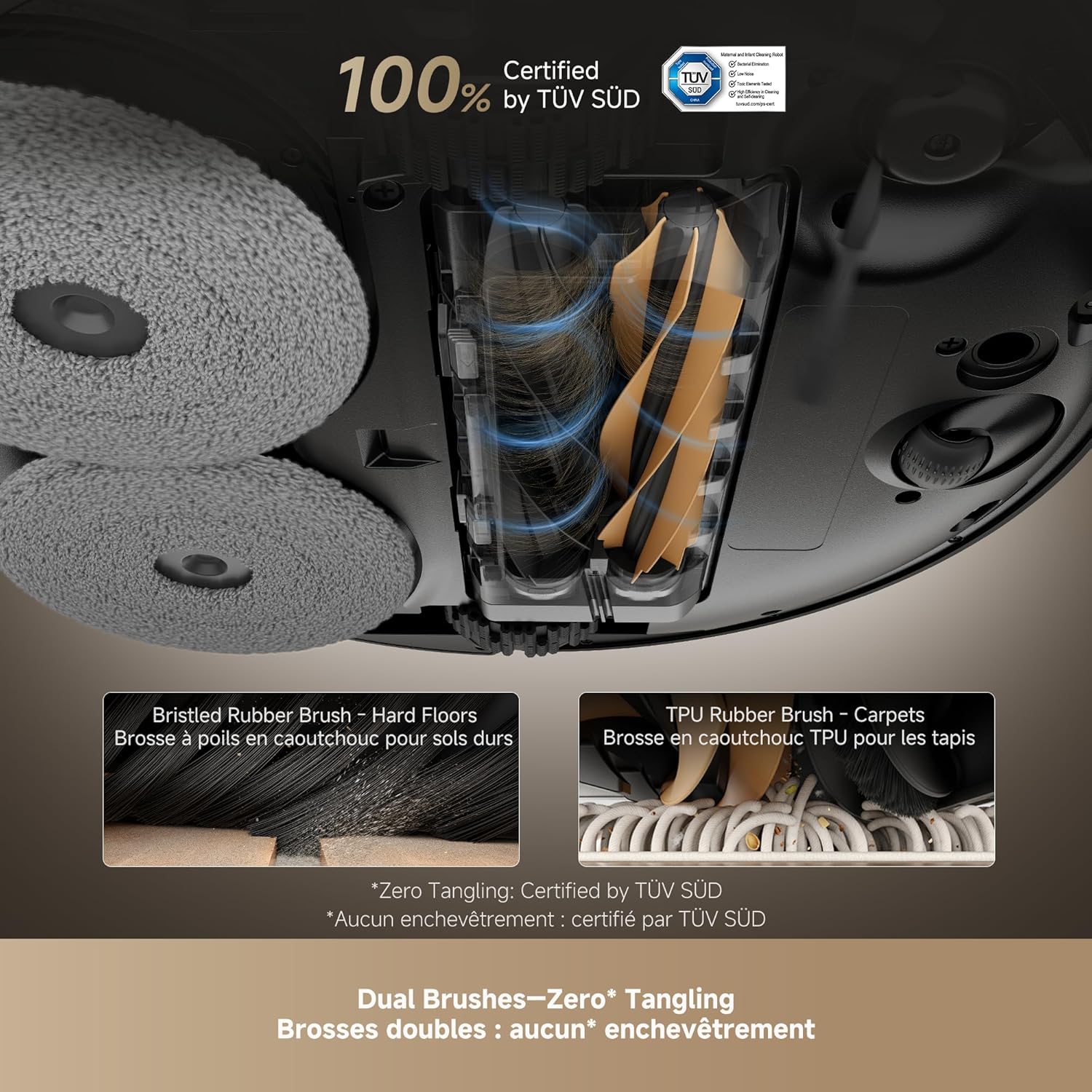
Сүрөт: Жакын план view of the DREAME L50 Ultra's dual brush system, showing a bristled rubber brush for hard floors and a TPU rubber brush for carpets, designed for effective hair removal.
Видео: This video shows the dirty water collected after two mopping cycles, demonstrating the effectiveness of the DREAME L50 Ultra's mopping function.
Видео: This video measures the sound level of the DREAME L50 Ultra during its self-empty cycle, providing an indication of its operational noise.
8. Кыйынчылыктарды
If your DREAME L50 Ultra encounters an issue, refer to the following common solutions. For persistent problems, contact customer support.
| Көйгөй | Мүмкүн себеп | Чечим |
|---|---|---|
| Робот күйбөйт. | Батареянын аздыгы; Кубат баскычы туура басылган жок. | Place the robot on the charging dock; Press and hold the power button for 3 seconds. |
| Робот заряддай албайт. | Charging contacts are dirty; Power cable not connected. | Clean the charging contacts on both the robot and dock; Ensure the power cable is securely plugged in. |
| Робот бат-баттан тыгылып калат. | Өтө көп тоскоолдуктар; Сенсорлор кир. | Clear the cleaning area of clutter; Clean all sensors on the robot. |
| Начар тазалоо көрсөткүчү. | таштанды челек толгон; щеткалар чаташкан; Фильтр бүтүп калды. | Empty the dustbin; Clean the main and side brushes; Clean or replace the filter. |
| Швабралар эффективдүү тазаланбайт. | Mop pads dirty; Water tank empty; No cleaning solution. | Ensure mop pads are clean; Refill the clean water tank; Refill the cleaning solution. |
| Robot is too loud during self-empty. | Кадимки иштөө. | The self-empty function involves powerful suction and is inherently noisy. This is normal. |
8.1 Restarting the Robot
If the robot is unresponsive or behaving erratically, a simple restart may resolve the issue. Press and hold the power button on the robot for a few seconds until it powers off, then press it again to turn it back on.
Видео: This video demonstrates how to perform a simple restart on the DREAME L50 Ultra robot vacuum by pressing and holding the power button.
8.2 Заводдук абалга кайтаруу
A factory reset will restore the robot to its original settings and delete all saved maps and Wi-Fi connections. This should be used as a last resort for persistent issues.
- Ensure the robot is powered on.
- Роботтун үстүнкү капкагын ачыңыз.
- Locate the small reset button (often a pinhole) near the Wi-Fi indicator.
- Using a small tool (like a SIM ejector tool or paperclip), press and hold the reset button for approximately 5 seconds until you hear a voice prompt confirming the factory reset.
- The robot will then restart with factory settings.
Видео: This video guides you through the process of performing a factory reset on the DREAME L50 Ultra robot vacuum, including locating the reset button and confirming the reset.
9. Техникалык шарттар
| Өзгөчөлүк | Деталь |
|---|---|
| Бренд | Кыял |
| Модель аты | Dreame L50 Ultra White |
| Элемент моделинин номери | RLL94CE |
| UPC | 810142561310 |
| Түс | Ак |
| Продукциянын өлчөмдөрү | 17"L x 16"W x 27"H |
| Элемент Салмагы | 42.1 фунт |
| Соруу күчү | 19,500Pa Vormax соргуч |
| Батареянын иштөө мөөнөтү | 180 мүнөт |
| Тtage | 110 вольт |
| Башкаруу ыкмасы | Колдонмо, пульт, үн |
| Чыпка түрү | көбүк |
| Surface Recommendation | Wood, Marble, Tile |
10. Кепилдик жана колдоо
DREAME products are covered by a limited warranty from the date of purchase. For specific warranty terms and conditions, please refer to the warranty card included in your package or visit the official DREAME webсайт.
Кардарларды колдоо:
If you have any questions, require technical assistance, or need to report an issue, please contact DREAME customer support through the following channels:
- Официалдуу Webсайт: Visit the DREAME official webКөп берилүүчү суроолор, колдоо ресурстары жана байланыш маалыматы үчүн сайт.
- Dreamehome колдонмосу: Access support directly through the app's help section.
- Электрондук почта/Телефон: Refer to your product's quick start guide or the official webсиздин аймактагы конкреттүү байланыш маалыматы үчүн сайт.
Please have your product model number (RLL94CE) and purchase information ready when contacting support.


