1. Киришүү
This manual provides essential information for setting up, operating, maintaining, and troubleshooting your VIBOX VTX-8 Gaming PC. This system is designed for gaming, photo editing, and video editing, offering a balance of performance and efficiency.

The VIBOX VTX-8 features an AMD Ryzen 5 5500 processor, an NVIDIA GeForce RTX 5060 graphics card, 16GB of DDR4 RAM, and a 1TB NVMe M.2 SSD. It comes pre-installed with Windows 11 Home and includes a Wi-Fi adapter for wireless connectivity.
2. Орнотуу колдонмосу
2.1 Кутудан чыгаруу жана алгачкы текшерүү
Carefully remove the PC from its packaging. Inspect the system for any visible damage. Ensure all accessories, such as the power cable, Wi-Fi adapter, and any documentation, are present.
2.2 Перифериялык түзүлүштөрдү туташтыруу
Connect your monitor, keyboard, and mouse to the appropriate ports on the rear of the PC. The PC supports HDMI and DisplayPort for video output. Connect the power cable to the PC and then to a power outlet.

- Кубат баскычы: алдыңкы панелинде жайгашкан.
- USB порттору: Multiple USB 2.0 and USB 3.0 ports are available for connecting peripherals.
- HDMI/Дисплей порту: Connect your monitor to the graphics card's HDMI or DisplayPort outputs.
- Wi-Fi Adapter: Insert the included Wi-Fi adapter into an available USB port for wireless internet access.
2.3 Биринчи жүктөө жана Windows 11 орнотуу
Press the power button to turn on your PC. The system comes with Windows 11 Home pre-installed. Follow the on-screen instructions to complete the initial Windows setup, including language, region, and network configuration.
3. Иштөө нускамалары
3.1 Жалпы колдонуу
Your VIBOX VTX-8 PC is optimized for a variety of tasks, including:
- Оюн: Experience fluid gameplay in 1080p and 1440p with the NVIDIA GeForce RTX 5060 graphics card and AMD Ryzen 5 5500 processor.
- Мазмун түзүү: Suitable for photo and video editing tasks due to its fast processor, ample RAM, and NVMe SSD.
- Көп тапшырма: The 16GB DDR4 RAM ensures smooth operation when running multiple applications simultaneously.
3.2 RGB жарыкты башкаруу
The PC features RGB lighting with Hex RGB Infinity 120mm fans. You can customize the lighting effects and colors using the dedicated RGB change button on the front panel or through compatible software (if provided by the manufacturer).

4. Техникалык тейлөө
4.1 Тазалоо
Regularly clean the exterior of the PC with a soft, dry cloth. Use compressed air to clear dust from fan vents and internal components to ensure optimal airflow and prevent overheating. Ensure the PC is powered off and unplugged before cleaning.
4.2 Программалык камсыздоо жаңыртуулары
Keep your Windows 11 operating system and graphics drivers updated to ensure optimal performance and security. Windows Update can be accessed via the Settings menu, and NVIDIA drivers can be downloaded from the official NVIDIA webсайт.
4.3 Component Upgrades
The VTX-8 PC is designed with future upgrades in mind. You may consider upgrading RAM (up to 128GB supported) or other components as needed. Consult the VIBOX support for compatibility and recommended procedures before performing any hardware changes.
5. Кыйынчылыктарды
If you encounter issues with your VIBOX VTX-8 PC, consider the following steps:
- Кубат жок: Ensure all power cables are securely connected to the PC and the wall outlet. Test the outlet with another device.
- Дисплей жок: Verify that your monitor is correctly connected to the graphics card (not the motherboard's video output, if present) and that the monitor is powered on and set to the correct input source.
- Аткаруу маселелери: Check for background applications consuming resources. Ensure drivers are up to date. Monitor system temperatures to rule out overheating.
- Тармакка туташуу: If experiencing Wi-Fi issues, ensure the Wi-Fi adapter is properly installed and drivers are updated. Consider using an Ethernet cable for a stable connection or upgrading the Wi-Fi adapter if necessary.
- Системанын туруксуздугу: Ensure all components are seated correctly. If issues persist, consult the VIBOX support team.
6. Техникалык шарттар
Below are the detailed technical specifications for the VIBOX VTX-8 Gaming PC:
| Бренд | VIBOX |
| Модель номери | V-506 (VTX-8 Series) |
| Түс | VTX-8 White |
| Операция системасы | Windows 11 Home |
| Процессор бренди | AMD |
| Процессордун түрү | Ryzen 5 5500 |
| Процессордун ылдамдыгы | 3.6 GHz (up to 4.2 GHz max boost) |
| Өзөктөрдүн саны | 6 |
| Графикалык карта | NVIDIA GeForce RTX 5060 |
| Graphics RAM | 8 ГБ GDDR7 |
| Тутум RAM | 16 ГБ DDR4 (3200 МГц) |
| Максималдуу эс тутум колдоого алынат | 128 ГБ |
| Сактагыч | 1 ТБ NVMe M.2 SSD |
| Байланыш | Wi-Fi, Ethernet |
| Video Output | HDMI 2.1, DisplayPort |
| USB порттору | 3x USB 2.0, 3x USB 3.0 |
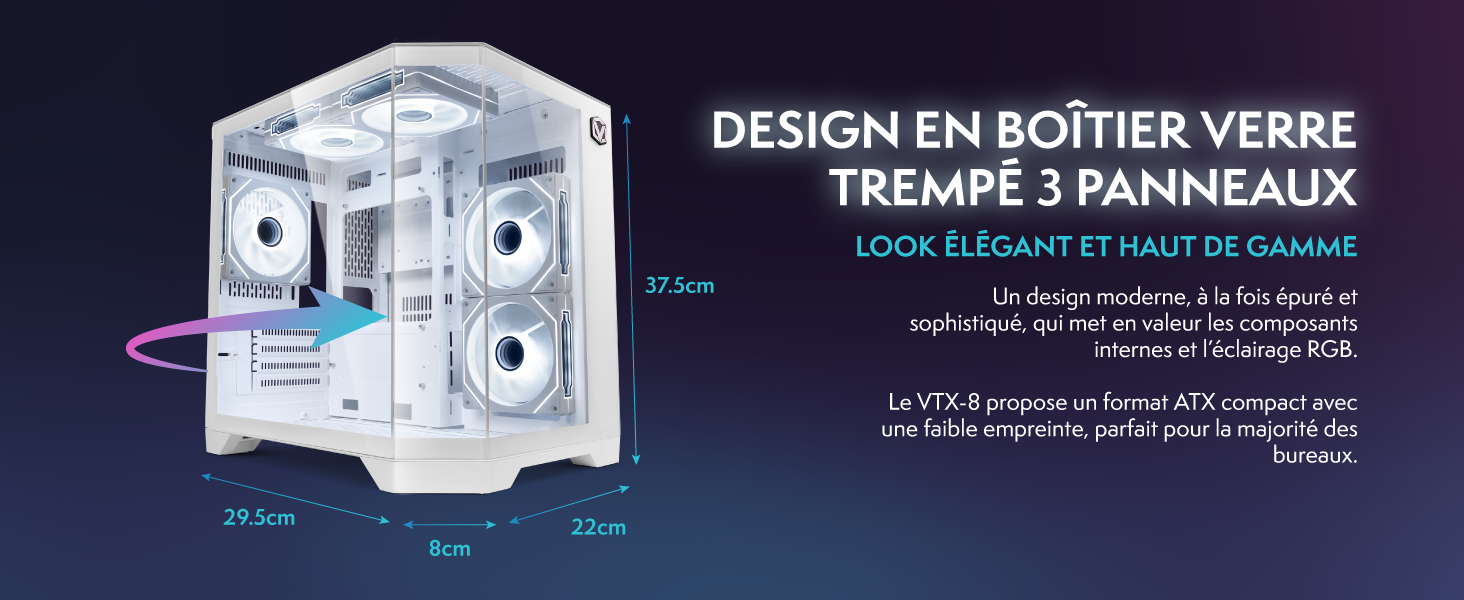
| Өлчөмдөрү (L x W x Y) | 35 x 28 x 38 см |
| камтылган | Wi-Fi Adapter, RGB Lighting |
7. Кепилдик маалыматы
Your VIBOX VTX-8 Gaming PC comes with a manufacturer's warranty of бөлүктөрү үчүн 2 жыл жана lifetime labor. Please retain your proof of purchase for warranty claims. For detailed terms and conditions, refer to the warranty documentation provided with your product or contact VIBOX customer support.
8. Кардарларды колдоо кызматы
For further assistance, technical support, or warranty inquiries, please contact VIBOX customer service. You can find contact information on the official VIBOX webсайт же сатуучу аркылуу.
Online resources and FAQs may also be available on the VIBOX support portal.


