1. Киришүү
This manual provides detailed instructions for the setup, operation, maintenance, and troubleshooting of your BOSGAME P3 Mini PC. Please read this manual thoroughly before using the device to ensure optimal performance and longevity.
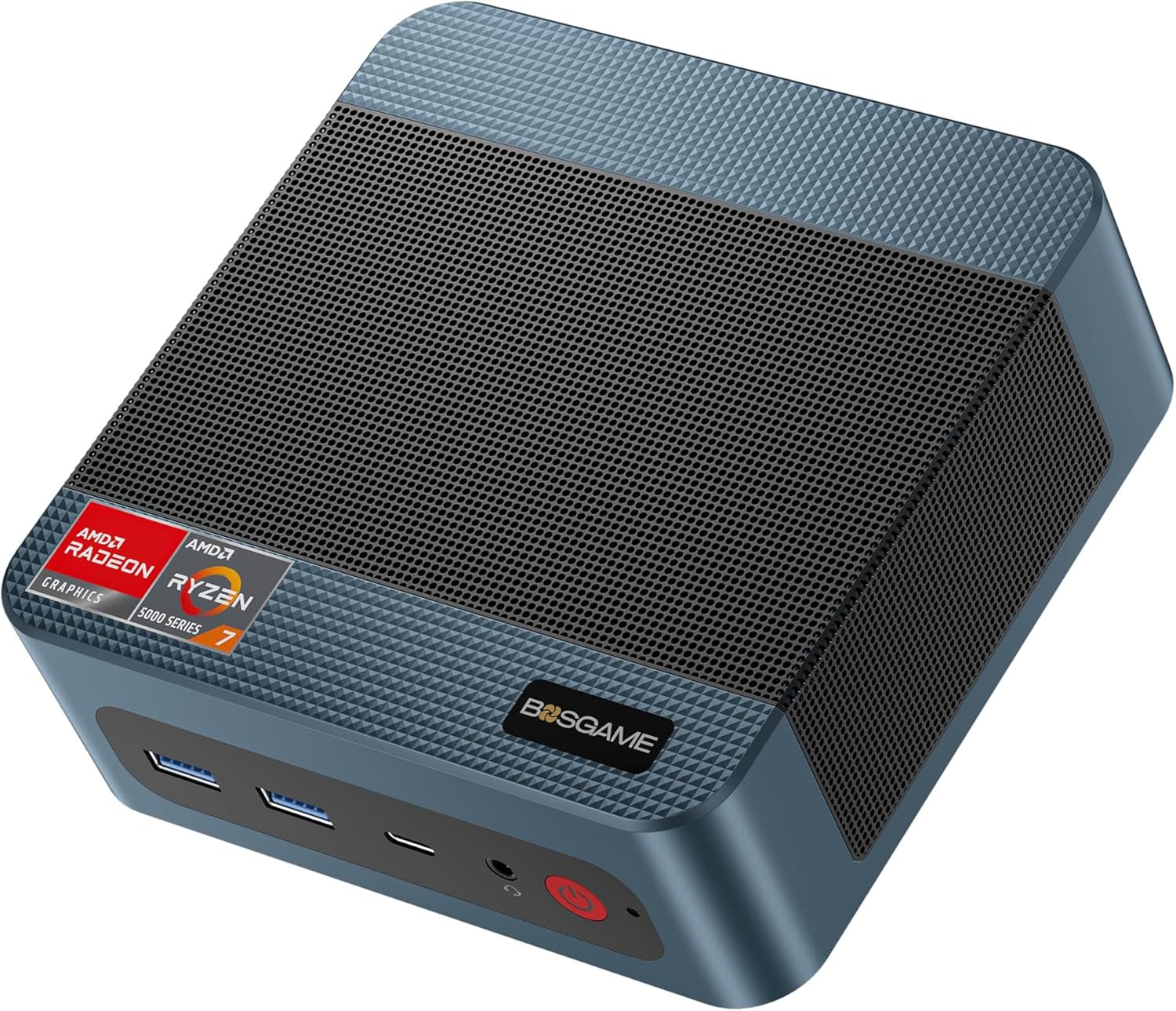
Image 1.1: The BOSGAME P3 Mini PC, a compact desktop computer.
2. Кутуда эмне бар
Пакетте бардык буюмдар бар экенин текшериңиз:
- 1 × BOSGAME P3 Mini PC
- 1 × HDMI кабели
- 1 × Кубат адаптери
- 1 × VESA Mount & Screws
- 1 × Колдонуучунун колдонмосу (бул документ)

Image 2.1: Contents of the BOSGAME P3 Mini PC package, including the mini PC, HDMI cable, power adapter, VESA mount, and user manual.
3. Продукт бүтүп калдыview
3.1. Негизги өзгөчөлүктөрү
- Процессор: AMD Ryzen 7 6800H (8 Cores, 16 Threads, up to 4.7GHz)
- Графика: AMD Radeon 680M GPU (1900MHz)
- Эстутум: 32GB (16GB x2) Dual-channel DDR5 4800MHz RAM (expandable to 64GB)
- Сактагыч: 1TB M.2 2280 PCIe 4.0 SSD (expandable to 4TB)
- Дисплей чыгаруу: Triple display support via 1x HDMI 2.0, 1x DisplayPort, and 1x USB4 (8K@60Hz)
- Тармак: Dual 2.5G LAN, WiFi 6E
- Зымсыз: Bluetooth 5.2
- USB порттору: USB4 port with PD 3.0 (up to 100W), USB 3.2 Gen2 10Gbps, USB 2.0 480Mbps

Сүрөт 3.1: Алдыңкы view of the BOSGAME P3 Mini PC highlighting its compact size and key specifications like AMD Ryzen 7 6800H, DDR5 RAM, NVMe SSD, triple screen support, Radeon Graphics, Wi-Fi 6E, Bluetooth 5.2, and 2.5G RJ45 LAN.
3.2. Порттор жана интерфейстер
The BOSGAME P3 Mini PC features a variety of ports for connectivity:
- Алдыңкы панели: Power button, Audio Jack, USB4 (Full-featured, PD 3.0), 2x USB 3.2 Gen2 10Gbps
- Арткы Panel: DC power input, 2x RJ45 2.5G LAN, HDMI 2.0, DisplayPort, 2x USB 2.0

Сүрөт 3.2: Детальдуу view of the front and rear interfaces of the BOSGAME P3 Mini PC, showing USB ports, audio jack, power button, DC input, LAN ports, HDMI, and DisplayPort.
3.3. Internal Components
The Mini PC is equipped with high-performance components for efficient operation:
- Эстутум: Two SODIMM slots for DDR5 4800MHz RAM.
- Сактагыч: One M.2 2280 NVMe PCIe 4.0 SSD slot.

Сүрөт 3.3: Ички view showing the SODIMM DDR5 4800MHz memory modules and the M.2 2280 NVMe PCIe 4.0 SSD slot.
3.4. Heat Dissipation and Noise
The BOSGAME P3 Mini PC incorporates an efficient cooling system to maintain optimal operating temperatures and minimize noise.

Image 3.4: Diagram illustrating the highly efficient heat dissipation system with a cooling fan and heat conduits.
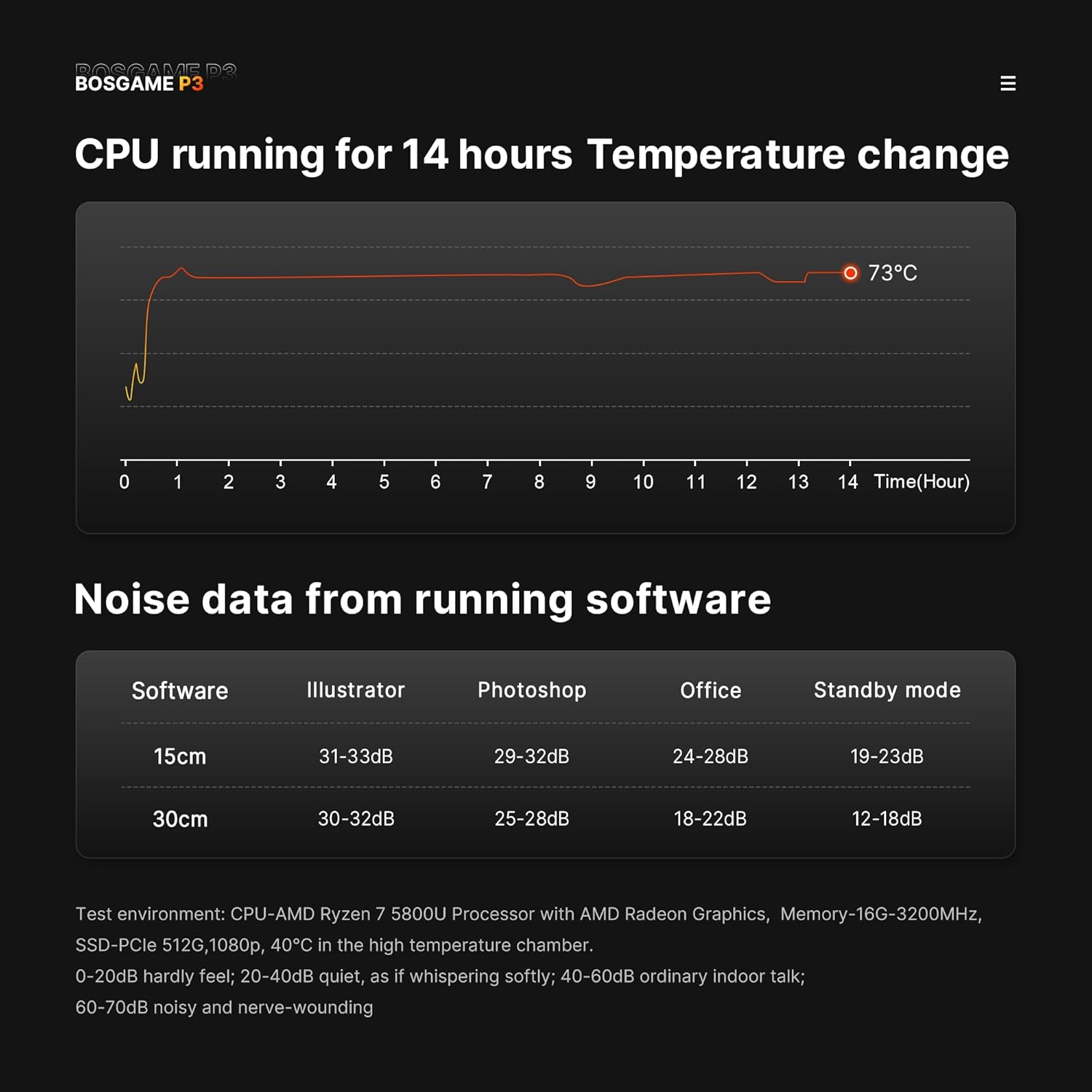
Image 3.5: Graphs showing CPU temperature change over 14 hours and noise levels (dB) during various software operations, indicating quiet performance.
4. Орнотуу колдонмосу
4.1. Перифериялык түзүлүштөрдү туташтыруу
- Дисплейди туташтыруу: Connect your monitor(s) to the HDMI, DisplayPort, or USB4 port using appropriate cables. The device supports up to three displays simultaneously.
- Баскычтоп менен чычканды туташтыруу: Plug your USB keyboard and mouse into the available USB ports.
- Тармакка туташуу (милдеттүү эмес): For a wired internet connection, connect an Ethernet cable from your router or modem to one of the 2.5G LAN ports.
- Туташуу кубаты: Plug the power adapter into the DC input port on the rear of the Mini PC, then plug the adapter into a power outlet. Alternatively, use a compatible USB-C PD 3.0 power source (up to 100W) with the front USB4 port for power.
4.2. Баштапкы күйгүзүү
- Press the power button on the front panel of the Mini PC. The power indicator light will illuminate.
- Follow the on-screen instructions to complete the operating system setup (e.g., Windows 11 Pro).
Видео 4.1: Бүттүview of the BOSGAME P3 Mini PC, demonstrating its compact size, internal components, connectivity options, and multi-display capabilities. This video provides a visual guide to the product's features and potential uses.
5. Иштөө нускамалары
5.1. Күйгүзүү/өчүрүү
- Күйгүзүү үчүн: Кубат баскычын бир жолу басыңыз.
- Жабуу: Click the Start menu in your operating system and select 'Power' > 'Shut down'.
- To Force Shut Down: Press and hold the power button for approximately 5-7 seconds until the device powers off. Use this only if the system is unresponsive.
5.2. Дисплей конфигурациясы
The Mini PC supports triple display output. To configure multiple displays:
- Connect all desired monitors to the available HDMI, DisplayPort, and USB4 ports.
- Windows'то, жумушчу столду оң баскыч менен чыкылдатып, "Экран жөндөөлөрү" дегенди тандаңыз.
- Arrange your displays, set resolutions, and choose display modes (e.g., Extend, Duplicate) as needed.
5.3. Network Connectivity
- Зымдуу туташуу: Ensure an Ethernet cable is connected to a 2.5G LAN port. The system should automatically detect the connection.
- Wireless Connection (Wi-Fi 6E): Windows'то, тапшырмалар тилкесиндеги тармак сүрөтчөсүн чыкылдатып, Wi-Fi тармагыңызды тандап, сырсөздү киргизип, туташыңыз.
- Bluetooth 5.2: To pair Bluetooth devices, go to Windows Settings > Devices > Bluetooth & other devices, and follow the instructions to add a new device.
6. Техникалык тейлөө
6.1. Тазалоо
- Мини-компьютердин сыртын жумшак, кургак чүпүрөк менен үзгүлтүксүз тазалап туруңуз.
- Use compressed air to gently clear dust from the ventilation grilles to ensure proper airflow and heat dissipation. Do not insert objects into the vents.
6.2. Программалык камсыздоону жаңыртуу
Keep your operating system and drivers updated to ensure optimal performance and security. Check for updates regularly through your operating system's settings.
6.3. Сактагычты башкаруу
Periodically check your SSD storage usage and delete unnecessary files to maintain system speed. Consider external storage solutions for large data archives.
7. Кыйынчылыктарды
7.1. Күч жок
- Кубат адаптери Мини компьютерге жана иштеген электр розеткасына бекем туташып турганын текшериңиз.
- Электр розеткасын башка аспап менен текшерип, анын иштешин ырастаңыз.
- If using a USB-C PD power source, ensure it meets the 100W requirement and is connected to the correct USB4 port.
7.2. Дисплейдин чыгышы жок
- Verify that the monitor is powered on and set to the correct input source (HDMI, DisplayPort, or USB-C).
- Check that the display cables are securely connected to both the Mini PC and the monitor.
- Try connecting to a different display port or using a different cable to rule out faulty components.
7.3. Тармакка туташуу маселелери
- текст: Ensure the Ethernet cable is properly connected and your router/modem is working. Check network adapter settings in the operating system.
- Зымсыз: Verify Wi-Fi is enabled and you are connecting to the correct network with the correct password. Restart your router/modem.
7.4. System Performance Issues
- Фондо иштеп жаткан керексиз тиркемелерди жабыңыз.
- Ensure the system has adequate ventilation and is not overheating.
- Run a disk cleanup and defragmentation (if applicable) or check SSD health.
- Update drivers and operating system.
8. Техникалык шарттар
| Өзгөчөлүк | Спецификация |
|---|---|
| Процессор | AMD Ryzen 7 6800H (8 Cores, 16 Threads, up to 4.7GHz) |
| Графика | AMD Radeon 680M (Integrated Graphics) |
| RAM | 32GB DDR5 4800MHz (2x16GB, expandable to 64GB) |
| Сактагыч | 1TB M.2 2280 PCIe 4.0 SSD (expandable to 4TB) |
| Операция системасы | Windows 11 Pro |
| Display Output | 1x HDMI 2.0 (4K@60Hz), 1x DisplayPort (4K@60Hz), 1x USB4 (8K@60Hz) |
| Network | Dual 2.5G RJ45 LAN, WiFi 6E |
| Зымсыз | Bluetooth 5.2 |
| USB порттору | 1x USB4 (Full-featured, PD 3.0), 2x USB 3.2 Gen2 10Gbps, 2x USB 2.0 |
| Элемент Салмагы | 2.6 фунт |
| Пакеттин өлчөмдөрү | 6.5 x 4.92 x 4.17 дюйм |
9. Кепилдик жана колдоо
BOSGAME provides a 1-year professional factory support warranty for this product. Additionally, free and reliable lifetime after-sales service is available, along with 24/7 online customer service.
For technical assistance, warranty claims, or any inquiries, please contact BOSGAME customer support through the official channels provided at the time of purchase or visit the BOSGAME Store on Amazon.
All products have FCC, ROHS, and CE certifications.


