1. Продукт бүтүп калдыview
The Varstrom VD618 Display is an advanced LCD screen designed for BAFANG e-bike systems. It provides clear, real-time data and offers various customizable settings to enhance your riding experience. This display features a triangular connector, specifically designed for BAFANG motors utilizing the CAN protocol.

Figure 1: Varstrom VD618 Display and Control Pad
The 3.5-inch HD LCD screen ensures data is clear and easy to read, even while riding. It integrates essential functions such as speed display, power output, battery level, and various trip metrics.

2-сүрөт: Детальдуу view of VD618 Digital Display features and readouts.
2. Шайкештик
The Varstrom VD618 Display is equipped with a triangular connector specifically designed for BAFANG motors using the CAN protocol. It is compatible with 2025 versions of BBS01B, BBS02B, and BBS-HD motors that have been updated to the CAN protocol. It also supports BAFANG M200, M400, M420, M500, M510, M600, M620, M625, M325, and M225 systems.
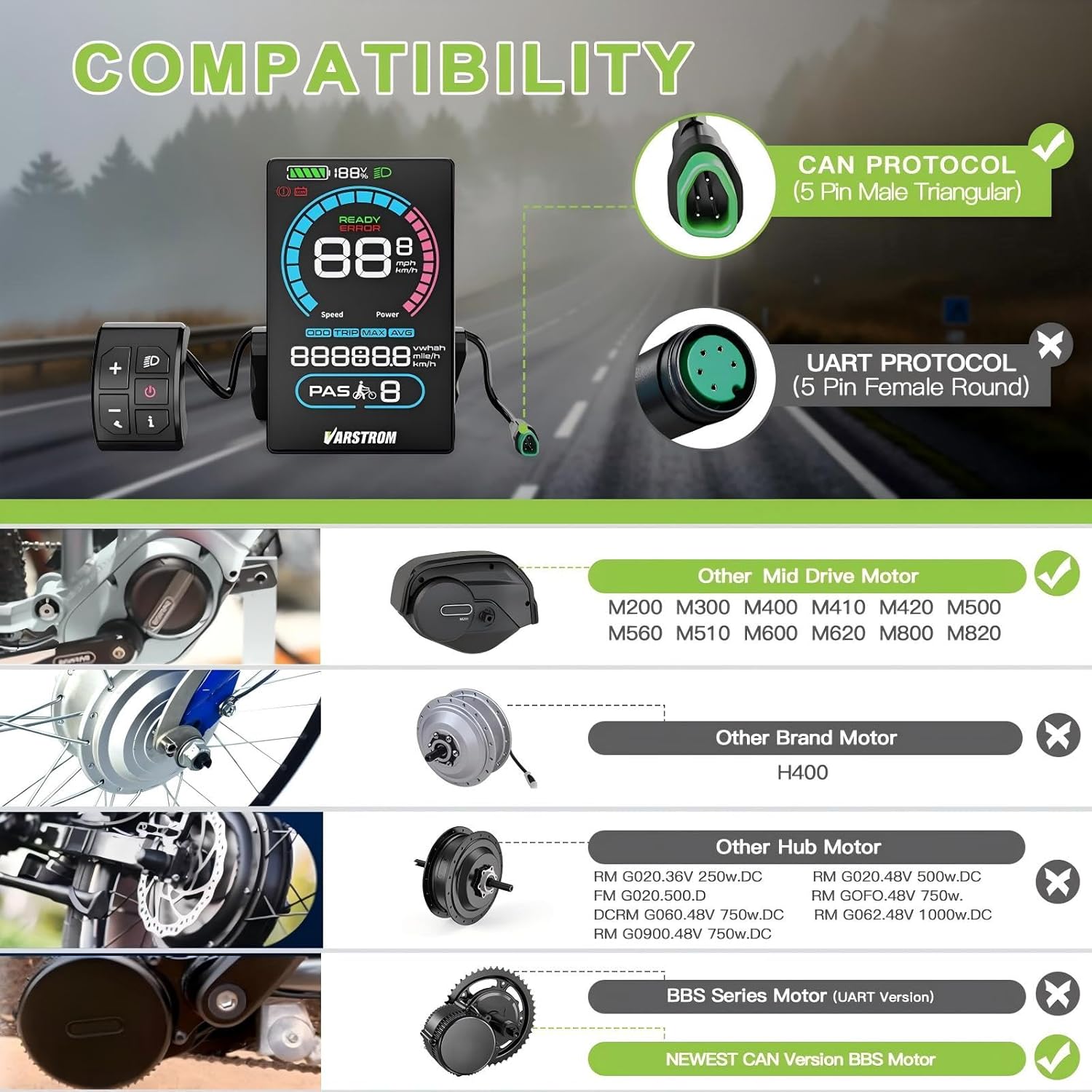
3-сүрөт: Шайкештик аяктадыview showing CAN protocol and supported BAFANG motors.
Маанилүү: This display is designed for CAN protocol systems. It is not compatible with UART protocol systems. Please verify your motor's protocol before installation.

Figure 4: Wiring diagram for the display cable, showing Female 5 Pins (EB1T4 Connector) and Male 5 Pins (Display Connector).
3. Орнотуу жана орнотуу
3.1 Дисплейди орнотуу
The display is compatible with handlebars of 22.2 mm, 25.4 mm, and 31.8 mm diameters. The control button unit fits standard 22.2 mm handlebars. Ensure the mounting bracket is securely fastened to your handlebar at a comfortable viewбурч.
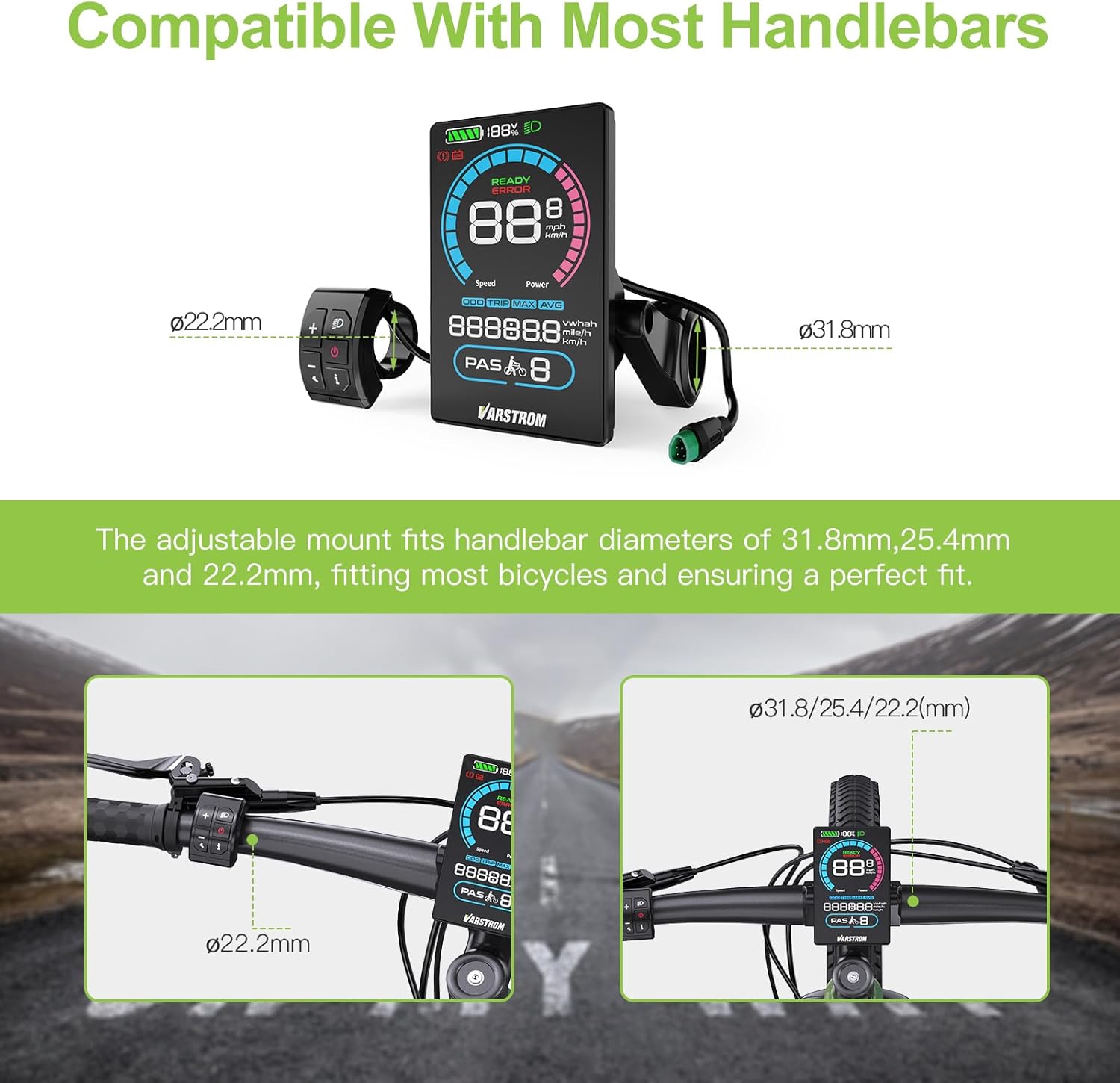
Figure 5: The adjustable mount fits handlebar diameters of 31.8mm, 25.4mm, and 22.2mm.
3.2 Кабелдерди туташтыруу
- Carefully align the triangular connector from the display with the corresponding port on your BAFANG motor system.
- Push firmly until the connector clicks into place, ensuring a secure connection.
- Route the cables neatly along your bike frame, securing them with cable ties to prevent snagging or damage.
4. Иштөө нускамалары
4.1 Күйгүзүү/өчүрүү
- To power on the display, press and hold the power button on the control pad for a few seconds.
- To power off, press and hold the power button again until the display shuts down. The display also features an auto-off function, configurable from 0-60 minutes.
4.2 Негизги функциялар жана функциялар
- Суу өткөрбөйт рейтинги: IP66, providing protection against dust and powerful water jets.
- PAS деңгээлдери: Supports 0-3, 0-5, or 0-9 PAS (Pedal Assist System) levels, which can be configured.
- USB Type-C заряддоо порту: (5V 1000mA) for charging external devices.
- Жөнгө салынуучу жарыктык: 1-3 levels of brightness for optimal visibility in various conditions.
- Автоматтык арткы жарык: The display features light-sensitive automation for automatic backlight adjustment (Figure 6).
- Ылдамдыкты чектөө жөндөөсү: Configurable speed limit.
- Wheel Size Configuration: Allows setting the correct wheel size for accurate speed and distance readings.
- Unit Interchangeability: Switch between miles and kilometers.
- Power Display: View power in percentage же тtage.
- Trip Meter, Odometer, and Average Speed: Essential riding data displayed clearly.

Figure 6: Automatic backlight adjustment for day and night riding.
5. Техникалык тейлөө
To ensure the longevity and optimal performance of your Varstrom VD618 Display, follow these maintenance guidelines:
- Тазалоо: Дисплейдин экранын жана корпусун жумшак менен сүртүңүз, damp кездеме. Экранга же экранга зыян келтириши мүмкүн болгон абразивдүү тазалоочу каражаттарды же эриткичтерди колдонуудан алыс болуңуз.asing.
- Туташуу текшерүү: Кабелдин бардык туташууларынын бекемдигин жана коррозияга учурабагандыгын текшерүү үчүн мезгил-мезгили менен текшерип туруңуз.
- Сактагыч: Эгерде дисплейди көпкө чейин колдонбосоңуз, аны кургак, салкын жерде, күндүн түз нурунан жана өтө жогорку температурадан алыс сактаңыз.
- Суу таасири: While the display is IP66 waterproof, avoid submerging it in water or exposing it to high-pressure water jets for prolonged periods.
6. Кыйынчылыктарды
If you encounter issues with your Varstrom VD618 Display, consider the following common troubleshooting steps:
- Дисплей күйбөйт:
- Ensure the battery is charged and properly connected to the motor system.
- Check all cable connections between the display, control pad, and motor for looseness or damage.
- Incorrect Readings (Speed/Distance):
- Verify that the correct wheel size is configured in the display settings. Refer to the detailed instruction manual (often available via QR code provided with the product) for setting parameters.
- Settings Difficult to Change/Save:
- Some settings may require specific button sequences or confirmation steps. Consult the comprehensive digital manual for precise instructions on navigating and saving settings.
- Display Draining Battery Excessively:
- Ensure the display is set to auto-off after a reasonable period of inactivity.
- Check for any background processes or settings that might be consuming more power than expected.
- Ката билдирүүлөрү:
- If an error message appears, note the code and refer to the full digital manual for specific error definitions and solutions.
Бул кадамдар маселени чечпесе, кардарларды колдоо кызматына кайрылыңыз.
7. Техникалык шарттар

Сүрөт 7: Продукциянын деталдуу мүнөздөмөлөрү жана өлчөмдөрү.
| Өзгөчөлүк | Description |
|---|---|
| Туташтыргыч | Male 5 PIN (Triangular) |
| Протокол | БОЛОТ |
| Экран | 3.5" TFT HD LCD |
| Тtage Шайкештик | 36V/48V/52V/60V/72V |
| PAS Level Options | 3, 5, 9 (Optional) |
| Ылдамдыктын чеги | 0km/h ~ 100km/h |
| Жарыктык | 1-3 Optional |
| Button Holder Diameter | Ø22.2мм |
| Display Holder Diameter | Ø31.8/25.4/22.2(mm) |
| Суу өткөрбөйт рейтинги | IP66 |
| Заряддоо порту | Type-C (5V 1000mA) |
| Иштөө температурасы | -20°C ~ 60°C |
| Сактоо температурасы | -30°C ~ 70°C |
| Авто ӨЧҮК | 0-60min Optional |
| Cable Length (Display) | 300мм (11.8") |
| Cable Length (Control Pad) | 310мм (12.2") |
8. Кепилдик жана колдоо
8.1 Кепилдик маалыматы
The Varstrom VD618 Display comes with a limited warranty. Please refer to your purchase documentation or contact the seller for specific details regarding the warranty period and coverage. Typically, this covers manufacturing defects under normal use.
8.2 Кардарларды колдоо
For technical assistance, troubleshooting, or warranty claims, please contact your retailer or the manufacturer directly. Ensure you have your product model number (LSEU-VD618 Display) and purchase details ready when contacting support.


