Introduction
Сатып алганыңыз үчүн рахматasing the Levoit Smart Stand Fan. This fan is designed to provide powerful yet quiet air circulation for large rooms, featuring smart control options via app and voice assistants, multiple modes, and adjustable oscillation. Please read this manual thoroughly before use and keep it for future reference.

Image: The Levoit Smart Stand Fan, showcasing its sleek design, accompanying remote control, and a smartphone displaying the VeSync app interface for smart control.
Коопсуздук маалыматы
Өрт, электр шок же жаракат алуу коркунучун азайтуу үчүн, төмөнкү коопсуздук чараларын сактаңыз:
- Тазалоодон же тейлөөдөн мурун дайыма желдеткичти сууруп алыңыз.
- Вентилятор торчосуна манжаларды же бөтөн нерселерди киргизбеңиз.
- Keep the fan away from water and moisture. Do not use in wet environments.
- Оңдоп кетүүдөн сактануу үчүн желдеткич туруктуу, түз бетке коюлганын текшериңиз.
- Аба тешиктерин жаап албаңыз.
- The fan housing may become warm during use; this is normal and within safe temperature standards.
Пакеттин мазмуну
- Levoit Smart Stand Fan
- Алыстан башкаруу
- Электр кабели
- Колдонуучунун Колдонмосу (бул документ)
Жайгашуу
The Levoit Smart Stand Fan is designed for easy assembly. Follow these steps to set up your fan:
- Бардык компоненттерди таңгактан кылдаттык менен алып салыңыз.
- Attach the fan head to the stand, ensuring it clicks securely into place.
- Кубат шнурун желдеткичке туташтырып, андан кийин аны кадимки электр розеткасына сайыңыз.
- Желдеткичти катуу, тегиз жерге кой.
For optimal performance, ensure the fan is positioned where airflow is not obstructed.
Иштөө нускамалары
Контролдоо ыкмалары
The Levoit Smart Stand Fan offers versatile control options:
- Түзмөктөгү дисплей: Use the buttons on the fan's main body to adjust settings.
- Алыстан башкаруу: The included remote allows convenient control from a distance. The remote is magnetic and can be stored on the back of the fan.
- VeSync App: Download the VeSync app from the App Store or Google Play to control your fan from your smartphone. This enables advanced features and scheduling.
- Үн менен башкаруу (Alexa): Integrate with Amazon Alexa for hands-free operation.

Image: A woman relaxing in bed, demonstrating voice control of the Levoit Smart Stand Fan via an Amazon Alexa device.
Күйөрман режимдери
Choose from four distinct modes to suit your comfort needs:
- Кадимки режим: Standard continuous airflow.
- Турбо режими: Provides maximum airflow for rapid cooling.
- Эко режими: Energy-efficient mode that adjusts fan speed based on ambient temperature.
- Уйку режими: Operates at a very low noise level (as low as 20 dB) for undisturbed sleep. The display can be turned off in this mode.

Image: A smartphone screen displaying the VeSync app with "Sleep Mode" activated, illustrating the fan's quiet operation at 20 dB for a peaceful night's sleep.
Ылдамдык орнотуулары
The fan features 12 adjustable speed levels, offering precise control over airflow intensity. Airflow can reach up to 7.5 m/s.

Image: A woman smiling, enjoying the powerful and fast airflow (7.5 m/s) from the Levoit Smart Stand Fan, illustrating its effectiveness in providing quick relief from heat.
Термелүү
Distribute cool air throughout your entire room with adjustable oscillation:
- Вертикалдуу термелүү: 120° чейин
- Горизонталдык термелүү: 90° чейин
Control oscillation angles via the display, remote, or VeSync app. The fan can circulate air up to 30 meters, ensuring comfort even in large spaces.
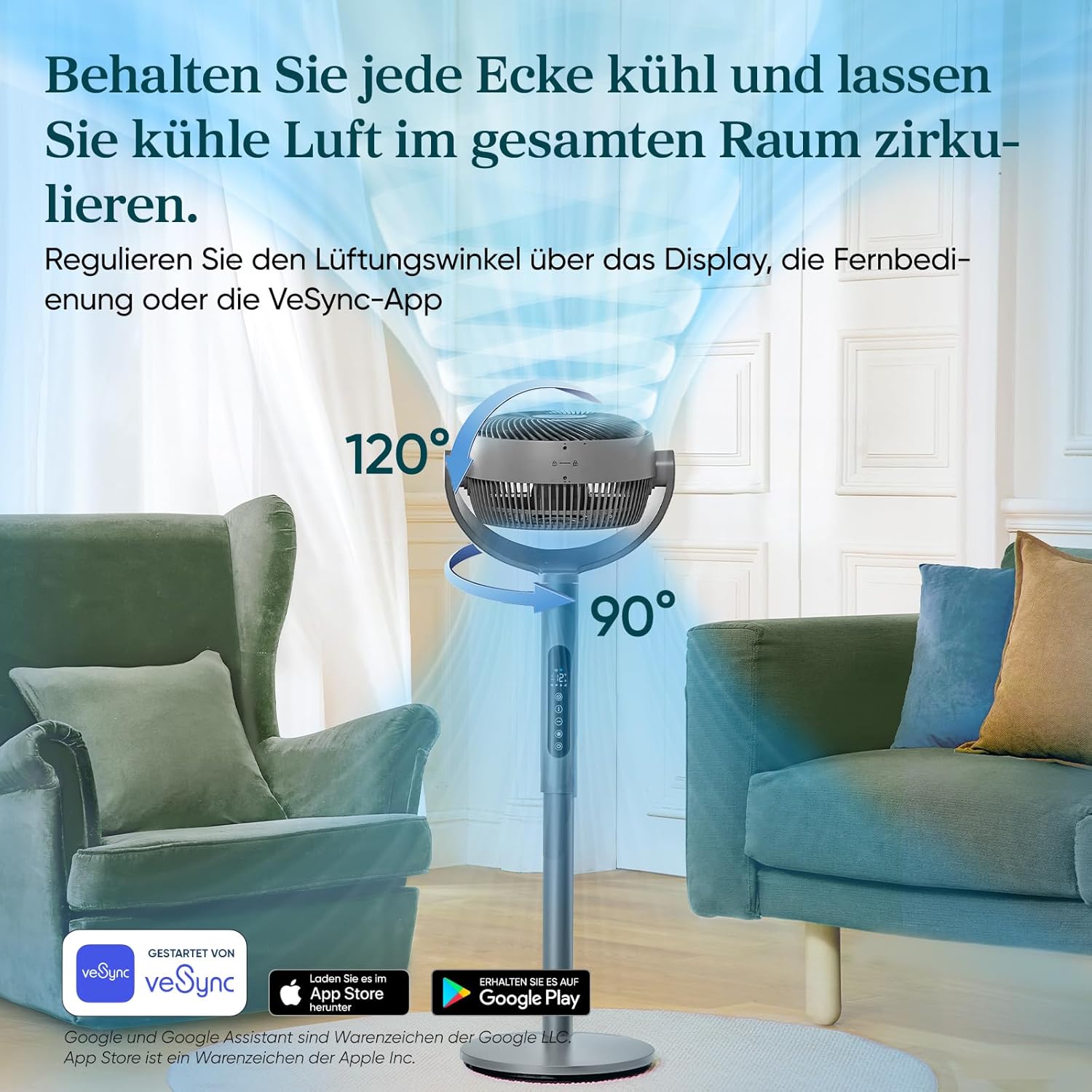
Image: A visual representation of the Levoit Smart Stand Fan's adjustable oscillation, showing its ability to move air vertically up to 120 degrees and horizontally up to 90 degrees, ensuring comprehensive room coverage.

Image: The Levoit Smart Stand Fan effectively circulating cool air across a large living space, demonstrating its impressive 30-meter air throw capability to keep distant areas comfortable.
Таймер функциясы
Set a timer for up to 12 hours for automatic fan shut-off, ideal for energy saving or nighttime use.
Энергия натыйжалуулугу
The Levoit Smart Stand Fan is highly energy-efficient, consuming a maximum of 30 Watts.

Image: A visual representation of the fan's low power consumption, showing a lightbulb plugged into an outlet with "30 Watt, Max." indicating its energy efficiency.
Техникалык тейлөө
Үзгүлтүксүз техникалык тейлөө желдеткичиңиздин оптималдуу иштешин жана узак мөөнөттүү иштешин камсыз кылат.
- Тазалоо:
- Тазалоодон мурун ар дайым желдеткичти сууруп алыңыз.
- Сырткы беттерин жумшак менен сүртүңүз, гamp кездеме.
- To clean the fan blades, carefully remove the front grille (refer to assembly instructions for reverse steps if needed). Use a soft brush or cloth to remove dust. Ensure all parts are dry before reassembling and operating.
- Сактагыч: Узак мөөнөткө колдонулбаганда, желдеткичти салкын, кургак жерде, эң жакшысы баштапкы таңгагында сактаңыз.
Проблемаларды чечүү
If you encounter issues with your Levoit Smart Stand Fan, please refer to the following common problems and solutions:
| Көйгөй | Мүмкүн себеп | Чечим |
|---|---|---|
| Желдеткич күйбөйт. | Not plugged in; Power outlet malfunction; Remote control battery low. | Ensure the power cord is securely plugged into a working outlet. Check remote control batteries and replace if necessary. |
| Алсыз аба агымы. | Fan speed too low; Obstruction in front/back of fan; Dirty blades. | Increase fan speed. Remove any obstructions. Clean fan blades and grille. |
| Желдетүүчү ызы-чуу. | Вентилятор тегиз жерде эмес; Бошоңдогон бөлүктөр; Бөгөттөнүп калган. | Place fan on a stable, level surface. Check for any loose components and secure them. Ensure no foreign objects are in the fan. Note: Oscillation motors may produce a slight sound, which is normal. |
| Пульт иштебей жатат. | Batteries dead or incorrectly inserted; Obstruction between remote and fan. | Replace batteries, ensuring correct polarity. Ensure a clear line of sight between the remote and the fan's receiver. |
| Колдонмонун туташуу маселелери. | Wi-Fi signal weak; Incorrect network settings; App outdated. | Ensure your Wi-Fi network is stable. Restart your router and the fan. Update the VeSync app to the latest version. Re-pair the device if necessary. |
Техникалык шарттар
| Өзгөчөлүк | Деталь |
|---|---|
| Бренд | Levoit |
| Модель номери | LPF-R432S-WEU |
| Түс | Боз |
| Өлчөмдөр (Продукт) | 32D x 36.6W x 110H см |
| Салмагы | 7.4 килограмм |
| Күч | 30 Ватт (макс) |
| Тtage | 120V |
| Ызы-чуу деңгээли | 20 дБ (минималдуу) |
| Air Throw Distance | 30 метрге чейин |
| Аба ылдамдыгы | 7.5 м/сек чейин |
| Термелүү | 120° Vertical, 90° Horizontal |
| Режимдер | Turbo, Normal, Eco, Sleep |
| Ылдамдык деңгээли | 12 |
| Таймер | 12 саатка чейин |
Кепилдик жана колдоо
The Levoit Smart Stand Fan comes with a 2 жылдык кепилдик. For warranty claims, technical support, or any questions regarding your product, please contact Levoit customer service. You can find contact information on the official Levoit website or through the VeSync app.
For the latest updates and support resources, visit the official Levoit webсайт: www.levoit.com


