Introduction
The Cecotec Conga Grasshopper 500 Map Connected is an intelligent robotic lawnmower designed for automatic and efficient lawn maintenance. This device is capable of covering areas up to 500 m² and features a brushless digital motor for quiet operation. With its C-ToF technology, it performs systematic cutting, ensuring no area is missed. Control and scheduling are managed conveniently through a dedicated mobile application.
Фронт view of the Cecotec Conga Grasshopper 500 Map Connected robot lawnmower.
Жайгашуу
Proper setup is crucial for the optimal performance of your Conga Grasshopper 500. Follow these steps to prepare your lawnmower for operation.
1. Таңгактан чыгаруу жана текшерүү
- Бардык компоненттерди таңгактан кылдаттык менен алып салыңыз.
- Verify that all parts listed in the user manual are present and undamaged.
2. Заряддоо станциясын жайгаштыруу
- Choose a flat, level area with access to a power outlet.
- Ensure there is sufficient clear space around the charging station for the robot to dock easily.
3. Perimeter Wire Installation
The robot operates within an area defined by a perimeter wire. This wire guides the robot and prevents it from leaving the designated mowing zone.
- Lay the perimeter wire around the edges of your lawn, securing it with the provided pegs.
- Ensure the wire is taut and free from kinks.
- Connect the ends of the perimeter wire to the charging station as instructed in the detailed manual.
- The Conga GrassHopper app provides assistance for checking the perimeter wire status in real-time.

Үстүңкү view illustrating the installation of the perimeter wire to define the mowing area.
4. Баштапкы заряддоо
- Place the robot on the charging station to allow it to fully charge before its first use.
- Refer to the display or app for charging status.
5. Колдонмо туташуусу
- Download the Conga GrassHopper app from your device's app store.
- Follow the in-app instructions to pair your robot lawnmower with your smartphone.
Иштөө нускамалары
The Conga Grasshopper 500 is designed for autonomous operation, but understanding its functions will help you optimize its performance.
1. Баштоо жана токтотуу
- To start mowing, press the 'Start' button on the robot or initiate a mowing session via the Conga GrassHopper app.
- To stop the robot, press the 'Stop' button on the robot or use the app. The robot will return to its charging station.
2. Колдонмону башкаруу жана пландаштыруу
The Conga GrassHopper app allows you to program the robot from anywhere, providing full control over its operations.
- Use the app to set mowing schedules for specific days and times.
- Monitor the robot's status, progress, and location in real-time.
- Receive notifications and alerts regarding the robot's operation or any issues.

The Conga GrassHopper app provides remote control and monitoring capabilities for the robot lawnmower.
3. Кесүү бийиктигин тууралоо
The robot features an adjustable cutting height to suit your lawn's needs.
- Adjust the cutting height using the dedicated dial on the robot or through the app, if available.
- Typical cutting heights range from 20mm to 50mm.

The cutting height can be adjusted to achieve the desired lawn length.
4. Systematic Cutting Technology
The Conga Grasshopper 500 utilizes C-ToF technology to calculate the most efficient mowing path, ensuring complete and orderly coverage of your lawn.
- The robot mows in parallel lines, minimizing missed spots and optimizing mowing time.
- It is more efficient than robots with random navigation patterns.

Illustration of the systematic cutting pattern used by the robot lawnmower for efficient coverage.
5. Slope and Obstacle Handling
The robot is designed to handle various lawn conditions.
- It can navigate slopes up to 45%.
- The floating cutting system allows blades to adapt to surface irregularities.
- If an obstacle is detected, the robot raises its blades to avoid collision.

The robot lawnmower is capable of navigating and mowing on slopes up to 45%.
6. Жамгыр сенсору
The integrated rain sensor detects precipitation and instructs the robot to return to its charging station, preventing mowing in wet conditions.

The robot's rain sensor detects precipitation, prompting it to return to its charging station.
Техникалык тейлөө
Regular maintenance ensures the longevity and efficient operation of your robot lawnmower.
1. Cleaning the Robot
- Periodically clean the exterior of the robot with a damp кездеме.
- Remove grass clippings and debris from the cutting deck and wheels using a brush or compressed air.
- Ensure charging contacts are clean and free of corrosion.
2. Blade текшерүү жана алмаштыруу
- Regularly inspect the cutting blades for sharpness and damage.
- Replace dull or damaged blades to maintain optimal cutting performance. Always use genuine replacement parts.
- Ensure the robot is powered off and blades are stationary before inspection or replacement.
3. Батареяга кам көрүү
- Store the robot in a dry, cool place during off-season periods.
- Узак мөөнөткө сактоонун алдында батареянын толук заряддалганын текшериңиз.
4. Сенсорду тазалоо
- Keep all sensors (e.g., rain sensor, collision sensors) clean and free from obstructions to ensure proper functionality.
Проблемаларды чечүү
This section provides solutions to common issues you might encounter with your Conga Grasshopper 500.
Robot Not Starting or Charging
- Кубат менен камсыздоону текшерүү: Ensure the charging station is properly connected to a power outlet and receiving power.
- Robot Placement: Verify the robot is correctly docked on the charging station, and its charging contacts align.
- Батарея деңгээли: Check the battery level via the app or robot display. Allow sufficient time for charging.
Robot Not Mowing or Staying Within Area
- Perimeter Wire: Inspect the perimeter wire for breaks or loose connections. The app can help identify issues. Use included connectors for repairs.
- Mowing Schedule: Ensure a mowing schedule is set and active in the app.
- Тоскоолдуктар: Clear any large obstacles from the mowing area that might be preventing the robot from operating freely.
Начар кесүү аткаруу
- Бышактар: Check if the cutting blades are dull, damaged, or obstructed by grass clippings. Replace blades if necessary.
- Кесүү бийиктиги: Adjust the cutting height to an appropriate level for your grass type and desired length.
- Газондун абалы: Avoid mowing excessively wet or tall grass, which can reduce cutting efficiency.
Robot Getting Stuck Frequently
- Тегиз эмес жер кыртышы: Identify and address any significant dips or holes in the lawn.
- Тоскоолдуктар: Remove small objects, toys, or loose garden tools that the robot might get caught on.
- Perimeter Wire Placement: Ensure the perimeter wire is not too close to obstacles or steep edges.
Техникалык шарттар
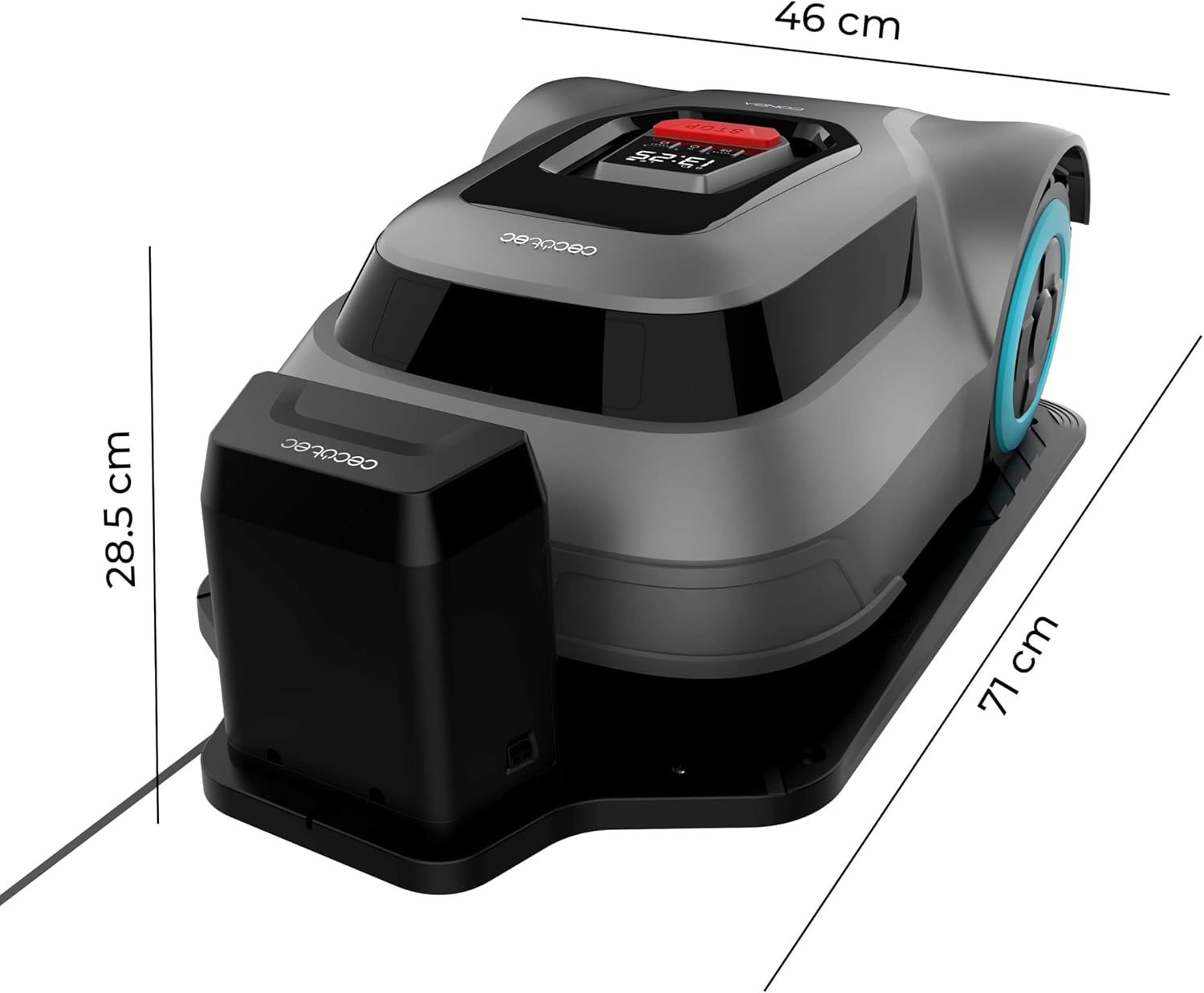
Detailed technical specifications for the Cecotec Conga Grasshopper 500 Map Connected robot lawnmower.

Dimensions of the Cecotec Conga Grasshopper 500 Map Connected robot lawnmower.
| Өзгөчөлүк | Спецификация |
|---|---|
| Бренд | Cecotec |
| Модел | Conga Grasshopper 500 Map Connected |
| Power Source | Батарея менен иштейт |
| Материал | Пластик |
| Түс | Боз |
| Иштөө режими | Автоматтык |
| Элемент Салмагы | 10.7 килограмм |
| Продукциянын өлчөмдөрү (L x W x Y) | 71 x 28 x 24.5 см (болжолдуу, сүрөттүн негизинде) |
| Max Mowing Area | 500 м² |
| Max Slope Capability | 45% |
| Ызы-чуу деңгээли | 58 дБ |
| ЕБнын запастык бөлүктөрүнүн болушу | 10 жыл |
| Ассамблея талап кылынат | Жок |
Кепилдик жана колдоо
For warranty information, technical support, or to purchase spare parts, please contact Cecotec customer service. The availability of EU spare parts is guaranteed for 10 years from the date of purchase.
Расмий Cecotec сайтына кайрылыңыз website or the documentation included with your product for specific contact details and warranty terms.


