1. Киришүү
This manual provides detailed instructions for the MCHOSE X75 V2 Wireless Mechanical Keyboard and M7 Ultra Wireless Gaming Mouse. It covers setup, operation, maintenance, and troubleshooting to ensure optimal performance and longevity of your devices. Please read this manual thoroughly before using the products.
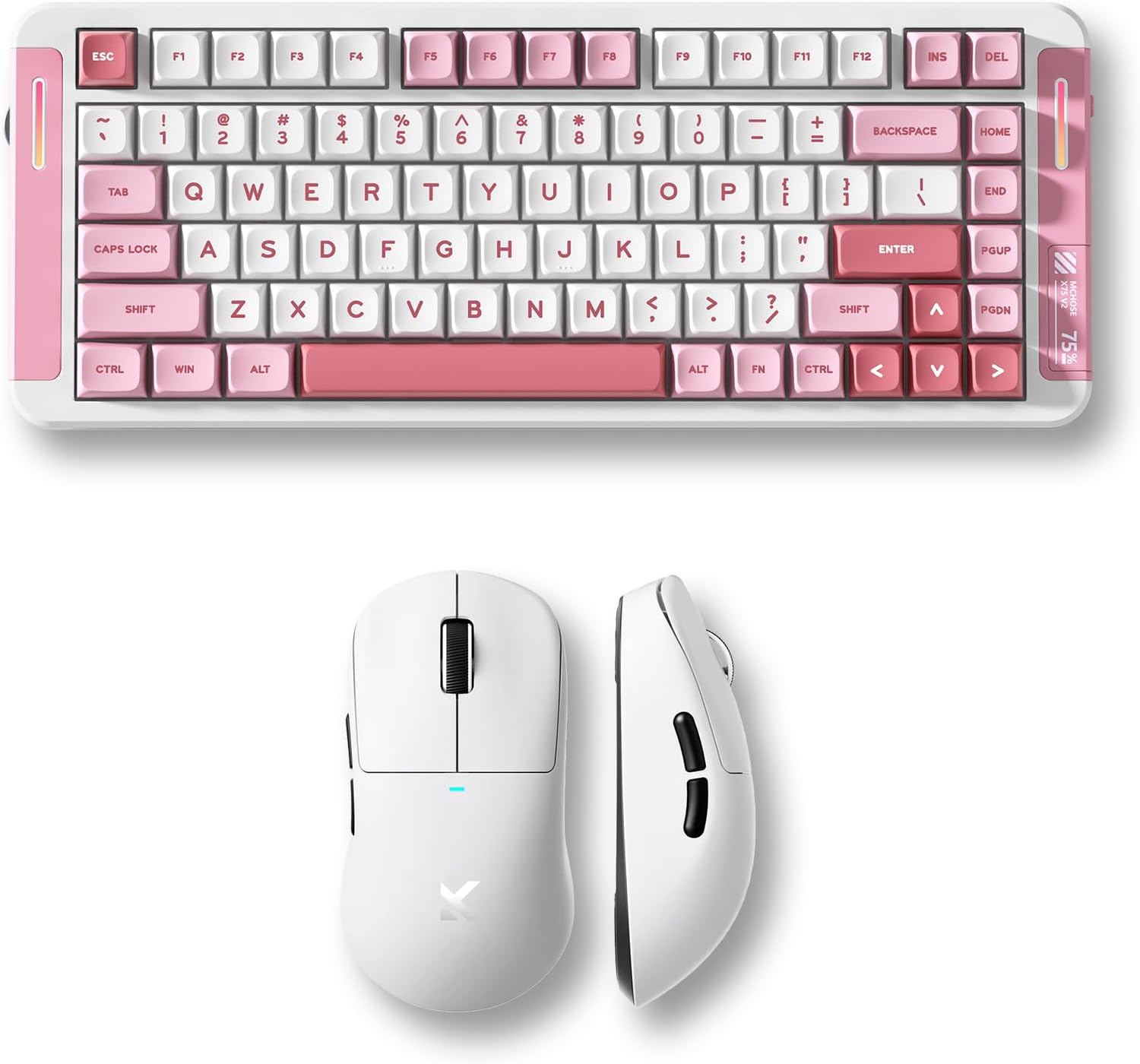
Image 1.1: MCHOSE X75 V2 Wireless Mechanical Keyboard (pink) and M7 Ultra Wireless Gaming Mouse (white) bundle.
2. Продукт бүтүп калдыview
2.1 MCHOSE X75 V2 Wireless Mechanical Keyboard
The MCHOSE X75 V2 is a 75% layout mechanical keyboard designed for both gaming and productivity. It features tri-mode connectivity, hot-swappable switches, and an ergonomic design.

Сүрөт 2.1: Бүттүview of MCHOSE X75 V2 Mechanical Keyboard features, including 75% layout, full RGB backlit, 3 modes, 8000mAh battery, hot-swappable switches, 5-layer gasket, ergonomic design, MCHOSE HUB compatibility, and a multi-media knob.
Негизги өзгөчөлүктөрү:
- 75% компакттуу жайгашуусу: 82 keys, saving desktop space while retaining essential keys.
- Tri-Mode туташуу: Bluetooth 5.0, 2.4GHz wireless, and USB wired connection.
- Hot-Swappable PCBA: Allows for easy switch replacement without soldering.
- 8000 мАч Батарея: High-capacity battery for extended wireless use.
- Embedded Multimedia Knob: For convenient media control.
- Эргономикалык дизайн: Optimized typing angle for comfort.

Сүрөт 2.2: Детальдуу view of the MCHOSE X75 V2 Keyboard's ergonomic design, highlighting Type-C ports, embedded multimedia knob, USB receiver container, two-stage adjustable tilt legs, and 360-degree immersive lighting.

Image 2.3: Illustration of the MCHOSE X75 V2 Keyboard's hot-swappable PCBA, showing Hyacinth Linear Switches and compatibility with 3/5-pin switches and south-facing LEDs.
2.2 MCHOSE M7 Ultra Wireless Gaming Mouse
The MCHOSE M7 Ultra is a lightweight gaming mouse featuring TOPSPEED wireless technology and an 8K polling rate for precise and responsive control.

Сүрөт 2.4: Бүттүview of MCHOSE M7 Ultra Gaming Mouse features, including 8K Hz Hyperpolling, Realtek Premium Processor, 55g ultra-lightweight design, PAW 3950 Sensor, MCHOSE Pro Optical Switches, 500mAh battery, ergonomic design, tri-mode connectivity, and MCHOSE CUSTOM DRIVER compatibility.
Негизги өзгөчөлүктөрү:
- TOPSPEED Wireless Technology: Ensures low latency wireless transmission.
- Dual 8K Polling Rate: Wired 1K and wireless 8K polling for ultra-low latency (0.125ms).
- 55g Ultra Lightweight: Ergonomic design for comfortable extended use.
- PAW 3950 Sensor: High-precision optical sensor.
- MCHOSE Pro Optical Switches: Durable and responsive switches.
- 500 мАч Батарея: Provides reliable power for gaming sessions.

Image 2.5: Diagram illustrating the MCHOSE M7 Ultra Mouse's six programmable buttons: Left, Right, Middle, Mode Switch, Forward, Back, along with the Indicator Light, DPI Switch, and USB Dongle storage location.

Сүрөт 2.6: Жарылып кеткен view of the MCHOSE M7 Ultra Mouse, showing internal components such as MCHOSE Pro Optical Switches, Realtek Premium Processor, PAW 3950 Sensor, and 500mAh battery.

Image 2.7: MCHOSE M7 Ultra Mouse highlighting its 8K Hz Hyperpolling Rate and TOPSPEED Wireless Technology, with the NANO Wireless 8K Receiver shown.
3. Орнотуу нускамалары
Биринчи жолу колдонуудан мурун, клавиатура менен чычкандын экөө тең толук заряддалганын текшериңиз.

Image 3.1: Illustration of the tri-mode connection options (BT 5.0, Wireless 2.4G, Type-C) and wide compatibility with various devices including phones, tablets, Switch, Xbox, and PS5.
3.1 MCHOSE X75 V2 Keyboard Setup
- Заряддоо: Connect the keyboard to a USB power source using the provided Type-C cable. The indicator light will show charging status.
- Режим тандоо: Use the switch on the keyboard to select your desired connection mode:
- USB зымдуу: Connect the Type-C cable directly to your computer.
- 2.4 ГГц зымсыз: Insert the 2.4GHz USB receiver (located in the keyboard's storage compartment) into your computer's USB port. Switch the keyboard to 2.4G mode.
- Bluetooth: Switch the keyboard to BT mode. Press and hold FN + 1/2/3 to enter pairing mode. The indicator light will flash. Select 'MCHOSE X75 V2' from your device's Bluetooth settings.
- Алгачкы колдонуу: Once connected, the keyboard is ready for use.
3.2 MCHOSE M7 Ultra Mouse Setup
- Заряддоо: Connect the mouse to a USB power source using the provided Type-C cable. The indicator light will show charging status.
- Режим тандоо: Use the switch on the bottom of the mouse to select your desired connection mode:
- USB зымдуу: Connect the Type-C cable directly to your computer.
- 2.4 ГГц зымсыз: Remove the 2.4GHz USB dongle from its storage compartment on the mouse's underside and insert it into your computer's USB port. Switch the mouse to 2.4G mode.
- Bluetooth: Switch the mouse to BT mode. The indicator light will flash. Select 'MCHOSE M7 Ultra' from your device's Bluetooth settings.
- DPI жөндөө: Press the DPI switch button on the bottom of the mouse to cycle through preset DPI levels.
- Иштөө режимдери: The M7 series offers two operating modes: Game-Enhancement Mode and Esports Mode. Refer to the operating instructions for switching between these modes.
4. Иштөө нускамалары
4.1 MCHOSE X75 V2 Keyboard Operation
- Мультимедиа баскычы: Rotate to adjust volume. Press to play/pause media. Specific functions may vary based on operating system.
- Function Keys (FN Combinations):
- FN + F1-F12: Access various multimedia and system functions. Refer to the keycap legends for specific actions.
- FN + Backlight Key: RGB жарык эффекттери аркылуу айланыңыз.
- FN + Жебе баскычтары: Adjust backlight brightness and speed.
- FN + 1/2/3: Жупташтырылган Bluetooth түзмөктөрүнүн ортосунда которуштуруу.
- Ыңгайлаштыруу: Download the MCHOSE HUB software from the official MCHOSE website for advanced key remapping, macro creation, and RGB lighting customization.
4.2 MCHOSE M7 Ultra Mouse Operation
- DPI которуу: Press the dedicated DPI button on the underside of the mouse to cycle through predefined DPI settings. The indicator light may change color to reflect the current DPI level.
- Иштөө режимдери: The M7 Ultra features Game-Enhancement Mode and Esports Mode. The mode switch button (if present, refer to Image 2.5) or specific software settings can be used to toggle between these modes for optimized performance.
- Программалануучу баскычтар: The six buttons (Left, Right, Middle, Mode Switch, Forward, Back) can be customized using the MCHOSE CUSTOM DRIVER software.
- Ыңгайлаштыруу: Download the MCHOSE CUSTOM DRIVER software from the official MCHOSE website to customize button assignments, DPI levels, polling rate, and other performance settings.
5. Техникалык тейлөө
Proper maintenance ensures the longevity and performance of your MCHOSE devices.
- Тазалоо: Use a soft, dry cloth to wipe the surfaces of the keyboard and mouse. For stubborn dirt, a slightly damp жумшак самын менен кездеме колдонсо болот, бул аппаратка суюктук кирбесин. Катуу химиялык заттардан же абразивдүү материалдардан алыс болуңуз.
- Баскычтоптун капкагын тазалоо (Баскычтоп): Keycaps can be carefully removed for deeper cleaning. Use a keycap puller to avoid damage. Clean keycaps with water and mild soap, then dry thoroughly before reattaching.
- Sensor Cleaning (Mouse): Кебезди жеңил колдонуңуз dampened with isopropyl alcohol to gently clean the optical sensor on the underside of the mouse.
- Батареяга кам көрүү: Avoid fully discharging the battery frequently. For long-term storage, charge the devices to about 50% and store them in a cool, dry place.
- Сактагыч: Store devices in a clean, dust-free environment when not in use.
6. Кыйынчылыктарды
If you encounter issues with your MCHOSE keyboard or mouse, refer to the following common solutions:
6.1 Keyboard Troubleshooting
- Баскычтоп жооп бербей жатат:
- Баскычтоп кубатталганын текшериңиз.
- Check the connection mode switch (USB, 2.4G, BT) and ensure it matches your connection method.
- 2.4 ГГц үчүн, USB кабыл алгыч бекем сайылганын текшериңиз.
- For Bluetooth, re-pair the device.
- Try connecting via USB cable to rule out wireless issues.
- Катталбай жаткан ачкычтар:
- Check for physical obstructions under the keycap.
- If hot-swappable, ensure the switch is properly seated.
- Update keyboard firmware via MCHOSE HUB software.
- RGB жарыктандыруу иштебейт:
- Ensure lighting is enabled via FN combinations or MCHOSE HUB software.
- Check battery level; low battery may disable lighting.
6.2 Mouse Troubleshooting
- Mouse not moving/responding:
- Чычкандын заряддалганын текшериңиз.
- Check the connection mode switch (USB, 2.4G, BT) and ensure it matches your connection method.
- For 2.4GHz, ensure the USB dongle is securely plugged in.
- For Bluetooth, re-pair the device.
- Оптикалык сенсорду тазалаңыз.
- Try connecting via USB cable to rule out wireless issues.
- Ыйгарымсыз байкоо:
- Оптикалык сенсорду тазалаңыз.
- Use on a clean, uniform mouse pad.
- DPI жөндөөлөрүн тууралаңыз.
- Баскычтар иштебейт:
- Check button assignments in MCHOSE CUSTOM DRIVER software.
- Физикалык тоскоолдук болбошу керек.
7. Техникалык шарттар
7.1 MCHOSE X75 V2 Wireless Mechanical Keyboard
| Өзгөчөлүк | Спецификация |
|---|---|
| Макет | 75% (82 ачкыч) |
| Байланыш | Tri-Mode (USB-C, 2.4GHz Wireless, Bluetooth 5.0) |
| Которгучтар | Ысык алмаштырууга болот (3/5 пин менен шайкеш келет) |
| Батарея сыйымдуулугу | 8000mAh |
| Арткы жарык | Толук RGB |
| Добуш берүү көрсөткүчү | Standard (wired/wireless) |
| Өзгөчөлүктөр | Multimedia Knob, 5-Layer Gasket Structure, Ergonomic Design |
7.2 MCHOSE M7 Ultra Wireless Gaming Mouse
| Өзгөчөлүк | Спецификация |
|---|---|
| Салмагы | 55 г (болжол менен) |
| Сенсор | PAW 3950 оптикалык сенсору |
| Которгучтар | MCHOSE Pro Optical Switches |
| Байланыш | Tri-Mode (USB-C, 2.4GHz Wireless, Bluetooth) |
| Добуш берүү көрсөткүчү | Wired 1K, Wireless 8K Hz Hyperpolling |
| Батарея сыйымдуулугу | 500mAh |
| Өзгөчөлүктөр | TOPSPEED Wireless Technology, Ergonomic Design, Programmable Buttons |
8. Кепилдик жана колдоо
MCHOSE products come with a limited warranty. For detailed warranty information, please refer to the warranty card included with your product or visit the official MCHOSE website. For technical support, driver downloads, or further assistance, please visit the MCHOSE official support page or contact customer service.
Расмий MCHOSE Webсайт: Amazon'догу MCHOSE дүкөнү


