1. Киришүү
Thank you for choosing the realme Buds T200 Lite Wireless Earbuds. These earbuds are designed to provide a high-quality audio experience with features such as 4-microphone AI Environmental Noise Cancellation (ENC) for clear calls, up to 48 hours of total playback, fast charging capabilities, low latency gaming mode, and Google Fast Pair for seamless connectivity. This manual will guide you through the setup, operation, and maintenance of your new earbuds.
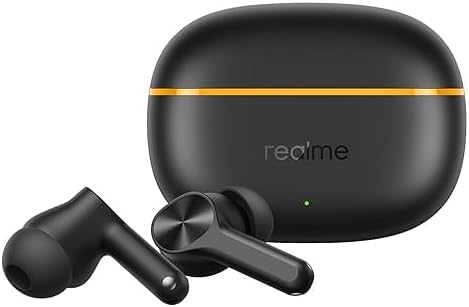
Image 1.1: realme Buds T200 Lite earbuds and their charging case.
2. Кутуда эмне бар
Пакетиңиздин мазмунун текшериңиз. Эгерде кандайдыр бир нерселер жок болсо же бузулса, кардарларды колдоо менен байланышыңыз.
- realme Buds T200 Lite Earbuds (Left and Right)
- Заряддоо кутусу
- USB Type-C кубаттоочу кабель
- Силикон кулак учтары (S, M, L өлчөмдөрү)
- User Manual
3. Орнотуу
3.1 Кулакчындарды жана кутучаны заряддоо
Before first use, fully charge the earbuds and the charging case. Place the earbuds into the charging case and connect the USB Type-C cable to the charging port on the case and a power source. The indicator light on the case will show the charging status.
- Total Playback: Заряддоо кутусу менен 48 саатка чейин.
- Тез кубаттоо: 10 мүнөттүк кубаттоо болжол менен 5 саат ойнотууну камсыз кылат.

Image 3.1: Illustration of 48 hours total playback and fast charging capability.
3.2 Сиздин аппаратыңыз менен жупташуу
- Биринчи жолу жупташтыруу: Заряддоо кутучасын ачыңыз. Кулакчындар жупташтыруу режимине автоматтык түрдө кирет.
- Google Fast Pair: For Android devices, a pop-up notification will appear on your screen. Tap to connect.
- Кол менен жупташтыруу: On your device, go to Bluetooth settings and select "realme Buds T200 Lite" from the list of available devices.
- Кайра жупташтыруу: If the earbuds do not connect automatically, place them back in the case, close the lid, then open it again to re-enter pairing mode.
4. Кулакчындарды иштетүү
4.1 Сенсордук башкаруу
The realme Buds T200 Lite feature intuitive touch controls on each earbud. Specific gestures can be customized via the realme Link app.
- Ойнотуу/тындыруу: Бир жолу таптоо.
- Кийинки трек: Эки жолу таптаңыз.
- Мурунку трек: Үч жолу таптоо.
- Чалууга жооп берүү/аяктоо: Бир жолу таптоо.
- Чакырууну четке кагуу: Басып кармап туруңуз.
- Үн Жардамчысын жандыруу: Press and hold (customizable).
- Switch Modes (e.g., Gaming Mode): Press and hold both earbuds (customizable).
4.2 Calls with AI ENC
The earbuds are equipped with 4 microphones and AI Environmental Noise Cancellation (ENC) technology to ensure your voice is clear during calls, even in noisy environments.

Image 4.1: Visual representation of Dual-Mic AI Noise Cancellation for clear calls.
4.3 Music Experience
Enjoy rich audio with the 12.4mm Dynamic Bass Driver, delivering deep, punchy bass and crisp highs for an immersive listening experience.

Image 4.2: Diagram illustrating the 12.4mm Dynamic Bass Driver.
4.4 Төмөнкү кечигүү менен ойноо режими
Activate the dedicated low latency gaming mode for a synchronized audio-visual experience, reducing delay during gameplay.
5. Техникалык тейлөө
5.1 Тазалоо
Regularly clean the earbuds and charging case to maintain optimal performance and hygiene.
- Кулакчындарды жана кутучаны сүртүү үчүн жумшак, кургак, түксүз чүпүрөктү колдонуңуз.
- Кулагынын учтарын алып салып, жумшак самын жана суу менен тазалаңыз, анан кайра кийер алдында жакшылап кургатып алыңыз.
- Кулакчындагы жана кутудагы заряддоо контакттарын кургак кебез тампон менен акырын тазалаңыз.
5.2 Сууга туруктуулук
The realme Buds T200 Lite are IPX4 water resistant, meaning they are protected against splashing water from any direction. This makes them suitable for workouts and light rain, but they are not designed for submersion in water.

Image 5.1: Illustration of IPX4 Water Resistance for the earbuds.
5.3 Сактоо
Кулакчындарды колдонбогон учурда коргоо жана кубаттоодо кармап туруу үчүн кубаттоочу кутучасында сактаңыз. Ашыкча температурадан жана түз күн нурунан алыс болуңуз.
6. Кыйынчылыктарды
If you encounter any issues with your realme Buds T200 Lite, try the following steps:
- Үн/Туташуу маселеси жок:
- Кулакчындардын кубатталганын текшериңиз.
- Түзмөгүңүздөгү Bluetooth'ду өчүрүп, күйгүзүңүз.
- Bluetooth жөндөөлөрүңүздө түзмөктү унутуп, кайра жупташтырыңыз.
- Reset the earbuds (refer to the realme Link app or product support for specific reset instructions).
- кубаттоо маселелери:
- Кубаттоочу кабелди жана адаптерди текшериңиз.
- Кулакчындардын жана кутучанын кубаттоочу контакттары таза жана кургак экенин текшериңиз.
- Чалуу сапаты начар:
- Микрофондор тоскоол болбогонун текшериңиз.
- Телефонуңуздагы тармак сигналынын күчүн текшериңиз.
7. Техникалык шарттар
| Өзгөчөлүк | Description |
|---|---|
| Бренд | realme |
| Модель аты | Buds T200 Lite |
| Модель номери | T310 |
| Түс | Кара |
| Кулак жайгаштыруу | Кулакта |
| Noise Control | Environmental Noise Cancellation (AI ENC) |
| Аудио драйвер түрү | 12.4mm Dynamic Bass Driver |
| Жыштык диапазону | 20Гц - 20,000Гц |
| Байланыш технологиясы | Зымсыз (Bluetooth) |
| Bluetooth версиясы | 5.0 |
| Батареянын иштөө мөөнөтү (жалпы) | 48 саатка чейин |
| Тез заряддоо | 10 мүнөттүк заряд = 5 саат ойнотуу |
| Сууга туруктуулук деңгээли | IPX4 |
| Башкаруу ыкмасы | App (realme Link) |
| Шайкеш түзмөктөр | Уюлдук телефондор |
8. Коопсуздук маалыматы
Түзмөгүңүзгө зыян келтирбөө же өзүңүзгө жаракат келтирбөө үчүн төмөнкү коопсуздук көрсөтмөлөрүн окуп чыгып, аткарыңыз:
- Буюмду демонтаждабаңыз, оңдобоңуз же өзгөртпөңүз.
- Аппаратты кургак жана нымдан алыс кармаңыз.
- Аппаратты экстремалдык температурага тийгизүүдөн сактаңыз.
- Do not use harsh chemicals or detergents to clean the device.
- Аппаратты жана анын батареясын жергиликтүү эрежелерге ылайык таштаңыз.
- Үндүн жогорку деңгээлдеги узакка созулган таасири угуунун бузулушуна алып келиши мүмкүн. Үндү коопсуз деңгээлге тууралаңыз.
9. Кепилдик жана колдоо
For warranty information and customer support, please refer to the warranty card included in your package or visit the official realme website. You can also contact realme customer service for assistance with product inquiries, troubleshooting, or service requests.


