1. Киришүү
This manual provides detailed instructions for the proper use and maintenance of your SKIUDCT N19 Bluetooth Headset. Please read this manual thoroughly before using the product to ensure optimal performance and longevity.
The SKIUDCT N19 is a wireless single-ear Bluetooth headset designed for clear communication and audio playback, featuring Bluetooth 5.3 connectivity, dual ENC noise-canceling microphones, and an IP7 waterproof rating.

Сүрөт: бүттүview of the SKIUDCT N19 Bluetooth Headset highlighting its key features such as Bluetooth 5.3, ENC Noise Cancellation, 120H Playtime, IP7 Waterproof, Ergonomic Design, HiFi Sound, Type-C Fast Charge, and LED Display.
2. Пакеттин мазмуну
Пакетте бардык буюмдар бар экенин текшериңиз:
- 1 x SKIUDCT N19 Bluetooth Earpiece
- 1 x зымсыз кубаттоо кутусу
- 1 х USB-C кубаттоо кабели
- 3 x Pairs of Eartips (S/M/L)
- 1 х Колдонуучунун колдонмосу (бул документ)

Image: Visual representation of the items included in the product box: charging case, N19 wireless headset, three pairs of eartips, packing case, user manual, and USB charging cable.
3. Продукт бүтүп калдыview
3.1 Гарнитуранын компоненттери
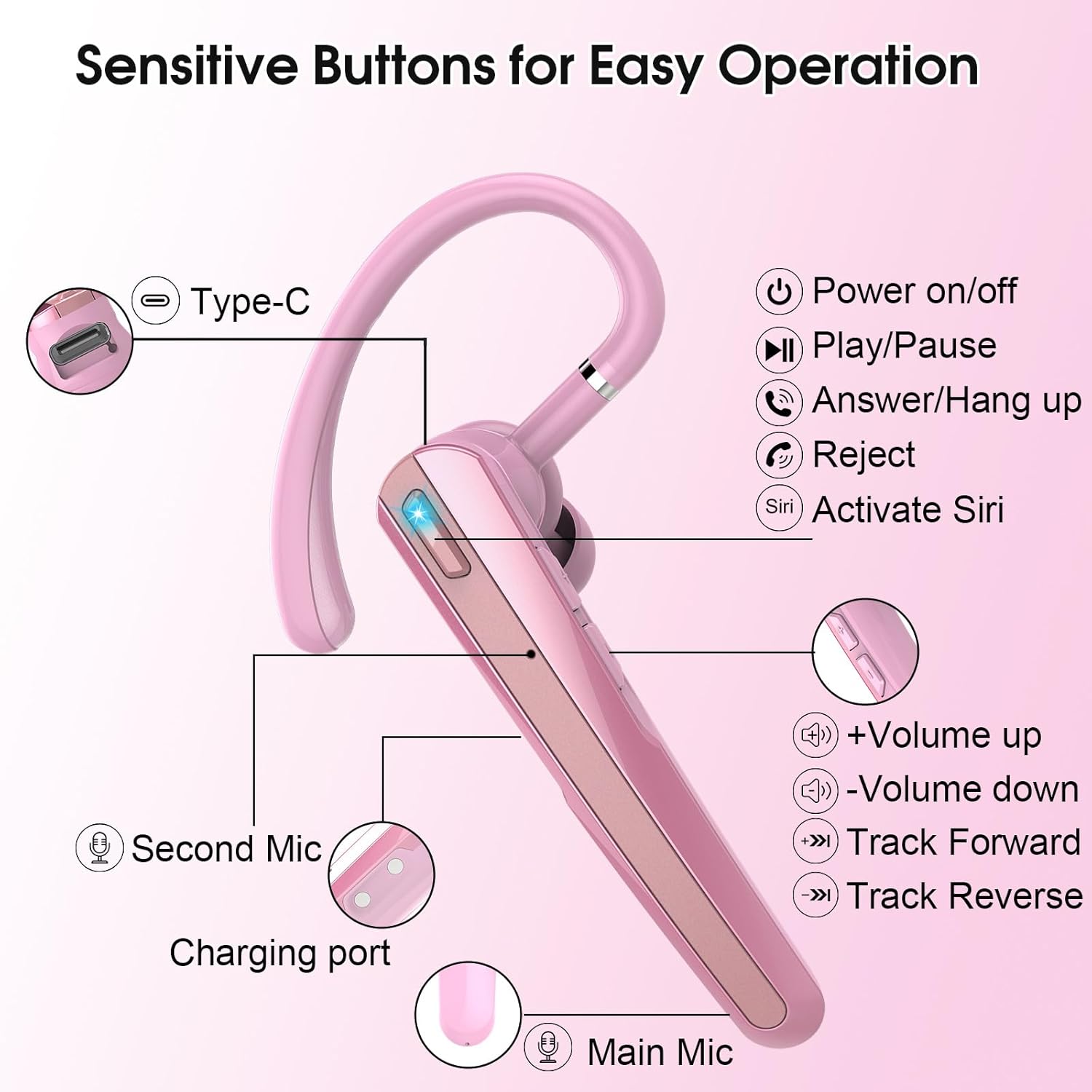
Image: Detailed diagram of the SKIUDCT N19 headset showing the Type-C port, Power on/off button, Play/Pause, Answer/Hang up, Reject, Activate Siri, Volume Up/Down, Track Forward/Reverse buttons, Second Mic, Charging port, and Main Mic.
- Кубат баскычы: Controls power on/off, play/pause, answer/hang up calls, reject calls, and activate voice assistant.
- Үн баскычтары: Adjusts volume, skips tracks.
- Main Microphone: Primary microphone for vocal voice collection.
- Second Microphone: Assists in noise reduction.
- Заряддоо порту: USB Type-C port for charging the headset.
- LED көрсөткүчү: Туташуу абалын жана батареянын деңгээлин көрсөтөт.
3.2 Негизги өзгөчөлүктөрү
- Ultra-Clear Call Technology: Features a 13mm composite dynamic unit for balanced sound and a high-performance audio decoding chip compatible with AAC and SBC formats.
- Dual ENC and CVC 8.0 Noise Cancellation: Effectively reduces ambient noise for clearer calls.
- Bluetooth 5.3: Provides a faster, more stable connection with lower power consumption.
- LED дисплейди кубаттоо кутусу: Shows real-time battery status of the charging box.
- Батареянын узак иштөө мөөнөтү: Заряддоо кутучасы менен күтүү убактысы 120 саатка чейин.
- Эргономикалык дизайн: 180° rotating ear hooks and 270° adjustable cantilever for comfortable fit, suitable for left or right ear. Includes three sizes of earplugs.
- IP7 суу өткөрбөйт рейтинги: Resists sweat, rain, and other liquids.

Image: A visual explanation of the dual ENC noise-canceling microphones, showing how the main mic collects vocal voice and the second mic performs noise reduction, with a waveform comparison of sound before and after noise cancellation.
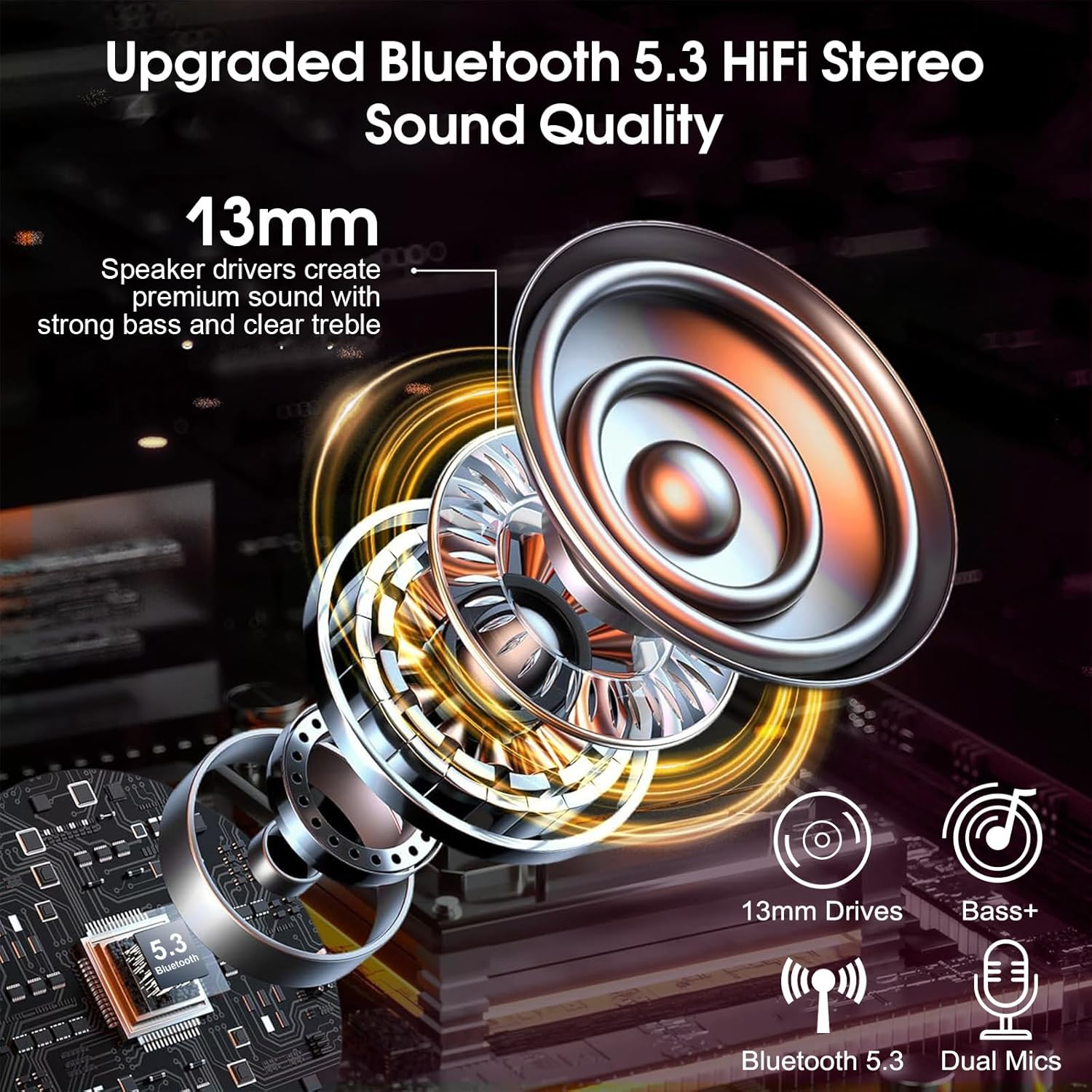
Сүрөт: жарылган view diagram illustrating the 13mm speaker drivers and internal components responsible for upgraded Bluetooth 5.3 HiFi stereo sound quality, emphasizing strong bass and clear treble.
4. Орнотуу
4.1 Гарнитураны жана кутуну заряддоо
Биринчи колдонуудан мурун гарнитураны жана кубаттоочу кутучаны толук заряддаңыз.
- Гарнитураны заряддоо кутусуна салыңыз.
- USB-C заряддоо кабелин корпустагы кубаттоо портуна жана кубат булагына туташтырыңыз.
- The LED display on the charging case will show the current battery percentage. The headset will fully charge in approximately 1.5 hours.

Image: The SKIUDCT N19 headset inside its charging case, displaying a 100% charge on the LED screen, along with battery life indicators for the case and single headset, and charging time.

Сүрөт: жакын план view of the USB-C charging port on the headset, indicating its charging capability.
4.2 Bluetooth жупташтыруу
- Гарнитура заряддалганын текшериңиз.
- Take the headset out of the charging case. It will automatically power on and enter pairing mode (the LED indicator will flash).
- Түзмөгүңүздө (смартфон, ноутбук ж.б.) Bluetooth'ду күйгүзүп, жеткиликтүү түзмөктөрдү издеңиз.
- Select "N19" from the list of devices.
- Once connected, the LED indicator on the headset will stop flashing, and a voice prompt will confirm the connection.

Image: A smartphone screen displaying the Bluetooth pairing process, showing "N19" as a discoverable device and indicating a successful connection for calls and media audio, with the headset and charging case in the background.
5. Иштөө нускамалары
5.1 Көп функциялуу баскычтарды башкаруу элементтери

Image: A detailed diagram illustrating the various functions of the multi-functional buttons on the SKIUDCT N19 headset, including power on/off, volume adjustment, track switching, answering/rejecting calls, and activating Siri.
- Күйгүзүү: Кубат баскычын 2 секунд басып туруңуз.
- Өчүрүү: Кубат баскычын 5 секунд басып туруңуз.
- Ойнотуу/тындыруу: Tap the Power button twice.
- Чакырууга жооп берүү: Кубат баскычын бир жолу таптаңыз.
- Чакырууну четке кагуу / Hang Up: Кубат баскычын 2 секунд басып туруңуз.
- Көлөмү: Tap the '+' button once.
- Үнүн азайтуу: Tap the '-' button once.
- Кийинки трек: '+' баскычын 2 секунд басыңыз.
- Мурунку трек: '-' баскычын 2 секунд басыңыз.
- Үн жардамчысын иштетүү (Siri/Google Жардамчысы): Tap the Power button three times.
6. Кийүү боюнча нускамалар
For optimal comfort and sound quality, adjust the headset to fit your ear properly.
- Insert the ear tip into your ear canal.
- Position the ear hook over the back of your ear.
- Adjust the ear hook (180° rotation) and cantilever (270° adjustment) for a secure and comfortable fit. The headset can be worn on either the left or right ear.
- Experiment with the three different sizes of ear tips (S/M/L) to find the best fit for your ear canals.

Image: A three-step visual guide demonstrating how to properly wear the wireless headset: inserting the ear tip, positioning the ear hook, and making final adjustments for comfort, including 360° and 180° rotation options.

Image: Illustration of the three different ear tip sizes (S, M, L) provided with the headset, emphasizing the ability to choose the best fit for individual ear canals for comfortable wear.

Image: Two individuals demonstrating that the headset can be comfortably worn on either the left or right ear.
7. Техникалык тейлөө
7.1 Тазалоо
- Regularly clean the ear tips and headset with a soft, dry, lint-free cloth.
- Катуу химиялык заттарды же абразивдүү материалдарды колдонбоңуз.
- Ensure the charging contacts are clean and dry before placing the headset in the charging case.
7.2 Суу өткөрбөйт
The SKIUDCT N19 headset has an IP7 waterproof rating, meaning it can withstand immersion in water up to 1 meter for 30 minutes. It is resistant to sweat and rain, but it is not recommended for swimming or prolonged submersion.

Image: The SKIUDCT N19 headset partially submerged in water, visually confirming its IP7 waterproof capability.
7.3 Сактоо
When not in use, store the headset in its charging case to protect it from dust and damage, and to keep it charged.
8. Кыйынчылыктарды
| Көйгөй | Мүмкүн себеп | Чечим |
|---|---|---|
| Гарнитура күйбөйт. | Батарея аз. | Charge the headset and charging case. |
| Түзмөк менен жупташтыруу мүмкүн эмес. | Bluetooth is off on device; headset not in pairing mode; too far from device. | Ensure Bluetooth is enabled on your device. Take headset out of case to enter pairing mode. Move headset closer to device (within 10 meters). |
| Үн жок же үнү төмөн. | Volume too low; headset not connected; incorrect audio output selected. | Adjust volume on headset and device. Re-pair the headset. Check audio output settings on your device. |
| Чалуу сапаты начар. | Weak signal; environmental noise; microphone obstruction. | Сигнал жакшыраак аймакка жылыңыз. Микрофон жабылбаганын текшериңиз. |
| Кубаттоочу кутучанын LED дисплейи өчүк. | Charging case battery is depleted. | Заряддоо кутусун USB-C кабели аркылуу кубат булагына туташтырыңыз. |
9. Техникалык шарттар
| Өзгөчөлүк | Деталь |
|---|---|
| Модель аты | N19 |
| Байланыш технологиясы | Зымсыз (Bluetooth) |
| Bluetooth версиясы | 5.3 |
| Аудио драйвер түрү | 13мм динамикалык драйвер |
| Noise Control | Dual ENC & CVC 8.0 Noise Cancellation |
| Батареянын иштөө мөөнөтү (заряддоо кутусу менен) | 120 саатка чейин (күтүү режиминде) |
| Заряддоо убактысы | Болжол менен 1.5 саат |
| Заряддоо порту | USB Type-C |
| Сууга туруктуулук деңгээли | IP7 суу өткөрбөйт |
| Жыштык диапазону | 20Гц - 20,000Гц |
| Башкаруу ыкмасы | Баскычты басуу, Үн |
| Шайкеш түзмөктөр | Smartphones, Laptops, Desktops, Tablets, Smart Speakers, Cars (with Bluetooth support) |
| Элемент Салмагы | 3.84 унция |
10. Коопсуздук маалыматы
- Продукцияны ажыратпаңыз же өзгөртпөңүз.
- Keep the headset away from extreme temperatures, direct sunlight, and open flames.
- Avoid exposing the headset to strong magnetic fields.
- Do not use the headset at excessively high volumes for prolonged periods to prevent hearing damage.
- Продукцияны жана анын батарейкасын жергиликтүү эрежелерге ылайык таштаңыз.
11. Кепилдик жана колдоо
For warranty information or technical support, please refer to the contact details provided with your purchase or visit the official SKIUDCT webсайт. Кепилдик дооматтар үчүн сатып алганыңыздын далилин сактаңыз.


