1. Киришүү
Thank you for choosing the Altera Homestep Walking Pad. This manual provides essential information for the safe and efficient use of your new walking pad. Please read all instructions carefully before operation and retain this manual for future reference.
2. Коопсуздук нускамалары
To reduce the risk of serious injury, read all important precautions and instructions in this manual and on your walking pad before use.
- Always place the walking pad on a level, stable surface.
- Иштеп жатканда балдарды жана үй жаныбарларын басуучу төшөктөн алыс кармаңыз.
- Ensure adequate clear space around the walking pad (at least 0.6 meters on all sides).
- Эгерде сиздин салмагыңыз 90 кг (198 фунт) ашса, басуучу жаздыкчаны колдонбоңуз.
- Тийиштүү спорттук бут кийим кийиңиз.
- Always attach the safety key clip to your clothing before starting the walking pad.
- Эгерде сиз алсырап, башыңыз айланып же ооруп жатсаңыз, машыгууну дароо токтотуңуз.
- Колдонулбай турганда же тазалоо/тейлөө иштеринин алдында басуучу жаздыкчаны электр розеткасынан сууруп коюңуз.
- Эгерде шнуру же сайгычы бузулган болсо же ал туура иштебесе, басуучу жаздыкчаны иштетпеңиз.
3. Пакеттин мазмуну
- Altera Homestep Walking Pad
- Алыстан башкаруу
- Электр кабели
- Колдонуучунун Колдонмосу (бул документ)
4. Продукт бүтүп калдыview
Familiarize yourself with the main components and features of your Altera Homestep Walking Pad.

Image 4.1: The Altera Homestep Walking Pad shown with its remote control.

Сүрөт 4.2: Детальдуу view of the LED display and remote control buttons. The display shows Time, Speed, Distance, and Calories. The remote has buttons for Speed Control (+/-), Mode (M), Start/Hold, and Stop.

Image 4.3: Diagram illustrating remote control functions: '+' to increase speed, 'M' to change mode, '-' to reduce speed, 'START/HOLD' to start/continue, and 'STOP' to pause.

Сүрөт 4.4: View of the walking pad's underside, highlighting anti-slip leveling feet, transport wheels, and the manual power switch.

Image 4.5: Diagram showing the multi-layered running belt construction, including wear-resistant surface, noise reduction, impact absorption, and high-resistance support layers.
5. Орнотуу
- Таңылганын ачуу: Басуучу жаздыкчаны жана бардык компоненттерди таңгактан этияттык менен алып салыңыз.
- Жайгашкан жери: Place the walking pad on a flat, stable, and non-slip surface. Ensure there is sufficient space around the unit for safe operation.
- Кубат туташуу: Connect the power cable to the walking pad and then to a grounded electrical outlet.
- Коопсуздук ачкычы: Locate the safety key. This key must be in place for the walking pad to operate. Attach the clip of the safety key to your clothing before starting.
- Күйгүзүү: Flip the manual power switch (refer to Image 4.4) to the 'ON' position. The LED display should illuminate.
6. Иштөө нускамалары
6.1 Алыстан башкарууну колдонуу
The walking pad is controlled via the included remote control. Ensure the remote has working batteries.
- Start/Hold: Press the "START/HOLD" button to begin or resume your workout. The walking pad will start at a low speed.
- Токтотуу: Press the "STOP" button to pause or end your workout.
- Ылдамдыкты жөндөө: Use the "+" button to increase speed and the "-" button to decrease speed. The speed range is 1 km/h to 6 km/h.
- Режим тандоо: Press the "M" button to cycle through different display modes (Time, Speed, Distance, Calories).
6.2 LED дисплей
The integrated LED display provides real-time feedback on your workout progress (refer to Image 4.2).
- TIME: Машыгуунун узактыгын көрсөтөт.
- ЫЛДАМ: Shows your current walking speed in km/h.
- ДИСТ: Indicates the distance you have walked.
- КАЛ: Сеанс учурунда күйгөн калорияларды эсептейт.
6.3 Adjustable Incline
The Altera Homestep Walking Pad features two manual incline positions to vary your workout intensity.
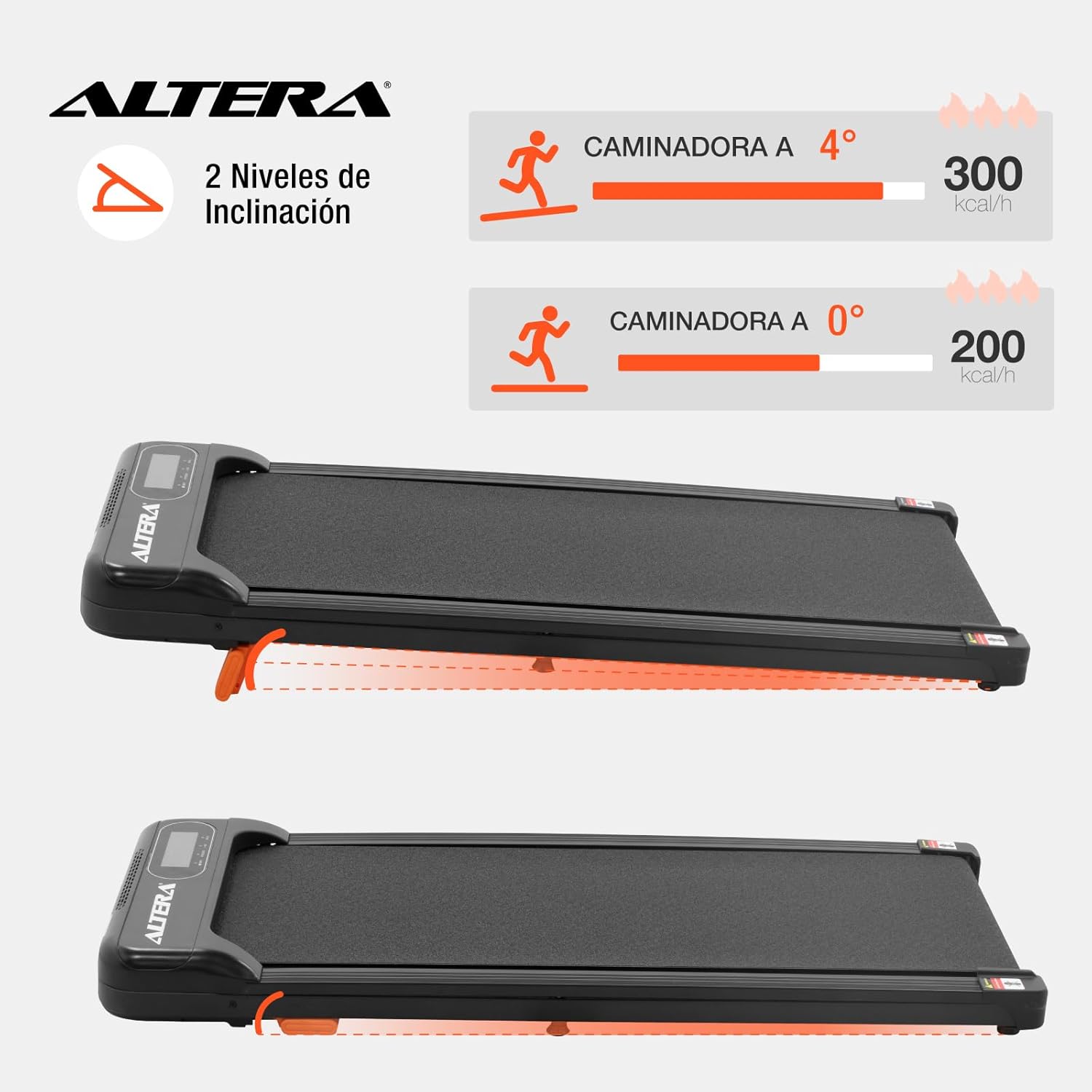
Image 6.1: Illustration of the two incline levels: 0 degrees (flat) and 4 degrees (inclined), showing estimated calorie burn difference.
To adjust the incline:
- Басуучу жаздык өчүрүлгөнүн жана розеткадан суурулганын текшериңиз.
- Carefully lift the front of the walking pad.
- Deploy or retract the small orange support feet located at the front underside of the unit to select your desired incline level.
- Ensure the support feet are securely locked in place before resuming use.
6.4 Ташуу жана сактоо
The walking pad is designed for easy storage and portability.
- To move the unit, ensure it is powered off and unplugged.
- Lift the front end slightly to engage the transport wheels (refer to Image 4.4).
- Roll the walking pad to your desired storage location. Its compact design allows it to fit in small spaces.
7. Техникалык тейлөө
Жөө басуучу төшөнчүңүздүн узак мөөнөттүү иштешин жана оптималдуу иштешин үзгүлтүксүз тейлөө камсыздайт.
- Тазалоо: Жарнама менен басуу аянтчасын сүртүңүзamp ар бир колдонуудан кийин кездеме. Абразивдүү тазалагычтарды же эриткичтерди колдонбоңуз.
- Белди майлоо: The walking belt may require lubrication periodically. Refer to the manufacturer's guidelines for specific lubrication instructions and recommended lubricants.
- Кур чыңалуу: Check the walking belt tension regularly. If the belt slips or feels loose, it may need adjustment. Consult a qualified technician if you are unsure how to adjust it.
- Сактагыч: Store the walking pad in a dry, cool place away from direct sunlight and moisture.
8. Кыйынчылыктарды
| Көйгөй | Мүмкүн себеп | Чечим |
|---|---|---|
| Walking pad does not start. |
|
|
| Кур тайып же тартынып калат. |
|
|
| Алыстан башкаруу жооп бербей жатат. |
|
|
9. Техникалык шарттар

Image 9.1: Technical specifications table and dimensional diagram of the Altera Homestep Walking Pad.
| Өзгөчөлүк | Деталь |
|---|---|
| Модель номери | CAM-HOM-02 |
| Мотор күчү | 1.5 HP |
| Ылдамдык диапазону | 1 - 6 км/саат |
| Максималдуу Колдонуучу Салмагы | 90 кг (198 фунт) |
| Эңкейүү деңгээли | 2 (manual, up to 4 degrees) |
| Running белдик өлчөмдөрү | 95 см х 36 см |
| Продукциянын өлчөмдөрү (L x W x Y) | 110 x 46 x 10 см |
| Продукт Салмагы | 17 кг |
| Материал | Металл, пластик |
| Өзгөчөлүктөрү | Bluetooth, Portable, LED Display, Anti-slip belt, Transport wheels |
| Power Source | Electric Cord (110V) |
10. Кепилдик жана колдоо
For warranty information or technical support, please refer to the contact details provided with your purchase or visit the official Altera webсайт. Кепилдик дооматтар үчүн сатып алганыңыздын далилин сактаңыз.


