1. Киришүү
Thank you for choosing the Geevon Wireless Indoor/Outdoor Thermometer. This device provides accurate temperature and humidity readings for up to four different locations simultaneously, helping you maintain a comfortable and healthy environment. Please read this manual carefully before use to ensure proper operation and longevity of your device.
2. Пакеттин мазмуну
- 1 x Main Display Unit
- 3 x Wireless Remote Sensors
- 1 x User Manual
3. Продукт бүтүп калдыview
3.1 Негизги дисплей бирдиги
The main unit features a large LCD screen displaying indoor temperature and humidity, along with readings from up to three remote sensors. It includes buttons for mode selection, unit switching, and alarm settings.

Image: The main display unit on the left, showing temperature and humidity readings for four channels, alongside three white remote sensors on the right.
3.2 Wireless Remote Sensors
Each remote sensor is designed to measure temperature and humidity in its specific location and transmit data wirelessly to the main unit. They are compact and can be placed indoors or outdoors (avoid direct sunlight and rain).

Сүрөт: деталдуу view of the main display unit and one remote sensor, illustrating their dimensions and key features such as thermometer, hygrometer, backlight, transmission range, unit switching, comfort symbols, temperature alarm, and Max/Min data records.
4. Орнотуу
4.1 Батареяны орнотуу
The main unit requires 2 AA batteries, and each remote sensor requires 2 AAA batteries (not included).
- Open the battery compartment cover on the back of the main unit and each remote sensor.
- Insert batteries according to the polarity indicators (+ and -).
- Батарея отсеги капкактарын бекем жабыңыз.
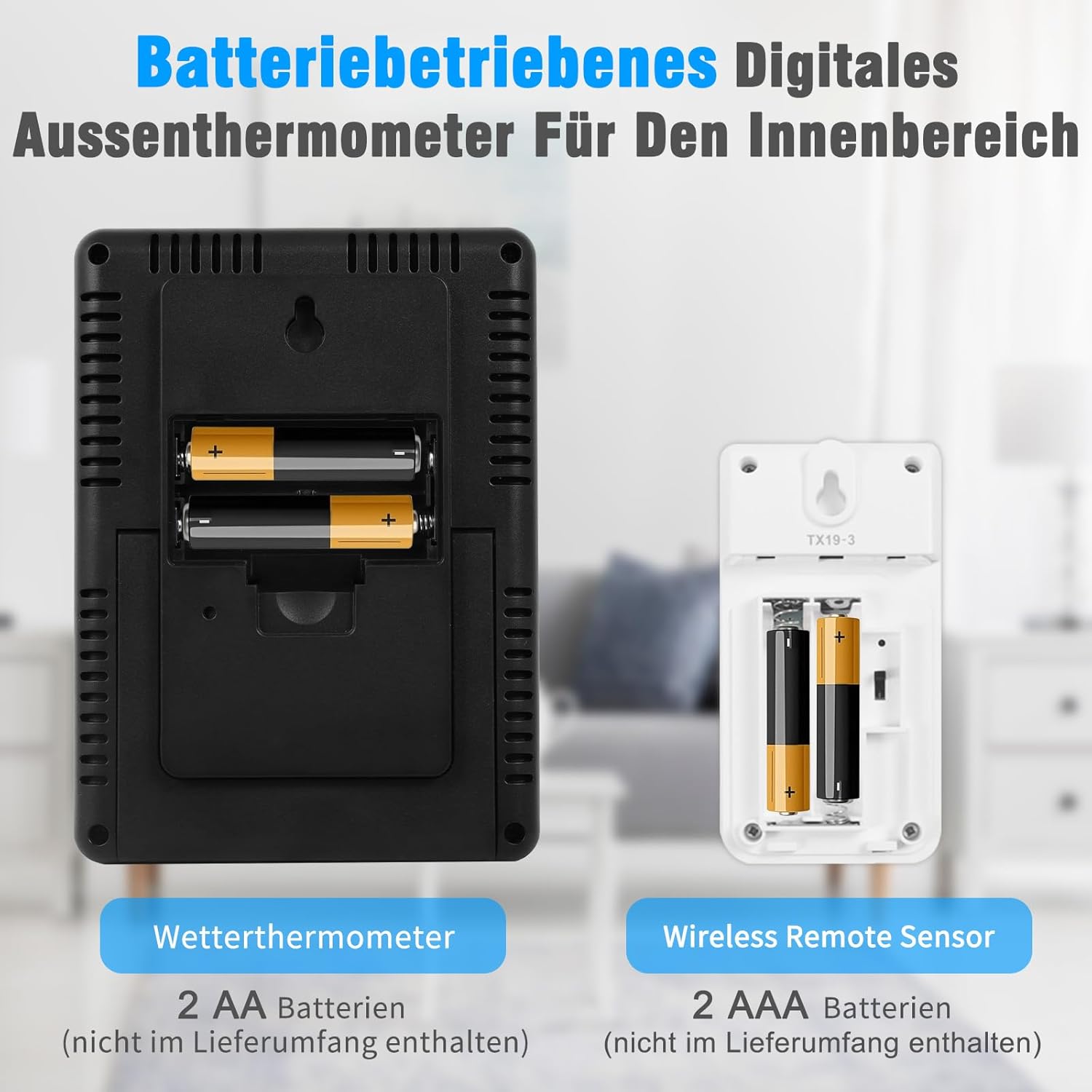
Сүрөт: А view of the back of the main weather thermometer unit showing its 2 AA battery slots, and the back of a wireless remote sensor showing its 2 AAA battery slots. Batteries are not included.
4.2 Сенсорду жупташтыруу
The main unit will automatically connect with the sensors once batteries are installed. If a sensor does not connect:
- Ensure both the main unit and sensors have fresh batteries.
- Press the 'CH/▲' button on the main unit to cycle through channels or initiate a search for sensors.
- Press the 'TX' button inside the battery compartment of the remote sensor to manually send a signal.
5. Иштөө нускамалары
5.1 Көрсөтүү режимдери
The large LCD screen displays current indoor temperature and humidity, along with readings from the three remote sensors. It also shows 24-hour Max/Min records and trend arrows for temperature and humidity.

Image: A close-up of the Geevon thermometer's 5-inch large LCD display, highlighting its backlight feature which stays on for 8 seconds when activated.
5.2 Бирдикти которуу (°C/°F)
Press the 'MEM/℃/℉' button on the main unit to switch between Celsius (°C) and Fahrenheit (°F) temperature units.
5.3 Температура жана нымдуулук сигнализациясы
The device features Hi/Lo temperature and humidity alarm functions. You can manually set maximum and minimum alert values. An audible alarm will sound when the readings reach these predefined points.

Image: An illustration showing the 4-channel Hi/Lo temperature and humidity warning feature, with icons representing conditions like Rhinitis, Asthma, Tracheitis, and Arthritis, suggesting how maintaining optimal conditions can help prevent these issues.
5.4 Макс/Мин. Жазуулар
The main unit automatically updates Max/Min temperature and humidity data every 24 hours. Press the 'MEM/℃/℉' button to view the maximum and minimum records for the past 24 hours.
5.5 Ыңгайлуулук деңгээлинин көрсөткүчү
The display includes a comfort level indicator (Dry, Comfort, Wet) based on current humidity levels, helping you quickly assess your living conditions.

Image: A visual representation of the comfort symbol feature, showing icons for 'Dry' (humidity < 40%), 'Comfort' (40% ≤ humidity ≤ 70% & 20°C ≤ temperature ≤ 28°C), and 'Wet' (humidity > 70%).
6. Жайгаштыруу боюнча көрсөтмөлөр
6.1 Негизги блокту жайгаштыруу
The main unit can be placed on a desktop using its integrated stand or mounted on a wall using the hanging hole. Choose a central location indoors for optimal reception from remote sensors.
6.2 Алыстан сенсорду жайгаштыруу
Place remote sensors in desired locations such as bedrooms, wine cellars, basements, gardens, greenhouses, grow tents, or offices. The wireless transmission range is up to 60 meters (200 feet) in open areas. Ensure outdoor sensors are protected from direct sunlight and rain, as they are splash-proof (IPX4) but not fully waterproof.

Image: An illustration demonstrating the ability to monitor four different locations simultaneously (CH1, CH2, CH3, and IN for indoor) with the Geevon thermometer, showcasing its 200ft/60m transmission range.

Image: Two placement options for the Geevon weather thermometer: wall mounting using the integrated hole and tabletop placement using the foldable stand.
7. Техникалык тейлөө
- Аппаратты жумшак, гamp кездеме. Абразивдүү тазалагычтарды же эриткичтерди колдонбоңуз.
- Do not immerse the main unit or remote sensors in water.
- Аппарат узак убакыт бою колдонулбай турган болсо, батарейкаларды алып салыңыз.
- Аппаратты экстремалдык температурага, тике күн нуруна же ашыкча нымдуулукка дуушар кылуудан алыс болуңуз.
8. Кыйынчылыктарды
| Көйгөй | Мүмкүн себеп | Чечим |
|---|---|---|
| Негизги блокто дисплей жок. | Батареялар өлүп калган же туура эмес орнотулган. | Туура полярдуулукту камсыз кылуу менен батарейкаларды жаңысына алмаштырыңыз. |
| Remote sensor not transmitting data. | Sensor batteries are dead; sensor is out of range; interference. | Replace sensor batteries. Move sensor closer to the main unit. Avoid placing near large metal objects or electronics that may cause interference. Press 'TX' button on sensor. |
| Туура эмес окуулар. | Sensor exposed to direct sunlight/heat source or moisture. | Relocate sensor to a shaded, well-ventilated area away from direct heat or moisture. Allow time for readings to stabilize. |
| Сигнал угулбай жатат. | Alarm settings are incorrect or disabled. | Check and adjust the Hi/Lo alarm settings as per operating instructions. |
9. Техникалык шарттар
| Өзгөчөлүк | Деталь |
|---|---|
| Жабык температура диапазону | -10°Cден 60°Cге чейин (14°Fтен 140°Fге чейин) |
| Тышкы температура диапазону | -50°Cден 70°Cге чейин (-58°Fтен 158°Fге чейин) |
| Температуранын тактыгы | ±1°C |
| нымдуулук колому | 20% - 95% RH |
| Нымдуулуктун тактыгы | ±5% RH |
| Зымсыз берүү диапазону | Ачык аянтта 60 метрге (200 фут) чейин |
| Жыштык | 433 МГц |
| Негизги блоктун кубаттуулугу | 2 x AA батарейкалар (киргизилген эмес) |
| Remote Sensor Power | 2 x AAA батарейкалар (киргизилген эмес) |
| Өлчөмдөрү (Негизги бирдик) | Болжол менен 10 x 13 x 1.5 см (3.9 x 5.3 x 0.6 дюйм) |
| Салмагы | 350 грамм |
10. Кепилдик жана колдоо
Geevon products are designed for reliability and performance. For any questions, troubleshooting assistance, or warranty claims, please refer to the contact information provided with your purchase or visit the official Geevon webсайт. Сураныч, кепилдик максаттары үчүн сатып алганыңыздын далилин сактап коюңуз.


