Introduction
Welcome to the user manual for your Insta360 X5 8K 360 Action Camera. The X5 is Insta360's flagship 360° camera, designed for capturing high-quality 8K 360° video and 72MP 360° photos. It features enhanced low-light performance, improved audio, extended battery life, and durable, user-replaceable lenses. This manual will guide you through the setup, operation, and maintenance of your camera to ensure optimal performance.
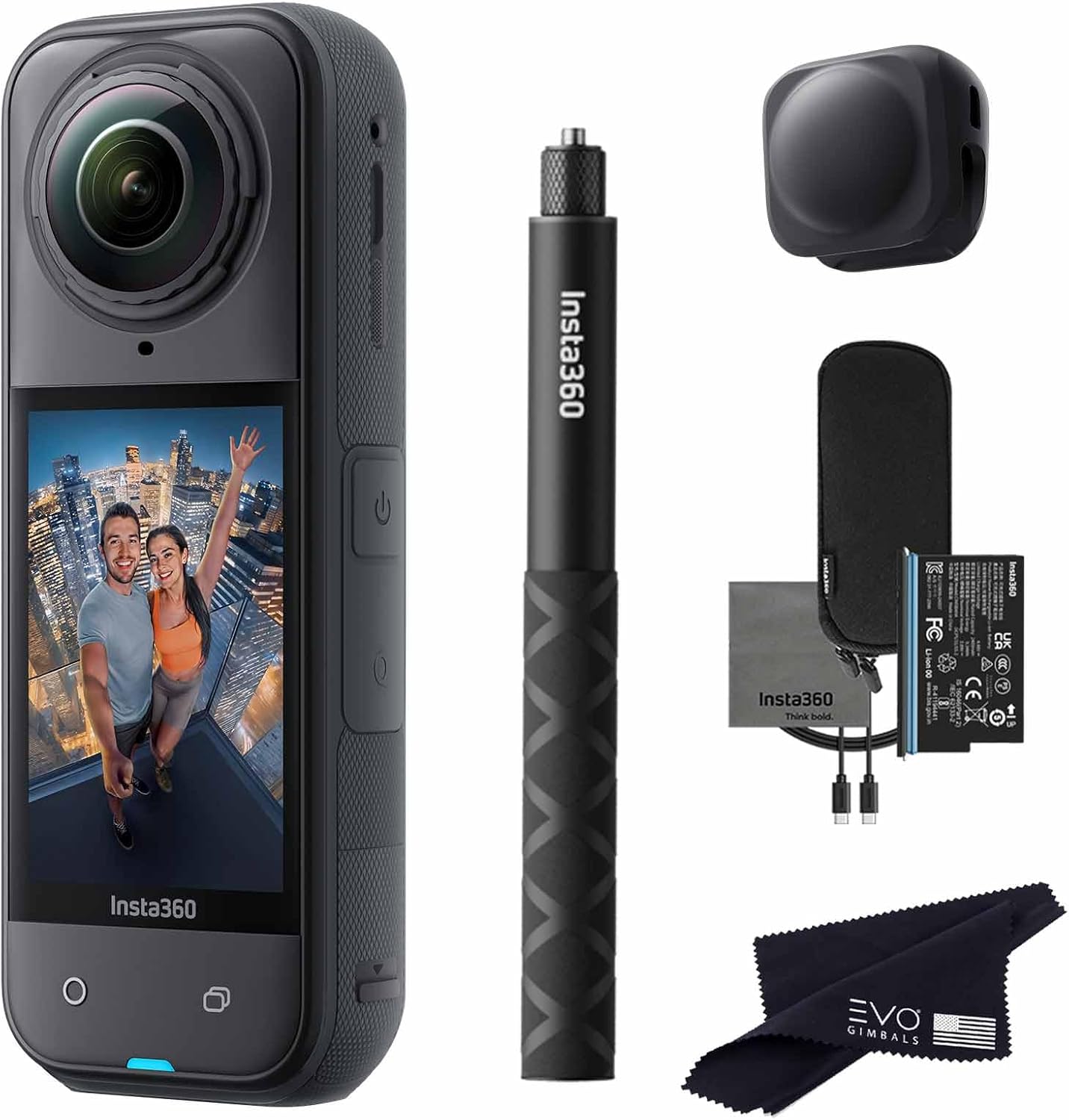
Figure 1: Insta360 X5 camera with selfie stick, lens cap, charging cable, protective pouch, and lens cloth.
Жайгашуу
1. Кутудан чыгаруу жана алгачкы текшерүү
Carefully unpack all components and verify that all items listed below are present.
Камтылган компоненттер:
- 1x Insta360 X5 Camera
- 1x Charge Cable
- 1x Protective Pouch
- 1x Ланс Cloth
- 1x колдонуучунун колдонмосу
- 1x Selfie Stick
- 1x линза капкагы
- 1x EVO Gimbals lens cloth
2. Батареяны орнотуу жана заряддоо
The Insta360 X5 is equipped with a 2400mAh battery, providing up to 185 minutes of recording time in endurance mode.
- Камерадагы батарея бөлүкчөсүн табыңыз.
- Insert the included 9V battery, ensuring correct polarity.
- Connect the camera to a power source using the provided charge cable.
- The camera supports rapid charging, reaching 80% capacity in approximately 20 minutes.

Figure 2: The Insta360 X5 features hyper charging and is waterproof up to 49ft (15m).
3. Lens Protection and Replacement
The X5 features upgraded lenses with sapphire glass-level scratch resistance. In case of damage, lenses are user-replaceable.
- Auto Lens Guard Detection: The camera automatically recognizes and adjusts to the correct lens mode when protective lenses are changed, preventing stitching issues.
- To replace a damaged lens, carefully follow the instructions provided with replacement lenses (sold separately).

Figure 3: The Insta360 X5 features a replaceable lens design for enhanced durability.
4. MicroSD Card Installation (Not Included)
The Insta360 X5 requires a Micro SDXC card for storing photos and videos. Ensure the card is formatted correctly before use.
- Камераңыздын капталынан MicroSD карта уячасын табыңыз.
- MicroSD картаны контакттары ылдый каратып, ордуна чыкылдаганча салыңыз.
- Чыгаруу үчүн картаны сыртка чыкканга чейин акырын түртүңүз.
Иштөө нускамалары
1. Basic Controls and Interaction
- Twist to Shoot: Twist the selfie stick back and forth twice to start or stop recording.
- Voice Control 2.0: Use voice commands to operate the camera hands-free.
- Жаңсоо башкаруу: Initiate photo capture or video recording with specific hand gestures.
2. Video Recording Modes
The Insta360 X5 offers various video modes to suit different shooting scenarios.
- 8K 360° Video: Capture immersive 360-degree footage with stunning 8K resolution.
- 360° PureVideo: This mode utilizes advanced AI-powered noise reduction and dynamic range optimization for clear, vivid footagаз жарык шарттарында e.

Figure 4: Enhanced low light performance with 360° PureVideo mode.
- 4K60fps Single-Lens Mode: Use the X5 as a traditional action camera, capturing 4K video at 60 frames per second. MaxView in FreeFrame Video offers a 170° view at 4K30fps.
- InstaFrame Mode: Capture flat videos instantly without editing by choosing a "Selfie View" or "Fixed View" before filming. The full 360° video is still saved for later reframing.

Figure 5: InstaFrame Mode allows for simultaneous flat and 360° video capture.

Figure 6: Experience ultra-clear 8K 30fps 360° videos with dual 1/1.28" sensors.
3. Photo Capture
- 72MP 360° Photo: Capture high-resolution 360-degree photos.
- HDR Option: Enhance your photos with richer, more dynamic details using the HDR option.
4. Аудио өзгөчөлүктөрү
The X5 features a new wind guard with an advanced multi-layer windproof steel mesh to filter out wind noise. It offers four versatile audio modes for various activities.
5. Stabilization and Horizon Lock
- FlowState турукташтыруу: This technology helps eliminate shakes and bumps, ensuring smooth cinematic footage even during dynamic activities.

Figure 7: FlowState Stabilization ensures steady footage.
- 360° Horizon Lock: Maintains a level horizon in your footage, regardless of camera movement, ideal for action sports.
6. Гидроизоляция
The Insta360 X5 is waterproof up to 49 feet (15 meters) without additional housing. For depths up to 50 meters, an invisible dive case (sold separately) is required.
7. Accessories and Mounting
- Magnetic Quick Release: The X5 features a new magnetic quick release interface for fast installation and removal, allowing seamless switching between various accessories and scenarios.
- Invisible Selfie Stick Effect: When used with the Invisible Selfie Stick (included in this bundle), the stick automatically disappears from your 360° footage, creating drone-like or third-person perspectives.

Figure 8: The Invisible Selfie Stick effect creates unique third-person views.
8. AI Editing and App Features
The Insta360 app (available for smartphones) provides powerful AI-powered editing tools.
- AI-Powered Reframing: Choose the best angles after recording your 360° footage.
- Photo Animator: Convert 360° photos into animated videos using AI facial recognition and preset effects.
- Мультиview: Turn a single 360° shot into a split-screen effect with up to four views, eliminating the need for multiple cameras.
Техникалык тейлөө
1. Камераны тазалоо
- Use the provided lens cloth to gently clean the camera lenses. Avoid abrasive materials.
- For the camera body, use a soft, dry cloth. If necessary, a slightly damp кездемени колдонсо болот, андан кийин дароо кургатуу.
- Ensure the camera is dry before closing any ports or using it in wet conditions.
2. Сактоо
Store the camera in its protective pouch in a cool, dry place away from direct sunlight and extreme temperatures.
Проблемаларды чечүү
If you encounter issues with your Insta360 X5, please refer to the following common troubleshooting steps:
- Камера күйбөй жатат: Ensure the battery is fully charged and correctly inserted. Try connecting the camera to a power source to see if it powers on.
- Жаздыруу маселелери: Check if the MicroSD card is properly inserted and has sufficient free space. Ensure the card is formatted correctly (FAT32 or exFAT).
- Тигүү көйгөйлөрү: Verify that the lenses are clean and free from obstructions. If using protective lenses, ensure they are correctly installed and recognized by the camera's Auto Lens Guard Detection.
- Колдонмо туташуусу: Ensure Bluetooth and Wi-Fi are enabled on your smartphone. Restart both the camera and the app.
- Ашыкча ысып кетүү: Prolonged 8K recording or use in hot environments can cause the camera to warm up. If it overheats, it may automatically shut down. Allow it to cool down before resuming use.
For more detailed troubleshooting or persistent issues, please visit the official Insta360 support webсайт.
Техникалык шарттар
| Өзгөчөлүк | Деталь |
|---|---|
| Бренд | Insta360 |
| Модель номери | X5_SELFIE-STICK_ |
| Элемент Салмагы | 2 фунт |
| Продукциянын өлчөмдөрү | 1.53 x 1.8 x 4.9 дюйм |
| Батареялар | 1 9V батарейка талап кылынат (кошулган) |
| Өзгөчөлүктөр | 360 action camera, 8K 360, AI editing, live stream, 5.7K Active HDR 360 Video, 72MP Photo, 4K Single-Lens Mode, 8K Timelapse, FlowState Stabilization |
| Фото сенсор технологиясы | CMOS |
| Видео тартуунун резолюциясы | 8K |
| Максималдуу фокус узундугу | 6 миллиметр |
| Максималдуу диафрагма | 5.6 миллиметр |
| Flash эс тутум түрү | Микро SDXC |
| Видео тартуу форматы | INSV |
| Колдоого алынган аудио формат | MP4 |
| Screen Size | 2.5 дюйм |
| Байланыш технологиясы | Bluetooth |
| Суу өткөрбөйт | Up to 49ft (15m) without case |
Кепилдик жана колдоо
1. Продукцияга кепилдик
The Insta360 X5 comes with a standard limited manufacturer's warranty. Please refer to the warranty card included in your product packaging or visit the official Insta360 webдеталдуу кепилдик шарттары жана шарттары үчүн сайт.
2. Кардарларды колдоо кызматы
For technical assistance, product inquiries, or further support, please visit the official Insta360 support page or contact their customer service.


