Introduction
This manual provides comprehensive instructions for the operation, maintenance, and troubleshooting of your TOOLTOP ET15S Professional Thermal Imager Camera with integrated Digital Multimeter. Please read this manual thoroughly before using the device to ensure safe and efficient operation.
The TOOLTOP ET15S is an industrial-grade thermal camera combined with a high-precision digital multimeter, designed for various applications including PCB inspection, HVAC repair, and general electrical measurements.
Негизги өзгөчөлүктөрү
- 256x192 Resolution Thermal Imaging Sensor: Provides clear thermal images with a 25Hz refresh rate.
- 19,999 Counts Digital Multimeter: High-precision measurements for voltage, current, resistance, capacitance, diode, frequency, NCV, and temperature.
- 3.5 дюймдук IPS экран: Large, high-definition display for clear viewing of thermal images and multimeter readings.
- Waveform Graph Visualization: Multimeter measurement results can be displayed as waveform graphs for data trend analysis.
- Кошумча макро линзалар: Captures small details (1mm x 1mm) for precise inspections like smartphone or PCB repairs.
- Көп тилдүү колдоо: Available in 11 languages.
- Батареянын узак иштөө мөөнөтү: Detachable 18650 lithium battery provides up to 8 hours of runtime.
- Компьютердик программалык камсыздоону колдоо: Allows transfer and analysis of multimeter data charts and thermal images.
Пакеттин мазмуну
Пакетте бардык буюмдар бар экенин текшериңиз:
- ET15S Thermal Imager & Multimeter Unit
- Macro Lens (if purchased with this option)
- Продукт колдонмосу
- Аспаптарды сактоочу баштык
- Мультиметрдик зонддор
- USB маалымат кабели

Figure 1: Included components of the ET15S package.
Жайгашуу
1. Батареяны орнотуу жана заряддоо
The ET15S is powered by a detachable 18650 lithium battery. Ensure the battery is fully charged before first use.
- Аппараттагы батарея бөлүкчөсүн табыңыз.
- Insert the 18650 battery, observing the correct polarity (+/-).
- Батарея отсегин бекем жабыңыз.
- Connect the device to a USB power source using the provided USB data cable for charging. The charging indicator will show the charging status.
2. Macro Lens Installation (Optional)
If your model includes the optional macro lens, follow these steps for installation:
- Identify the macro lens attachment point on the top of the ET15S unit.
- Carefully align the macro lens with the attachment point.
- Gently slide or click the macro lens into place until it is secure.
- When using, the macro lens can be moved left and right to adjust focus for optimal small detail capture.

Figure 2: Installation and adjustment of the optional macro lens.
Иштөө нускамалары
1. Күйгүзүү / Өчүрүү
Press and hold the power button (usually located on the side or front) to turn the device on or off.
2. Интерфейсте навигация
The ET15S features a 3.5-inch IPS screen. Use the navigation buttons (e.g., directional pad, SELECT, MENU) to move through menus and select options.

Figure 3: ET15S display and control layout.
3. Thermal Imaging Mode
To activate thermal imaging:
- Select the "IR Camera" mode from the main menu.
- Point the camera lens towards the object or area you wish to inspect.
- The screen will display the thermal image with temperature readings.
- Adjust emissivity (0.1 – 0.99, default 0.95) as needed for accurate temperature measurements based on the material being inspected.
- Choose from various color palettes (e.g., White Heat, Black Heat, Rainbow, Iron Red) to visualize temperature differences effectively.

4-сүрөт: Температуранын бөлүштүрүлүшүн көрсөткөн жылуулук сүрөткө тартуу дисплейи.
4. Digital Multimeter Mode
The ET15S integrates a full-featured digital multimeter. To use:
- Connect the multimeter probes to the appropriate input jacks (COM, VΩ, 10A MAX).
- Select the "Multimeter" mode from the main menu.
- Choose the desired measurement function (e.g., DCV, ACV, Resistance, Capacitance, Diode, Frequency, NCV).
- The device supports both manual and automatic ranging.
- For waveform visualization, select the appropriate option within the multimeter interface to view data trends.
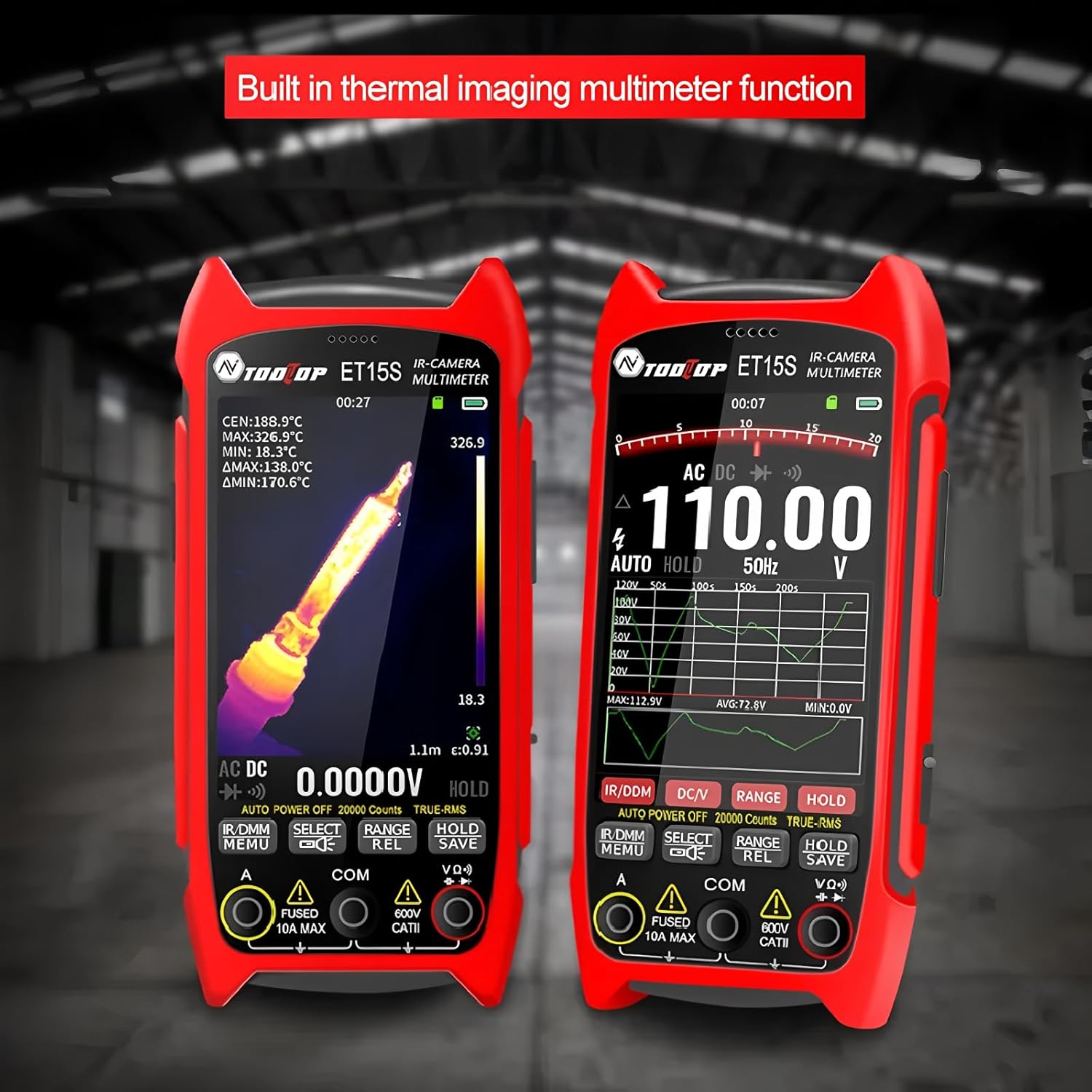
Figure 5: Multimeter interface showing voltage measurement and waveform graph.
5. Data Storage and PC Connectivity
The ET15S allows for saving thermal images and multimeter data. To transfer data to a PC:
- Connect the ET15S to your computer using the USB data cable.
- Түзмөк алынуучу сактагыч катары көрүнүшү керек.
- Access saved images and data files.
- Use the dedicated PC software (available for download from the manufacturer's website) for advanced analysis of multimeter data charts and thermal images.

Figure 6: Connecting the ET15S to a PC for data transfer and analysis.
Техникалык тейлөө
1. Аспапты тазалоо
Үзгүлтүксүз тазалоо аппараттын иштешин жана узак иштөөсүн сактоого жардам берет.
- Аппараттын сыртын сүртүү үчүн жумшак, кургак чүпүрөктү колдонуңуз.
- For the screen and lens, use a microfiber cloth specifically designed for optics. Avoid abrasive materials or harsh chemicals.
- Тазалоодон мурун аппараттын өчүрүлгөнүн текшериңиз.
2. Батареяга кам көрүү
- Аппаратты жана батареяны колдонбогондо салкын, кургак жерде сактаңыз.
- Батареяны бат-баттан толук кубаттап калуудан алыс болуңуз.
- If storing for extended periods, charge the battery to approximately 50% to prolong its lifespan.
3. Сактоо
When not in use, store the ET15S in its provided instrument storage bag to protect it from dust, moisture, and physical damage.
Проблемаларды чечүү
| Көйгөй | Мүмкүн себеп | Чечим |
|---|---|---|
| Түзмөк күйбөйт. | Battery is discharged or incorrectly installed. | Батареяны заряддаңыз. Батарея туура полярдуулук менен салынганын текшериңиз. |
| Термикалык сүрөт бүдөмүк же түшүнүксүз. | Lens is dirty; incorrect focus (with macro lens); object is out of range. | Clean the lens. Adjust the macro lens position. Ensure the object is within the optimal working distance. |
| Multimeter readings are inaccurate. | Probes are not properly connected; incorrect measurement function selected; battery low. | Check probe connections. Select the correct measurement mode. Charge the battery. |
| Компьютерге туташуу мүмкүн эмес. | USB cable issue; driver not installed; device not in data transfer mode. | Try a different USB cable/port. Install necessary drivers (if prompted). Ensure the device is in USB mode. |
Техникалык шарттар
Термикалык сүрөттөө параметрлери
- Сенсор: Ванадий оксиди (VOx)
- Сүрөт тартуу жыштыгы: 25Hz
- Термикалык сүрөттөө пикселдери: 256x192
- Display Image Resolution: 427 x 320
- талаасы View (FOV): 50.0°(H) × 37.2°(V)
- Чыгаруучу: 0.1 – 0.99 жөнгө салынуучу (демейки боюнча 0.95)
- Температура диапазону: -20℃ ~ +550℃
- Тактыгы: ±2℃ же ±2%
- Өлчөө токтому: 0.1 ℃/0.1 ℉
- Түс палитралары: White Heat, Black Heat, Fusion 1, Rainbow, Fusion 2, Iron Red 1, Iron Red 2, Dark Brown, Түс 1, Түс 2, Ice Fire, Rain, Green Heat, Red Heat, Deep Blue
- Macro Lens Working Distance: Approximately 5cm (Optional)
Мультиметрдин параметрлери
- Дисплей: 19999 саны, Жаңыртуулар 3/сек
- DC Maximum Input Voltage: 1000V
- AC максималдуу киргизүү көлөмүtage: 750V
- Максималдуу ток өлчөө: 10A
- Maximum Resistance: 99.99МΩ
Жалпы мүнөздөмөлөр
- Модель номери: TT-ET15S+Macro lens
- Бренд: TOOLTOP
- Элемент Салмагы: 1 килограмм
- Пакеттин өлчөмдөрү: 7.87 x 5.91 x 3.94 дюйм
- Келип чыккан өлкө: Кытай
- Сертификаттар: CE, RoHS
Кепилдик маалымат
TOOLTOP provides a limited warranty for the ET15S Professional Thermal Imager Camera & Digital Multimeter. Please refer to the warranty card included with your product or visit the official TOOLTOP website for detailed warranty terms and conditions. This warranty typically covers manufacturing defects and material flaws under normal use.
ЕБ запастык бөлүктөрүнүн болушунун узактыгы: 1 жыл
Кардарларды колдоо
For technical assistance, product inquiries, or service requests, please contact TOOLTOP customer support through the following channels:
- Webсайт: Visit the official TOOLTOP website for FAQs, software downloads, and contact forms.
- Электрондук почта: Продуктуңуздун таңгагына же расмий өкүлгө кайрылыңыз webкардарларды тейлөө электрондук почта даректери үчүн сайт.
- Телефон: Байланыш телефондору расмий сайтта болушу мүмкүн webсиздин аймак үчүн сайт.
When contacting support, please have your product model number (TT-ET15S+Macro lens) and purchase information ready.


