Corehan Double Din Car Stereo User Manual
Model: CDI-JD-AACP-A3
1. Киришүү
Thank you for choosing the Corehan Double Din Car Stereo. This unit is designed to provide a superior in-car entertainment and connectivity experience, featuring wireless Apple CarPlay, Android Auto, a vibrant 7-inch touch screen, Bluetooth, and various multimedia options. This manual will guide you through the installation, operation, and maintenance of your new car stereo.

Сүрөт 1: Алдыңкы view of the Corehan Double Din Car Stereo, showcasing its 7-inch display, alongside a depiction of its wireless CarPlay/Android Auto capabilities and the rear panel with various input/output ports.
2. Орнотуу жана орнотуу
Proper installation is crucial for optimal performance. It is recommended that installation be performed by a qualified professional. Before beginning, ensure your vehicle is compatible with a double din head unit.
2.1. Орнотууга чейинки текшерүүлөр
- Verify product suitability for your car model using compatibility tools if available.
- Acquire any necessary aftermarket dash kits, wiring harnesses, or interfaces specific to your vehicle.

Figure 2: Important tips for installation, emphasizing the need to check product compatibility with your car model and to purchase additional aftermarket accessories like dash kits and wiring harnesses.
2.2. Зымдарды туташтыруу
Refer to the wiring diagram provided with your unit and the specific wiring harness for your vehicle. Ensure all connections are secure to prevent electrical issues.
- Кубат туташуулары: Connect the constant 12V (yellow), accessory/ignition (red), and ground (black) wires.
- Динамик байланыштары: Connect all speaker wires (e.g., white/white-black for front left, grey/grey-black for front right, green/green-black for rear left, purple/purple-black for rear right).
- Көмөкчү байланыштар: Connect subwoofer output, audio outputs (L-OUT, R-OUT), video outputs (V-OUT1, V-OUT2), audio input (L-IN, R-IN), and backup camera input (F-CAM, R-CAM).
- Руль башкаруусу (SWC): If your vehicle supports SWC, connect the SWC adapter/interface to the stereo's main harness. This typically involves a 3.5mm adapter. Follow the adapter's instructions for programming.

Figure 3: Detailed wiring diagram for the car stereo, illustrating connections for power, speakers, and various audio/video inputs and outputs. Also shown are the physical dimensions of the unit.
2.3. Агрегатты монтаждоо
Secure the stereo into your vehicle's double din dash opening using the mounting brackets and screws provided with your dash kit. Ensure the unit is firmly in place and does not obstruct any vehicle controls or airbags.
2.4. Баштапкы күйгүзүү
Once installed, the stereo features an instant startup, powering on quickly when your vehicle starts. This ensures minimal downtime before use.
3. Иштөө нускамалары
3.1. Зымсыз Apple CarPlay & Android Auto
Connect your smartphone wirelessly to access navigation, make calls, send texts, manage schedules, and play music. Use voice controls via Siri or Google Assistant for hands-free operation.
- Смартфонуңузда Bluetooth жана Wi-Fi иштетилгенин текшериңиз.
- On the stereo, select the CarPlay or Android Auto icon.
- Түзмөгүңүздү жупташтыруу үчүн экрандагы көрсөтмөлөрдү аткарыңыз.

Figure 4: Demonstration of wireless CarPlay and Android Auto functionality, showing voice command integration for navigation and messaging.
3.2. Audio Processing (DSP)
The built-in DSP chip with 10-band sound control allows for precise audio customization. Access the equalizer settings to adjust frequencies and optimize sound quality for various music genres or personal preferences.

Figure 5: Visual representation of the integrated DSP chip and its 10-band sound control interface, along with a diagram detailing the comprehensive audio and video output options.
3.3. 7-Inch HD IPS Display
The 1024x600 pixel HD IPS screen provides vivid colors and sharp contrast, ensuring clear visibility in various lighting conditions. Navigate menus and view content with excellent clarity.

Figure 6: Close-up of the 7-inch HD IPS screen, highlighting its fidelity color restoration and sharp contrast for clear viewкүнү-түнү иштейт.
3.4. Bluetooth байланышы
Utilize Bluetooth 5.0 for hands-free calling and wireless music streaming. Pair your device through the Bluetooth settings menu on the stereo.

Figure 7: Illustration of Bluetooth 5.0 capabilities for hands-free phone calls and music playback, alongside the rapid 1-second instant boot feature of the stereo.
3.5. Wireless MirrorLink (Airplay & Miracast)
Share your smartphone screen directly to the stereo display using wireless MirrorLink, compatible with both Airplay (for iOS) and Miracast (for Android). This feature allows passengers to view телефонуңуздагы мазмунду чоң экранда көрүңүз.

Figure 8: Depiction of wireless Airplay and Miracast (MirrorLink) functionality, allowing smartphone screen mirroring. Also shown are the front panel's USB, AUX, and SD card slots for versatile media input.
3.6. Front Panel Connectivity
The front panel includes an AUX input, SD card slot, and USB port for connecting external music or video media. Simply insert your device or card, and the stereo will detect and play compatible files.
3.7. FM Radio Tuner
Access your favorite radio stations using the built-in FM tuner. Scan for available stations or manually tune to specific frequencies.
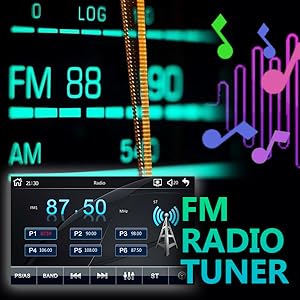
Figure 9: The user interface for the integrated FM radio tuner, displaying frequency selection and station presets.
3.8. Рулду башкаруу элементтери
If connected and configured during installation, use your vehicle's steering wheel controls to manage volume, tracks, and other functions without taking your hands off the wheel.
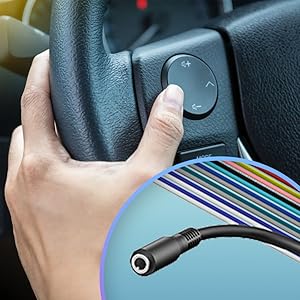
Figure 10: Diagram illustrating the connection point for steering wheel controls, enabling remote operation of the stereo.
4. Техникалык тейлөө
- Тазалоо: Экранды жана аппаратты тазалоо үчүн жумшак, кургак чүпүрөктү колдонуңуз. Абразивдүү тазалагычтардан же эриткичтерден качыңыз.
- Программалык камсыздоонун жаңыртуулары: Мезгил-мезгили менен өндүрүүчүнүн текшерүү website for continuous firmware upgrades to ensure optimal performance and access to new features.

Figure 11: An icon representing the availability of continuous firmware upgrades for the device, indicating ongoing support and feature enhancements.
5. Кыйынчылыктарды
Эгер көйгөйлөргө туш болсоңуз, төмөнкү жалпы көйгөйлөрдү жана чечимдерди караңыз:
- Кубат жок:
- Check all power connections (yellow, red, black wires) for secure contact.
- Verify the vehicle's fuse box and the stereo's inline fuse are intact.
- Аудио жок:
- Ensure all speaker wires are correctly connected and not short-circuited.
- Check the volume level and mute settings on the stereo.
- Verify the audio source is correctly selected (e.g., Bluetooth, AUX, Radio).
- CarPlay/Android Auto туташпай жатат:
- Ensure Bluetooth and Wi-Fi are enabled on your phone and the stereo.
- Forget the device on both the phone and stereo, then attempt to re-pair.
- Check for any software updates for your phone's operating system or the stereo's firmware.
- USB Charging is Slow/Insufficient:
- The USB port is primarily for data transfer and may provide standard charging output. For faster charging, use a dedicated car charger.
- Сенсордук экран жооп бербейт:
- Perform a soft reset by pressing the RST (reset) button, usually a small pinhole on the front panel.
- Экран таза жана таштандылардан таза экенин текшериңиз.
6. Техникалык шарттар
| Өзгөчөлүк | Спецификация |
|---|---|
| Бренд | Корехан |
| Модель номери | CDI-JD-AACP-A3 |
| Дисплей өлчөмү | 7 дюйм |
| Дисплей түрү | HD IPS сенсордук экран |
| Резолюция | 1024x600 пиксел |
| Байланыш технологиясы | Auxiliary, Bluetooth, USB, Wireless Android Auto, Wireless Carplay |
| Bluetooth версиясы | 5.0 |
| Өзгөчөлүктөр | Android Auto, Apple CarPlay, FM Tuner, Screen Mirroring, Voice Control |
| Controller Type | Google Жардамчысы, Siri |
| Аудио чыгаруу режими | Стерео (2.1 Айланадагы үн каналынын конфигурациясы) |
| Элемент Салмагы | 1.68 фунт |
| Пакеттин өлчөмдөрү | 8.23 x 6.06 x 4.37 дюйм |
| Түс | Кара |
7. Кепилдик жана колдоо
7.1. Кепилдик маалыматы
This Corehan product comes with a standard manufacturer's warranty. Please refer to the warranty card included in your product packaging for specific terms, conditions, and duration. Keep your proof of purchase for warranty claims.
7.2. Кардарларды колдоо кызматы
For technical assistance, troubleshooting beyond this manual, or warranty inquiries, please contact Corehan customer support through the following channels:
- Онлайн колдоо: Visit the official Corehan webКөп берилүүчү суроолор, колдоо булактары жана байланыш формалары үчүн сайт.
- Электрондук почта колдоо: Продуктуңуздун таңгагына же расмий өкүлгө кайрылыңыз webкардарларды тейлөө электрондук почта дареги үчүн сайт.


