Introduction
This manual provides essential instructions for setting up, operating, and maintaining your SVITOO Kids Tablet 10 Inch. Designed for young users, this Android 15 tablet features parental controls, a durable shockproof case, and a vibrant 10-inch HD IPS display. Please read this guide thoroughly to ensure proper use and to maximize your tablet's functionality.
Кутуда эмне бар
- SVITOO Kids Tablet 10 Inch
- Protective Cover (Pre-installed)
- USB-C заряддоо кабели
- User Manual
- Белек куту
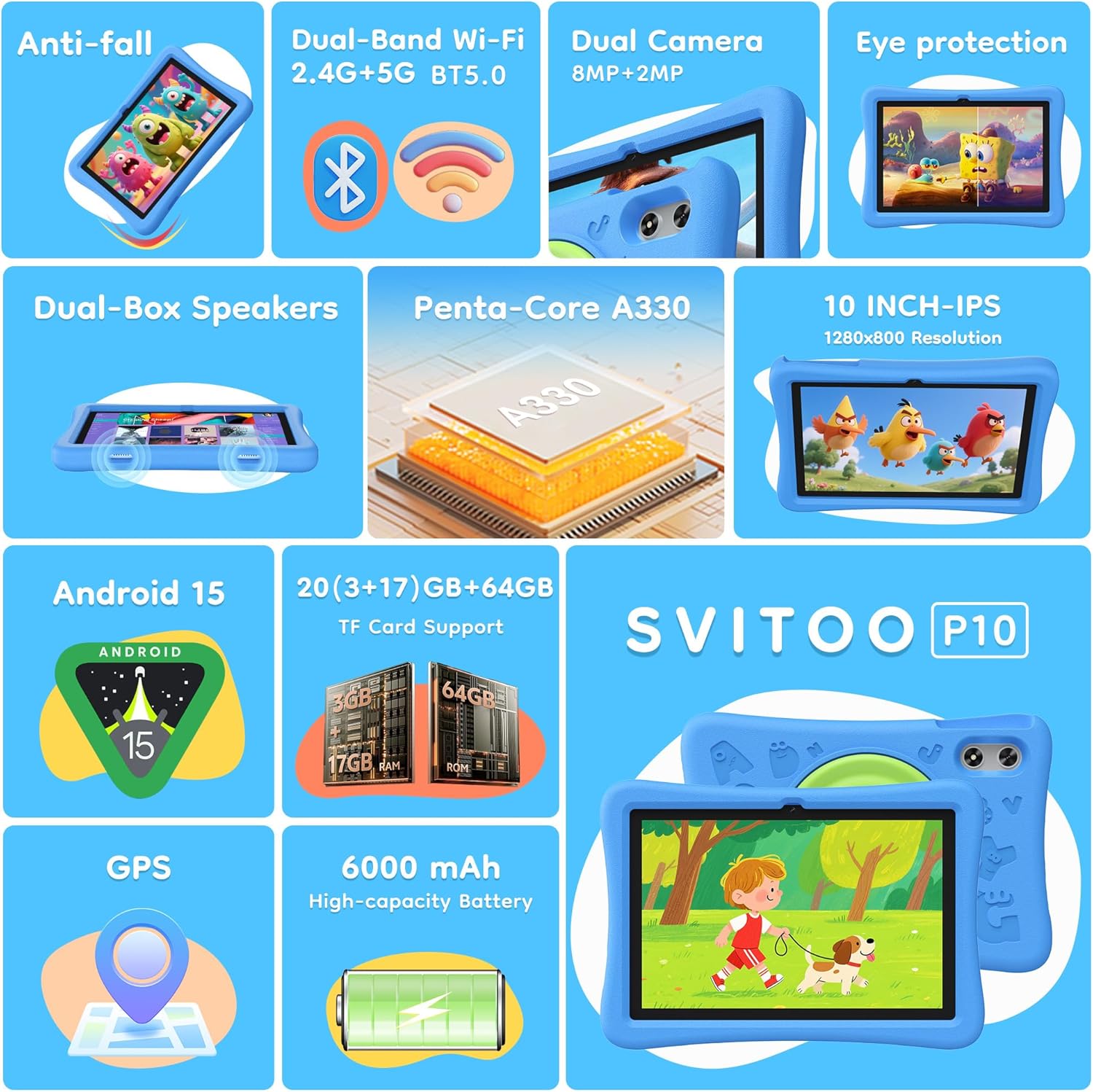
Image: The SVITOO Kids Tablet 10 Inch, shown in its blue protective case, highlighting its robust design suitable for children.
Продукт бүттүview
Негизги өзгөчөлүктөрү
- Операция системасы: Android 15 with GMS Certification for full Google Play access.
- Дисплей: 10-inch HD IPS (1280 x 800 pixels) touchscreen with eye protection mode.
- Процессор: Unisoc T7200 8-core CPU for smooth performance.
- Эстутум жана сактоо: 20GB RAM (3GB physical + 17GB virtual) and 64GB internal storage, expandable up to 1TB via microSD card (sold separately).
- Камералар: 8MP Rear Camera and 2MP Front Camera.
- Байланыш: Dual-Band Wi-Fi (2.4/5 GHz) and Bluetooth 5.0.
- Батарея: 6000mAh high-capacity battery for extended usage.
- Аудио: Dual-box speakers and a 3.5mm headphone jack.
- Узактыгы: Kid-friendly EVA shockproof case with a 360° rotating handle and 180° rotating stand.
- Ата-энелик көзөмөл: Advanced settings for screen time limits, content filtering, and app management.
Планшет компоненттери
Планшетиңиздин физикалык компоненттери менен таанышып алыңыз:

Сүрөт: деталдуу view of the tablet's side and rear, indicating the USB Type-C port, headphone jack, power ON/OFF button, volume controls, speakers, rear camera, and front camera.
- USB Type-C порту: Заряддоо жана маалыматтарды өткөрүү үчүн.
- Наушник уячасы (3.5 мм): Зымдуу кулакчындарды туташтыруу үчүн.
- Power ON/OFF баскычы: To turn the tablet on/off or put it to sleep.
- Үн баскычтары: Аудио үнүн жөндөө үчүн.
- Баяндамачылар: Dual-box speakers for audio output.
- Алдыңкы камера: Видео чалуулар жана селфи үчүн.
- Арткы камера: Сүрөт жана видео тартуу үчүн.
- MicroSD картасынын уячасы: Located under a protective flap, for storage expansion.

Image: The tablet's protective case featuring a versatile 360-degree rotating handle that also functions as a 180-degree rotating stand, allowing for various viewбурчтар.
Орнотуу колдонмосу
- Планшетти заряддоо: Before first use, fully charge the tablet using the provided USB-C cable and a compatible power adapter.
- Күйгүзүү: Press and hold the Power ON/OFF button until the screen lights up.
- Баштапкы орнотуу: Тилиңизди тандоо, Wi-Fi тармагына туташуу жана Google аккаунтуңузду орнотуу үчүн экрандагы көрсөтмөлөрдү аткарыңыз.
- Google Kids Space / Parental Controls: During setup, you will have the option to configure Google Kids Space or other parental control settings. It is highly recommended to set these up immediately to ensure a safe environment for your child.
- Колдонмолорду орнотуу: Once setup is complete, you can download age-appropriate apps and games from the Google Play Store.
Иштөө нускамалары
Негизги навигация
- Башкы экран: Swipe left or right to access different app pages.
- Колдонмо тартмасы: Экранды ылдый жагынан өйдө сүрүңүз view бардык орнотулган колдонмолор.
- Эскертмелер жана Ыкчам жөндөөлөр: Swipe down from the top of the screen to access notifications and quick settings like Wi-Fi, Bluetooth, and screen brightness.
- Back, Home, Recent Apps: Use the navigation buttons at the bottom of the screen to go back, return to the home screen, or view жакында ачылган колдонмолор.
Планшетти заряддоо
Connect the USB-C charging cable to the tablet's USB-C port and the other end to a power adapter. The battery icon on the screen will indicate charging status. A full charge provides approximately 12 hours of mixed use.

Image: The tablet connected to a charger, displaying a battery icon with 99% charge, illustrating the charging process and battery life features like Night Mode and Energy Saving.
Көздү коргоо режими
To reduce eye strain, especially during prolonged use, activate the Eye Protection Mode (often called Night Mode or Reading Mode) from the quick settings panel or display settings. This mode adjusts screen colors to warmer tones.
Ата-энелик көзөмөл
The SVITOO Kids Tablet features robust parental controls to help manage your child's digital experience. These controls are integrated with Android 15 and Google Family Link.

Image: A family using the tablet, with an overlay showing various parental control options such as setting screen time limits, blocking harmful apps/websites, approving app downloads, and tracking child's location.
Configuring Parental Controls:
- Кирүү Орнотуулары: барыңыз Орнотуулар > Санариптик бакубаттуулук жана ата-эненин көзөмөлү or search for "Family Link" in your app drawer.
- Set Screen Time Limits: Define daily limits for tablet usage to encourage balanced screen time.
- Мазмунду чыпкалоо: Орунсуз мазмунга кирүүнү бөгөттөө webсайттар жана колдонмолор.
- Колдонмо бекитүүлөрү: Require parental approval for new app downloads or in-app purchases.
- Жайгашкан жерди көзөмөлдөө: Monitor your child's device location (if enabled and configured).
For detailed instructions on Google Family Link, please refer to Google's official support documentation.
Техникалык тейлөө
- Тазалоо: Экранды жана планшеттин корпусун тазалоо үчүн жумшак, мамыксыз чүпүрөктү колдонуңуз. Абразивдүү тазалоочу каражаттарды же эриткичтерди колдонбоңуз.
- Батареяга кам көрүү: To prolong battery life, avoid fully discharging the tablet frequently. Charge it regularly and avoid exposing it to extreme temperatures.
- Программалык камсыздоо жаңыртуулары: Keep the tablet's operating system and apps updated to ensure optimal performance and security.
- Сактагыч: Store the tablet in a cool, dry place away from direct sunlight when not in use.
- Коргоочу корпус: The included EVA shockproof case provides protection against drops and bumps. Ensure it is properly fitted at all times.
Проблемаларды чечүү
| Көйгөй | Чечим |
|---|---|
| Планшет күйбөйт. | Ensure the tablet is fully charged. Connect it to a charger for at least 30 minutes, then try powering it on again. |
| Экран жооп бербей жатат. | Perform a force restart by holding the Power ON/OFF button for 10-15 seconds. If the issue persists, contact support. |
| Wi-Fi туташуу маселелери. | Check if other devices can connect to the Wi-Fi network. Restart your router and the tablet. Forget the network and reconnect. |
| Колдонмолор бузулуп же жай иштеп жатат. | Close background apps. Clear app cache (Settings > Apps > [App Name] > Storage > Clear Cache). Ensure sufficient storage space is available. Restart the tablet. |
| Батарея бат эле түгөнөт. | Экрандын жарыктыгын азайтыңыз. Колдонулбаган колдонмолорду жабыңыз. Колдонулбай турганда Wi-Fi/Bluetooth'ту өчүрүңүз. Кубатты көп сарптаган колдонмолорду аныктоо үчүн жөндөөлөрдөн батареянын колдонулушун текшериңиз. |
Техникалык шарттар
| Өзгөчөлүк | Деталь |
|---|---|
| Модель аты | SVITOO Tab 10 GMS Certified 1027C |
| Операция системасы | Android 15 |
| Screen Size | 10 дюйм |
| Screen Resolution | 1280 x 800 пиксел (HD IPS) |
| Процессор | 1.8 GHz (Unisoc T7200 8-core CPU) |
| RAM | 20 ГБ (3 ГБ физикалык + 17 ГБ виртуалдык) |
| Ички сактагыч | 64 ГБ |
| Кеңейтүүчү сактагыч | Up to 1TB via MicroSD (sold separately) |
| Графикалык сопроцессор | Mali-G57 processor Imagination Tech |
| Зымсыз түрү | 802.11a/b/g/n/ac (Dual-Band 2.4/5 GHz) |
| Bluetooth | Bluetooth 5.0 |
| Батарея сыйымдуулугу | 6000mAh |
| Батареянын орточо иштөө мөөнөтү | 12 саат |
| Алдыңкы камера | 2 мегапиксел |
| Арткы камера | 8 мегапиксел |
| Элемент Салмагы | 2.44 фунт |
| Продукциянын өлчөмдөрү | 9.7 x 6.4 x 0.4 дюйм |
Кепилдик жана колдоо
Your SVITOO Kids Tablet comes with a 1-Year Manufacturer Protection. This warranty covers manufacturing defects under normal use. It does not cover damage caused by misuse, accidents, natural disasters, or unauthorized modifications.
For technical support, warranty claims, or any questions regarding your product, please contact SVITOO customer service through your Amazon order page. Look for the "Contact Us" option next to your order details.
Сураныч, кепилдик максаттары үчүн сатып алганыңыздын далилин сактап коюңуз.


