Dasqua 8300-0025 High Precision Level with Portable Display Kit User Manual
Model: 8300-0025 | Brand: Dasqua
1. Продукт бүтүп калдыview
The Dasqua ultra-high precision leveling device allows operators to save over 70% of the time spent on machine leveling. The measuring end and the handheld terminal are connected wirelessly, and the measuring data is directly displayed on the handheld terminal so that the horizontal state of the machine can be viewed anytime. This completely solves the problem that operators have to repeatedly check the bubble of the traditional bar-type level instrument. The unique network leveling function can help with improving leveling process to be more accurate and faster when completing the leveling work on large high-precision machine tools. This is a hand-held terminal device for long distance observation and recording. Precision-machined groove bottom and rounded side allow accurate measurements on both flat and cylindrical surfaces. Repeatability is 0.02mm/m. Metal on/off button. Completely sealed and waterproof.

Figure 1: Dasqua 8300-0025 High Precision Level with Portable Display Kit, showing the main leveling unit with a handle and power button.
2. Product Structure and Components
Familiarize yourself with the key components of the Dasqua High Precision Level and Portable Display Kit.

Figure 2: Labeled diagram of the main unit and portable display. Key components include the Handle, Top Cover, Battery Compartment, Switch, Body, Base, LOGO, Measuring Surface, and LCD.
- Main Leveling Unit: Features a handle for portability, a top cover, and a power switch. The body contains the internal precision sensors.
- Батарея бөлүмү: Located on the main unit for power source.
- Measuring Surface: Precision-machined groove bottom and rounded side for accurate measurements on both flat and cylindrical surfaces.
- Portable Display: A separate handheld terminal with an LCD screen for viewing measurement data wirelessly.
3. Орнотуу жана алгачкы колдонуу
Before operation, ensure the device is properly set up.
- Заряддоо: Ensure both the main leveling unit and the portable display are fully charged. Refer to the technical data for charging specifications (e.g., 5V 1A, 7h charging time, 500 cycles).
- Күйгүзүү: Turn on the power switch on the main leveling unit.
- Connect Handheld Terminal: Turn on the handheld terminal. Click the "refresh product number" icon on the handheld terminal to connect to the main unit wirelessly.
- Enter System: Click the logo on the handheld terminal to enter the system.
- Select Module: Select the module to be operated on the handheld terminal.

Figure 3: The main leveling unit alongside its portable wireless display.
4. Иштөө нускамалары
4.1. Single Machine Leveling Operation
Follow these steps for precise leveling of a single machine.
- Click the "Leveling Mode" of the software to enter the leveling module.
- Click the "Single Gauge Leveling" button to enter the single gauge leveling interface.
- Click the corresponding section to enlarge as needed.
- According to the position and value of the virtual bubble, rotate the adjusting nut until the bubble is in the middle and the value reaches the required tolerance range.
4.2. Level Gauge Calibration Operation
Calibration ensures the accuracy of your level gauge.
- Place the level gauge on the level table tightly to ensure full contact with the machine table.
- Use the right angle accessory to locate the initial position of the level gauge.
- Click "Calibration interface" of app to enter calibration module.
- Click "Select Number" button to select the number displayed on the LCD of the corresponding level gauge.
- Click the "Step 1" button to start calibration.
- Rotate the level gauge by 180° on the machine table.
- Click the "Step 2" button and prompt "Calibration Complete...".
- Turn the level gauge back to its original position (use the right angle accessory, try to make the level gauge at same position with the initial place.).
- Prompt "Calibration Complete..." click the "Confirm" button to complete the calibration operation.

Figure 4: Excerpt from the operation manual showing steps for single machine leveling and calibration.
4.3. Network Leveling Function
The unique network leveling function significantly improves the accuracy and speed of leveling large high-precision machine tools. This feature allows for coordinated measurements and adjustments across multiple points, streamlining complex leveling tasks.
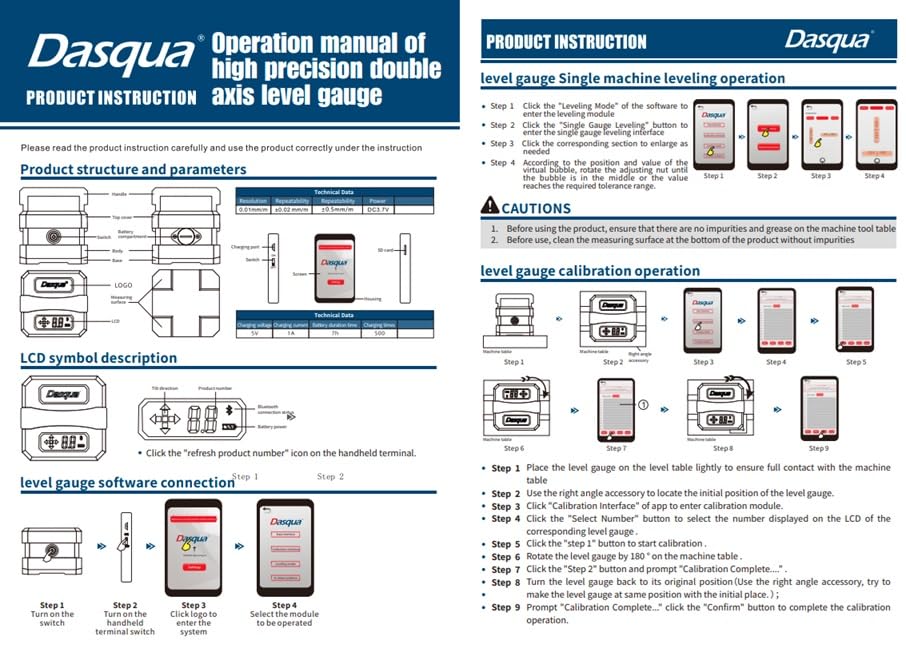
Figure 5: The handheld terminal in use, demonstrating its capability for long-distance observation and recording of leveling data.
5. Техникалык тейлөө жана кам көрүү
Proper maintenance ensures the longevity and accuracy of your Dasqua High Precision Level.
- Тазалоо: Keep the measuring surfaces clean and free from dust, debris, and grease. Use a soft, dry cloth for cleaning. Avoid abrasive materials or harsh chemicals.
- Сактагыч: Store the device in its protective case when not in use. Keep it in a dry environment, away from extreme temperatures and direct sunlight.
- Батареяга кам көрүү: For prolonged storage, ensure the batteries are partially charged (around 50%) and recharge them periodically to maintain battery health.
- Текшерүү: Regularly inspect the device for any signs of damage or wear. Ensure all connections are secure.
6. Кыйынчылыктарды
Жалпы маселелер жана аларды чечүү жолдору.
| Көйгөй | Мүмкүн себеп | Чечим |
|---|---|---|
| Түзмөк күйбөй жатат | Low battery; Power switch off; Internal fault. | Charge the device; Ensure power switch is in ON position; Contact support if issue persists. |
| No connection to handheld terminal | Bluetooth off; Out of range; Interference. | Ensure Bluetooth is enabled on both devices; Move closer to the main unit; Reduce potential interference sources. |
| Так эмес окуулар | Device not calibrated; Dirty measuring surface; External vibrations. | Perform calibration (refer to Section 4.2); Clean measuring surface; Ensure stable measurement environment. |
7. Техникалык шарттар
Detailed technical specifications for the Dasqua 8300-0025 High Precision Level.
- Модел: 8300-0025
- Продукциянын өлчөмдөрү: 5 x 7 x 7 дюйм; 10 фунт
- Кайталануучулук: 0.02мм/м
- Measuring Surfaces: Precision-machined groove bottom and rounded side for flat and cylindrical surfaces.
- Байланыш: Wireless connection to handheld terminal.
- Өзгөчөлүктөрү: Metal on/off button, completely sealed and waterproof.
- Өндүрүүчү: HHIP
- ASIN: B0F5WZQ8S2
8. Кепилдик жана колдоо
For warranty information, technical support, or service inquiries, please contact Dasqua customer service or refer to the official Dasqua webсайт. Кепилдик дооматтары үчүн сатып алуу дүмүрчөгүңүздү сактаңыз.
Байланыш маалыматы:
- Бренд дүкөнү: Visit the Dasqua Store on Amazon
- Өндүрүүчү: HHIP


