1. Киришүү
Thank you for choosing the GOBOULT Astra Neo Bluetooth In-Ear Earbuds. This manual provides essential information for setting up, operating, and maintaining your earbuds to ensure optimal performance and longevity. Please read this manual thoroughly before use.
2. Коопсуздук маалыматы
- Кулакчындарды же кубаттоочу кутуну өтө температурага, нымдуулукка же суюктукка тийгизбеңиз.
- Аппаратты түшүрүүдөн, тийүүдөн же ажыратуудан качыңыз.
- Кубаттоо үчүн берилген кубаттоочу кабелди же сертификатталган Type-C кабелин гана колдонуңуз.
- Угуу жөндөмүнө зыян келтирбөө үчүн орточо үн деңгээлинде угуңуз.
- Балдар жана үй жаныбарлары жетпеген жерде сактаңыз.
3. Пакеттин мазмуну
Пакетиңизде бардык буюмдар бар экенин текшериңиз:
- GOBOULT Astra Neo Earbuds (Left and Right)
- Заряддоо кутусу
- C түрүндөгү кубаттоочу кабель
- Кулак жаздыктары (ар кандай өлчөмдөгү)
- User Manual
- Кепилдик картасы
4. Продукт бүтүп калдыview
The GOBOULT Astra Neo earbuds feature a sleek design with touch controls and a compact charging case. The case includes breathing LED lights for status indication.

Image: GOBOULT Astra Neo Earbuds and Charging Case. The image displays the black earbuds removed from their charging case, which features a glowing blue LED strip.

Image: GOBOULT Astra Neo Comfort Grip Case and Earbuds. This image highlights the textured surface of the charging case and earbuds, along with the breathing case lights.
5. Орнотуу
5.1 Кулакчындарды жана кутучаны заряддоо
Биринчи колдонуудан мурун, кулакчындарды жана кубаттоочу кутучаны толук заряддаңыз.
- Кулакчындарды заряддоо кутусуна салыңыз. Алардын туура отурганын текшериңиз.
- Type-C заряддоо кабелин корпустагы заряддоо портуна жана кубат булагына туташтырыңыз.
- The LED indicator on the case will illuminate during charging and turn off or change color when fully charged.
A 10-minute charge provides approximately 100 minutes of playtime.

Image: GOBOULT Astra Neo Fast Charging Feature. This image illustrates the 70-hour playtime and the fast charging capability: 10 minutes of charge equals 100 minutes of playtime.
5.2 Pairing with a Device (Bluetooth 5.4)
The Astra Neo uses Bluetooth 5.4 with Blink & Pair technology for quick and stable connections.
- Заряддоо кутучасын ачыңыз. Кулакчындар жупташтыруу режимине автоматтык түрдө кирет.
- Түзмөгүңүздө (смартфон, планшет, ноутбук) Bluetooth иштетиңиз.
- Издөө available Bluetooth devices and select "GOBOULT Astra Neo" from the list.
- Туташкандан кийин үн билдирүүсү ийгиликтүү жупташтырууну ырастайт.

Image: GOBOULT Astra Neo Bluetooth 5.4 Pairing. This image shows a smartphone screen displaying a successful Bluetooth 5.4 connection to 'Astra Neo', emphasizing power efficiency and stable connection.
6. Иштөө нускамалары
6.1 Сенсордук башкаруу
The Astra Neo earbuds feature intuitive touch controls on each earbud:
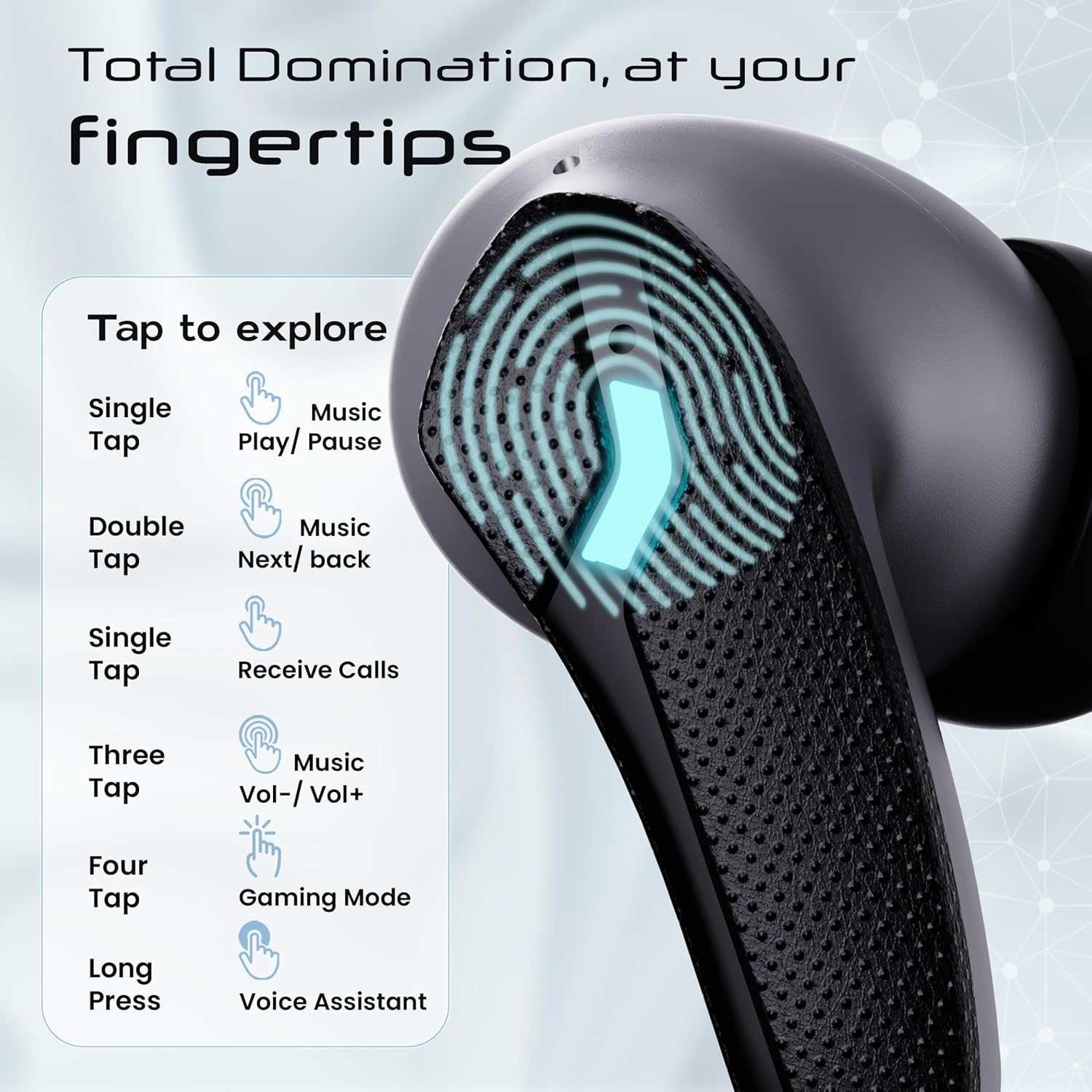
Image: GOBOULT Astra Neo Touch Controls Guide. This graphic details the various touch gestures for controlling music, calls, gaming mode, and voice assistant.
- Бир жолу таптоо: Play/Pause music, Receive Calls.
- Эки жолу таптоо: Music Next/Back (specific earbud for each function).
- Three Tap: Music Volume Up/Down (specific earbud for each function).
- Four Tap: Activate Gaming Mode.
- Узак басуу: Activate Voice Assistant (Google Assistant/Siri).
6.2 Оюн режими (40мс аз кечигүү)
Activate Gaming Mode for a synchronized audio experience during gameplay, reducing audio delay to 40ms.
- To activate: Four tap on either earbud.
- To deactivate: Four tap again on either earbud.

Image: GOBOULT Astra Neo Gaming Mode with 40ms Low Latency. This image depicts a user playing a mobile game with the earbuds, highlighting the ultra-low latency feature for an immersive gaming experience.
6.3 ZEN Quad Mic ENC for Calls
The ZEN Quad Mic Environmental Noise Cancellation (ENC) system ensures clear voice calls by filtering out background noise.

Image: GOBOULT Astra Neo ZEN Quad Mic ENC Technology. This image illustrates the internal components and the function of the 4 microphones for clear in-game communication and crystal-clear calling with Acoustic Echo Cancellation (AEC).
6.4 EQ режимдери
The Astra Neo earbuds support 4 EQ modes for customized audio experiences. Refer to the product packaging or official GOBOULT website for specific instructions on how to switch between these modes, as this functionality is typically managed via a companion app or specific touch gestures not detailed here.
7. Техникалык тейлөө
7.1 Тазалоо
- Кулакчындарды жана кубаттоочу кутуну жумшак, кургак, түксүз чүпүрөк менен акырын сүртүңүз.
- Катуу химиялык заттарды, тазалоочу эриткичтерди же күчтүү жуучу каражаттарды колдонбоңуз.
- Туура кубаттоону камсыз кылуу үчүн кулакчындардын жана капчыктын заряддоо контакттарын үзгүлтүксүз тазалап туруңуз.
7.2 Сууга туруктуулук (IPX5)
The Astra Neo earbuds are IPX5 water-resistant, meaning they are protected against sweat, rain, and splashes. They are not designed for submersion in water.
- Кулакчындарды атайылап сууга салбаңыз.
- If exposed to sweat or rain, wipe them dry before placing them back in the charging case.

Image: GOBOULT Astra Neo IPX5 Water Resistance and Voice Assistant. This image highlights the earbuds' sweatproof, rainproof, and splashproof capabilities, along with compatibility with Google Assistant and Hey Siri.
7.3 Сактоо
Колдонулбаганда, кулакчындарды коргоо жана кубаттоо үчүн кубаттоочу кутучага сактаңыз.
8. Кыйынчылыктарды
- Кулакчындар жупташкан жок: Эки кулакчын тең кубаттоочу кутуда экенин текшерип, жупташтыруу режимине кайра кирүү үчүн капкакты ачыңыз. Түзмөгүңүздүн Bluetooth жөндөөлөрүн текшерип, кайра туташтырып көрүңүз.
- Бир гана кулакчын иштейт: Эки кулакчынды тең кутуга кайра салып, капкагын жаап, бир нече секунд күтүп, андан кийин кайра ачыңыз. Бул көп учурда аларды кайра шайкештештирет.
- Үн жок: Түзмөгүңүздөгү жана кулакчындардын үнүнүн деңгээлин текшериңиз. Кулакчындар түзмөгүңүзгө туура туташтырылганын текшериңиз.
- Заряддоо маселелери: Clean the charging contacts on the earbuds and inside the case. Ensure the charging cable is securely connected and the power source is active.
- Чалуу сапаты начар: Ensure the microphones are not obstructed. Try moving to a quieter environment.
9. Техникалык шарттар
Key technical specifications for the GOBOULT Astra Neo Earbuds:
| Өзгөчөлүк | Спецификация |
|---|---|
| Модель аты | Astra Neo |
| Bluetooth версиясы | 5.4 |
| Оюн убактысы | 70 саатка чейин (кубаттоочу корпусу менен) |
| Тез заряддоо | 10 мүнөт кубаттоо = 100 мүнөт ойноо убактысы |
| Төмөн күтүү | 40 мс (Оюн режими) |
| Айдоочунун өлчөмү | 13mm BoomX Drivers |
| Микрофон | ZEN Quad Mic ENC |
| Суу каршылык | IPX5 |
| Башкаруу ыкмасы | тийүү |
| Байланыш технологиясы | Bluetooth, зымсыз |
| Наушник уясы | С типтеги тез кубаттоочу уяча |
| Элемент Салмагы | 47 грамм |
| Продукциянын өлчөмдөрү | 6.2 x 5.3 x 3.2 см |
| Батарея түрү | Литий полимери |
| Bluetooth диапазону | 10 метр |
| Импеданс | 32 Ом |

Image: GOBOULT Astra Neo 13mm BoomX Drivers. This image highlights the 13mm BoomX drivers, emphasizing crystal clear sound and support for MSBC, SBC, and AAC codecs.
10. Кепилдик жана колдоо
The GOBOULT Astra Neo Earbuds come with a 1 жылдык өндүрүүчү кепилдик from the date of purchase. This warranty covers manufacturing defects. For warranty claims or technical support, please refer to the contact information provided on your warranty card or visit the official GOBOULT webсайт.


