1. Киришүү
The OMBAR N1 is a high-performance rear view mirror dash camera system designed to enhance driving safety and provide comprehensive video recording. It features dual cameras for front 4K and rear 2.5K recording, advanced driver-assistance systems (ADAS), blind spot detection (BSD), lane change assist (LCA), GPS tracking, parking monitoring, and Wi-Fi connectivity for easy file башкаруу.

Image 1.1: OMBAR N1 Mirror Dash Cam and companion mobile application interface.
2. Пакеттин мазмуну
Төмөндө тизмеленген нерселердин баары пакетиңизге камтылганын текшериңиз. Эгерде кандайдыр бир нерселер жок болсо же бузулса, кардарларды колдоо менен байланышыңыз.

Image 2.1: All components included in the OMBAR N1 Mirror Dash Cam package.
- 1 x OMBAR N1 4K Mirror Dash Cam
- 1 x 2.5K арткы камера, бурамалары жана жабышчаак бекиткичи менен
- Унаа кубаттагычы менен 1 x 12 футтук C типтеги кубат кабели
- 1 х 20 фут арткы камера кабели
- 1 х тышкы GPS антеннасы
- 1 x 64 ГБ MicroSD картасы
- 1 x Анти Жаркылдаган коргоочу пленка
- 1 x OMBAR User Manual
- 5 х кабелдик клиптер
- 4 x кайыш
- 1 x Pry куралы
- 1 x Тазалоочу майлыктар
3. Орнотуу жана орнотуу
3.1. Камераны орнотуу
- Attach to Rear View Күзгү: Secure the N1 Mirror Dash Cam over your existing rear view mirror using the provided straps. Ensure it is firmly attached and centered for optimal viewing.
- Adjust Front Camera Lens: The front camera lens can be adjusted to capture the desired field of view.
3.2. Арткы камераны орнотуу
- Монтаждоо ордун тандоо: Install the rear camera on the rear windshield or near the license plate. Ensure the view тоскоолдуксуз болуп саналат.
- Connect Rear Camera Cable: Route the 20ft rear camera cable from the main dash cam unit to the rear camera. Connect the cable securely.
- Adjust Rear Camera View: The rear camera display can be adjusted for mirror flip and vertical flip settings to match your installation orientation.

Image 3.1: Adjustable rear camera display options for mirror and vertical flipping.
3.3. Connecting Power and GPS
- MicroSD картасын салыңыз: Insert the provided 64GB MicroSD card into the designated slot on the dash cam.
- GPS антеннасын туташтыруу: Plug the external GPS antenna into the dash cam and mount it on the dashboard or windshield where it has a clear view асмандын.
- Кубат туташуу: Connect the Type-C power cable to the dash cam and plug the car charger into your vehicle's 12V power outlet.
3.4. Applying Anti-Glare Protective Film
The anti-glare protective film helps minimize reflections and enhances contrast for improved visibility. Carefully apply the film to the dash cam screen, ensuring no air bubbles.

Image 3.2: The anti-glare protective film reduces reflections and improves screen clarity.
4. Иштөө нускамалары
4.1. Негизги операция
- Күйгүзүү/өчүрүү: The dash cam will automatically power on and begin recording when the vehicle starts, and power off when the ignition is turned off.
- Экрандагы дисплей: The 12-inch IPS display provides a wide field of view. Brightness, lens angle, and field of view can be adjusted via the touchscreen interface.

Image 4.1: Adjustable screen settings for optimal viewтажрыйбасы.
4.2. Жазуу режимдери
- Цикл жаздыруу: The dash cam records video in segments (1, 3, or 5 minutes). When the MicroSD card is full, the oldest unlocked recordings are automatically overwritten.
- Шашылыш жазуу: In case of a collision, the built-in G-sensor automatically locks the current video segment to prevent it from being overwritten. This can also be triggered manually or via voice command.

Image 4.2: Emergency recording methods ensure critical footage сакталды.
4.3. Паркинг монитору
The 24-hour parking monitor provides surveillance when your vehicle is parked. This feature requires a hardwire kit (sold separately, ASIN: B0DQK1QW7ZM) for continuous power.

Image 4.3: The 24-hour parking monitor provides security for your vehicle.
4.4. Үн менен башкаруу
The dash cam supports various voice commands for hands-free operation. Examples include "Take photo," "Start recording," "Turn on WiFi," "Turn off display," and "Show rear camera."

Image 4.4: Voice control allows for hands-free operation of the dash cam.
4.5. Wi-Fi and App Control
Connect the dash cam to your smartphone via 5.8GHz Wi-Fi using the OMBAR app. This allows for live viewжазылган foo файлын ing, жүктөө жана бөлүшүүtage. The Wi-Fi range is approximately 25ft (about 1.5 parking spaces) and does not support remote live view.

Image 4.5: The OMBAR app facilitates video management via 5.8GHz Wi-Fi.
5. Өркүндөтүлгөн функциялар
5.1. ADAS (Advanced Driver Assistance System)
The ADAS feature provides real-time alerts to help prevent accidents. This includes:
- Алдыга кагылышуу эскертүүсү: Alerts when approaching a vehicle too quickly.
- Жолдон кетүү эскертүүсү: Notifies if the vehicle drifts out of its lane.
- Жөө жүргүнчүлөрдүн кагылышуусу жөнүндө эскертүү: Detects pedestrians in the vehicle's path.
- Forward Vehicle Start Warning: Alerts when traffic ahead begins to move.
- Close Range Warning: Warns of objects in close proximity.
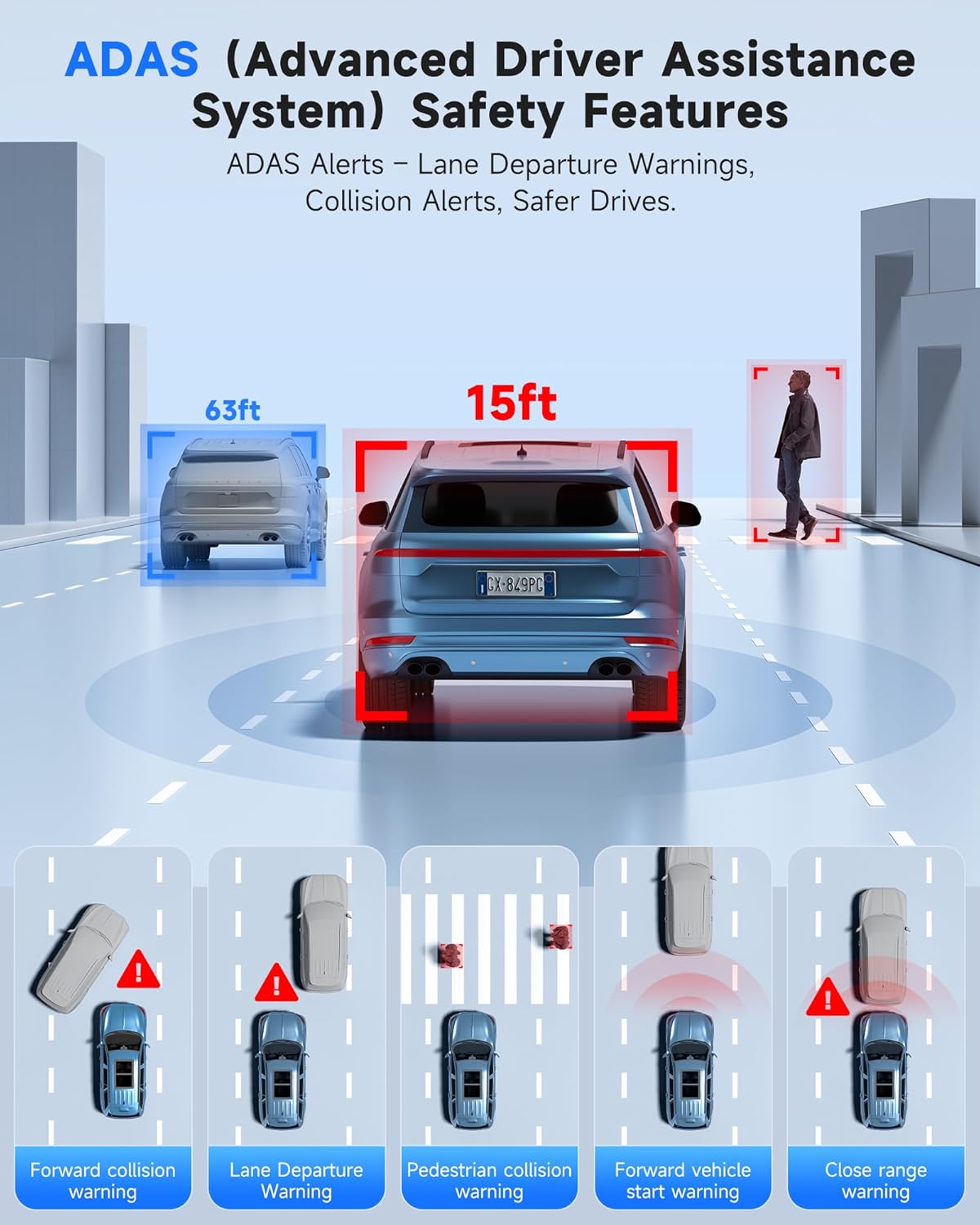
Image 5.1: ADAS provides multiple safety alerts for a safer driving experience.
5.2. BSD (Blind Spot Detection) & LCA (Lane Change Assist)
These features provide 360° protection by monitoring your vehicle's sides and rear for approaching vehicles.
- Blind Spot Detection: Alerts to vehicles in your blind spots.
- Тилкени алмаштырууга жардам берүү: Warns if a lane change is unsafe due to approaching vehicles.

Image 5.2: BSD and LCA provide warnings for vehicles in blind spots and during lane changes.
5.3. Built-in GPS & Route Tracking
The integrated GPS module records your driving route, speed, and location data, which can be reviewed via the OMBAR app or dedicated PC software.

Image 5.3: GPS tracking records route and speed data for review.
5.4. Түнкү көрүнүш
Advanced HDR technology and sensor capabilities ensure clear video recording even in low-light conditions, capturing details like license plates at night.

Image 5.4: Night vision capabilities provide clear footage аз жарык чөйрөдө.
6. Техникалык тейлөө
- Тазалоо: Use a soft, dry cloth to clean the dash cam screen and lenses. Avoid abrasive cleaners.
- MicroSD картага кам көрүү: Format the MicroSD card regularly (e.g., once a month) to ensure optimal performance and prevent data corruption. Use only high-quality MicroSD cards.
- Программалык камсыздоонун жаңыртуулары: Check the OMBAR website or app periodically for firmware updates to ensure your dash cam has the latest features and improvements.
7. Кыйынчылыктарды
| Көйгөй | Мүмкүн себеп | Чечим |
|---|---|---|
| Dash камерасы күйбөйт. | Электр менен камсыздоо жок; кабели бузук. | Check power cable connection to car charger and dash cam. Ensure car's 12V outlet is functional. |
| Жаздыруу токтойт же катып калат. | MicroSD card full or corrupted; low-quality MicroSD card. | Format the MicroSD card. Replace with a high-speed, high-endurance MicroSD card if issues persist. |
| GPS сигналы табылган жок. | GPS антеннасы тосулган же ажыратылган. | Ensure GPS antenna is mounted with a clear view of the sky and securely connected. |
| Wi-Fi туташуу маселелери. | Сырсөз туура эмес; диапазондон тышкары. | Verify Wi-Fi password. Ensure device is within 25ft of the dash cam. |
| Screen is too dark/bright. | Жарыктык жөндөөлөрү. | Adjust screen brightness via the touchscreen settings. |
8. Техникалык шарттар
| Өзгөчөлүк | Деталь |
|---|---|
| Модель аты | N1 |
| Алдыңкы камеранын чечилиши | 4K (3840x2160) @ 30 кадр/сек |
| Арткы камеранын чечилиши | 2.5K (2560x1440) @ 30 кадр/сек |
| Дисплей | 12 дюймдук IPS сенсордук экраны |
| Байланыш | 5.8GHz Wi-Fi, USB, Memory SD Card |
| Өзгөчөлүктөр | Built-In WiFi, Built-In GPS, G-Sensor, ADAS, Blind Spot Detection, Lane Change Assist, Parking Monitor, Reverse Assist, Touch Screen, App Control, Voice Control, Loop Recording, Built-In Microphone, Built-In Speaker, Built-In Supercapacitor, HDR, Night Vision |
| Сактагыч | MicroSD картасын колдойт (64 ГБ кошо) |
| Иштөө температурасы | -20°F – 176°F (-28°C – 80°C) |
| Продукциянын өлчөмдөрү | 0.1 x 0.5 x 0.5 дюйм |
| Элемент Салмагы | 2.38 фунт |
| Монтаж түрү | Арткыview Mirror Mount |
| Унаа кызматынын түрү | Bus, Car, Minivan, Truck |

Image 8.1: The dash cam is designed for reliable operation in extreme temperatures.
9. Кепилдик жана колдоо
- Кепилдик: The OMBAR N1 Mirror Dash Cam comes with a 1-year manufacturer's warranty.
- Кайтаруу саясаты: A 30-day return policy is applicable from the date of purchase.
- Кардарларды колдоо: For technical assistance or warranty claims, please contact OMBAR customer support at support@ombars.com. Support is typically available within 24 hours.


