1. Продукт бүтүп калдыview
The ARENTI P10 Wireless Video Doorbell is an innovative security solution designed to provide comprehensive surveillance of your entryway. Featuring a dual-camera system, advanced motion detection, and two-way audio, it ensures you are always connected to your home's front door, whether you are present or away.
Its robust and elegant design, coupled with IP65 weather protection, ensures reliable operation in various environmental conditions. The P10 offers flexible power options, including a long-lasting battery or optional wired connection, and supports both local and cloud storage for video recordings.

Figure 1: ARENTI P10 Wireless Video Doorbell and Chime Unit. The doorbell features a sleek black design with two cameras and a large button, accompanied by a compact, patterned chime unit.
2. Орнотуу колдонмосу
2.1 Пакеттин мазмуну
Орнотууну баштоодон мурун, бардык компоненттер бар экенин текшериңиз:
- ARENTI P10 Video Doorbell
- Коңгуроо бирдиги
- Кронштейн орнотуу
- Power Cables (for AC output, if wired installation is chosen)
- Кубаттуу адаптер
- Бурама пакети
- Пинди чыгаруу
- Double-sided Adhesive Tape (for chime and doorbell)
- User Manual
2.2 Коңгуроону заряддоо
The ARENTI P10 Video Doorbell comes with a built-in 5200 mAh lithium-ion battery. For optimal performance, fully charge the doorbell before initial use. Connect the doorbell to the power adapter using the provided USB cable.
2.3 Колдонмону орнотуу жана жупташтыруу
- жүктөп алыңыз Arenti App from the App Store (iOS 9 or higher) or Google Play Store (Android 5 or higher).
- Каттоо эсебин түзүп, кириңиз.
- Follow the in-app instructions to add your ARENTI P10 doorbell. This typically involves scanning a QR code on the device or manually selecting the device type and connecting to your Wi-Fi network (2.4 GHz IEEE802.11b/g/n).
- Pair the doorbell with the chime unit as instructed in the app.
2.4 Коңгуроону орнотуу
The ARENTI P10 is designed for easy wireless installation, typically taking only a few minutes. It can also be permanently wired if preferred.
- Кире бериш эшигиңиздин жанына ылайыктуу жерди тандап, тазалыкты камсыз кылыңыз view сиз көзөмөлдөгүңүз келген аймак.
- Attach the mounting bracket to the wall using the provided screws or double-sided adhesive tape.
- Secure the doorbell onto the mounting bracket. Ensure it clicks into place firmly.

Figure 2: ARENTI P10 Doorbell with Mounting Plate. The image shows the back of the doorbell detached from its mounting plate, illustrating how the device connects to its wall mount.
3. Иштөө нускамалары
3.1 Кош камера системасы
The ARENTI P10 features two high-resolution cameras for comprehensive coverage:
- Upper Camera: Provides 3-megapixel (2304 x 1296 pixels) recordings, ideal for reliable face and person detection.
- Lower Camera: Offers 2-megapixel (1920 x 1080 pixels) recordings, suitable for monitoring packages or objects directly in front of your door.
3.2 Кыймылды аныктоо жана эскертмелер
The integrated PIR sensor reliably detects human motion up to 5 meters away within a 100° detection angle. Upon detection, you will receive an instant notification on your smartphone via the Arenti app, allowing you to respond immediately.
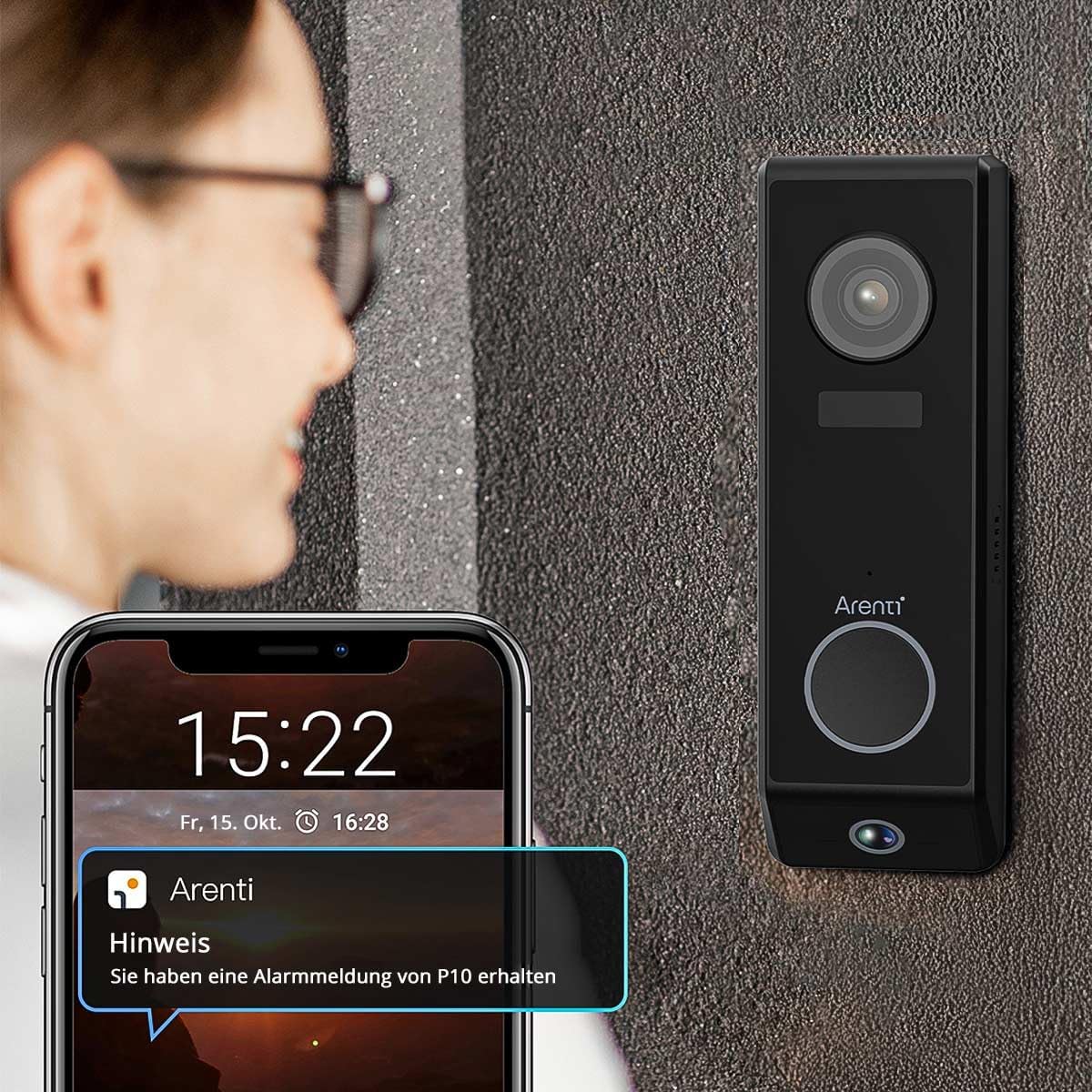
Figure 3: ARENTI P10 Doorbell with Phone Notification. A person is shown looking at their smartphone, which displays an alert from the Arenti app, indicating motion detection by the doorbell.
3.3 Эки тараптуу аудио байланыш
Utilize the full-duplex two-way audio function to communicate clearly with visitors at your door. High-quality microphones and speakers ensure excellent conversation quality, allowing you to speak to visitors, ask questions, or provide instructions from anywhere.
3.4 Түнкү көрүнүш
Modern integrated infrared LEDs provide clear and detailed video recordings even in complete darkness, with a night vision range of up to 10 meters. This ensures your entryway remains monitored and protected day and night.
3.5 Сактоо параметрлери
Video recordings can be stored flexibly:
- Жергиликтүү сактагыч: Insert a microSD card (up to 256 GB) into the doorbell for local storage.
- Булут кызматы: Utilize the convenient cloud service for secure and accessible recordings.

Figure 4: ARENTI P10 Cloud and SD Card Storage Options. A diagram illustrating the two storage methods: cloud storage and local storage via an SD card, with an inset showing the SD card slot on the doorbell.
3.6 Smart Home интеграциясы
The ARENTI P10 doorbell seamlessly integrates with popular smart home systems such as Amazon Alexa and Google Home, allowing for convenient control and monitoring through voice commands or your existing smart home ecosystem.
4. Техникалык тейлөө
4.1 Батареяны башкаруу
The 5200 mAh battery provides up to 6 months of standby time. With regular use (approximately 10 detections per day), the battery typically lasts 2 to 3 months. Recharge the doorbell when the battery level is low, as indicated by the Arenti app.
4.2 Тазалоо
To maintain optimal performance and appearance, periodically clean the doorbell's exterior. Use a soft, damp cloth to wipe away dust and dirt. Avoid using harsh chemicals or abrasive cleaners, as these can damage the device. Ensure the camera lenses are clean for clear video quality.
4.3 Микропрограмма жаңыртуулары
Regularly check the Arenti app for available firmware updates. Updates often include performance improvements, new features, and security enhancements. Follow the in-app instructions to perform any necessary updates.
5. Кыйынчылыктарды
5.1 No Power/Doorbell Not Turning On
- Ensure the battery is fully charged. Connect the doorbell to power and allow it to charge for several hours.
- If using wired power, verify the connection and power source.
5.2 Видеонун сапаты начар
- Камера линзаларын жумшак, мамыксыз чүпүрөк менен тазалаңыз.
- Көзөмөлгө алынган аймакта шайкеш жарыктандырууну камсыз кылуу.
- Wi-Fi сигналыңыздын күчүн текшериңиз. Алсыз сигнал видео агымынын сапатына таасирин тийгизиши мүмкүн.
5.3 Кыймылды аныктоо көйгөйлөрү
- Adjust the motion detection sensitivity settings in the Arenti app.
- Сенсордун ишине тоскоол болгон эч кандай тоскоолдуктар жок экенин текшериңиз view.
- Verify the doorbell is positioned correctly to cover the desired area.
5.4 Wi-Fi байланыш көйгөйлөрү
- Wi-Fi тармагыңыз 2.4 ГГц экенин текшериңиз. Коңгуроо 5 ГГц тармактарды колдоого албайт.
- Коңгуроосун Wi-Fi роутериңизге жакындатыңыз же Wi-Fi кеңейткичин карап көрүңүз.
- Роутериңизди жана коңгуроону өчүрүп күйгүзүңүз.
- If issues persist, try resetting the doorbell to factory settings (refer to the app or quick start guide for reset instructions) and re-pairing it.
5.5 Эки тараптуу аудио иштебей жатат
- Check the volume settings on your smartphone and in the Arenti app.
- Ensure there are no obstructions covering the doorbell's microphone or speaker.
- Интернет байланышыңыз туруктуу экенин текшериңиз.
6. Техникалык шарттар
| Өзгөчөлүк | Спецификация |
|---|---|
| Видео жаздыруу чечими | Upper Camera: 2304 x 1296 pixels (3MP) Lower Camera: 1920 x 1080 pixels (2MP) |
| Батарея сыйымдуулугу | 5200 мАч литий-ион |
| Батареянын иштөө мөөнөтү (күтүү режими) | 6 айга чейин |
| Кыймылды аныктоо диапазону | Up to 5 meters (PIR sensor) |
| Motion Detection Angle | 100° |
| Түнкү көрүү диапазону | Up to 10 meters (Infrared LEDs) |
| Зымсыз байланыш | Wi-Fi 2.4 GHz (IEEE802.11b/g/n) |
| Сактагыч параметрлери | MicroSD card (max. 256 GB), Cloud service |
| Аудио | Two-way audio (Full Duplex) |
| Аба ырайына каршылык | IP65 (Waterproof, protected against dust, rain, and snow) |
| Шайкеш түзмөктөр | iOS 9 же андан жогору, Android 5 же андан жогору |
| Өлчөмдөрү (L x W x Y) | 3.4 x 5.4 x 16.5 см (1.34 x 2.13 x 6.5 дюйм) |
| Салмагы | 490 грамм |
| Күч | 5 вольт, 2 ватт |
| Орнотуу түрү | Screw-in / Wall mount bracket |
7. Кепилдик жана колдоо
For detailed warranty information and customer support, please refer to the official ARENTI website or contact ARENTI customer service directly. Keep your purchase receipt for warranty claims.


