1. Продукт бүтүп калдыview
The DOOGEE Tab A9 is a 10.1-inch Android 15 tablet designed for versatile use, from productivity to entertainment. It features a quad-core processor, ample memory, and a high-capacity battery, complemented by a suite of accessories for enhanced functionality.
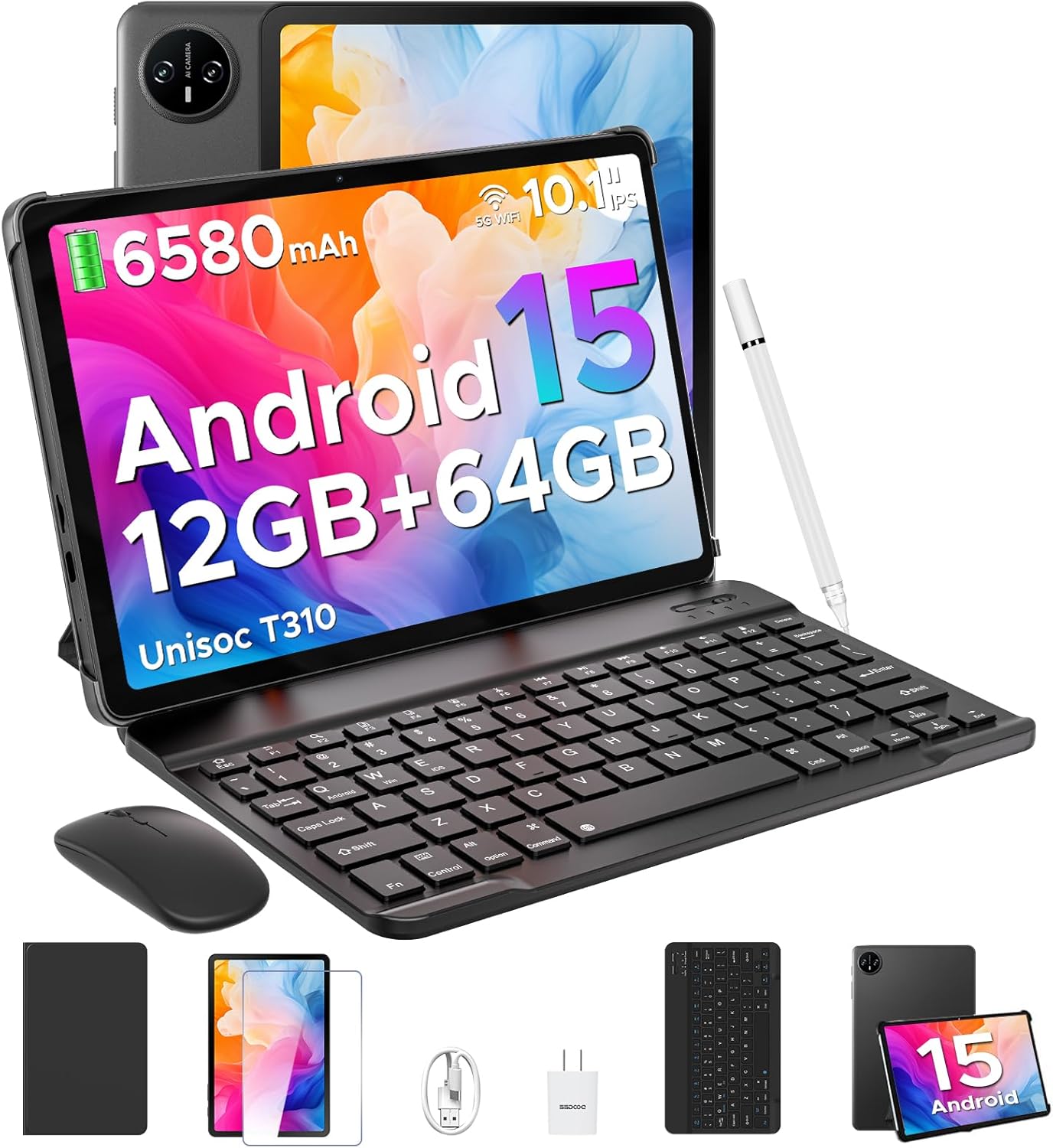
Image 1.1: DOOGEE Tab A9 tablet with its complete accessory kit.
Негизги өзгөчөлүктөрү:
- Операция системасы: Android 15 for enhanced performance and privacy.
- Процессор: Unisoc T310 Quad-Core, 2.0GHz.
- Эстутум жана сактоо: 12GB RAM (3GB physical + 9GB virtual) and 64GB internal storage, expandable up to 2TB via microSD.
- Дисплей: 10.1-inch IPS HD (1280x800) touchscreen.
- Батарея: Узак мөөнөттүү колдонуу үчүн 6580 мАч.
- Камералар: 8 МП арткы камера жана 5 МП алдыңкы камера.
- Байланыш: 2.4G/5G Dual-band WiFi, Bluetooth 5.0.
- Коопсуздук: Жүзүнөн ачуу.
- Аудио: Dual speakers and 3.5mm headphone jack.
2. Эмнелер камтылган
Your DOOGEE Tab A9 package includes the following items:

Image 2.1: Contents of the DOOGEE Tab A9 package.
- DOOGEE Tab A9 Tablet
- Bluetooth баскычтоп
- Bluetooth чычкан
- Стилус калеми
- Screen Protector
- Коргоочу кап
- Заряддагыч
- USB Type-C кабели
- User Manual
3. Орнотуу
3.1 Алгачкы заряддоо
Before first use, fully charge your tablet using the provided charger and USB Type-C cable. Connect the cable to the tablet's charging port and the charger to a power outlet. The battery indicator on the screen will show charging status.
3.2 Күйгүзүү/өчүрүү
- Күйгүзүү үчүн: Press and hold the Power button (located on the side of the tablet) until the DOOGEE logo appears.
- Өчүрүү үчүн: Кубат баскычын басып, кармап туруңуз, андан кийин экранда пайда болгон параметрлерден "Өчүрүү" дегенди тандаңыз.
- Кайра баштоо үчүн: Кубат баскычын басып, кармап туруңуз, андан кийин параметрлерден "Кайра баштоо" тандаңыз.
3.3 Connecting Accessories (Keyboard & Mouse)
The included keyboard and mouse connect via Bluetooth:
- Клавиатура/чычкан кубатталганын жана күйүп турганын текшериңиз.
- Планшетиңизден төмөнкүгө өтүңүз Орнотуулар > Туташкан түзмөктөр > Bluetooth.
- Bluetooth'ду күйгүзүп, жеткиликтүү түзмөктөрдү издеңиз.
- Select the keyboard or mouse from the list and follow any on-screen pairing instructions.
3.4 MicroSD картасын салуу
To expand storage, insert a microSD card (up to 2TB, sold separately):
- Планшеттин капталындагы SIM/microSD карта салгычын табыңыз.
- Салгычты ачуу үчүн берилген SIM чыгаруучу куралды колдонуңуз.
- Place the microSD card into the designated slot on the tray.
- Таблетканы кылдаттык менен кайра салыңыз.
4. Иштөө нускамалары
4.1 Android 15 системасы
Your DOOGEE Tab A9 runs on Android 15, offering improved app launch speeds, system smoothness, and enhanced privacy controls. Explore the intuitive interface and customize settings to your preference.
Видео 4.1: Бүттүview of the DOOGEE Tab A9 tablet's features, including its display, speakers, and connectivity.

Image 4.1: The Android 15 system logo, highlighting its intelligent, seamless, and secure features.
4.2 Дисплей орнотуулары
The 10.1-inch IPS HD display offers clear visuals. You can adjust display settings for comfort:
- Көзгө кам көрүү режими: Reduces blue light to minimize eye strain. Activate it in Settings > Display > Eye Care Mode.
- Караңгы режим: Changes the system theme to a darker palette, ideal for low-light environments. Activate it in Settings > Display > Dark Mode.

Image 4.2: Visual representation of the tablet's 10.1-inch IPS HD display and its key specifications.
4.3 Камераны колдонуу
Capture photos and videos with the tablet's cameras:
- Арткы камера (8MP): Suitable for general photography.
- Алдыңкы камера (5 мегапиксел): Видео чалуулар жана селфилер үчүн идеалдуу.
Open the Camera app from the home screen or app drawer to start. Tap the shutter button to take a photo or switch to video mode to record.

Сүрөт 4.3: Мисamples of photos taken with the 8MP main camera.

Image 4.4: The 5MP front camera is suitable for clear video calls.
4.4 Аудио өзгөчөлүктөрү
The tablet is equipped with dual speakers for clear audio output and a 3.5mm audio jack for private listening with headphones.

Image 4.5: Illustration of the tablet's dual speaker system for enhanced audio.
4.5 Байланыш
- Wi-Fi: Supports 2.4G and 5G dual-band Wi-Fi for stable and fast internet access. Connect via Орнотуулар > Тармак жана интернет > Wi-Fi.
- Bluetooth 5.0: For connecting wireless peripherals like headphones, speakers, and the included keyboard and mouse. Manage connections in Орнотуулар > Туташкан түзмөктөр > Bluetooth.

Image 4.6: Features of the tablet's WiFi 5 connectivity.
4.6 Жүзүнөн ачуу
For convenient and secure access, set up Face Unlock:
- барыңыз Орнотуулар > Коопсуздук жана купуялык > Жүз менен таануу.
- Жүзүңүздү каттоо үчүн экрандагы нускамаларды аткарыңыз.
- Ensure you are in a well-lit area during registration for optimal performance.

Image 4.7: The tablet's facial recognition unlock feature in action.
4.7 Multitasking with Split-Screen
Utilize the split-screen feature to run two apps simultaneously:
- Биринчи тиркемени ачыңыз.
- Акыркы колдонмолорго кирүү үчүн экрандын ылдый жагынан өйдө карай сүрүп, кармап туруңуз.
- Tap the app icon at the top of the first app's card and select "Split screen".
- Акыркы колдонмолоруңуздан экинчи колдонмону тандаңыз же экрандын экинчи жарымын толтуруу үчүн колдонмолордун суурмасын тандаңыз.

Image 4.8: Demonstrating efficient split-screen multitasking on the tablet.
4.8 Аткаруу жана сактоо
The Unisoc T310 Quad-Core processor and 12GB RAM (3GB physical + 9GB virtual) ensure smooth operation for daily tasks and multitasking. The 64GB internal storage provides space for essential apps and files, with expandable storage up to 2TB via microSD card.
Video 4.2: Highlights of the DOOGEE Tab A9's processor, RAM, and storage capabilities.

Image 4.9: Visual representation of the Unisoc T310 Quad-Core processor.

Image 4.10: Illustrates the tablet's memory and storage capacity, including expandable memory.
4.9 Батареянын иштөө мөөнөтү
The 6580mAh battery, combined with smart battery management, provides all-day usage. Actual battery life may vary based on usage patterns and settings.

Image 4.11: Details on the 6580mAh battery capacity and estimated usage times.
5. Техникалык тейлөө
- Программалык камсыздоо жаңыртуулары: Оптималдуу аткарууну жана коопсуздукту камсыз кылуу үчүн системанын жаңыртууларын дайыма текшерип, орнотуңуз. барыңыз Орнотуулар > Система > Системаны жаңыртуу.
- Тазалоо: Планшеттин экранын жана корпусун тазалоо үчүн жумшак, мамыксыз чүпүрөктү колдонуңуз. Абразивдүү материалдарды же катуу химиялык заттарды колдонбоңуз.
- Батареяга кам көрүү: To prolong battery life, avoid extreme temperatures and do not let the battery fully discharge frequently.
- Сактагычты башкаруу: Мезгил-мезгили менен ачык-айкын керексиз files and apps to maintain system speed.
6. Кыйынчылыктарды
Жалпы маселелер жана аларды чечүү үчүн төмөнкү таблицага кайрылыңыз:
| Маселе | Мүмкүн чечим |
|---|---|
| Планшет күйбөйт | Ensure the battery is charged. Connect the charger and try again. If unresponsive, press and hold the Power button for 10-15 seconds to force a restart. |
| Wi-Fi туташуу маселелери | Restart the tablet and your Wi-Fi router. Check Wi-Fi settings to ensure the correct network is selected and the password is entered correctly. |
| Bluetooth түзмөгү жупташкан жок | Ensure the Bluetooth device is in pairing mode and within range. Restart both the tablet and the Bluetooth device. Check tablet's Bluetooth settings. |
| Жай аткаруу | Колдонулбаган тиркемелерди жабыңыз. Кэшти жана убактылууну тазалаңыз files. Consider uninstalling rarely used apps. Perform a system update if available. |
| Экран жооп бербейт | Планшетти кайра иштетиңиз. Эгер маселе чечилбесе, экрандын таза жана таштандылардан таза экенин текшериңиз. |
7. Техникалык шарттар
| Өзгөчөлүк | Деталь |
|---|---|
| Модель аты | Tab A9 |
| Операция системасы | Android 15 |
| Процессор | Unisoc T310 Quad-Core, 2 GHz |
| RAM | 12 ГБ (3 ГБ физикалык + 9 ГБ виртуалдык) |
| Ички сактагыч | 64 ГБ |
| Кеңейтүүчү сактагыч | MicroSD картасы аркылуу 2 ТБ чейин |
| Screen Size | 10.1 дюйм |
| Screen Resolution | 1280 x 800 пиксел (IPS HD) |
| Арткы камера | 8 депутат |
| Алдыңкы камера | 5 депутат |
| Батарея сыйымдуулугу | 6580 мАч |
| Зымсыз түрү | 802.11ac, 802.11b, 802.11g, 802.11n (2.4G/5G WiFi) |
| Bluetooth | Bluetooth 5.0 |
| Өлчөмдөрү (LxWxH) | 9.54 x 6.33 x 0.38 дюйм |
| Элемент Салмагы | 1.12 фунт |
8. Кепилдик жана колдоо
Your DOOGEE Tab A9 tablet comes with a 2 жылдык кепилдик жана өмүр бою техникалык колдоо. For any questions, issues, or support needs, please contact DOOGEE customer service. Refer to the warranty card included in your package for specific terms and conditions.


