Introduction
This manual provides detailed instructions for the SGIN Android Tablet SGIN-T12. It covers setup, operation, maintenance, and troubleshooting to ensure optimal use of your device. The SGIN-T12 features a 10.51-inch Full HD IPS display, an Octa-Core processor, 6GB RAM, 128GB internal storage, and runs on Android 13. It supports 5G WiFi, Bluetooth 5.0, and GPS functionality.
1. Орнотуу
1.1 Пакеттин мазмуну
Пакетте бардык буюмдар бар экенин текшериңиз:
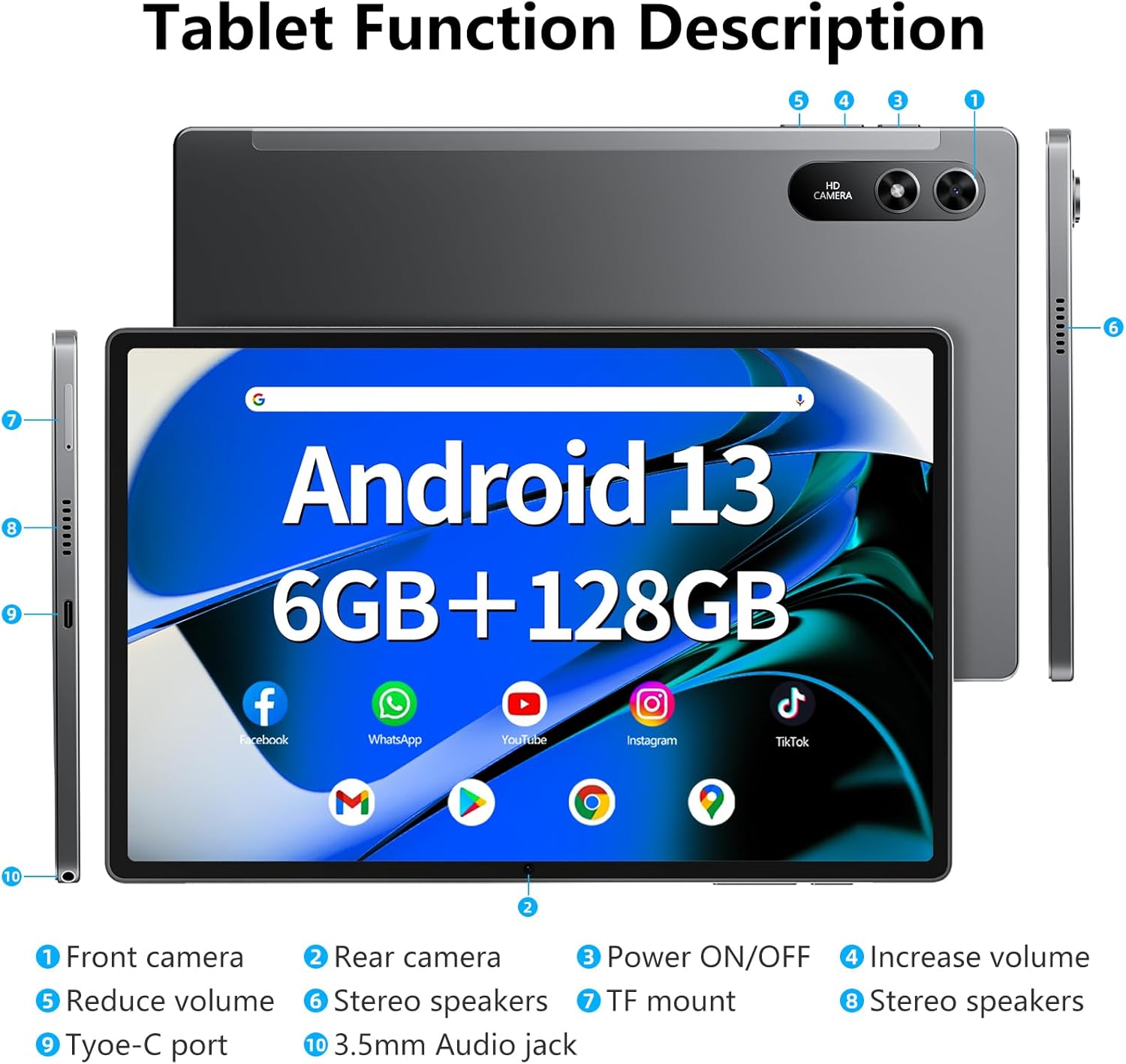
Image: The SGIN-T12 tablet, power adapter, USB-C charging cable, SIM ejector tool, and user manual.
- SGIN Android Tablet SGIN-T12
- Кубаттуу адаптер
- USB-C заряддоо кабели
- SIM чыгаруучу курал
- User Manual
1.2 Түзмөктүн жайгашуусу
Планшетиңиздин физикалык компоненттери жана порттору менен таанышып алыңыз.

Image: Labeled diagram of the SGIN-T12 tablet indicating the location of the front camera, rear camera, power ON/OFF button, volume increase/decrease buttons, stereo speakers, TF card slot, Type-C charging port, and 3.5mm audio jack.
- Алдыңкы камера
- Арткы камера
- Күйгүзүү/ӨЧҮРҮҮ баскычы
- Үнүн жогорулатуу баскычы
- Үндү азайтуу баскычы
- Стерео динамиктер
- TF mount (MicroSD card slot)
- Стерео динамиктер
- Type-C порту
- 3.5 мм аудио уячасы
1.3 Алгачкы заряддоо
Before first use, fully charge the tablet. Connect the USB-C charging cable to the tablet's Type-C port and the power adapter to a wall outlet. The charging indicator will show the charging status.
1.4 Күйгүзүү/өчүрүү
- Күйгүзүү үчүн: Press and hold the Power ON/OFF button until the SGIN logo appears.
- Өчүрүү үчүн: Press and hold the Power ON/OFF button until the power options appear on the screen. Select "Power off" and confirm.
- Кайра баштоо үчүн: From the power options, select "Restart."
1.5 Баштапкы орнотуу устасы
Планшет биринчи жолу күйгүзүлгөндө, ал сизге баштапкы орнотуу процессин көрсөтөт:
- Каалаган тилиңизди тандаңыз.
- Wi-Fi тармагына туташыңыз.
- Review жана шарттарды кабыл алуу.
- Google аккаунтуңуз менен кириңиз же жаңысын түзүңүз. Бул Google Play Дүкөнүнө жана башка Google кызматтарына кирүү үчүн зарыл.
- Экран кулпусун орнотуу (PIN, үлгү же сырсөз).
- Суралгандай башка жөндөөлөрдү конфигурациялаңыз.
2. Иштөө нускамалары
2.1 Негизги навигация
- таптаңыз: Бир нерсени тандоо же тиркемени ачуу үчүн экранга бир жолу тийип коюңуз.
- Таптап кармаңыз: Touch and hold an item to access contextual menus or move icons.
- Серпүү: Барактарды же тизмелерди жылдыруу үчүн манжаңызды экрандын үстүнөн сүйрөңүз.
- Чымчуу: Сүрөттөрдү чоңойтуу же кичирейтүү үчүн эки манжаңызды колдонуңуз жана web барактар.
2.2 Wi-Fi туташуусу
Зымсыз тармакка туташуу үчүн:
- барыңыз Орнотуулар > Тармак жана интернет > Wi-Fi.
- Wi-Fi которуштуруу On.
- Тизмеден каалаган тармакты тандаңыз.
- Эгер суралса, сырсөздү киргизип, таптаңыз Туташуу.
2.3 Bluetooth жупташтыруу
Bluetooth түзмөгү менен жупташтыруу үчүн (мисалы, кулакчындар, клавиатура):
- барыңыз Орнотуулар > Туташкан түзмөктөр > Bluetooth.
- Bluetooth которуштуруу On.
- Bluetooth түзмөгүңүз жупташтыруу режиминде экенин текшериңиз.
- Select the device from the "Available devices" list and follow any on-screen prompts to complete pairing.
2.4 Камеранын иштеши
Планшеттин алдыңкы камерасы 5 МП жана арткы 13 МП камерасы бар.

Image: The SGIN-T12 tablet showcasing its front camera for video calls and rear camera for capturing images.
- ачыңыз Камера колдонмо.
- Tap the camera switch icon to alternate between the front and rear cameras.
- Сүрөткө тартуу же видео жазууну баштоо/токтоо үчүн жапкычты таптаңыз.
- Access various camera modes and settings within the app.
2.5 Сактагычты башкаруу
The tablet comes with 128GB of internal storage and supports expansion up to 256GB via a TF (MicroSD) card.
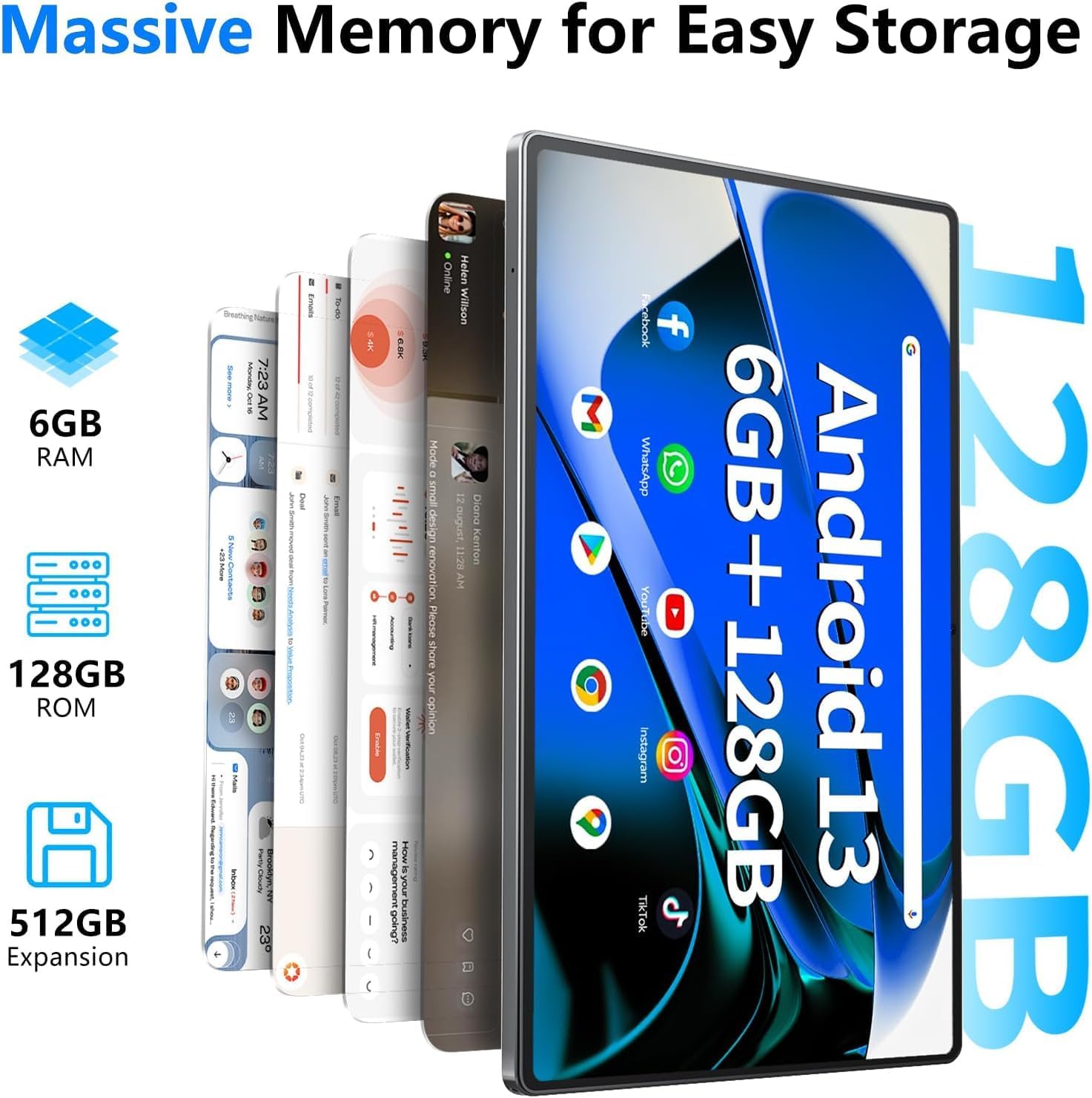
Image: Visual representation of the tablet's memory specifications, highlighting 6GB RAM, 128GB ROM, and support for up to 512GB external storage expansion.
- TF картасын салуу: Use the provided SIM ejector tool to open the TF card slot. Insert the MicroSD card with the gold contacts facing down, then close the tray.
- Сактагычты башкаруу: барыңыз Орнотуулар > Сактагыч чейин view сактагычты колдонуу жана башкаруу files.
2.6 Аудио орнотуулары
The tablet features dual stereo speakers and a 3.5mm audio jack.

Image: The SGIN-T12 tablet illustrating its four-speaker stereo system for an immersive audio experience.
- Үндү көзөмөлдөө: Use the physical volume buttons on the side of the tablet or adjust volume in Орнотуулар > Үн жана титирөө.
- Гарнитура уячасы: Жеке угуу үчүн стандарттуу 3.5 мм кулакчындарды туташтырыңыз.
2.7 GPS функциясы
Планшет навигация жана жайгашкан жерди аныктоо кызматтары үчүн GPSти камтыйт.
- камсыз кылуу Жайгашкан жер services are enabled in Орнотуулар > Жайгашкан жер.
- Use pre-installed mapping applications or download others from the Google Play Store for navigation.
3. Техникалык тейлөө
3.1 Батареяга кам көрүү

Image: The SGIN-T12 tablet highlighting its 6200mAh battery, designed for extended use.
- Батареяны бат-баттан толук кубаттап калуудан алыс болуңуз.
- Планшетти экстремалдык температурага тийгизбеңиз.
- Берилген кубаттагычты же сертификатталган шайкеш кубаттагычты гана колдонуңуз.
- If the tablet will not be used for an extended period, charge it to about 50% before storing.
3.2 Аппаратты тазалоо
- Экранды жана денени тазалоо үчүн жумшак, түксүз чүпүрөктү колдонуңуз.
- өжөр тактар үчүн, бир аз гampчүпүрөккө суу же электроника үчүн арналган экран тазалагыч.
- Катуу химиялык заттарды, абразивдүү материалдарды же ашыкча нымдуулукту колдонуудан алыс болуңуз.
3.3 Программалык камсыздоо жаңыртуулары
Оптималдуу аткарууну жана коопсуздукту камсыз кылуу үчүн программалык камсыздоо жаңыртууларын дайыма текшерип, орнотуп алыңыз.
- барыңыз Орнотуулар > Система > Системаны жаңыртуу.
- Follow the on-screen instructions to check for and install any available updates.
4. Кыйынчылыктарды
| Көйгөй | Чечим |
|---|---|
| Планшет күйбөйт. | Батарея заряддалганын текшериңиз. Планшетти заряддагычка туташтырыңыз жана кайра күйгүзүү аракетинен мурун бир нече мүнөт күтүңүз. |
| Экран жооп бербей жатат. | Perform a forced restart by pressing and holding the Power ON/OFF button for approximately 10-15 seconds until the device restarts. |
| Wi-Fi туташуу маселелери. | Restart your Wi-Fi router. On the tablet, toggle Wi-Fi off and then on again. Forget the network and reconnect. |
| Applications are crashing or freezing. | Close and reopen the application. Clear the app's cache in Орнотуулар > Колдонмолор > [Колдонмонун аты] > Сактоо жана кэш. Эгер маселе чечилбесе, колдонмону чыгарып салып, кайра орнотуңуз. |
| Жай аткаруу. | Колдонулбаган тиркемелерди жабыңыз. Кэшти жана убактылууну тазалаңыз files. Consider performing a factory reset if performance issues are severe and persistent (back up data first). |
| "Reboot errors" or "Failed to load" messages. | Attempt multiple restarts. If the issue persists, a factory reset may be required. Warning: A factory reset will erase all data on the device. Back up important fileулантуудан мурун. If the problem continues after a factory reset, contact customer support. |
5. Техникалык шарттар
| Өзгөчөлүк | Деталь |
|---|---|
| Модел | SGIN-T12 |
| Операция системасы | Android 13 |
| Screen Size | 10.51 дюйм |
| Screen Resolution | 1920 x 1200 пиксел (FHD IPS) |
| Процессор | Octa-Core (2 GHz ARM_Cortex_A5) |
| RAM | 6 ГБ DDR4 SDRAM |
| Ички сактагыч | 128 ГБ |
| Кеңейтүүчү сактагыч | Supports up to 256GB TF card (MicroSD) |
| Алдыңкы камера | 5 депутат |
| Арткы камера | 13 депутат |
| Батарея сыйымдуулугу | 6200 мАч литий-ион |
| Батареянын орточо иштөө мөөнөтү | 6 саатка чейин |
| Зымсыз байланыш | 5G Wi-Fi (802.11bgn), Bluetooth 5.0 |
| Навигация | GPS |
| Порттар | Type-C, 3.5mm Audio Jack, TF Card Slot |
| Өлчөмдөрү (LxWxH) | 10.51 x 6.36 x 0.3 дюйм |
| Элемент Салмагы | 2.2 фунт |
6. Кепилдик жана колдоо
6.1 Продукциянын кепилдиги
The SGIN Android Tablet SGIN-T12 comes with a 1 жылдык чектелген кепилдик сатып алынган күндөн тартып. Бул кепилдик кадимки колдонуудагы өндүрүштүк кемчиликтерди жана чеберчиликти камтыйт. Ал туура эмес колдонуудан, кырсыктардан, уруксатсыз өзгөртүүлөрдөн же табигый кырсыктардан келип чыккан зыянды камтыбайт.
Кепилдик дооматтары үчүн сатып алганыңыздын далилин сактап коюңуз.
6.2 Кардарларды колдоо
For technical assistance, troubleshooting not covered in this manual, or warranty inquiries, please contact SGIN customer support. Refer to the contact information provided on the SGIN official webсайт же сатып алуу документтери.
Сиз да зыярат кылсаңыз болот SGIN Store on Amazon кошумча продукт маалымат жана ресурстар үчүн.


