1. Киришүү
This manual provides detailed instructions for the proper use and maintenance of your havit OWS915 Open Ear Headphones. Please read this manual thoroughly before using the product to ensure optimal performance and longevity. Keep this manual for future reference.
2. Пакеттин мазмуну
Төмөндө тизмеленген нерселердин баары пакетиңизге камтылганын текшериңиз:
- havit OWS915 Open Ear Headphones (Left and Right earbuds)
- Заряддоо кутусу
- USB заряддоо кабели
- User Manual
Image: Contents of the havit OWS915 package, showing the earbuds, charging case, USB cable, and user manual.
3. Продукт бүтүп калдыview
The havit OWS915 headphones feature an open-ear design for comfort and situational awareness. Each earbud is lightweight (7.9 grams) and equipped with a flexible TPU ear hook for a secure fit. The charging case provides extended battery life.
Негизги компоненттер:
- Кулакчындар: Сол жана Оң, интегралдык кулак илгичтери жана тийүү менен башкаруу аймактары.
- Заряддоо кутусу: Houses and charges the earbuds, with a USB-C charging port.
- LED көрсөткүчтөрү: On earbuds and charging case for status updates.
- Микрофондор: Four built-in microphones with ENC technology for clear calls.
- Баяндамачылар: 14.2mm dynamic drivers for audio output.

Image: The havit OWS915 Open Ear Headphones and their charging case.

Сүрөт: жарылган view of the havit OWS915 earbud and charging case, detailing internal components and features.
4. Орнотуу
4.1. Наушниктерди заряддоо
Before first use, fully charge the headphones and charging case. Place the earbuds into the charging case. Connect the USB charging cable to the USB-C port on the case and to a power source. The LED indicator on the case will show charging status.
A full charge of the case takes approximately 2.5 hours. The earbuds provide up to 8.5 hours of playtime at 60% volume on a single charge, with the charging case extending total playtime to 64 hours.
Video: Demonstration of how to use the HAVIT LIFE app with wireless earbuds, including a visual of the charging indicator on the case.
4.2. Bluetooth Жупташтыруу
To pair your havit OWS915 headphones with your device:
- Заряддоо кутучасын ачыңыз. Кулакчындар жупташтыруу режимине автоматтык түрдө кирет.
- Түзмөгүңүздө (смартфон, планшет ж.б.) Bluetooth иштетиңиз.
- Издөө "HAVIT OWS915" in the list of available Bluetooth devices.
- Select "HAVIT OWS915" to connect. A voice prompt will confirm successful pairing.
The headphones will automatically reconnect to the last paired device when removed from the case, if Bluetooth is enabled on the device.

Image: A diagram illustrating the Bluetooth 5.4 chip, emphasizing stable and easy pairing with various operating systems.
5. Кийүү боюнча нускамалар
To ensure a comfortable and secure fit, follow these steps:
- Сол (L) жана Оң (R) кулакчындарды аныктаңыз.
- Gently hook the earbud over your ear, positioning the speaker part towards your ear canal.
- Adjust the ear hook and earbud until it rests comfortably and securely on your ear. The flexible TPU material allows for slight adjustments.

Image: A visual guide demonstrating the correct method for wearing the havit OWS915 headphones.
6. Наушниктерди иштетүү
6.1. Башкаруу элементтерине тийүү
The havit OWS915 headphones feature intuitive touch controls on each earbud:
- Ойнотуу/тындыруу: Кулакчындарды эки жолу таптаңыз.
- Мурунку ыр: Touch and hold the left earbud for 1 second.
- Кийинки ыр: Touch and hold the right earbud for 1 second.
- Чалууга жооп берүү/аяктоо: Кулакчындарды эки жолу таптаңыз.
- Чакырууну четке кагуу: Touch and hold either earbud for 1 second.
- Үн жардамчысы: Tap the left earbud thrice.
- Оюн режими/Музыка режими: Tap the right earbud thrice.

Image: A visual representation of the touch control functions on the havit OWS915 earbuds.
6.2. HAVIT LIFE App
Enhance your listening experience by customizing settings via the HAVIT LIFE App:
- Эквалайзер орнотуулары: Аудиону тууралооfileсиздин каалооңуз боюнча.
- Customize Touch Settings: Personalize earbud touch controls.
- Headphone Battery Display: Батареянын деңгээлин көзөмөлдөңүз.
- Оюн режими: Optimize audio for gaming with reduced latency.
- Түзмөктүн атын өзгөртүү: Rename your headphones for easy identification.
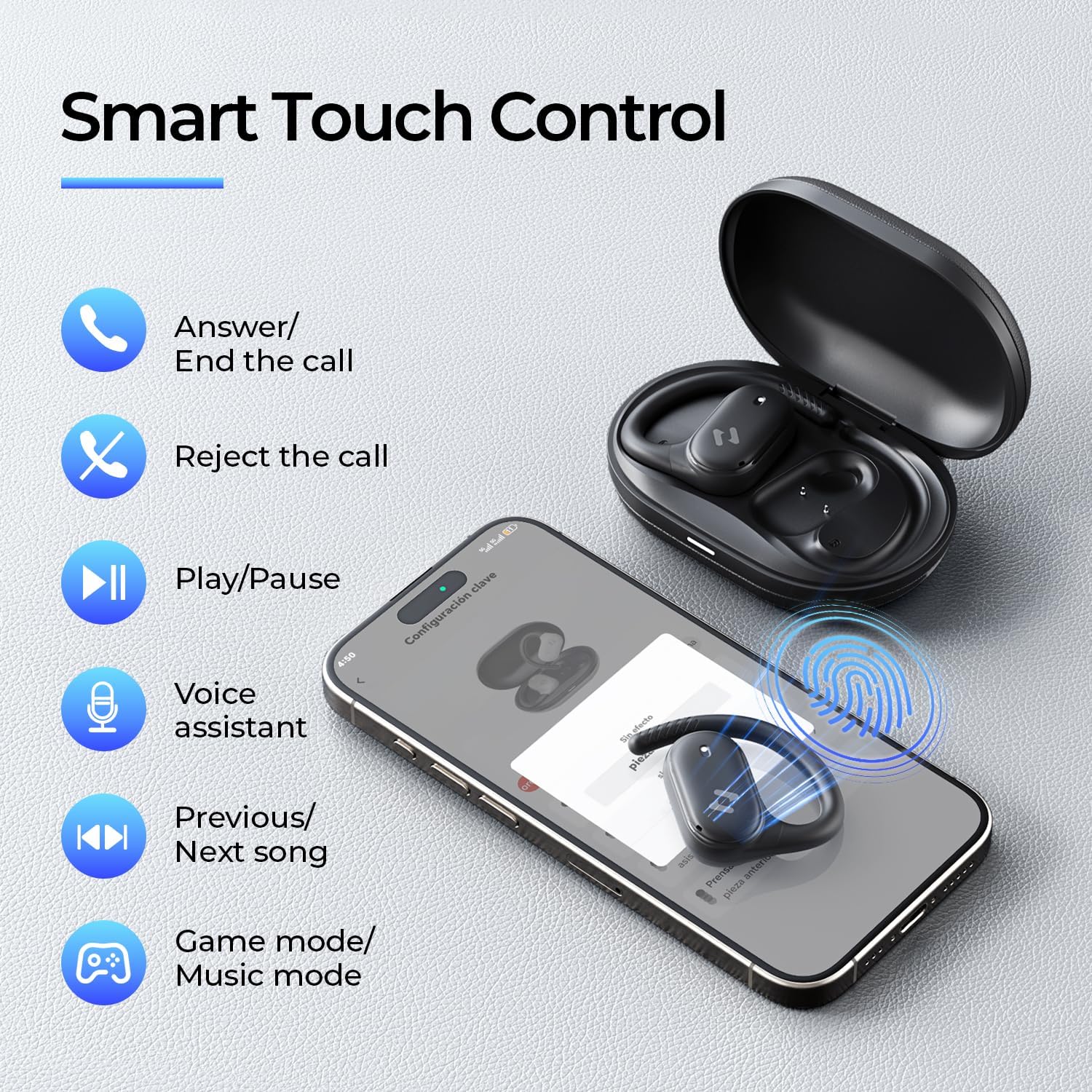
Image: Screenshots of the HAVIT LIFE App demonstrating various customization options.
Video: A guide on how to download, connect to, and customize settings within the HAVIT LIFE App.
7. Техникалык тейлөө
Наушникиңиздин иштешин жана көрүнүшүн сактоо үчүн:
- Тазалоо: Use a soft, dry cloth to clean the earbuds and charging case. Avoid using harsh chemicals or abrasive materials.
- Сактагыч: Кулакчындарды чаңдан жана бузулуудан коргоо үчүн колдонулбай турган учурда кубаттоочу кутучасында сактаңыз.
- Батареяга кам көрүү: Charge the headphones regularly, even if not in frequent use, to prolong battery life. Avoid extreme temperatures.
- Суу каршылык: The headphones are IPX5 waterproof, meaning they are resistant to sweat and splashes. Do not submerge them in water. Ensure they are dry before placing them back in the charging case.

Image: The havit OWS915 headphones demonstrating their IPX5 water resistance.
8. Кыйынчылыктарды
If you encounter issues with your havit OWS915 headphones, refer to the following common solutions:
| Көйгөй | Чечим |
|---|---|
| Түзмөк менен жупташтыруу мүмкүн эмес | Ensure Bluetooth is enabled on your device. Make sure the earbuds are charged and in pairing mode. Try restarting your device and the headphones. |
| Үн жок же үнү төмөн | Check the volume level on both your device and the headphones. Ensure the headphones are properly connected. Clean any debris from the speaker grilles. |
| Кулакчындар заряддалбай жатат | Ensure the charging cable is securely connected to both the case and the power source. Check if the charging contacts on the earbuds and case are clean. Try a different charging cable or power adapter. |
| Туташуу туруксуз | Ensure your device is within the Bluetooth range (10 meters). Avoid obstacles between the headphones and your device. Disconnect and re-pair the headphones. |
| HAVIT LIFE App connection fails | Ensure you have the latest version of the HAVIT LIFE App installed. Check your device's internet connection. Restart the app and your headphones. |
9. Техникалык шарттар
| Өзгөчөлүк | Деталь |
|---|---|
| Модель аты | OWS915 |
| Bluetooth версиясы | 5.4 |
| Bluetooth диапазону | 10 метр |
| Батареянын иштөө мөөнөтү (наушник) | 8.5 саат (60% үн) |
| Жалпы ойноо убактысы (капка менен) | 64 саат |
| Заряддоо корпусунун батареясы | 1000mAh |
| Заряддоо учуру | 2.5 саат |
| Аудио драйверинин өлчөмү | 14.2 миллиметр |
| Сууга туруктуулук деңгээли | IPX5 (Суу өткөрбөйт) |
| Буюмдун салмагы (кулакчын) | 7.9 грамм (ар бири) |
| Материал | PC + ABS + TPU |
| Башкаруу ыкмасы | Колдонмо, тийүү |
| Noise Control | Жок (чалуулар үчүн ENC функциялары) |
| Frequency Response | 20 KHz |
| Сезимталдуулук | 118 дБ |
| Импеданс | 32 Ом |
10. Кепилдик жана колдоо
Your havit OWS915 Open Ear Headphones come with a standard manufacturer's warranty. Please refer to the warranty card included in your package for specific terms and conditions. For technical support or customer service inquiries, please contact havit customer support through their official webсайтты же кепилдик документтериңизде көрсөтүлгөн байланыш маалыматын.
11. Коопсуздук боюнча маанилүү маалымат
- Угуу коргоо: To protect your hearing, avoid listening at high volume levels for extended periods.
- Экологиялык маалымдуулук: The open-ear design allows you to hear your surroundings. However, always exercise caution when using headphones in situations requiring full attention, such as driving or cycling.
- Балдар: Keep the headphones and accessories out of reach of children under three years of age to prevent choking hazards.
- Заряддоо: Use only the provided charging cable and a certified power adapter. Do not attempt to charge the device if it is wet.
- Демонтаж: Кулакчындарды же кубаттоочу кутучаны бөлүктөргө бөлүүгө же өзгөртүүгө аракет кылбаңыз, анткени бул кепилдикти жокко чыгарып, зыян келтириши мүмкүн.


