1. Киришүү
Thank you for choosing the Havit Gamenote KB904L Magnetic Switch Mechanical Keyboard. This manual provides essential information for setting up, operating, maintaining, and troubleshooting your new keyboard. Please read it thoroughly to ensure optimal performance and longevity of your device.
2. Коопсуздук маалыматы
- Баскычтопту суюктуктардан жана ашыкча нымдуулуктан алыс кармаңыз.
- Клавиатураны экстремалдык температурага тийгизүүдөн сактаңыз.
- Клавиатураны бөлүктөргө бөлүүгө же өзгөртүүгө аракет кылбаңыз, анткени бул кепилдикти жокко чыгарып, зыян келтириши мүмкүн.
- Туташуу үчүн берилген USB кабелин гана колдонуңуз.
- Clean the keyboard with a soft, dry cloth.
3. Пакеттин мазмуну
Сураныч, пакетте төмөнкү нерселерди текшериңиз:
- Havit Gamenote KB904L Mechanical Keyboard
- USB-C - USB-A кабели
- Баскыч капкагын тартуучу (кошулушу мүмкүн)
- Которгучту тартуучу (кошулушу мүмкүн)
- Колдонуучунун Колдонмосу (бул документ)
4. Орнотуу
4.1 Баскычтопту туташтыруу
- Locate the USB-C port on the back or side of the Havit Gamenote KB904L keyboard.
- Берилген кабелдин USB-C учун клавиатурага туташтырыңыз.
- Кабелдин USB-A учунун компьютериңиздеги жеткиликтүү USB портуна туташтырыңыз.
- Баскычтоп сиздин операциялык тутумуңуз тарабынан автоматтык түрдө таанылат. Негизги функциялар үчүн, адатта, кошумча драйверлер талап кылынбайт.

Image: The Havit Gamenote KB904L keyboard shown with its detachable USB-C cable, illustrating the connection point.
5. Иштөө нускамалары
5.1 Негизги баскычтоп функциялары
The Havit Gamenote KB904L functions as a standard mechanical keyboard. All keys perform their labeled functions. For special characters and secondary functions, use the Shift key as usual.
5.2 RGB жарыкты башкаруу
The keyboard features customizable RGB backlighting. Use the Function (Fn) key in combination with specific keys to adjust lighting effects and brightness.
- Fn + [Ачкыч]: Specific key combinations will cycle through various RGB lighting modes, adjust brightness, or change color patterns. Refer to the keycaps for printed legends indicating lighting controls (e.g., Fn + F1-F12, or dedicated lighting keys).
- Жарыктыкты жөндөө: Typically, Fn + Up/Down arrow keys or similar combinations control brightness.
- Ылдамдыкты жөндөө: Some lighting effects allow speed adjustment via Fn + Left/Right arrow keys or similar.
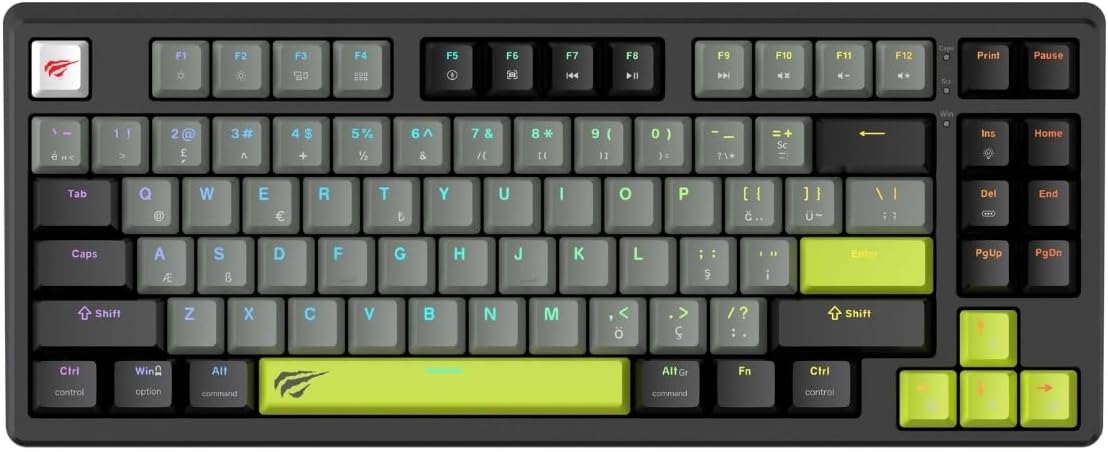
Сүрөт: толук view of the Havit Gamenote KB904L keyboard, showcasing its layout and potential RGB lighting.
5.3 Magnetic Switches & Rapid Trigger
The KB904L utilizes magnetic switches, which allow for adjustable actuation points and the Rapid Trigger feature.
- Жөнгө салынуучу кыймылдаткыч: Magnetic switches allow you to customize how deep a key needs to be pressed before it registers an input. This can be configured via the keyboard's dedicated software (if available) or specific onboard commands.
- Rapid Trigger: This feature allows a key to reset instantly when it begins to move upwards, enabling faster, more responsive repeated presses without needing to release the key fully. This is particularly beneficial for gaming. Configuration for Rapid Trigger is typically done through the keyboard's software.
5.4 Ысытма менен алмаштырылуучу дизайн
The Havit Gamenote KB904L features a hot-swappable design, allowing you to change the mechanical switches without soldering. This enables customization of typing feel and sound.
- Которуу шайкештиги: Ensure replacement switches are compatible with the keyboard's socket type (e.g., 3-pin or 5-pin, depending on the specific model's design).
- Которуу тарткычын колдонуу: Gently use the provided switch puller to remove existing switches. Align the puller's prongs with the clips on the switch and squeeze firmly while pulling upwards.
- Жаңы которгучтарды орнотуу: Align the pins of the new switch with the holes on the PCB. Press down firmly until the switch clicks into place. Ensure pins are not bent during installation.

Сүрөт: бурчтуу view of the Havit Gamenote KB904L keyboard, illustrating the individual keycaps and the underlying switch structure, relevant for hot-swapping.
5.5 8kHz Polling Rate
The keyboard operates at an 8kHz polling rate, meaning it reports inputs to your computer 8000 times per second. This significantly reduces input latency, providing an extremely responsive experience, especially critical for competitive gaming.
6. Техникалык тейлөө
6.1 Баскычтопту тазалоо
- Жалпы тазалоо: Use a soft, dry, lint-free cloth to wipe down the keycaps and chassis.
- Чаңды тазалоо: Use compressed air to blow away dust and debris from between the keycaps.
- Deep Cleaning (Keycaps): For stubborn dirt, you can carefully remove keycaps using a keycap puller and clean them with mild soap and water. Ensure they are completely dry before reattaching.

Сүрөт: Жогорудан ылдый карай так сүрөт view of the Havit Gamenote KB904L keyboard, useful for illustrating areas to clean.
6.2 Коммутаторлорду алмаштыруу
As mentioned in the operating section, the hot-swappable design allows for easy switch replacement. Always ensure the keyboard is disconnected from the computer before attempting to remove or install switches.
- Use the switch puller to carefully remove the desired switch.
- Insert the new switch, ensuring its pins align correctly with the PCB sockets.
- Press down gently but firmly until the switch is fully seated.
7. Кыйынчылыктарды
- Баскычтоп жооп бербейт:
- USB кабели клавиатурага жана компьютерге бекем туташып турганын текшериңиз.
- Баскычтопту компьютериңиздин башка USB портуна туташтырууга аракет кылыңыз.
- Системага тиешелүү маселени болтурбоо үчүн баскычтопту башка компьютерде сынап көрүңүз.
- Компьютериңизди өчүрүп күйгүзүңүз.
- RGB жарыктандыруу иштебейт:
- Check if the lighting is turned off or set to minimum brightness using the Fn key combinations.
- Ensure any keyboard software is running correctly and not conflicting.
- Катталбаган белгилүү бир ачкычтар:
- If the keyboard is hot-swappable, carefully remove and re-seat the problematic switch. Ensure its pins are not bent.
- Клавиатуранын капкагынын жана которгучтун айланасын тазалап, ар кандай таштандыларды кетириңиз.
- If possible, swap the problematic switch with a known working switch from another key to determine if the issue is with the switch or the PCB socket.
- Keyboard Lag or Input Delay:
- Ensure no other high-bandwidth USB devices are connected to the same USB hub.
- Try connecting to a different USB port, preferably a USB 3.0 or higher port.
- Check for any background processes on your computer that might be consuming excessive CPU resources.
8. Техникалык шарттар
| Өзгөчөлүк | Description |
|---|---|
| Модел | KB904L |
| Бренд | Хавит |
| Баскычтоптун түрү | Mechanical, Magnetic Switch |
| Добуш берүү көрсөткүчү | 8кГц |
| Арткы жарыктандыруу | RGB |
| Негизги өзгөчөлүктөрү | Magnetic Switches, Rapid Trigger, Hot-Swappable Design |
| Сунушталган колдонуу | Оюндар |
9. Кепилдик жана колдоо
The Havit Gamenote KB904L Mechanical Keyboard comes with a 2-year distributor warranty. Кепилдик дооматтары үчүн сатып алганыңыздын далилин сактап коюңуз.
For technical support, warranty inquiries, or further assistance, please contact your local Havit distributor or visit the official Havit webколдоо булактары үчүн сайт.
Эскертүү: Кепилдиктин шарттары жана шарттары аймакка жараша өзгөрүшү мүмкүн.


