1. Продукт бүтүп калдыview
The BOMGE 602B-4Ch 2x400W is a versatile 6-channel powered mixer amplifier designed for various audio applications. It integrates a mixer and a power amplifier, providing 2x400W output at 4 ohms. Key features include USB and Bluetooth connectivity, 6 high-quality microphone preamps with switchable +48V phantom power, 256 digital signal processing (DSP) effects, and a 7-band main output equalizer.

1-сүрөт: алдыңкы панелдин жайгашуусу жана башкаруу элементтери
This unit combines essential audio processing and amplification into a single device, suitable for live sound, studio recording, and public address systems.
2. Орнотуу нускамалары
2.1 Таңгактан чыгаруу жана алгачкы текшерүү
Carefully remove the mixer from its packaging. Inspect the unit for any signs of damage during transit. Retain the packaging for future transport or storage.
2.2 Кубат туташтыруу
- Миксердин кубат которгучу OFF абалында экенин текшериңиз.
- Connect the provided power cable to the AC input on the rear panel of the mixer.
- Plug the other end of the power cable into a standard 110V AC power outlet.

Figure 2: Rear Panel with Power and Speaker Outputs
2.3 Connecting Microphones and Line Inputs
The mixer supports both XLR and 1/4'' unbalanced plugs for mono channels.
- For microphones, connect the XLR cable to the MIC/LINE input jack.
- For line-level instruments or devices, use a 1/4'' TS cable for the LINE input.
- If using condenser microphones, activate the +48V phantom power by pressing the corresponding button for the channel. Ensure all connections are made before engaging phantom power.

Figure 3: XLR and 6.35mm Input Connections
2.4 Динамиктерди бириктирүү
The mixer features 2x400W power output at 4 ohms.
- Connect your passive speakers to the OUTPUT A and OUTPUT B jacks on the rear panel using appropriate speaker cables.
- Ensure the speakers' impedance matches the mixer's output specifications (4 ohms recommended).
2.5 Bluetooth байланышы
- Press the 'MODE' button on the USB/MP3 player section until 'Bluetooth' mode is selected.
- On your Bluetooth device (smartphone, tablet), search for available devices and select 'pmx-602b' (or similar name).
- Once paired, audio from your device will stream to the mixer. Bluetooth range is approximately 15 feet.

Figure 4: Bluetooth Connection Setup
2.6 USB/Flash Drive Connection
- Insert a USB flash drive into the USB port on the mixer's front panel.
- The mixer will automatically detect the drive and enter playback mode.
- Use the controls in the USB/MP3 section to play, pause, and navigate tracks.

Figure 5: USB Flash Drive Connection
3. Иштөө нускамалары
3.1 Каналды башкаруу
Each mono channel (1-6) features the following controls:
- УТУШ: Туташкан микрофон же аспап үчүн киргизүү сезгичтигин тууралайт.
- 3-ДИАПАЛУУ ЭКВ (ЖОГОРКУ, ОРТО, ТӨМӨН): Adjusts the treble, midrange, and bass frequencies for the channel.
- AUX: Controls the level of the channel signal sent to the AUX output.
- FX: Controls the level of the channel signal sent to the internal DSP effects processor.
- ПАН: Adjusts the stereo position of the channel signal (left to right).
- ҮНҮН БАСАҢДАТУУЧУ: Каналдын жалпы чыгаруу деңгээлин көзөмөлдөйт.
- PAD: Attenuates the input signal for high-level sources.
- Үнсүз: Каналдын чыгышын үнсүз кылат.
- SOLO (PFL): Isolates the channel signal for monitoring through headphones without affecting the main mix.
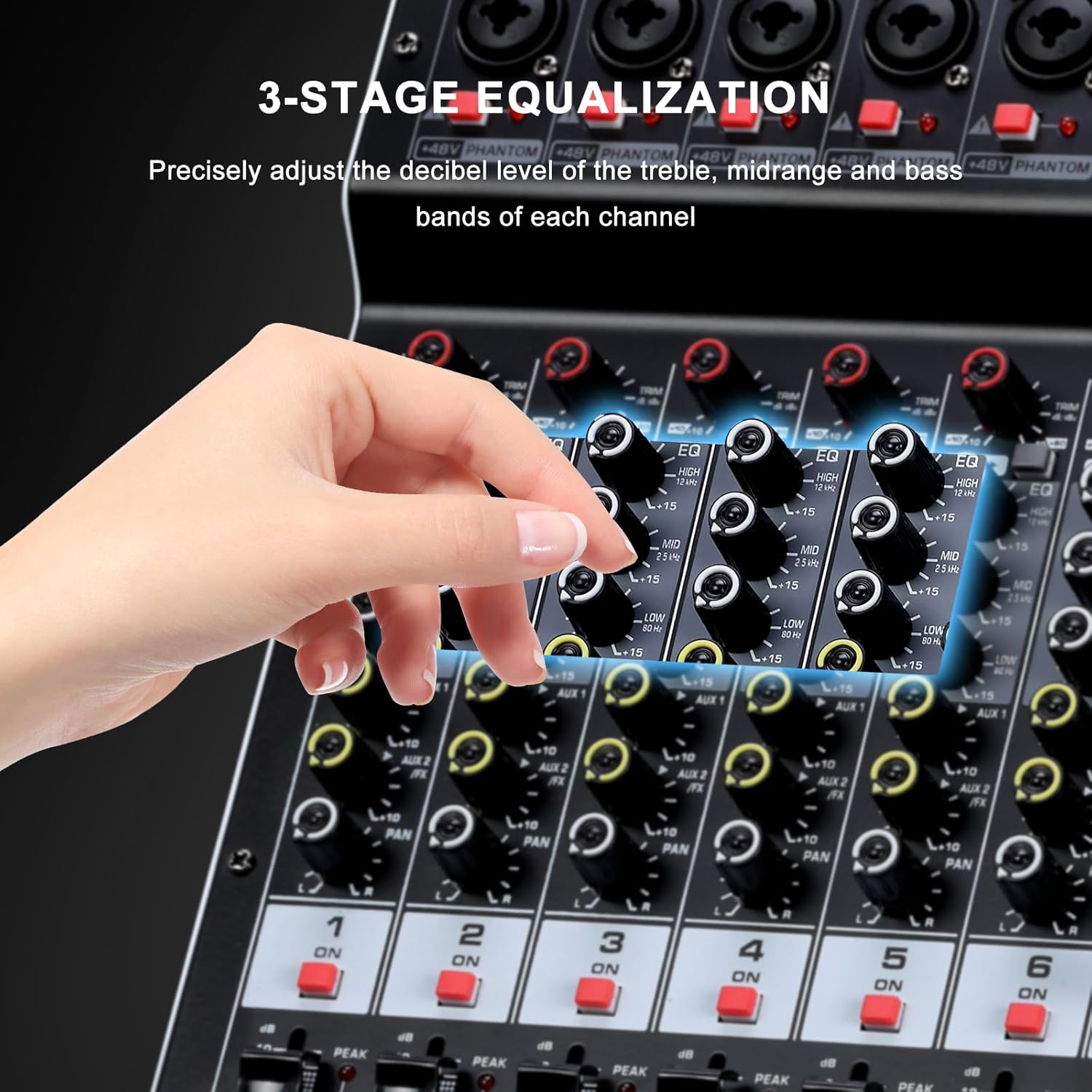
6-сүрөт: 3 тилкелүү теңдөө башкаруу элементтери
3.2 DSP эффекттери
The mixer includes a 24-bit digital effects processor with 256 preset effects.
- Use the 'PROGRAM' knob to select one of the 256 available effects (e.g., Hall, Room, Chorus, Plate, Delay). The selected effect number will be displayed on the screen.
- Adjust the 'FX LEVEL' control to set the overall intensity of the selected effect.
- The 'FX MUTE' button can temporarily disable the effects.
- An FX foot switch input allows external control to turn effects on or off.
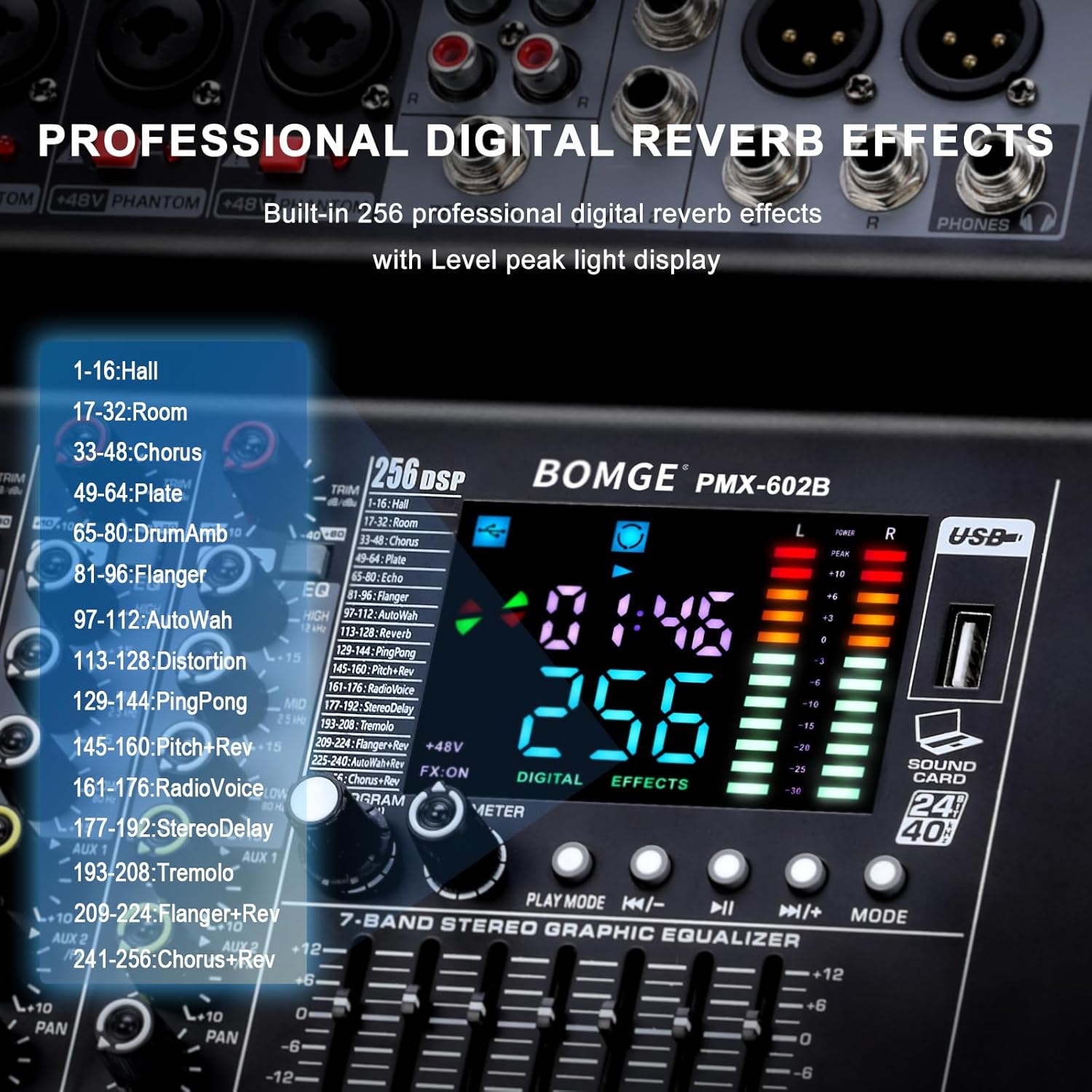
Figure 7: DSP Effects Selection and Display
3.3 Main Output 7-Band Equalizer
The main output features a 7-band graphic equalizer for fine-tuning the overall audio output.
- Adjust the faders for each frequency band to shape the sound of the main mix.
- This allows for compensation for room acoustics or specific sound preferences.
3.4 USB ойнотуу жана жаздыруу
The USB interface supports playback of digital audio files and recording of the main mix.
- Ойнотуу: Аудио менен USB флэш-дискти салыңыз files. Use the 'PLAY/PAUSE', 'PREV', 'NEXT', and 'MODE' buttons to control playback.
- Жаздыруу: The mixer can record the main output directly to a connected USB device. Refer to the specific instructions on the unit's display for initiating and stopping recordings.
- The mixer also functions as a USB sound card/audio interface for connection to a computer (MAC compatible).
3.5 Мониторинг
Connect headphones to the headphone jack for monitoring the main signal or individual channels using the PFL (Pre-Fader Listen) function.
4. Техникалык тейлөө
4.1 Тазалоо
Regularly clean the mixer's exterior with a soft, dry cloth. Avoid using abrasive cleaners, solvents, or waxes, as these can damage the finish and controls. Ensure the unit is powered off and unplugged before cleaning.
4.2 Вентиляция
Ensure that the ventilation openings on the mixer are not obstructed. Proper airflow is crucial to prevent overheating and ensure long-term reliability of the internal components.
4.3 Сактоо
When not in use for extended periods, store the mixer in a cool, dry place, away from direct sunlight and extreme temperatures. It is recommended to use the original packaging for protection.
5. Кыйынчылыктарды
This section addresses common issues you might encounter with your BOMGE powered mixer.
5.1 Үн чыгышы жок
- Күчтү текшерүү: Ensure the mixer is powered on and connected to a working outlet.
- Үн деңгээли: Verify that all channel faders, main output faders, and connected speaker volumes are turned up.
- Mute/Solo Buttons: Check if any channel's MUTE button is engaged or if a SOLO button is active, which would mute other channels.
- Байланыштары: Confirm all audio cables (inputs, outputs, speakers) are securely connected.
- Киргизүү булагы: Ensure the input source (microphone, instrument, Bluetooth, USB) is active and sending a signal.
5.2 Бурмаланган үн
- Пайда деңгээли: Reduce the GAIN knob for the affected channel if the PEAK LED is frequently lighting up.
- Үн деңгээли: Lower channel faders or the main output fader to prevent clipping.
- Динамик Импеданс: Ensure connected speakers match the mixer's impedance requirements (4 ohms).
- Кабелдин сапаты: Try different audio cables to rule out faulty wiring.
5.3 Bluetooth туташуу маселелери
- Режим тандоо: Миксер Bluetooth режиминде экенин текшериңиз.
- Түзмөктүн көрүнүүсү: Make sure your Bluetooth device's Bluetooth is enabled and discoverable.
- Аралык: Keep the Bluetooth device within 15 feet of the mixer.
- Интерференция: Тоскоолдукка алып келиши мүмкүн болгон башка зымсыз түзмөктөрдөн алыс болуңуз.
5.4 USB Device Not Recognized
- Формат: Ensure the USB flash drive is formatted correctly (e.g., FAT32).
- File Түрлөрү: Аудио экенин текшериңиз files on the USB drive are supported by the mixer.
- Кайрадан киргизүү: Remove and re-insert the USB drive.
- Башка түзмөктөр: Try a different USB flash drive to determine if the issue is with the drive itself.
5.5 Unusual Noise (e.g., Loud Fan)
- Кадимки операция: Some fan noise is normal for powered equipment, especially under heavy load.
- Ашыкча ызы-чуу: If the fan noise is unusually loud or accompanied by other sounds, ensure proper ventilation. If the issue persists, contact customer support.
5.6 Safety Warning: Smoke or Malfunction
If you observe smoke, sparks, or hear unusual noises like an explosion from the unit, immediately disconnect the power cable from the wall outlet. Do not attempt to operate or repair the unit. Contact customer support for assistance.
6. Техникалык шарттар
| Өзгөчөлүк | Спецификация |
|---|---|
| Модель номери | 602B-4Ch 2x400w |
| Бренд | BOMGE |
| Каналдардын саны | 6 (Mono) + 1 (RCA Stereo) |
| Power Output | 2 x 400W (4 ohms) |
| фантомдук күч | +48V (которулуучу) |
| DSP эффекттери | 256 алдын ала орнотуулар |
| Теңдөө | 3-band EQ per channel, 7-band graphic EQ on main output |
| Байланыш | Көмөкчү, Bluetooth, RCA, USB |
| Тtage | 110 вольт |
| Продукциянын өлчөмдөрү | 13"D x 14.17"W x 5.52"H (33cmx36cmx14cm) |
| Элемент Салмагы | 14.3 фунт (6.5 килограмм) |

Сүрөт 8: Продукциянын өлчөмдөрү
7. Кепилдик жана колдоо
7.1 Кепилдик маалыматы
Please refer to the warranty card included with your product or visit the official BOMGE website for detailed warranty terms and conditions. Typically, BOMGE products come with a limited manufacturer's warranty covering defects in materials and workmanship.
7.2 Кардарларды колдоо
For technical assistance, troubleshooting not covered in this manual, or warranty claims, please contact BOMGE customer support. You can usually find contact information on the BOMGE official webсайт же сатуучу аркылуу.
BOMGE Official Store: Visit BOMGE Store on Amazon


