1. Киришүү
Thank you for choosing the Gawfolk GF270G 27-inch 4K IPS 144Hz Gaming Monitor. This manual provides essential information for setting up, operating, and maintaining your monitor to ensure optimal performance and longevity. Please read this manual thoroughly before using the product.

Figure 1.1: Gawfolk GF270G 27-inch 4K IPS 144Hz Gaming Monitor
Негизги өзгөчөлүктөрү:
- Дисплей: 27-inch IPS Panel with 4K UHD (3840 x 2160) resolution.
- Жаңыртуу ылдамдыгы: 144Hz for smooth visuals.
- Жооп убактысы: 1ms.
- Түс тактыгы: 10-bit color depth, 128% sRGB.
- Байланыш: HDMI 2.1 (supports 4K@120Hz), DisplayPort 1.4 (supports 4K@144Hz), Audio Out.
- Эргономика: Multi-directional angle adjustment (tilt, height, pivot).
- Көзгө кам көрүү: Flicker-Free technology and Blue Light filter.
- Дизайн: Ultra-thin, frameless design.
2. Коопсуздук маалыматы
Please observe the following safety precautions to prevent damage to the monitor and ensure your safety:
- Мониторду жамгырдын, нымдуулуктун же экстремалдык температуранын таасирине тийгизбеңиз.
- туура желдетүүнү камсыз кылуу; желдетүү тешиктерин жаап албаңыз.
- Монитор менен кошо берилген кубат адаптерин гана колдонуңуз.
- Электр кабелине оор нерселерди коюудан алыс болуңуз.
- Disconnect the power cable from the outlet if the monitor will not be used for an extended period.
- Do not attempt to open the monitor casing; бардык тейлөөлөрдү квалификациялуу кызматкерлерге тапшырыңыз.
3. Пакеттин мазмуну
Verify that all items are present in your package. If any items are missing or damaged, please contact your retailer.
- Gawfolk GF270G 27-inch Monitor
- Монитор стенд (негизги жана моюн)
- Кубат адаптери жана кубат кабели
- HDMI кабели
- DisplayPort кабели
- Колдонуучунун Колдонмосу (бул документ)
4. Орнотуу
4.1 Стендди чогултуу
- Мониторду таңгагынан этияттык менен алып чыгыңыз, аны жумшак бетке коюп коргоңуз.
- Монитор панелине стенд мойнуна бекитиңиз.
- Стенд негизин стенд мойнуна бекитип, аны берилген бурагыч менен бекитиңиз.
- Чогулган мониторду туруктуу, жалпак бетке коюңуз.
4.2 VESA орнотуу
The monitor supports VESA 75x75mm mounting. To mount the monitor on a wall or an alternative stand:
- Remove the stand if it is already attached.
- Attach your VESA-compatible mount to the four screw holes on the back of the monitor.
- Монтаждын бекем орнотулганын текшериңиз.
4.3 Түзмөккө туташуу
The monitor features multiple input ports. Choose the appropriate cable for your device (PC, game console, etc.).

Figure 4.1: Monitor Product Interface and Dimensions. Includes DC power input, HDMI 2.0 ports (up to 120Hz), DisplayPort 1.4 ports (up to 144Hz), and Audio Out.
- HDMI туташуу: Connect one end of the HDMI cable to the HDMI port on your device and the other end to an HDMI port on the monitor. The monitor supports HDMI 2.1, allowing 4K resolution at up to 120Hz.
- DisplayPort туташуу: Connect one end of the DisplayPort cable to the DisplayPort on your device and the other end to a DisplayPort on the monitor. DisplayPort 1.4 supports 4K resolution at up to 144Hz.
- Аудио чыгаруу: Connect external speakers or headphones to the 3.5mm Audio Out port on the monitor.
4.4 Кубат туташтыруу
- Connect the power adapter to the DC input port on the monitor.
- Электр кабелин розеткага сайыңыз.
5. Иштөө нускамалары
5.1 Күйгүзүү/өчүрүү
Аны күйгүзүү же өчүрүү үчүн монитордо жайгашкан кубат баскычын басыңыз. Монитор күйүп турганда кубат индикаторунун жарыгы күйөт.
5.2 Экрандагы дисплей (OSD) менюсу
The OSD menu allows you to adjust various monitor settings. Use the joystick/buttons on the monitor to navigate and select options.
Жалпы OSD жөндөөлөрү:
- Сүрөт жөндөөлөрү: Жарыктыгын, контрастын, курчтугун жана түс температурасын тууралаңыз.
- Киргизүү булагы: Manually select between HDMI and DisplayPort inputs.
- Дисплейдин жөндөөлөрү: Adjust aspect ratio, HDR mode, and refresh rate.
- Аудио: Adjust volume for the audio output.
- Көзгө кам көрүү: Enable/disable Flicker-Free and Low Blue Light modes.
5.3 Өзгөчөлүктөр

Figure 5.1: ашыкview of key monitor features including 4K resolution, Low Blue Light, IPS Panel, 144Hz Refresh Rate, Gameplay Assist, 128% sRGB, and VESA compatibility.
- 4K UHD токтому: Experience detailed visuals with 3840x2160 pixels.
- 144Hz жаңыртуу ылдамдыгы: Provides smooth motion, especially beneficial for gaming.
- IPS панели: Кеңири сунуш кылат viewбурчтарды жана так түстөрдү чыгаруу.
- Flicker-Free & Low Blue Light: Reduces eye strain during prolonged use.
- Gameplay Assist: Includes features like a crosshair function for enhanced gaming.
- Адаптивдүү синхрондоштуруу: Advanced technology to eliminate screen tearing and stuttering.

Figure 5.2: Multi-directional angle adjustment capabilities, including tilt from -5° to 15°, height adjustment from 0-120mm, and 90° pivot rotation.
5.4 Эргономикалык жөндөөлөр
Монитор стендиңизди оптималдаштыруу үчүн ар кандай тууралоолорду жүргүзүүгө мүмкүндүк берет viewтажрыйбасы:
- Россия: Adjust the screen angle from -5° to 15° forward or backward.
- Бийиктигин тууралоо: Raise or lower the screen by up to 120mm.
- Пивот: Портреттик режим үчүн экранды 90° буруңуз viewing.
6. Техникалык тейлөө
6.1 Мониторду тазалоо
- Тазалоодон мурун ар дайым мониторду сууруп коюңуз.
- Жумшак, түксүз кездемени жеңил колдонуңуз dampсуу же атайын экран тазалоочу менен бүткөрүлөт.
- Do not use abrasive cleaners, alcohol, or ammonia-based solutions, as these can damage the screen or casing.
- Экранды акырын сүртүңүз; ашыкча басым жасабаңыз.
6.2 Сактоо
If storing the monitor for an extended period, ensure it is:
- Салкын, кургак жерде сакталат.
- Protected from dust and extreme temperatures.
- Kept in its original packaging if possible, to prevent damage.
7. Кыйынчылыктарды
Эгерде сиз мониторуңузда көйгөйлөргө туш болсоңуз, төмөнкү көйгөйлөрдү чечүү боюнча көрсөтмөнү караңыз:
- Дисплей жок:
- Кубат кабели мониторго да, розеткага да бекем туташтырылганын текшериңиз.
- Verify that the video cable (HDMI/DisplayPort) is properly connected to both the monitor and your device.
- OSD менюсунда туура киргизүү булагы тандалганын текшериңиз.
- Test the monitor with another device or cable if possible.
- Жаркылдаган же бурмаланган сүрөт:
- Видео кабели коопсуз туташтырылганын текшериңиз.
- Adjust the refresh rate settings on your computer.
- Disable Adaptive Sync in the OSD menu to see if the issue persists.
- No Sound from Audio Out:
- Check the volume settings in the OSD menu and on your connected device.
- Ensure your speakers or headphones are properly connected.
- Verify that the audio output is correctly configured on your computer.
- Optimal Performance for 4K@144Hz:
- To achieve 4K (3840x2160) resolution at 144Hz, your PC must be equipped with a dedicated GPU.
- We recommend using HDMI 2.0 or later and DisplayPort 1.4 or later ports. Lower versions may limit performance (e.g., HDMI 1.4 supports only 4K@30Hz).
- It is recommended to use a GPU equivalent to or above an NVIDIA GTX 1650.

Figure 7.1: Illustration of a compatible GPU and recommended ports (DP 1.4 and HDMI 2.0 or later) for achieving the monitor's highest parameters.
8. Техникалык шарттар
| Өзгөчөлүк | Спецификация |
|---|---|
| Бренд | Gawfolk |
| Модель номери | GF270G |
| Screen Size | 27 дюйм (68.58 см) |
| Резолюция | 4K UHD (3840 x 2160p) |
| Панел түрү | IPS |
| Жаңыртуу ылдамдыгы | 144 Гц |
| Жооп убактысы | 1 Миллисекунд |
| Аспект катышы | 16:9 |
| Контраст катышы | 4000:1 |
| Screen Surface Description | Мт |
| Өзгөчөлүктөр | Blue Light Filter, Tilt Adjustment, Frameless, Flicker-Free, Eye Care |
| Байланыш | HDMI, DisplayPort, аудио чыгуу |
| VESA шайкештиги | 75 x 75 мм |
| Энергия керектөө | 40.8 Ватт |
| Энергия натыйжалуулугунун рейтинги | F |
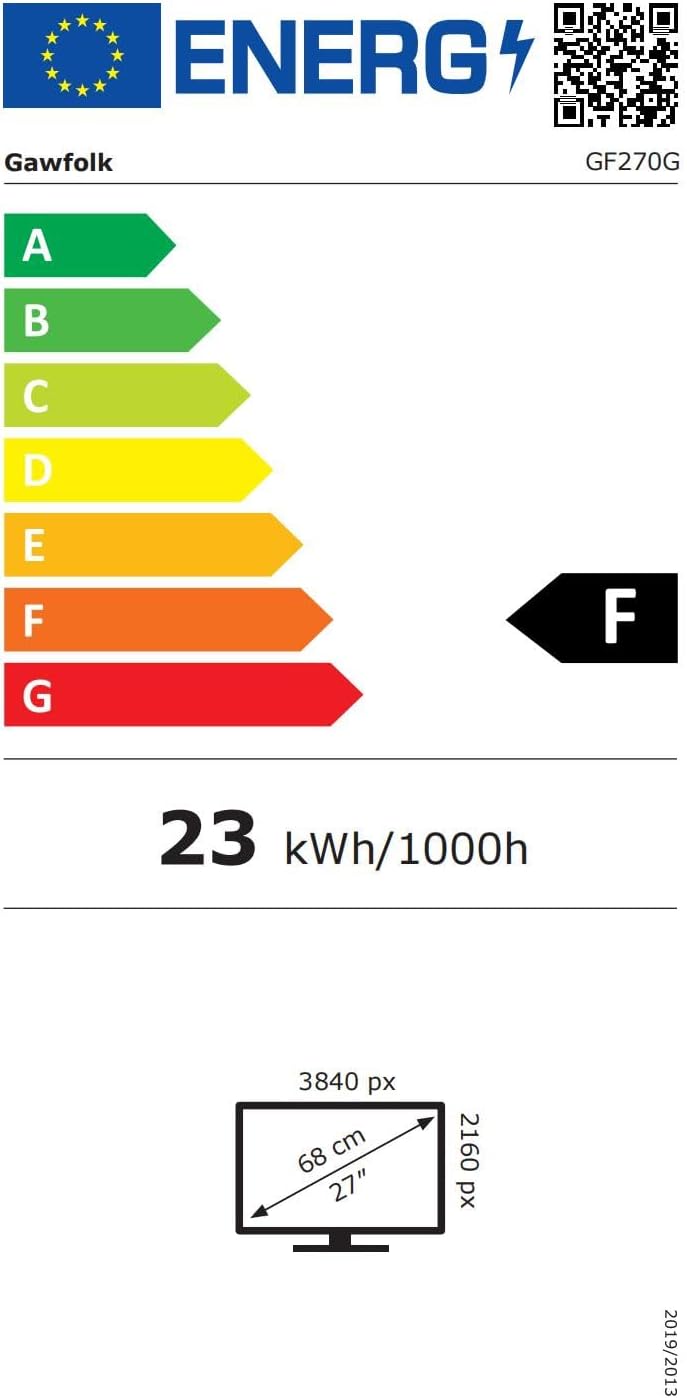
Figure 8.1: Energy label and product data sheet for the Gawfolk GF270G monitor. For more details, refer to the official EPREL database: ЕПРЕЛ 2198346.
9. Кепилдик жана колдоо
The Gawfolk GF270G monitor comes with a 12 айлык кепилдик, ensuring worry-free security for your purchase. Gawfolk provides premium Italian support for any assistance you may require.
For technical support, warranty claims, or any product-related inquiries, please contact Gawfolk customer service through your retailer or the official Gawfolk support channels.


