1. Киришүү
This manual provides detailed instructions for the setup, operation, maintenance, and troubleshooting of your NEOSMAY KC12-F Fanless Industrial Mini PC. Please read this manual thoroughly before using the device to ensure proper functionality and longevity.
2. Продукт бүтүп калдыview
The NEOSMAY KC12-F is a high-performance fanless industrial mini PC designed for various applications requiring robust and silent operation. It features an Intel 12th Gen Core i5-1240P processor, ample memory and storage, and extensive connectivity options.
Негизги өзгөчөлүктөрү:
- Процессор: Intel 12th Gen Core i5-1240P (12 Cores, 16 Threads, up to 4.4 GHz)
- Графика: Intel Iris Xe графикасы
- Эстутум: 16GB DDR4 RAM (Dual Channel, expandable up to 64GB)
- Сактагыч: 512GB M.2 2280 NVME SSD (expandable, supports M.2 SATA SSD)
- Тармак: Dual 2.5 Gigabit Ethernet, WiFi 6, Bluetooth 5.2
- Дисплей чыгаруу: Supports 4K 60Hz Quad Display via 2x HDMI 2.0, 1x DP 1.4, 1x Full Function Type-C
- Порттор: USB 3.2 x 4, USB 2.0 x 4, Full Function Type-C (20Gbps), RS485 COM, RS232 COM, Audio/MIC Jack
- Дизайн: Fanless aluminum shell with S-shaped copper sheet for efficient heat dissipation.
Порттун жайгашуусу:

Сүрөт 2.1: Алдыңкы жана арткы View of the NEOSMAY KC12-F Mini PC. The front panel includes power button, USB 3.2, USB 2.0, Type-C, and audio jacks. The rear panel features DC input, dual 2.5Gbe Ethernet, HDMI, DisplayPort, additional USB ports, and COM ports.
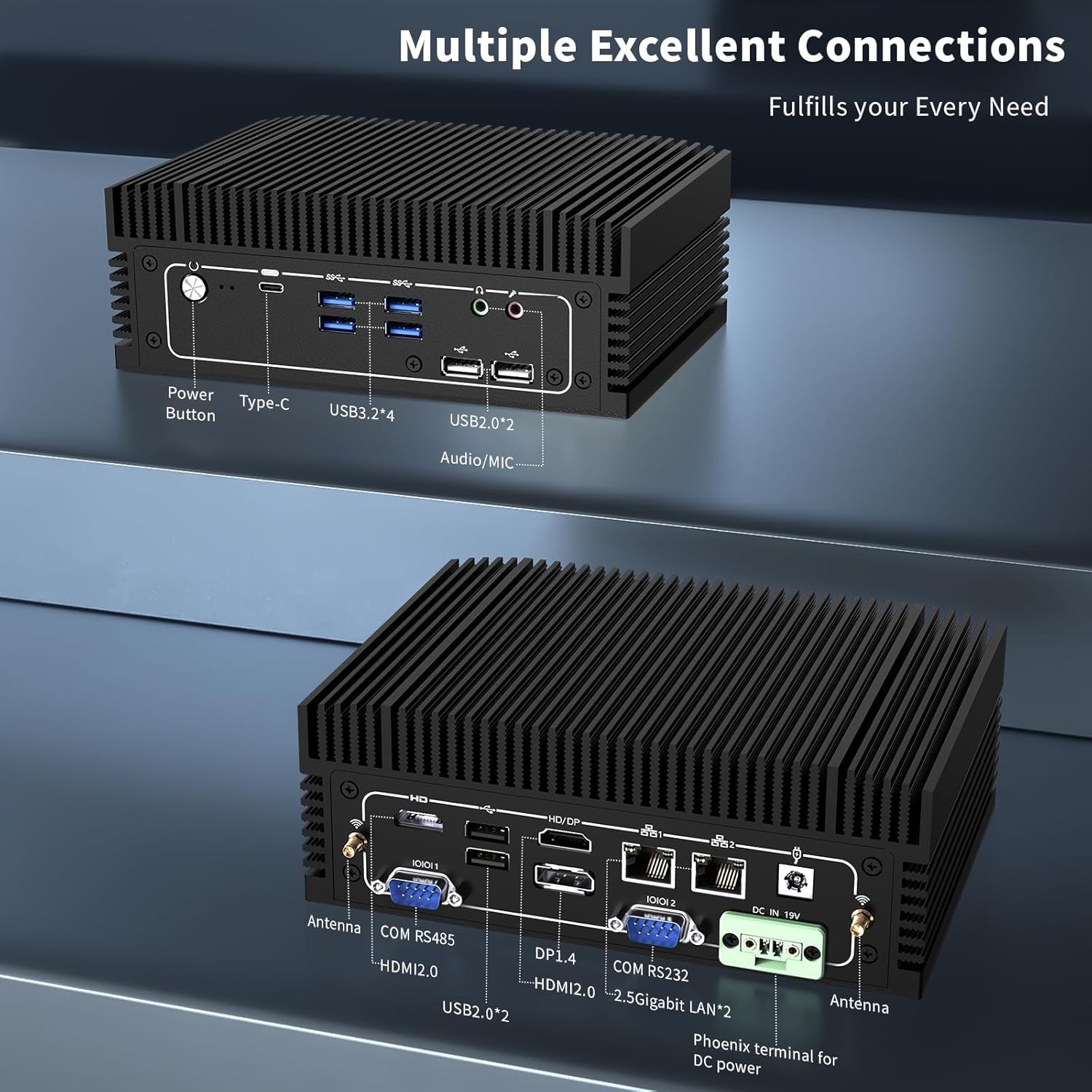
Сүрөт 2.2: Деталдаштырылган view of the front and rear ports. The front includes a power button, Type-C port, 4x USB 3.2 ports, 2x USB 2.0 ports, and an Audio/MIC Jack. The rear includes 2x HDMI 2.0, 1x DP 1.4, 2x 2.5 Gigabit LAN, 2x USB 2.0, COM RS485, COM RS232, DC IN 19V, and antenna connectors.
3. Орнотуу нускамалары
3.1 Пакеттин мазмуну
Улантуудан мурун, пакетте бардык элементтер бар экенин текшериңиз:

Сүрөт 3.1: Contents of the NEOSMAY KC12-F Mini PC package. Includes the Mini PC unit, power adapter, power cord, Wi-Fi antennas, VESA mount bracket, and screws.
- NEOSMAY KC12-F Mini PC Unit
- Кубат адаптери (19V DC)
- Электр кабели
- Wi-Fi антенналары
- VESA орнотуу кронштейни жана бурамалар
3.2 Баштапкы туташуу
- Дисплейди туташтыруу: Connect your monitor(s) to the Mini PC using HDMI, DisplayPort, or Type-C cables. The device supports up to four displays simultaneously.
- Перифериялык түзүлүштөрдү туташтыруу: Клавиатураңызды, чычканыңызды жана башка USB түзмөктөрүңүздү жеткиликтүү USB портторуна сайыңыз.
- Тармакка туташуу: For a wired connection, connect an Ethernet cable to one of the 2.5 Gigabit LAN ports. For wireless, screw in the provided Wi-Fi antennas to the antenna connectors on the rear panel.
- Туташуу кубаты: Connect the power adapter to the DC IN 19V port on the Mini PC, then plug the power cord into an electrical outlet.
4. Иштөө нускамалары
4.1 Күйгүзүү/өчүрүү
- Күйгүзүү: Press the power button located on the front panel of the Mini PC. The power indicator light will illuminate.
- Өчүрүү: To shut down the system, use the operating system's shutdown function. Alternatively, press and hold the power button for 5-7 seconds to force a shutdown (not recommended for regular use).
4.2 Дисплейдин конфигурациясы
The Mini PC supports up to four independent 4K@60Hz displays. After connecting multiple monitors, you may need to configure the display settings within your operating system (e.g., Windows Display Settings) to extend or duplicate your desktop.

Сүрөт 4.1: Illustration of the Mini PC supporting a quad 4K display setup, demonstrating its capability for multi-monitor environments.
5. Техникалык тейлөө
5.1 Тазалоо
- Ensure the Mini PC is powered off and unplugged before cleaning.
- Use a soft, dry cloth to wipe the exterior. For stubborn marks, a slightly damp кездеме, андан кийин кургак чүпүрөк колдонсо болот.
- Катуу химиялык заттарды, эриткичтерди же абразивдүү тазалагычтарды колдонуудан алыс болуңуз.
- As this is a fanless design, there are no internal fans to clean. However, ensure the heat sink fins are free from dust accumulation to maintain optimal thermal performance. Use compressed air if necessary.
5.2 Storage and Environment
- Store the Mini PC in a cool, dry place away from direct sunlight and extreme temperatures.
- Avoid placing the device in areas with high humidity or excessive dust.
- Ensure adequate airflow around the device, especially around the heat sink fins, even though it is fanless.

Сүрөт 5.1: Diagram illustrating the fanless aluminum case design and S-shaped copper sheet for efficient heat dissipation, ensuring stable operation.
6. Кыйынчылыктарды
Бул бөлүмдө сиздин Mini PC менен кездешиши мүмкүн болгон жалпы көйгөйлөр каралат.
6.1 Күч жок
- кубат туташуу текшерүү: Ensure the power adapter is securely connected to both the Mini PC and the electrical outlet. Verify the outlet is functional.
- Кубаттуу адаптер: Confirm the power adapter is the correct one supplied with the Mini PC.
6.2 Display Output жок
- Монитор туташуу: Ensure the display cable (HDMI, DP, Type-C) is securely connected to both the Mini PC and the monitor.
- Монитор киргизүү: Verify your monitor is set to the correct input source (e.g., HDMI 1, DisplayPort).
- Башка порт/кабелди байкап көрүңүз: Test with a different display port on the Mini PC or a different cable if available.
- Монитор функциясы: Test your monitor with another device to ensure it is working correctly.
6.3 Тармакка туташуу маселелери
- Зымдуу туташуу: Check the Ethernet cable connection. Ensure the router/modem is working.
- Зымсыз туташуу: Ensure Wi-Fi antennas are securely attached. Verify Wi-Fi is enabled in the operating system and you are connected to the correct network with the correct password.
- Айдоочу маселелери: Ensure network drivers are properly installed and updated.
6.4 Системанын иштешинин маселелери
- Ашыкча ысып кетүү: Although fanless, ensure the Mini PC is in a well-ventilated area and its heat sink fins are not obstructed.
- Программалык камсыздоо: Close unnecessary applications. Check for malware or viruses.
- Сактагыч: Ensure the SSD is not critically full.
7. Техникалык шарттар
| Өзгөчөлүк | Спецификация |
|---|---|
| Бренд | NEOSMAY |
| Модель номери | KC12-F |
| Процессор | Intel 12th Gen Core i5-1240P (12 Cores, 16 Threads, up to 4.4 GHz) |
| Графикалык сопроцессор | Intel Iris Xe графикасы (интегралдык) |
| RAM | 16GB DDR4 (2x 8GB SODIMM, 3200MHz), expandable up to 64GB |
| Катуу диск | 512GB M.2 2280 NVME SSD (PCIE x 4), expandable |
| Max Screen Resolution | 3840 x 2160 (4K) |
| Display Outputs | 2x HDMI 2.0, 1x DP 1.4, 1x Full Function Type-C (supports 4K@60Hz quad display) |
| USB порттору | 4x USB 3.2, 4x USB 2.0 |
| Network | 2x 2.5 Gigabit Ethernet (Intel I226-V chip), WiFi 6, Bluetooth 5.2 |
| Башка порттор | RS485 COM, RS232 COM, Audio/MIC Jack |
| Операция системасы | OS (Pre-installed Windows 11 Pro may vary by configuration) |
| Power Input | 19V DC |
| Элемент Салмагы | 5.28 фунт |
| Пакеттин өлчөмдөрү | 7.28 x 5.02 x 2.64 дюйм |
8. Кепилдик жана колдоо
NEOSMAY provides comprehensive support for its products. For technical assistance, warranty claims, or general inquiries, please use the contact information below.

Сүрөт 8.1: NEOSMAY Sales and Support contact details, including email and telephone number.
- Электрондук почта: info@newsmaytech.com
- Telephone (CN): +86-0755-89456786 (Mon-Sat 9:00-18:00 GMT)
- Онлайн чат: Log into your Amazon account, navigate to 'Your Orders', and select 'Ask Product Question'.
- Кызматтын жеткиликтүүлүгү: 7 days a week, 24 hours a day support is available.
Сураныч, кепилдик максаттары үчүн сатып алганыңыздын далилин сактап коюңуз.


