1. Киришүү
Thank you for choosing the Ajazz AF84 Wireless Membrane Silent Typewriter Keyboard. This keyboard combines a unique retro aesthetic with modern dual-mode connectivity, offering a comfortable and versatile typing experience. This manual provides detailed instructions for setup, operation, maintenance, and troubleshooting to ensure optimal performance of your device.

1.1-сүрөт: Ajazz AF84 Keyboard Overview
2. Продукциянын өзгөчөлүктөрү
- Wireless Bluetooth & 2.4G Dual-Mode: Seamless connectivity with Bluetooth 5.0 and a 2.4G USB receiver for versatile use across multiple devices.
- Vintage Typewriter Style: Features two-tone, spherical keycaps and a classic typewriter aesthetic for a unique look.
- Built-In Tablet & Phone Stand: An extended front ledge with a sturdy card slot supports iPads, Kindles, or smartphones up to 12.9 inches for hands-free viewing.
- Эргономикалык дизайн: 84-key layout with adjustable feet for customizable typing angles, promoting comfort during extended use.
- Portable & Battery-Powered: Operates on 2 AAA batteries (6+ months lifespan), offering a wireless and minimalist setup ideal for travel.
3. Орнотуу колдонмосу
3.1 Батареяны орнотуу
The Ajazz AF84 keyboard requires 2 AAA batteries for operation. The battery compartment is located on the underside of the keyboard.
- Locate the battery compartment cover on the bottom of the keyboard.
- Бөлүмдү ачуу үчүн капкакты жылдырыңыз же көтөрүңүз.
- Бөлүмдүн ичинде көрсөтүлгөндөй туура полярдуулукту (+/-) камсыз кылып, 2 AAA батарейкасын салыңыз.
- Батарея бөлүкчөсүнүн капкагын бекем орнотуңуз.
3.2 Байланыш режимдери
The keyboard supports two connection modes: 2.4G Wireless via USB receiver and Bluetooth 5.0.
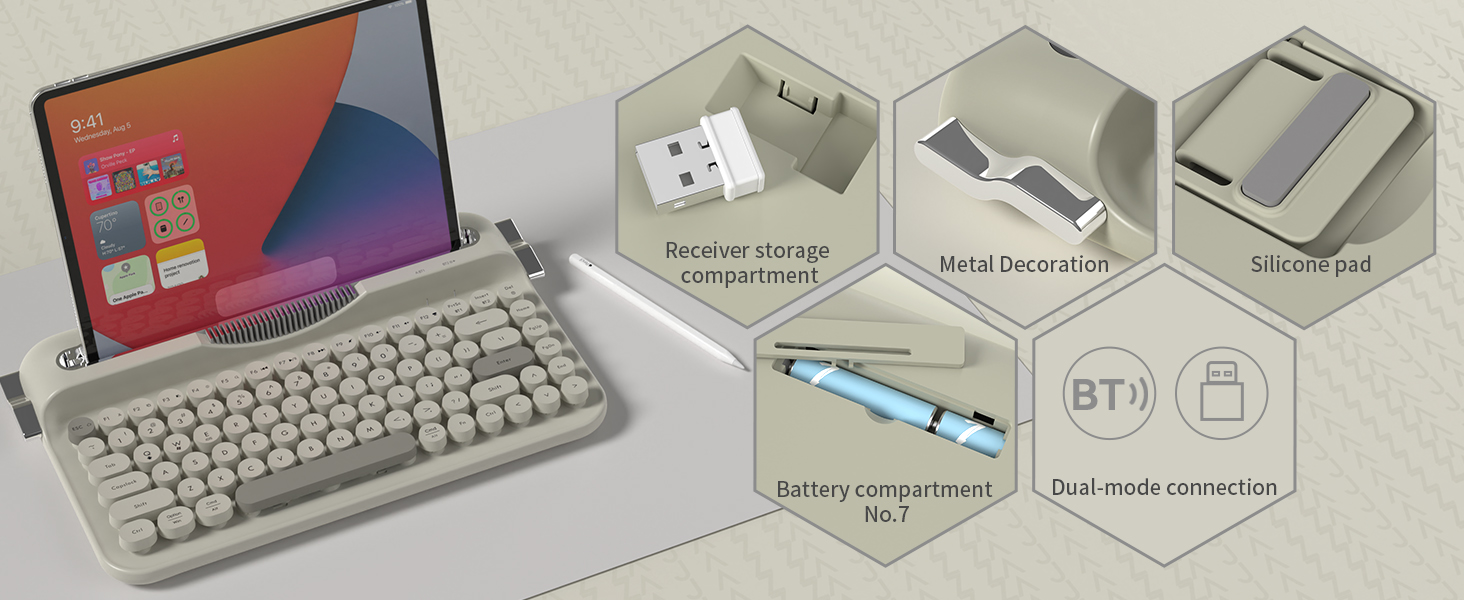
3.1-сүрөт: Keyboard Components and Connectivity Options
3.2.1 2.4G зымсыз байланыш
This mode provides a stable and fast connection using the included USB receiver.
- Locate the 2.4G USB receiver, typically stored in a dedicated slot on the keyboard.
- USB кабыл алгычты компьютериңиздеги же түзмөгүңүздөгү жеткиликтүү USB портуна сайыңыз.
- The keyboard should automatically connect. If not, ensure the keyboard is powered on and in 2.4G mode (refer to Section 4.2 for mode switching).

3.2-сүрөт: 2.4G USB Receiver туташуу
3.2.2 Bluetooth байланышы
Connect your keyboard to Bluetooth-enabled devices like tablets, smartphones, or computers.
- Баскычтоп күйгүзүлгөнүн текшериңиз.
- Switch the keyboard to Bluetooth mode (refer to Section 4.2).
- Түзмөгүңүздө Bluetooth жөндөөлөрүнө өтүп, Bluetooth'ду иштетиңиз.
- Издөө available devices. The keyboard should appear as "Ajazz AF84" or similar.
- Select the keyboard to pair. If prompted, enter the displayed code on the keyboard and press Enter.
3.3 Түзмөктүн шайкештиги
The Ajazz AF84 keyboard is compatible with a wide range of operating systems and devices:
- Операциялык системалар: Windows (8.0 and above), macOS (10.10 and above), Android, iOS.
- Түзмөктөр: Laptops, PCs, Smartphones, Tablets, Smart TVs.

3.3-сүрөт: Көп түзмөктү колдоо
4. Иштөө нускамалары
4.1 Индикатор жарыктары
Баскычтопто абал жөнүндө маалымат берүү үчүн бир нече индикаторлор бар:
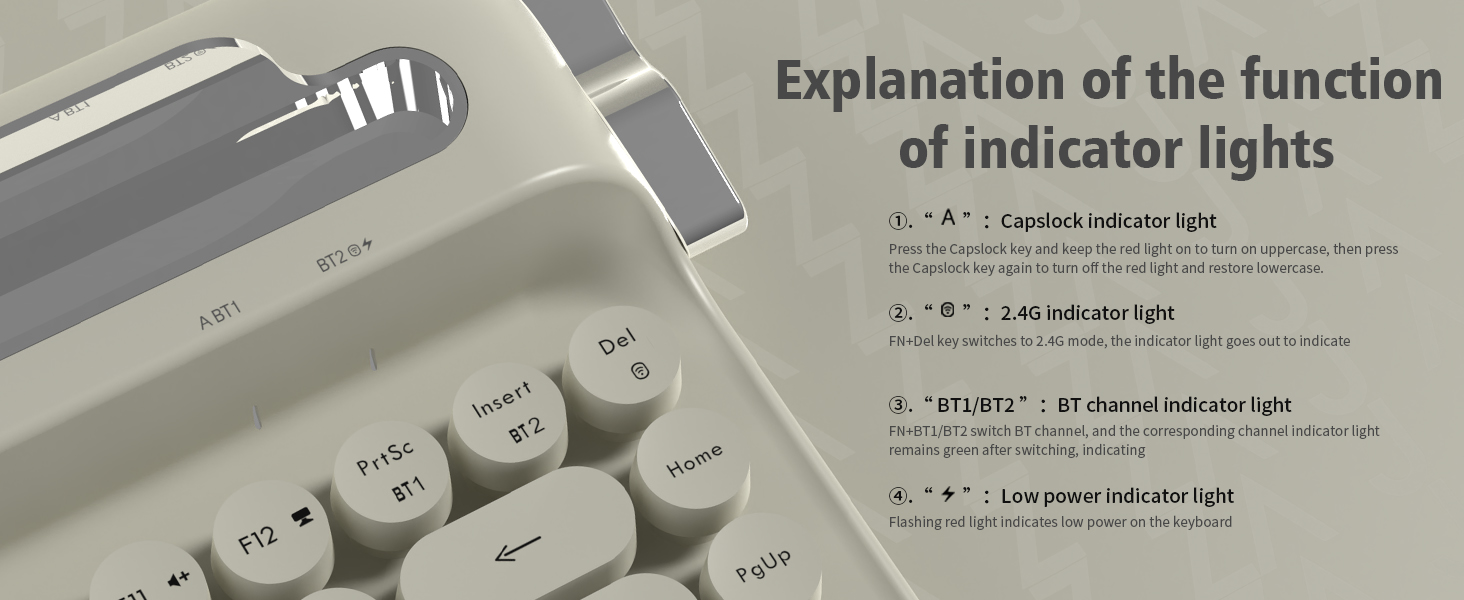
4.1-сүрөт: Индикатор жарыгынын функциялары
- "A" (Capslock) Indicator Light: Press the Capslock key to turn on (red light) for uppercase. Press again to turn off (light off) for lowercase.
- "2.4G" Indicator Light: When in 2.4G mode, this light will go out to indicate connection.
- "BT1/BT2" (Bluetooth Channel) Indicator Light: The corresponding channel indicator light remains green after switching to indicate active Bluetooth connection.
- "Low Power" Indicator Light: A flashing red light indicates low battery power on the keyboard.
4.2 Режимдердин ортосунда которулуу
To switch between 2.4G and Bluetooth modes, use the designated function keys:
- Басыңыз FN + Del 2.4G режимине өтүү үчүн.
- Басыңыз FN + BT1 or FN + BT2 to switch between Bluetooth channels.
4.3 Эргономикалык өзгөчөлүктөрү
The AF84 keyboard is designed for comfort during long typing sessions.
4.3.1 Жөнгө салынуучу бут
The keyboard features two-stage adjustable tilt legs on its underside, allowing you to set the angle for maximum comfort based on your personal habits.

4.2-сүрөт: Ergonomic Comfort with Adjustable Feet
4.3.2 Integrated Tablet/Phone Stand
The extended front ledge of the keyboard includes a sturdy card slot designed to securely prop up your iPad, Kindle, or smartphone (up to 12.9 inches), streamlining your workflow with hands-free viewтерип жатканда терүү.

4.3-сүрөт: Integrated Card Slot Bracket
5. Техникалык тейлөө
Proper maintenance ensures the longevity and performance of your Ajazz AF84 keyboard.
- Тазалоо: Клавиатуранын бетин жумшак, кургак чүпүрөк менен сүртүңүз. Өтө кир болсо, бир аз сүртүңүз.amp cloth can be used, but ensure no liquid enters the keyboard. Do not use harsh chemicals or abrasive cleaners.
- Баскыч капкактары: The round keycaps can be carefully removed for deeper cleaning if necessary. Use a keycap puller or gently pry them off from the edges. Realign and press firmly to reattach.
- Сактагыч: When not in use for extended periods, store the keyboard in a cool, dry place. Remove batteries if storing for several months to prevent leakage.
- Төгүлгөндөн сактаныңыз: Ички бөлүктөргө зыян келтирбөө үчүн клавиатурадан суюктуктарды алыс кармаңыз.
6. Кыйынчылыктарды
If you encounter issues with your Ajazz AF84 keyboard, refer to the following common troubleshooting steps:
- Баскычтоп жооп бербейт:
- Check battery level. Replace batteries if the low power indicator is flashing.
- Баскычтоп күйгүзүлгөнүн текшериңиз.
- Verify the correct connection mode (2.4G or Bluetooth) is selected.
- 2.4G байланышындагы көйгөйлөр:
- USB кабыл алгычтын иштеген USB портуна бекем сайылганын текшериңиз.
- Ресиверди башка USB портуна сайып көрүңүз.
- Диапазондогу көйгөйлөрдү жокко чыгаруу үчүн клавиатураны кабыл алгычка жакындатыңыз.
- Bluetooth жупташтыруу маселелери:
- Ensure Bluetooth is enabled on your device and the keyboard is in pairing mode.
- Forget the keyboard from your device's Bluetooth list and attempt to re-pair.
- Башка түзмөктөр Bluetooth сигналына тоскоолдук кылбасын текшериңиз.
- Try pairing with a different device to confirm keyboard functionality.
- Ачкычтар туура иштебейт:
- Check for any debris or foreign objects under the keycaps.
- Ensure keycaps are properly seated.
- If specific keys are not working, it may indicate a hardware issue.
If these steps do not resolve the issue, please contact Ajazz customer support for further assistance.
7. Техникалык шарттар
Detailed technical specifications for the Ajazz AF84 keyboard:

7.1-сүрөт: Продукциянын өлчөмдөрү
| Атрибут | Нарк |
|---|---|
| Бренд | Ajazz |
| Модель аты | AJAZZ AF84 |
| Байланыш технологиясы | 2.4Ghz/BT (Bluetooth 5.0) |
| Keyboard Description | Retro typewriter |
| Ачкычтардын саны | 84 |
| Түс | Боз |
| Өзгөчө өзгөчөлүк | Round Key, Integrated Tablet/Phone Stand, Adjustable Feet |
| Шайкеш түзмөктөр | Ноутбук, компьютер, смартфон, планшет |
| Элемент Салмагы | 1.87 фунт (болжол менен 850 г) |
| Пакеттин өлчөмдөрү | 14.41 x 8.39 x 2.68 дюйм |
| Өндүрүүчү | AJAZZ |
| Power Source | 2 x AAA батареялары |
8. Кепилдик жана колдоо
For warranty information and customer support, please refer to the official Ajazz webсайтка же сатуучуга кайрылыңыз. Сатып алуу квитанциясын кепилдик дооматтары үчүн сатып алуунун далили катары сактаңыз.
For technical assistance or inquiries, please visit the Ajazz Store: Ajazz Official Store


