1. Киришүү
The IRRADIO IR-203 Sound+ is a compact and portable wireless speaker designed for high-quality audio playback. Featuring Bluetooth 5.0 connectivity and a USB port for external media, it offers versatile listening options. Its robust design and long-lasting battery make it ideal for both home use and on-the-go entertainment.

1.1-сүрөт: IRRADIO IR-203 Sound+ Wireless Speaker. This image shows the speaker from an angled perspective, highlighting its compact size and fabric grille.
2. Коопсуздук маалыматы
Сураныч, аппаратты колдонуудан мурун бардык коопсуздук нускамаларын кылдат окуп чыгыңыз. Бул колдонмону келечекте маалымат алуу үчүн сактаңыз.
- Динамикти сууга же ашыкча нымдуулукка дуушар кылбаңыз. Бул продукт суу өткөрбөйт.
- Avoid extreme temperatures. Do not place near heat sources or in direct sunlight.
- Do not disassemble, repair, or modify the device. This will void the warranty and may cause damage or injury.
- Көрсөтүлгөн кубаттоо көлөмүн гана колдонуңузtage (DC 5V/2A).
- Балдар жетпеген жерде сактаңыз.
3. Пакеттин мазмуну
Пакетте бардык буюмдар бар экенин текшериңиз:
- IRRADIO IR-203 Sound+ Wireless Speaker
- USB заряддоо кабели
- Колдонуучунун Колдонмосу (бул документ)
4. Продукт бүтүп калдыview
4.1. Башкаруу каражаттары жана порттор

4.1-сүрөт: Side view of the speaker showing control buttons. From left to right: Mode button (M), Volume Down (-), Volume Up (+), Play/Pause/Next Track button (▶).

4.2-сүрөт: Артка view of the speaker showing connectivity ports. From left to right: TF (MicroSD) card slot, USB-A port, ON/OFF switch, DC 5V charging port.
The speaker features intuitive controls on its top edge and essential connectivity ports on its rear panel.
- Режим баскычы (M): Press to switch between Bluetooth and USB playback modes.
- Үнүн төмөндөтүү (-): Үндү азайтуу үчүн басыңыз.
- Үнүн жогорулатуу (+): Үнүн көбөйтүү үчүн басыңыз.
- Play/Pause/Next Track (▶): Press to play or pause audio. Long press to skip to the next track.
- TF карта уячасы: Түз аудио ойнотуу үчүн MicroSD картаны салыңыз.
- USB-A порту: Insert a USB flash drive for direct audio playback.
- ON/OFF которуу: Slide to power the speaker on or off.
- DC 5V порт: Динамикти кубаттоо үчүн USB кубаттоо кабелин бул жерге туташтырыңыз.
5. Орнотуу
5.1. Динамикти кубаттоо
Before first use, fully charge the speaker. The battery capacity is 400 mAh.
- Connect the provided USB charging cable to the DC 5V port on the speaker.
- Connect the other end of the USB cable to a compatible USB power adapter (DC 5V/2A recommended) or a computer USB port.
- Динамик зарядталып жатканын көрсөтүү үчүн заряддоо индикатору күйөт (түсү ар кандай болушу мүмкүн).
- Charging typically takes approximately 2 hours for a full charge. The indicator light will change or turn off once charging is complete.
A full charge provides approximately 2 hours and 40 minutes of continuous playback at 50% volume.
5.2. Күйгүзүү / Өчүрүү
To power on the speaker, slide the ON/OFF switch to the 'ON' position. You will hear an audible prompt. To power off, slide the switch to the 'OFF' position.
6. Иштөө нускамалары
6.1. Bluetooth Жупташтыруу
The speaker uses Bluetooth 5.0 for stable wireless connection up to 10 meters.
- Ensure the speaker is powered on and in Bluetooth mode. If not, press the 'M' (Mode) button to switch to Bluetooth mode. The speaker will enter pairing mode, indicated by a flashing LED light and an audible prompt.
- Түзмөгүңүздө (смартфон, планшет, ноутбук) Bluetooth иштетиңиз жана жеткиликтүү түзмөктөрдү издеңиз.
- Select "IRRADIO IR-203 Sound+" from the list of found devices.
- Once paired, the speaker will provide an audible confirmation, and the LED light will stop flashing.
- Эми сиз түзмөгүңүздөн аудиону динамик аркылуу ойной аласыз.
Эскертүү: Динамик күйгүзүлгөндө акыркы жупташтырылган түзмөккө автоматтык түрдө кайра туташуу аракетин көрөт.
6.2. USB/TF картасын ойнотуу
The speaker supports direct audio playback from a USB flash drive or a MicroSD (TF) card.
- Insert a USB flash drive into the USB-A port or a MicroSD card into the TF card slot.
- The speaker will automatically switch to USB/TF card mode and begin playing audio files (MP3, WAV, etc.) from the inserted storage device. If it does not switch automatically, press the 'M' (Mode) button to select the correct mode.
- Use the Play/Pause/Next Track button (▶) to control playback.
6.3. Үндү башкаруу
Use the '+' and '-' buttons on the speaker to adjust the volume. You can also control the volume from your connected device.
7. Техникалык тейлөө
To ensure the longevity and optimal performance of your speaker, follow these maintenance guidelines:
- Тазалоо: Use a soft, dry cloth to wipe the speaker's surface. Do not use abrasive cleaners, alcohol, or chemical solvents.
- Сактагыч: Узак мөөнөткө колдонулбаганда, динамикти күн тийбеген жана өтө температурадан алыс, салкын, кургак жерде сактаңыз.
- Батареяга кам көрүү: To preserve battery life, avoid fully discharging the battery frequently. Charge the speaker regularly, even if not in use.
8. Кыйынчылыктарды
If you encounter issues with your IRRADIO IR-203 Sound+ speaker, refer to the following common problems and solutions:
| Көйгөй | Мүмкүн себеп | Чечим |
|---|---|---|
| Динамик күйбөйт. | Батарея түгөнүп калды. | Динамикти кеминде 30 мүнөткө заряддаңыз. |
| Үн жок. | Үн өтө төмөн же үнсүз. Туура эмес режим тандалган. | Increase volume on both speaker and connected device. Press 'M' button to switch modes. |
| Bluetooth аркылуу жупташтыруу мүмкүн эмес. | Динамик жупташтыруу режиминде эмес. Түзмөк өтө алыс. Интерференция. | Ensure speaker is in Bluetooth pairing mode (flashing LED). Move device closer to speaker (within 10m). Turn off other Bluetooth devices. |
| USB/TF картасы ойнотулбай жатат. | Туура эмес file форматтоо. Карта/диск туура эмес салынган. | аудиону камсыз кылуу files are in supported format (e.g., MP3). Reinsert the USB drive or TF card firmly. Press 'M' button to select USB/TF mode. |
Бул чечимдерди колдонуп көргөндөн кийин көйгөй чечилбесе, кардарларды колдоо менен байланышыңыз.
9. Техникалык шарттар
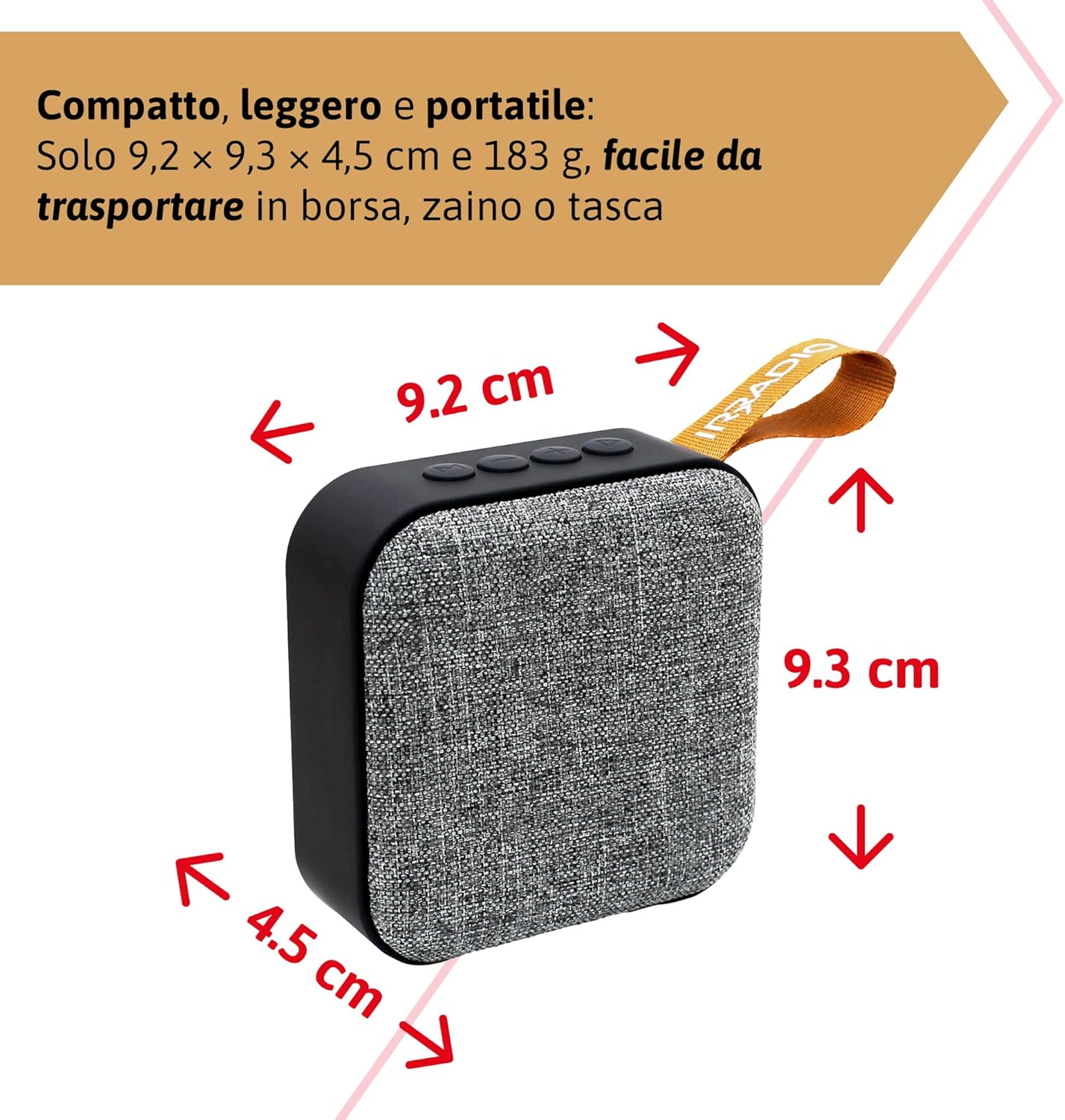
9.1-сүрөт: Dimensions of the IRRADIO IR-203 Sound+ speaker: 9.2 cm (width) x 9.3 cm (height) x 4.5 cm (depth).
| Өзгөчөлүк | Деталь |
|---|---|
| Модель аты | IR-203 Sound+ |
| Элемент моделинин номери | 550922126 |
| Бренд | IRRADIO |
| Продукциянын өлчөмдөрү | 9.2 x 9.3 x 4.5 см |
| Салмагы | 183 грамм |
| Динамик түрү | Woofer (Full Range 50mm Driver + Passive Radiator) |
| Спикердин максималдуу чыгаруу күчү | 3.5 Ватт RMS |
| Байланыш технологиясы | Bluetooth 5.0, USB |
| Wireless КПП Расстояние | 10 метрге чейин (тоскоолдуктарсыз) |
| Аудио чыгаруу режими | Стерео |
| Батарея сыйымдуулугу | 400 3.7 мАч (1.48 В, XNUMX Вт) |
| Батареянын иштөө мөөнөтү | Approx. 2 hours 40 minutes (at 50% volume) |
| Заряддоо убактысы | Болжол менен 2 саат |
| Заряддоо киргизүү | DC 5V/2A |
| Шайкеш түзмөктөр | Smartphones, Tablets, Laptops, Desktop Computers, MP3 Players, USB Flash Drives |
| Түс | Боз |
| Суу өткөрбөйт | Жок |
10. Кепилдик жана колдоо
10.1. Кепилдик маалыматы
For information regarding warranty and returns, please refer to the purchase platform's policies. Typically, products purchased on Amazon.it can be returned within 30 days of receipt if you change your mind. For defective or damaged products, specific return policies apply.
For specific information on purchases made through the Marketplace, please consult the relevant help page on the platform.
10.2. Кардарларды колдоо кызматы
For further assistance, technical support, or inquiries about your IRRADIO IR-203 Sound+ speaker, please visit the official IRRADIO store page:


