1. Киришүү
Thank you for choosing the AIWA FPH-S100/4G Simple Mobile Phone. This device is designed for ease of use, featuring large keys, a clear display, and essential functions like 4G connectivity, an SOS emergency button, FM radio, and a flashlight. This manual provides detailed instructions to help you set up, operate, and maintain your new phone.
2. Продукт бүтүп калдыview
The AIWA FPH-S100/4G is a user-friendly mobile phone with a focus on simplicity and accessibility. It supports 4G LTE for reliable calls and features a 1.8-inch color screen.

2.1-сүрөт: Фронт view of the AIWA FPH-S100/4G mobile phone, displaying the screen and large, clearly labeled keypad.

2.2-сүрөт: Артка view of the AIWA FPH-S100/4G mobile phone, highlighting the prominent orange SOS button and the integrated camera.

2.3-сүрөт: Side view of the AIWA FPH-S100/4G mobile phone, illustrating its ergonomic design.

2.4-сүрөт: Жогорку view of the AIWA FPH-S100/4G mobile phone, featuring the built-in LED flashlight.
Негизги өзгөчөлүктөрү:
- Чоң ачкычтар: Easy to see and press for comfortable dialing and texting.
- SOS баскычы: Dedicated button for quick access to emergency contacts.
- 1.8" LCD дисплей: Clear color screen for easy viewing of numbers and text.
- 4G LTE байланышы: Ensures clear and stable call quality.
- FM радиосу: Listen to your favorite radio stations on the go.
- LED фонарик: Convenient for low-light situations.
- USB-C заряддоо: Modern and reversible connector for easy charging.
- Кош SIM колдоо: Use two SIM cards simultaneously.
- TF карта уячасы: Expandable storage for contacts, photos, and more.
3. Орнотуу
3.1. Пакеттин мазмуну
Бардык буюмдар кутуда бар экенин текшериңиз:
- AIWA FPH-S100/4G Mobile Phone
- USB кабели
- Колдонуучунун Колдонмосу (бул документ)
3.2. Батареяны орнотуу
- Телефондун арткы капкагын оюктан акырын ачып, чечиңиз.
- Батареянын контакттарын телефондун ичиндеги терминалдар менен тегиздеңиз.
- Батареяны бекем ордуна орнотулганга чейин басыңыз.
- Арткы капкакты ордуна коюп, чыкылдагандай болгонун текшериңиз.
3.3. SIM карталарды жана TF картасын салуу
The phone supports two SIM cards and one TF (microSD) card for expandable storage.
- With the back cover and battery removed, locate the SIM card slots and the TF card slot.
- Carefully insert your SIM card(s) into the designated slots with the gold contacts facing down, following the orientation indicated on the phone.
- Insert the TF card into its slot, ensuring it is properly seated.
- Батареяны жана арткы капкакты кайра орнотуңуз.
3.4. Баштапкы заряддоо
Биринчи жолу колдонуудан мурун, телефондун батарейкасын толугу менен заряддаңыз.
- Connect the USB-C cable to the charging port on the phone.
- USB кабелинин экинчи учун туура келген USB кубат адаптерине (кошумча эмес) же компьютердин USB портуна туташтырыңыз.
- Экрандагы батареянын индикатору заряддоо абалын көрсөтөт.
- Толук заряддалгандан кийин заряддагычты ажыратыңыз.


3.1-сүрөт: Icons representing USB-C charging and the flash card slot.
4. Иштөө нускамалары
4.1. Күйгүзүү/өчүрүү
- Күйгүзүү үчүн: басып, кармап туруңуз Red Call End/Power экран күйгүчө баскычын басыңыз.
- Өчүрүү үчүн: басып, кармап туруңуз Red Call End/Power button until the power off options appear, then select 'Power Off'.
4.2. Чалууларды кабыл алуу жана кабыл алуу
- Чалуу үчүн: Enter the phone number using the large keypad. Press the Жашыл чакыруу чалууну баштоо үчүн баскычты басыңыз.
- Чалууга жооп берүү үчүн: Телефон шыңгыраганда, басыңыз Жашыл чакыруу баскычы.
- Чалууну аяктоо үчүн: басыңыз Red Call End/Power баскычы.

4.1-сүрөт: The phone's simplified interface, showing the large numeric keypad for easy dialing.
4.3. SOS өзгөчө кырдаал баскычы
The dedicated SOS button provides a quick way to contact pre-set emergency numbers.
- Setting Up Emergency Contacts: Navigate to the 'SOS Settings' in the phone's menu. Add up to 5 emergency contact numbers. These contacts will be called in sequence when the SOS button is activated.
- SOSту иштетүү: Апельсинди басып, кармап туруңуз SOS button on the back of the phone for a few seconds. The phone will automatically dial the emergency contacts one by one until a connection is made. It will also send a pre-set emergency SMS message to these contacts.
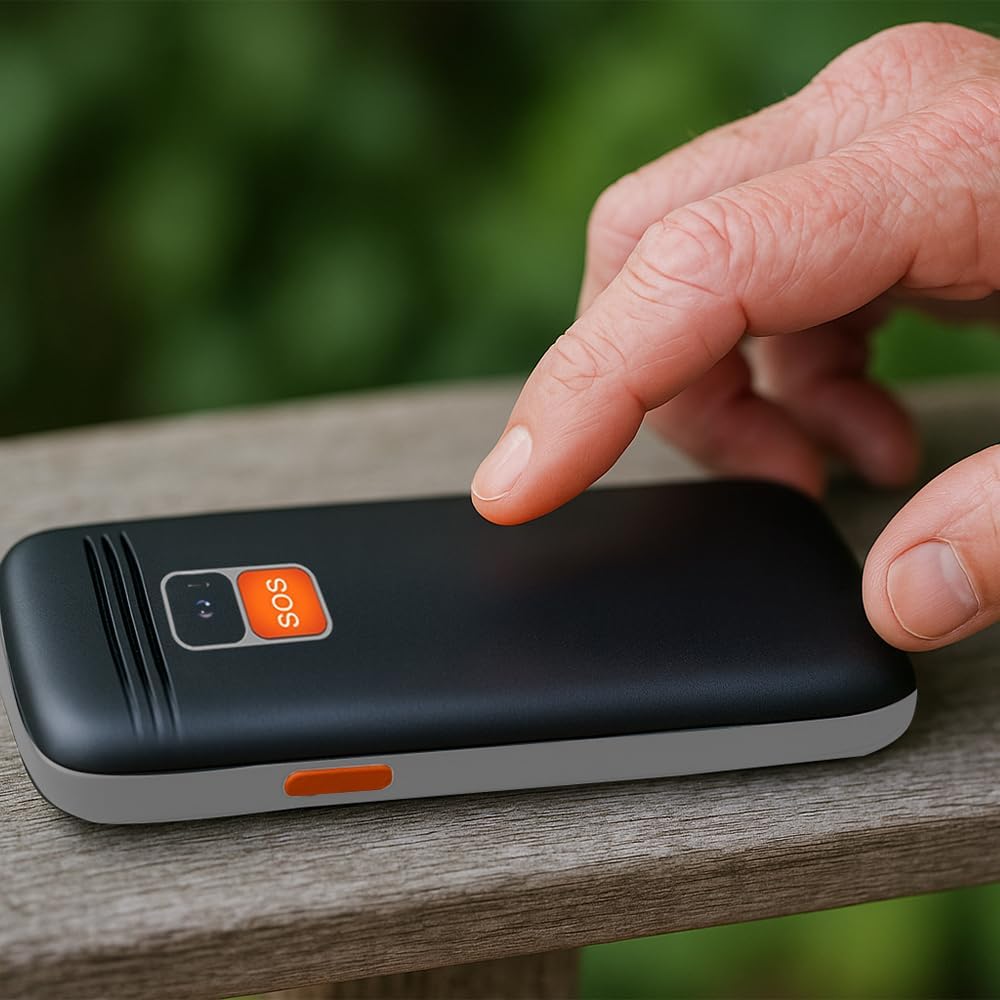
4.2-сүрөт: A user activating the SOS emergency function by pressing the dedicated button on the phone's rear.
4.4. Фонарды колдонуу
To turn the LED flashlight on or off, locate the dedicated flashlight button on the side of the phone (or refer to the manual for specific key combination if not a dedicated button). Press and hold or toggle the button as instructed.

4.3-сүрөт: Icon indicating the flashlight function.
4.5. FM радиосу
To use the FM radio, connect a wired headset (not included) to the 3.5mm audio jack, as it acts as an antenna. Navigate to the 'FM Radio' application in the phone's menu to scan for stations and adjust volume.

4.4-сүрөт: Icon representing the earphone output port.
4.6. Bluetooth байланышы
Bluetooth түзмөгү менен жупташтыруу үчүн:
- 'Орнотуулар' > 'Bluetooth' бөлүмүнө өтүңүз.
- Bluetooth'ду күйгүзүңүз.
- тандоо 'Издөө devices' to find available Bluetooth accessories.
- Select your desired device from the list and follow the on-screen prompts to pair.
5. Техникалык тейлөө
5.1. Аспапты тазалоо
Use a soft, dry, lint-free cloth to clean the phone's screen and body. Avoid using harsh chemicals, cleaning solvents, or abrasive materials, as these can damage the phone's surface.
5.2. Батареяга кам көрүү
- Батареяны өтө жогорку температурага (ысык же суук) дуушар кылбаңыз.
- Батареяны тешпеңиз, бөлүктөргө бөлбөңүз же өзгөртпөңүз.
- Эгер телефон көпкө колдонулбаса, сактоодон мурун аны болжол менен 50% га чейин кубаттаңыз.
5.3. Сактоо
Колдонулбаган учурда телефонду салкын, кургак жерде, күн нуру түз тийген жана нымдуулуктан алыс сактаңыз.
6. Кыйынчылыктарды
This section addresses common issues you might encounter with your AIWA FPH-S100/4G.
| Көйгөй | Мүмкүн себеп | Чечим |
|---|---|---|
| Телефон күйбөйт. | Low battery or battery not installed correctly. | Батареяны жок дегенде 30 мүнөт кубаттаңыз. Батарея туура салынганын текшериңиз. |
| Тармак сигналы жок. | SIM card not inserted, out of network coverage, or SIM card issue. | Check SIM card installation. Move to an area with better network coverage. Contact your service provider if the issue persists. |
| Чалууларды кабыл алуу же жасоо мүмкүн эмес. | No network signal, incorrect call settings, or insufficient balance (prepaid). | Verify network signal. Check call barring settings. Ensure sufficient credit if using a prepaid SIM. |
| SOS баскычы иштебей жатат. | Emergency contacts not set up or incorrect numbers. | Go to 'SOS Settings' and ensure emergency contacts are correctly saved. Test the function in a non-emergency situation. |
| FM радиосу иштебейт. | Headset not connected or faulty. | Ensure a wired headset is properly connected, as it functions as the antenna. Try a different headset if available. |
7. Техникалык шарттар
Detailed technical specifications for the AIWA FPH-S100/4G mobile phone.
| Өзгөчөлүк | Спецификация |
|---|---|
| Модель аты | FPH-S100/4G |
| Бренд | Айва |
| Операция системасы | Symbian 9.1 |
| Мобилдик технология | 4G |
| Зымсыз кызмат көрсөтүүчү | Бардык операторлор |
| Түс | Кара |
| Туташтыргыч түрү | USB Type-C |
| Форма фактору | Бар |
| Дисплей түрү | LCD |
| Дисплей өлчөмү | 1.8 дюйм |
| Батарея сыйымдуулугу | 800 mAh (Removable) |
| Өлчөмдөрү (пакет) | 15 x 15 x 10 см |
| Салмагы | 58 г |
| Камтылган компоненттер | USB кабели |


7.1-сүрөт: Icons highlighting the 1.8" LCD display and the phone's light weight of 58g.
8. Кепилдик жана колдоо
8.1. Продукцияга кепилдик
The AIWA FPH-S100/4G mobile phone comes with a Продукцияга 2 жылдык кепилдик сатып алынган күндөн тартып. Бул кепилдик өндүрүштүк кемчиликтерди жана нормалдуу колдонуудагы бузулууларды камтыйт. Кепилдик дооматтары үчүн сатып алганыңыздын далилин сактап коюңуз.
8.2. Кардарларды колдоо кызматы
For technical assistance, troubleshooting beyond this manual, or warranty inquiries, please contact your retailer or the official Aiwa customer support. Refer to the contact information provided with your purchase or visit the official Aiwa webколдоо чоо-жайы үчүн сайт.