Introduction
This manual provides detailed instructions for setting up, operating, and maintaining your Blink Video Doorbell and Blink Outdoor 4 camera system. These devices offer advanced wireless smart security features, including head-to-toe HD view, two-year battery life, and two-way audio, designed to enhance your home security and peace of mind.

Сүрөт: бүттүview of the Blink Video Doorbell system highlighting key features like Head-to-Toe HD View, Two-Year Battery Life, Two-Way Audio, and Smart Notifications.
Эмне камтылган
Your Blink Video Doorbell + Outdoor 4 system package includes the following components:
- 1 Blink Video Doorbell
- 1 Blink Outdoor 4 camera
- 1 Blink Sync Module Core
- 5 AA Energizer lithium batteries (3 for Doorbell, 2 for Outdoor 4)
- Mounting kits for each device
- 1 Wall Plate (for Doorbell)
- 1 Doorbell Removal Tool
- 2 Wire Extenders (for Doorbell)
- 1 Corner Mount Accessory (for Doorbell)
- 1 Drill template (for Doorbell)
- 1 Doorbell removal key
- 1 Power Adapter (for Sync Module Core)
- 1 USB-C Cable (for Sync Module Core)
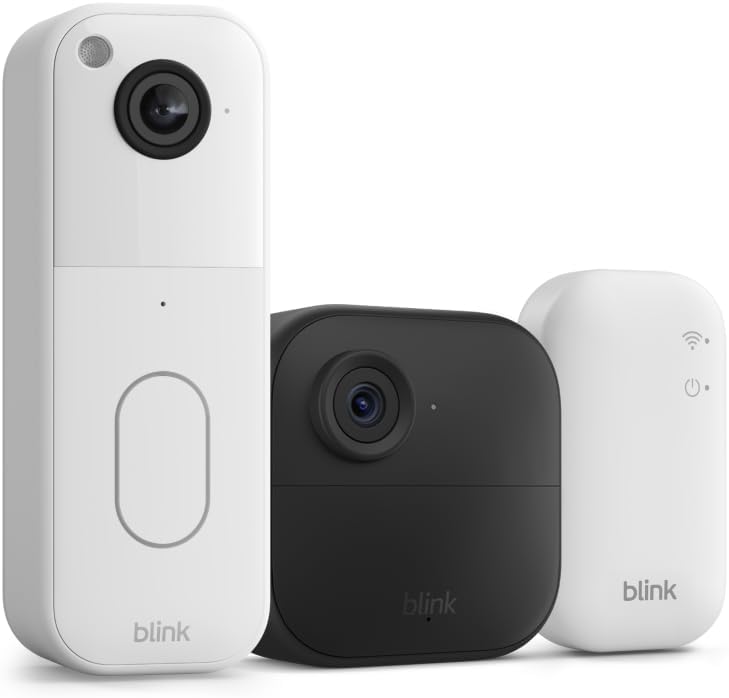
Image: The main components of the Blink security system: the Blink Video Doorbell, the Blink Outdoor 4 camera, and the Blink Sync Module Core.
Орнотуу колдонмосу
1. Download the Blink Home Monitor App
Before beginning installation, download the Blink Home Monitor app from your device's app store (iOS, Android, or Fire OS). Create an account or log in if you already have one.
2. Set Up the Sync Module Core
The Sync Module Core is essential for your Blink system to function.
- Plug the Sync Module Core into a power outlet using the provided power adapter and USB-C cable.
- Place it centrally within your home, ensuring it's within Wi-Fi range and can communicate with both the Video Doorbell and Outdoor 4 camera.
- Follow the in-app instructions to connect the Sync Module Core to your 2.4 GHz Wi-Fi network.
3. Install the Blink Video Doorbell
The Blink Video Doorbell can be installed wirelessly or wired to an existing chime.
- Insert the three AA lithium batteries into the Video Doorbell.
- Choose your mounting location. Use the drill template and mounting kit to secure the wall plate.
- If wiring, connect the doorbell wires to the terminals on the wall plate using the wire extenders if necessary. Ensure power is off before connecting.
- Snap the Video Doorbell onto the wall plate.
- Follow the in-app instructions to add the Video Doorbell to your Sync Module system.
4. Install the Blink Outdoor 4 Camera
The Outdoor 4 camera is designed for outdoor use and is completely wireless.
- Insert the two AA lithium batteries into the Outdoor 4 camera.
- Select an optimal outdoor location for the camera, ensuring it has a clear view and is within range of the Sync Module Core.
- Use the provided mounting kit to securely attach the camera to a wall or surface.
- Follow the in-app instructions to add the Outdoor 4 camera to your Sync Module system.

Image: A hand holding the Blink Video Doorbell, illustrating its compact size and the location of the battery compartment, emphasizing its two-year battery life.
Operating Your Blink System
Using the Blink Home Monitor App
The Blink app is your central control hub for managing your security system.
- Live View: Access real-time video streams from your Video Doorbell (head-to-toe HD) and Outdoor 4 camera (1080p HD).
- Эки тараптуу аудио: Speak and listen to visitors or deter intruders using the built-in microphone and speaker on both devices.
- Кыймылды аныктоо: Configure motion detection zones and sensitivity for both devices. Receive instant alerts on your smartphone when motion is detected. Outdoor 4 features enhanced dual-zone motion detection.
- Түнкү көрүнүш: Both devices feature infrared night vision for clear viewжарык аз шарттарда.
- Arm/Disarm System: Easily arm or disarm your entire system or individual cameras through the app.
- Видео сактагыч: With a Blink Subscription Plan (sold separately), securely store video clips in the cloud for up to 60 days. A free 30-day trial is typically included.
- Акылдуу эскертмелер: Receive intelligent alerts, including person detection (with a Blink Subscription Plan), directly on your phone.

Image: A smartphone displaying the Blink app interface, showcasing the 150-degree head-to-toe field of view from the Blink Video Doorbell, allowing users to see packages and visitors clearly.

Сүрөт: Үй-бүлө viewing a live feed from their Blink camera on an Alexa-compatible smart display, demonstrating the two-way communication feature.

Image: A smartphone screen displaying smart notifications from the Blink app, including alerts for motion detection and person detection.
Техникалык тейлөө
Батареяны алмаштыруу
Both the Video Doorbell and Outdoor 4 camera are designed for up to two years of battery life under typical usage. The Blink app will notify you when battery levels are low.
- Видео Коңгуроо: Use the provided doorbell removal tool to detach the doorbell from its wall plate. Replace the three AA 1.5V lithium metal batteries.
- Outdoor 4 Camera: Open the battery compartment on the back of the camera. Replace the two AA 1.5V lithium metal batteries.
- Always use non-rechargeable lithium metal batteries for optimal performance and battery life.
Түзмөктөрүңүздү тазалоо
Periodically clean the camera lenses and device surfaces to ensure clear video quality and proper functionality.
- Use a soft, dry, lint-free cloth to wipe the lens and body of the devices.
- Avoid using harsh chemicals or abrasive cleaners, as these can damage the device.
Проблемаларды чечүү
Байланыш маселелери
- Live жок View/Offline Device: Ensure your Sync Module Core is powered on and connected to your Wi-Fi network. Check your home Wi-Fi signal strength.
- Видеонун сапаты начар: Check your Wi-Fi signal strength at the camera's location. Ensure the camera lens is clean and free from obstructions.
Кыймылды аныктоо көйгөйлөрү
- Too Many/Few Alerts: Adjust motion detection sensitivity and activity zones within the Blink app. Consider the camera's placement relative to high-traffic areas or environmental factors (e.g., moving branches).
- Жалган эскертүүлөр: Refine activity zones to exclude areas with frequent, non-relevant motion.
Батареянын иштөө мөөнөтү
- Shorter Than Expected Battery Life: Frequent Live View access, high motion detection sensitivity, and extreme temperatures can reduce battery life. Review your settings in the Blink app. Ensure you are using recommended lithium metal batteries.
Техникалык шарттар
Blink Video Doorbell
- талаасы View: 150°HV
- Видеонун чечилиши: 1440 x 1440p
- Аспект катышы: 1:1
- Камеранын кадр ылдамдыгы: 30 FPS
- Өлчөмдөрү: 1.85 дюйм x 5.12 дюйм x 1.44 дюйм (47 мм x 130 мм x 36.6 мм)
- Салмагы: 4oz (113 гр)
- Күч: 3 AA 1.5V lithium metal (non-rechargeable) batteries; Existing chime wiring: 8-24 VAC
- Аудио: Speaker output and two-way audio recording
- Диоддордон: Recording indicator, Button LED
- Иштөө температурасы: -5°F – 113°F (-20° – 45°C)
- Муун: 2nd Generation
Blink Outdoor 4 Camera
- талаасы View: 143° диагональ
- Камеранын чечилиши: 1080p HD видео
- Сүрөттүн чечими: 640 x 360
- Камеранын кадр ылдамдыгы: 30 кадр/сек чейин
- Өлчөмдөрү: 2.8 x 2.8 x 1.6 дюйм (70 x 70 x 41 мм)
- Бирдик Салмагы: 5.0 унция (141 г)
- Күч: 2 AA 1.5V lithium metal batteries (non-rechargeable)
- Аудио: 2 тараптуу аудио
- Иштөө температурасы: -4°F жана 113°F
- Муун: 4-муун – 2023 чыгаруу
Жалпы системалык талаптар
- Интернет байланышы: Always-on high-speed internet (broadband, fiber, or DSL)
- Wi-Fi тармагы: 2.4 ГГц 802.11b/g/n
- Minimum Smartphone Requirements: iOS 15.0, Android 9.0 же Fire 9.0
- Blink App: Blink HomeMonitor
Кепилдик жана колдоо
Кепилдик маалымат
Your Blink Video Doorbell and Outdoor 4 camera system comes with a one-year limited warranty. The purchase and use of Blink devices are subject to the terms found on the official Blink webсайт.
Программалык камсыздоонун коопсуздук жаңыртуулары
This device receives guaranteed software security updates for at least four years after it is last available for purchase as a new unit on our websites. For more information on software security updates, please refer to the official Blink support resources.
Кардарларды колдоо
For additional information, setup guides, and troubleshooting assistance, please visit the official Blink Support page.
Visit the Blink Store


