Introduction
Thank you for choosing the Monster S290 Portable Bluetooth Speaker. This manual provides essential information for setting up, operating, and maintaining your speaker to ensure optimal performance and longevity. Please read these instructions carefully before using the product.
Image: The Monster S290 speaker, designed for portability, shown being carried by a person outdoors.
Пакеттин мазмуну
Төмөндө тизмеленген нерселердин баары пакетиңизге камтылганын текшериңиз:
- Monster S290 Speaker x1
- AUX-IN Cable x1
- USB-C заряддоо кабели x1
- X1
- Кепилдик картасы x1
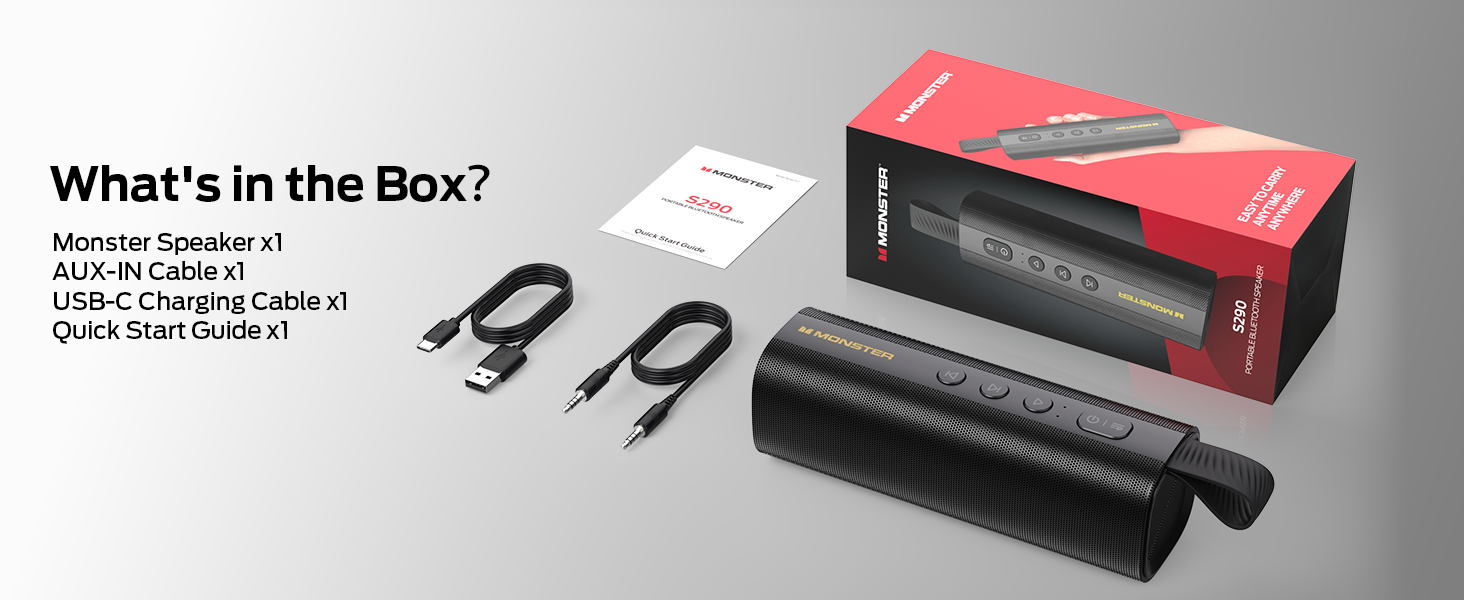
Image: A visual representation of the Monster S290 speaker and its included accessories: AUX-IN cable, USB-C charging cable, quick start guide, and warranty card.
Продукт бүттүview
Speaker Layout
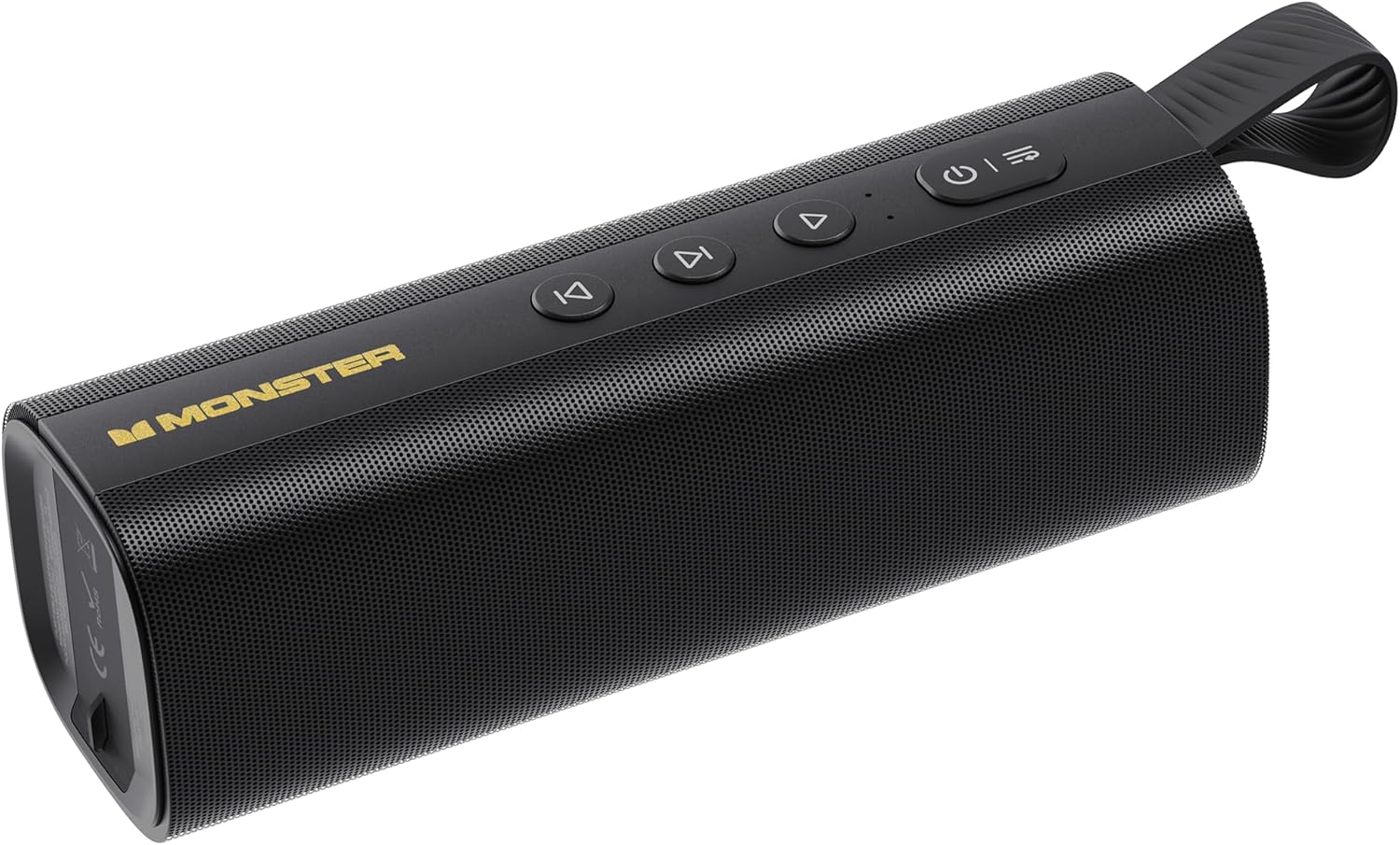
Image: The Monster S290 Portable Bluetooth Speaker, showcasing its cylindrical design, control buttons on top, and integrated carrying strap.
Башкаруу баскычтары
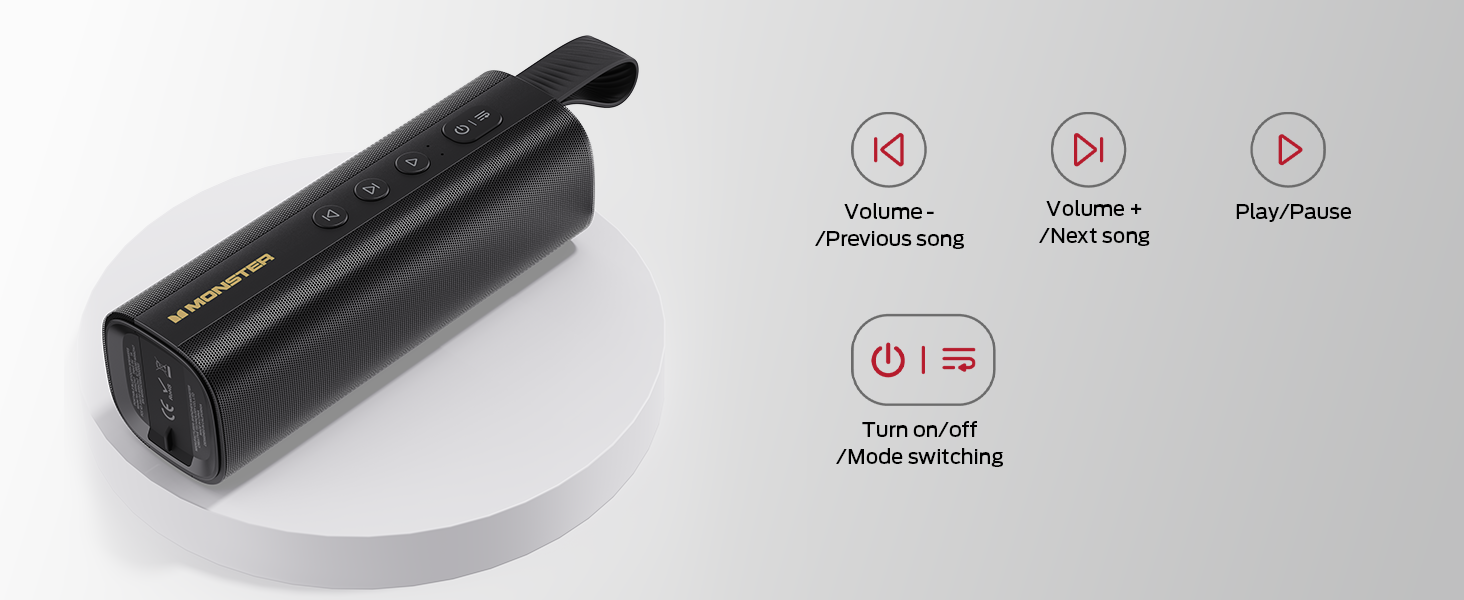
Image: A diagram detailing the functions of the speaker's buttons: Power On/Off/Mode Switching, Volume Down/Previous Song, Volume Up/Next Song, and Play/Pause.
- Кубат баскычы (⏻): Press and hold to power on/off. Short press to switch between input modes (Bluetooth, AUX, TF Card, USB).
- Volume Down / Previous Song (⏮): Short press for previous song. Press and hold to decrease volume.
- Play / Pause (⏯): Short press to play or pause audio.
- Volume Up / Next Song (⏭): Short press for next song. Press and hold to increase volume.
Киргизүү порттору

Сүрөт: деталдуу view of the speaker's connectivity panel, showing the TF card slot, USB port, USB-C charging port, and AUX-IN port, protected by a rubber flap.
- TF карта уячасы: For playing audio directly from a MicroSD/TF card.
- USB порту: For playing audio directly from a USB flash drive.
- USB-C (DC 5V): Charging port for the speaker.
- AUX-IN: 3.5mm audio input for wired connection to devices.
Жайгашуу
Спикерди заряддоо
- Connect the provided USB-C charging cable to the USB-C port on the speaker.
- Кабелдин экинчи учун USB кубат адаптерине (кошумча эмес) же компьютердин USB портуна туташтырыңыз.
- Заряддоо индикатору кубаттоо учурунда күйөт жана толук заряддалганда өчөт.
- Толук кубаттоо болжол менен 15 саат ойноо убактысын камсыз кылат.

Image: The Monster S290 speaker held in a hand, visually representing its extended battery life of up to 15 hours on a single charge.
Күйгүзүү/өчүрүү
- Күйгүзүү: Кубат баскычын басып, кармап туруңуз (⏻) for approximately 2-3 seconds until you hear an audible prompt and the indicator light turns on.
- Өчүрүү үчүн: Кубат баскычын басып, кармап туруңуз (⏻) for approximately 2-3 seconds until you hear an audible prompt and the indicator light turns off.
Иштөө нускамалары
Bluetooth жупташтыруу (бир динамик)
- Ensure the speaker is powered on and in Bluetooth pairing mode (indicated by a flashing blue LED). If not, short press the Power button (⏻) to cycle through modes until Bluetooth mode is active.
- Мобилдик түзмөгүңүздө (смартфон, планшет ж.б.) Bluetooth функциясын иштетиңиз.
- Издөө available Bluetooth devices. You should see "Monster S290" in the list.
- Select "Monster S290" to connect. Once connected, the indicator light will turn solid blue, and you will hear a confirmation sound.
- Динамик күйгүзүлгөндө автоматтык түрдө акыркы жупташтырылган түзмөккө кайра туташуу аракетин көрөт.

Сүрөт: рентген view of the Monster S290 speaker, emphasizing the integrated Bluetooth 6.0 chip for stable and efficient wireless connectivity.
TWS (Чыныгы Wireless Stereo) жупташтыруу
TWS pairing allows you to connect two Monster S290 speakers together for a stereo sound experience.
- Monster S290 динамиктеринин экөө тең күйгүзүлгөнүн жана эч кандай Bluetooth түзмөгүнө туташпаганын текшериңиз.
- On one of the speakers (this will be the primary speaker), press and hold the Play/Pause button (⏯) 2-3 секунд. Сиз TWS жупташтыруу режимин көрсөтүүчү эскертүүнү угасыз.
- The two speakers will automatically search for and connect to each other. Once connected, you will hear a confirmation sound, and the primary speaker's indicator light will flash, while the secondary speaker's light will be solid.
- Эми, "Bluetooth жупташтыруу" бөлүмүндө сүрөттөлгөндөй, мобилдик түзмөгүңүздү негизги динамикке Bluetooth аркылуу туташтырыңыз.
- Аудио эми эки динамиктен тең стерео режиминде ойнотулат.

Image: Two Monster S290 speakers demonstrating TWS connectivity, allowing them to play audio in stereo from a single Bluetooth source.
AUX-IN режими
- Connect one end of the 3.5mm AUX-IN cable to the AUX-IN port on the speaker.
- Connect the other end of the cable to the audio output jack of your device.
- Кубат баскычын кыска басыңыз (⏻) to switch to AUX mode. The speaker will announce "AUX mode".
- Туташкан түзмөгүңүздөн ойнотууну жана үндү башкаруу.
TF картасын ойнотуу режими
- Аудио менен TF (MicroSD) картасын салыңыз fileTF карта уячасына.
- Кубат баскычын кыска басыңыз (⏻) to switch to TF Card mode. The speaker will announce "TF card mode" and begin playing audio.
- Use the speaker's control buttons for playback (Play/Pause, Next/Previous Song, Volume Up/Down).
USB ойнотуу режими
- Аудио менен USB флэш-дискти салыңыз fileUSB портуна киргизиңиз.
- Кубат баскычын кыска басыңыз (⏻) to switch to USB mode. The speaker will announce "USB mode" and begin playing audio.
- Use the speaker's control buttons for playback (Play/Pause, Next/Previous Song, Volume Up/Down).
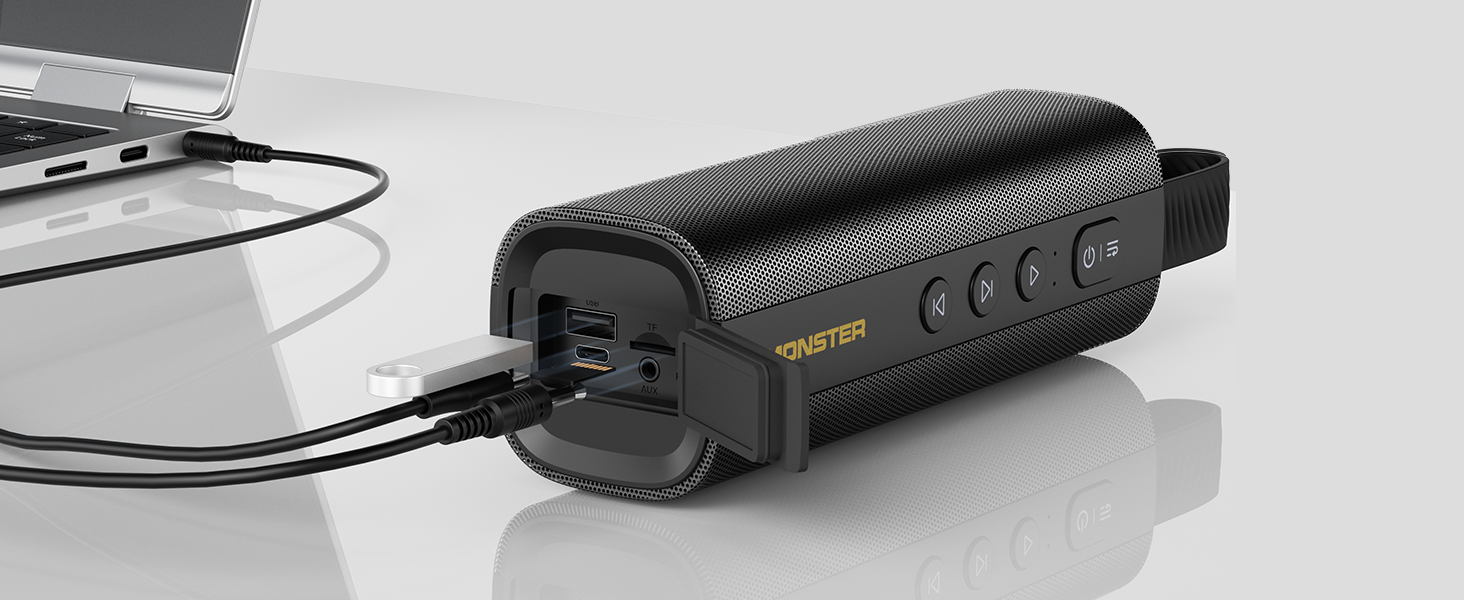
Image: The Monster S290 speaker connected to a laptop, illustrating its versatility with AUX, USB, and TF card input options.
Техникалык тейлөө
Сууга туруктуулук (IPX6)
The Monster S290 speaker features an IPX6 waterproof rating, meaning it is protected against high-pressure water jets from any direction. This makes it suitable for outdoor use and resistant to splashes, rain, and sweat.
- Ensure the rubber flap covering the charging and input ports is securely closed to maintain water resistance.
- Динамикти сууга батырбаңыз.
- Суу тийгенден кийин, заряддоодон же порттун капкагын ачуудан мурда динамикти жумшак чүпүрөк менен кургатып сүртүңүз.

Image: The Monster S290 speaker positioned near a pool, illustrating its IPX6 waterproof capability, making it suitable for use in wet environments.
Тазалоо жана сактоо
- Динамикти жумшак менен тазалаңыз, гamp кездеме. Абразивдүү тазалагычтарды же эриткичтерди колдонбоңуз.
- Динамикти түз күн нурунан жана өтө температурадан алыс салкын, кургак жерде сактаңыз.
- Узак мөөнөткө сактасаңыз, анын ден соолугун сактоо үчүн батареяны мезгил-мезгили менен заряддаңыз.
Проблемаларды чечүү
| Көйгөй | Мүмкүн себеп | Чечим |
|---|---|---|
| Динамик күйбөйт. | Батарея аз. | Берилген USB-C кабели аркылуу динамикти кубаттаңыз. |
| Үн жок. | Динамиктин же туташкан түзмөктүн үнү өтө төмөн. Киргизүү режими туура эмес. | Increase volume on both speaker and device. Ensure correct input mode is selected (Bluetooth, AUX, TF, USB). |
| Bluetooth аркылуу жупташтыруу мүмкүн эмес. | Динамик жупташтыруу режиминде эмес. Түзмөктүн Bluetooth функциясы өчүк. Динамик башка түзмөккө туташып турат. | Ensure speaker is in Bluetooth pairing mode (flashing blue LED). Turn on Bluetooth on your device. Disconnect from other devices or restart the speaker. |
| TWS жупташтыруу ишке ашпай калды. | Speakers are too far apart. One speaker is already paired to a device. | Ensure speakers are within 10 meters of each other. Disconnect both speakers from any Bluetooth devices before initiating TWS pairing. |
| Үн сапаты начар. | Low battery. Device too far from speaker (Bluetooth). Interference. | Charge the speaker. Move device closer to the speaker. Avoid obstacles between device and speaker. |
Техникалык шарттар
- Модель аты: S290 (Item Model Number: S38)
- Бренд: Monster
- Bluetooth версиясы: 6.0
- Аудио чыгаруу: 30 Вт
- Оюн убактысы: Up to 15 hours (varies by volume and content)
- Суу өткөрбөйт рейтинги: IPX6
- Киргизүү интерфейстери: Bluetooth, AUX-IN, TF Card, USB
- Заряддоо порту: USB-C (DC 5V)
- Батарея: 1 Батарея (кошулган)
- Продукциянын өлчөмдөрү: 2.36 x 7.24 x 2.68 дюйм
- Элемент Салмагы: 1.08 фунт
- Материал: Пластик
- Түс: Кара
Кепилдик жана колдоо
The Monster S290 Portable Bluetooth Speaker comes with a warranty. Please refer to the included "Warranty Card" for detailed terms and conditions. For further assistance or technical support, please consult the "Quick Start Guide" or visit the official Monster support webсайт.
Сатып алуу квитанциясын кепилдик дооматтары үчүн сатып алуунун далили катары сактаңыз.


