1. Introduction to Radon and the RM-73 Detector
Radon is a naturally occurring, colorless, and odorless radioactive gas that can accumulate indoors, posing health risks. It emanates from foundation soil and building materials, and can enter from outdoor air into indoor spaces. Radon is also released from natural gas used in water supply and heating, as well as kitchen appliances. Early detection and continuous monitoring are essential for maintaining a healthy indoor environment.
The CHNADKS RM-73 Radon Detector is designed to provide accurate and continuous monitoring of radon levels in your home or workplace. Featuring a high-precision sensor and a user-friendly touchscreen display, it offers real-time data, historical records, and customizable alarms to help you manage radon exposure effectively.

Figure 1: Understanding Radon and its Sources
2. Пакеттин мазмуну
Пакетиңизде бардык буюмдар бар экенин текшериңиз:
- 1x CHNADKS RM-73 Radon Detector
- 1x Колдонуучунун колдонмосу
- 1x заряддоо кабели (USB-C)

Figure 2: Items included in the package
3. Продукт бүтүп калдыview
The CHNADKS RM-73 Radon Detector is a compact and advanced device designed for accurate radon measurement. It features a 3.4-inch capacitive touchscreen LCD color display for intuitive operation and clear data visualization.
Негизги өзгөчөлүктөрү:
- Жогорку тактык сенсор: Utilizes a self-developed high-precision radon pulse ionization chamber sensor with ±10% accuracy.
- Реалдуу убакыттагы жаңыртуулар: Provides data updates every 10 minutes.
- Тарыхый жазуулар: Stores up to 508 days of historical data, viewable directly on the device or via computer (PDF reports).
- Audible & Visual Alarms: Customizable alert levels with dual warning lights and alarm sounds.
- Энергияны үнөмдөө (ЭКО) режими: Automatic energy-saving function with adjustable sleep duration, offering up to 12-day battery life in auto ECO mode.
- Өлчөө диапазону: 0.054-540 pCi/L (2-20 kBq/m³).

Figure 3: CHNADKS RM-73 Radon Detector

Figure 4: High-Precision Ionization Chamber Sensor
4. Орнотуу жана алгачкы колдонуу
4.1 Аппаратты заряддоо
Before first use, fully charge the RM-73 Radon Detector using the provided USB-C charging cable. Connect the cable to the USB-C port on the device and a compatible power source. Off-power charging typically takes about 6 hours.
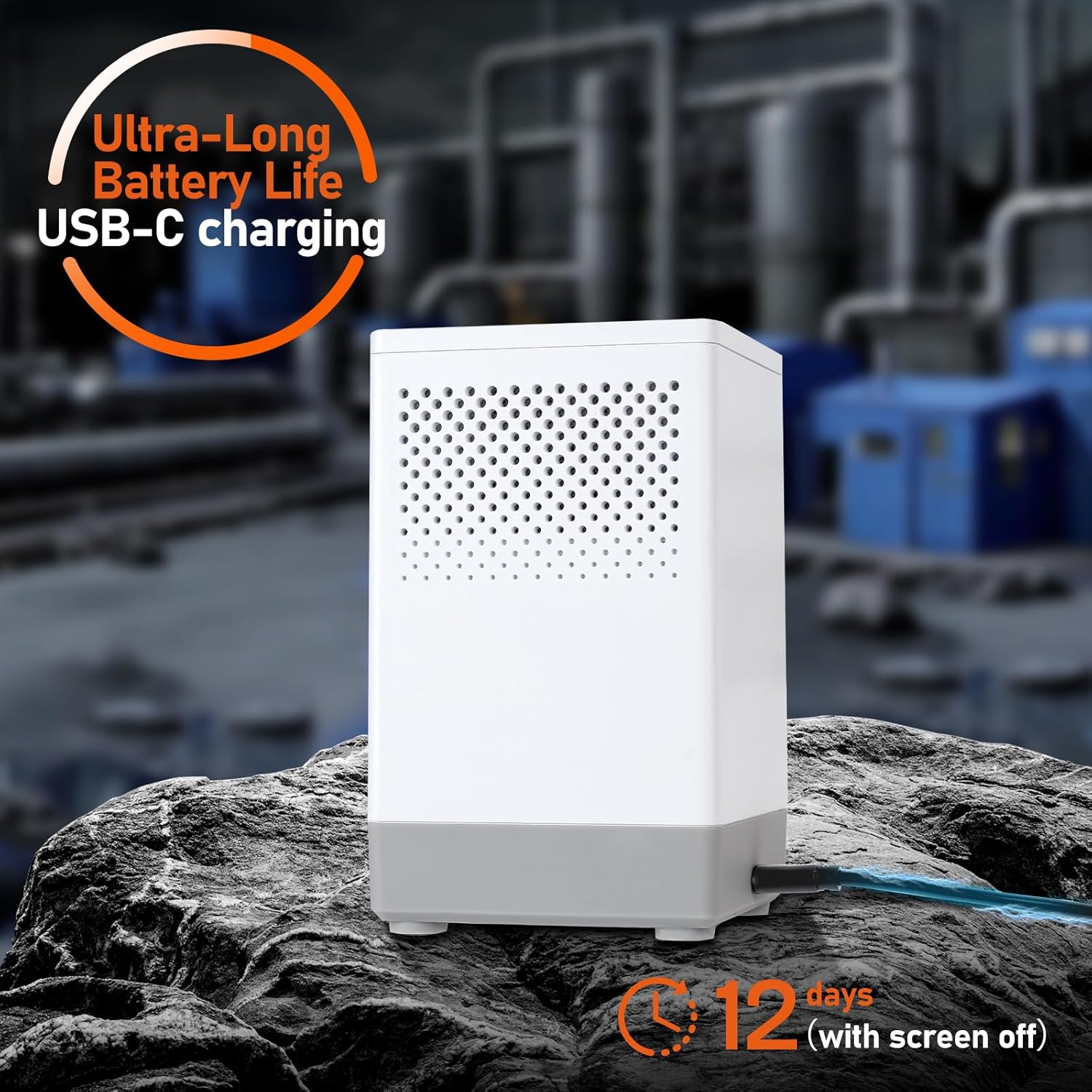
5-сүрөт: USB-C заряддоо порту
4.2 Күйгүзүү
To power on the device, long-press the power button located on the front. The device will display a welcome message and begin its initial data clearing and parameter setting process. This process ensures accurate measurements. The first measurement data will be available in approximately 10 minutes.
Video 1: Unboxing and Initial Power-On of the CHNADKS RM-73 Radon Detector. This video demonstrates the unboxing, initial power-on sequence, and basic display features of the CHNADKS RM-73 Radon Detector, including its quick response time and touchscreen interface.

Figure 6: Initial Data Refresh and Reliability
5. Операция
5.1 Navigating the Touchscreen Display
The RM-73 features a responsive touchscreen for easy navigation. The main screen displays the latest 1-hour radon value, accumulated average value, and total count. You can tap the left/right arrows to view accumulated average values for 12h, 24h, 48h, and 96h, as well as the accumulated peak value.
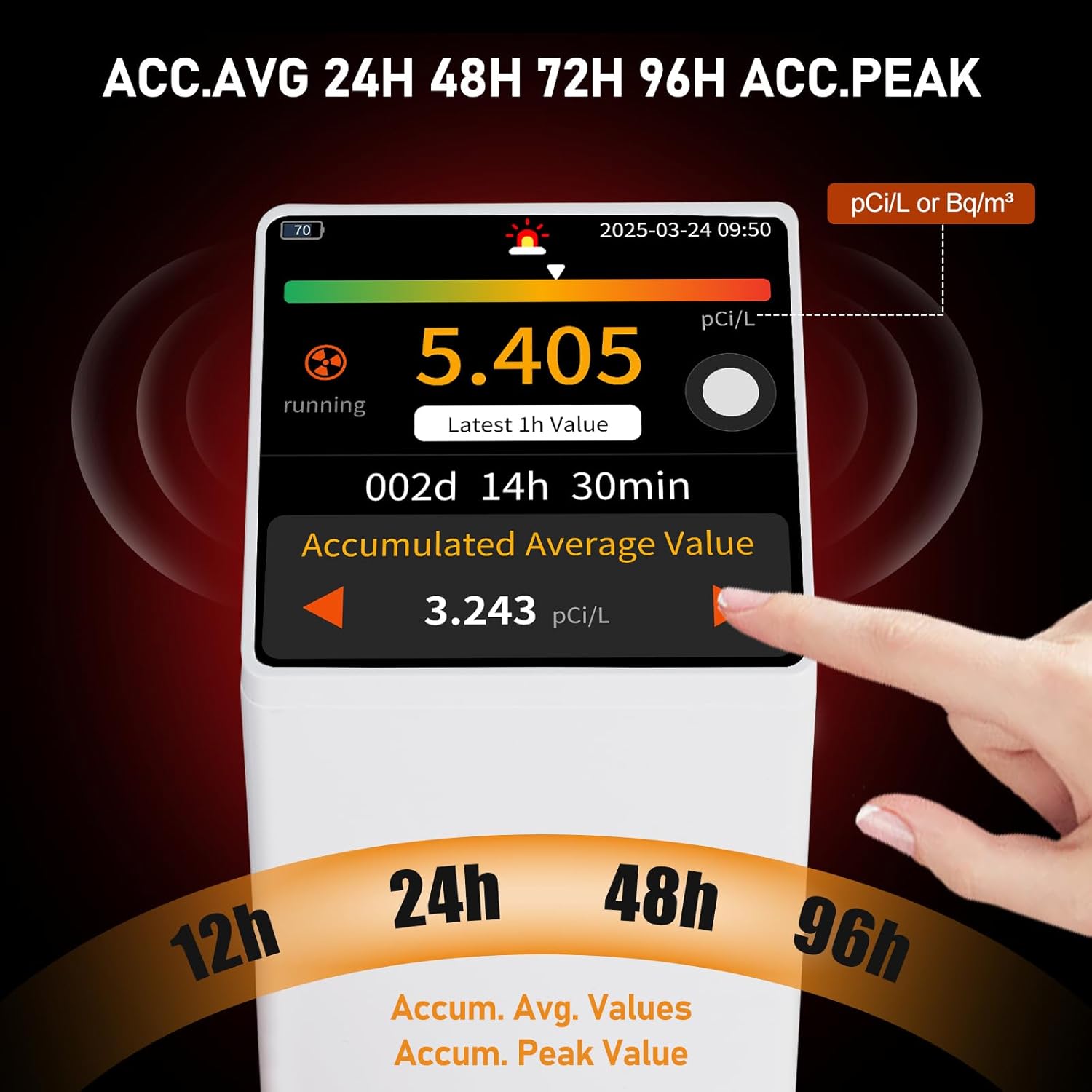
Figure 7: Accumulated Average Values Display
5.2 ViewТарыхый маалыматтар
The device can store up to 508 days of historical data. To access this, navigate to the 'Data' section from the main menu. You can view records directly on the device in both curve graph and table formats. For more detailed analysis, connect the device to a computer via USB to access PDF data reports.
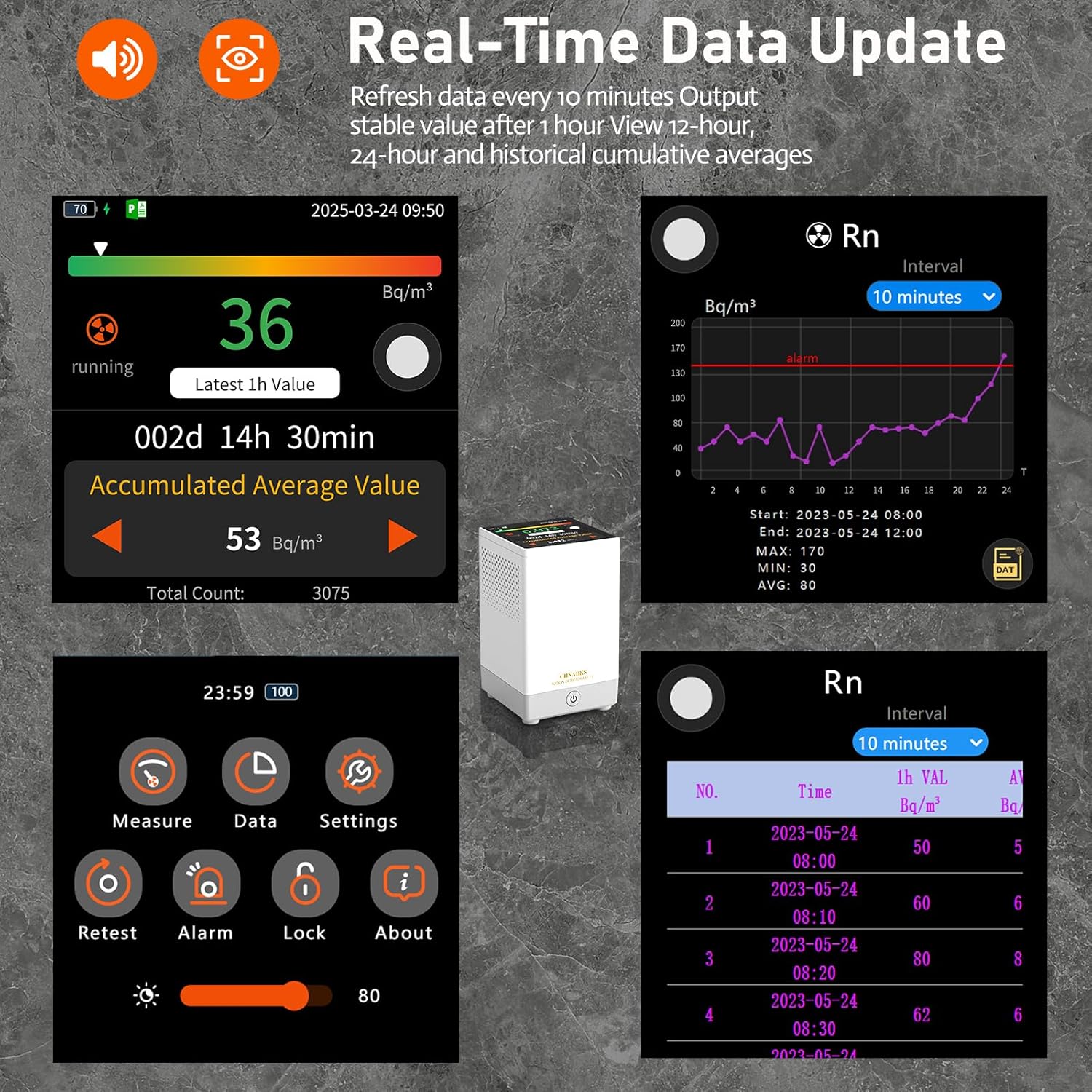
Figure 8: Real-time Data and Historical Records
Video 2: Detailed Operation of the CHNADKS RM-73 Radon Detector. This video provides a detailed overview of the CHNADKS RM-73 Radon Detector's operational features, including navigating the touchscreen menu, setting alarms, adjusting ECO mode, and viewing historical radon data in graph and table formats.
5.3 Ойготкучтарды орнотуу
The RM-73 allows you to set custom alert levels. When the radon concentration exceeds the set threshold, the device will activate dual warning lights and an audible alarm for 20 seconds every 10 minutes. You can also enable or disable the alpha particle sound control.
- From the main menu, tap 'Settings' then 'Alarm'.
- Adjust the 'Alarm Line' to set your desired radon concentration threshold.
- Toggle 'Particle Alarm' to enable or disable the alpha particle sound.

Figure 9: Three Types of Alarms
5.4 ECO Mode and Battery Life
The device features an automatic energy-saving (ECO) function. After 1 minute of inactivity, it enters ECO mode, where the screen turns off to conserve power. You can adjust the sleep duration, brightness, and sound settings within the 'ECO' menu under 'Settings'. The device maintains normal operation with up to 12-day battery life in auto ECO mode.
5.5 Unit and Time Settings
You can change the radon concentration unit between pCi/L and Bq/m³, and set the temperature unit (°C or °F) in the 'Unit' menu under 'Settings'. The date and time can also be adjusted in the 'Time & Date' menu to ensure accurate timestamping of your readings.
6. Radon Levels and Recommended Actions
Understanding your radon levels is crucial for taking appropriate action. The following table provides general guidelines for interpreting radon concentrations:

Figure 10: Radon Levels and Recommended Actions
Эскертүү: These are general guidelines. Consult local health authorities or certified radon professionals for specific recommendations and mitigation strategies in your area.
7. Техникалык тейлөө
- Тазалоо: Аппаратты тазалоо үчүн жумшак, кургак чүпүрөктү колдонуңуз. Абразивдүү тазалагычтарды же эриткичтерди колдонбоңуз.
- Жайгашкан жери: Place the detector in an area where radon levels are representative of the living space, typically in the lowest lived-in area of the home. Avoid placing it near drafts, vents, or in direct sunlight.
- Титирөөнү болтурбоо: Do not vibrate the device during measurement to ensure accurate readings.
- Сактагыч: Узак мөөнөткө колдонулбаганда, аппаратты салкын, кургак жерде сактаңыз.
8. Кыйынчылыктарды
8.1 Түзмөк күйбөй жатат
- Ensure the device is fully charged. Connect it to a power source using the USB-C cable and allow it to charge for at least 6 hours.
- Confirm you are long-pressing the power button. A short press may not activate the device.
8.2 Так эмес же өзгөрмөлүү көрсөткүчтөр
- Ensure the device is placed in an appropriate location, away from drafts, vents, and direct sunlight.
- Avoid moving or vibrating the device during measurement.
- Radon levels naturally fluctuate. Long-term monitoring provides a more accurate average. Refer to the historical data for trends.
8.3 Ойготкуч угулбайт
- Check the alarm settings in the 'Settings' menu to ensure the alarm is enabled and the threshold is set correctly.
- Verify that the sound is not muted in the 'ECO' settings.
8.4 Экран жооп бербейт
- Ensure the screen is not locked. Tap the lock icon and confirm to unlock.
- If the screen remains unresponsive, try restarting the device by long-pressing the power button.
9. Техникалык шарттар
| Өзгөчөлүк | Деталь |
|---|---|
| Бренд | CHNADKS |
| Модель номери | RM-73 |
| Power Source | Батарея менен иштейт (1 литий-иондук батарейка камтылган) |
| Продукциянын өлчөмдөрү | 3.11"D x 3.11"W x 5.24"H |
| Элемент Салмагы | 430 грамм (15.2 унция) |
| Ойготкуч түрү | Audible, Visual (LED Indicator, Horn Icon) |
| Сенсор түрү | High-precision radon pulse ionization chamber |
| Тактык | ±10% |
| Өлчөө диапазону | 0.054-540 pCi/L (2-20 kBq/m³) |
| Маалыматтарды сактоо | Up to 508 days of historical data |
| Байланыш | USB for data export |
10. Кепилдик жана колдоо
For warranty information, technical support, or any questions regarding your CHNADKS RM-73 Radon Detector, please refer to the contact details provided in your product packaging or visit the official CHNADKS webсайт. Кепилдик дооматтары үчүн сатып алуу дүмүрчөгүңүздү сактаңыз.


