1. Баштоо: Баштапкы орнотуу
This section guides you through the initial setup of your new Motorola moto g56 5G smartphone.
1.1. Кутудан чыгаруу жана Пакеттин мазмуну
Баштоодон мурун, пакетте бардык элементтер бар экенин текшериңиз:
- Motorola moto g56 5G Smartphone
- USB кабели (заряддоо жана маалыматтарды өткөрүү үчүн)
- Phone Case (protective cover)
- SIM чыгаруучу курал
Note: A wall charger is not included and must be purchased separately. The device supports TurboPower 30W charging.
1.2. SIM картаны салуу
- Түзмөгүңүздүн капталындагы SIM карта салгычын табыңыз.
- SIM чыгаруучу куралды лотоктогу кичинекей тешикке салып, лоток чыгып кеткиче акырын басыңыз.
- Nano-SIM картаңызды(ларыңызды) алтын түстөгү контакттары ылдый каратып салгычка салыңыз. туура багытты камсыз кылуу.
- If using a microSD card for expanded storage, place it in the designated slot on the SIM tray.
- Аспаптын ичине лотокту чыкылдагыча этияттык менен түртүңүз.
1.3. Күйгүзүү жана баштапкы кубаттоо
- To power on your device, press and hold the Power button (located on the side) until the Motorola logo appears.
- For the first use, it is recommended to fully charge the device. Connect the USB cable to the phone's charging port and to a compatible 30W TurboPower charger (sold separately).
- Баштапкы орнотууларды, анын ичинде тилди тандоону, Wi-Fi туташуусун, Google аккаунтуна кирүүнү жана коопсуздук жөндөөлөрүн аяктоо үчүн экрандагы көрсөтмөлөрдү аткарыңыз.
2. Operating Your Motorola moto g56 5G
This section covers the primary functions and features of your smartphone.
2.1. Дисплей жана навигация
The moto g56 5G features a 6.72-inch FHD+ display with a 120Hz refresh rate for smooth visuals and a peak brightness of 1000 nits for clear visibility even in bright conditions.

Image: The Motorola moto g56 5G display, highlighting its FHD+ resolution, 120Hz refresh rate, 1000 nit brightness, and Dolby Atmos audio capabilities.
- Тийүү жаңсоолору: Navigate the interface using standard Android gestures (swipe, tap, pinch-to-zoom).
- Жаңыртуу ылдамдыгы: The 120Hz refresh rate provides a fluid scrolling and viewing experience. This can often be adjusted in display settings to optimize battery life.
- Аудио: Enjoy immersive sound with stereo speakers and Dolby Atmos support.
2.2. Камеранын өзгөчөлүктөрү
Capture detailed photos and videos with the advanced camera system.

Image: A visual representation of the Motorola moto g56 5G's camera capabilities, featuring a 50MP main sensor, ultrawide lens, and 32MP selfie camera, with people enjoying photography.
- Негизги камера: 50MP sensor (Sony LYTIA) for high-resolution photos, even in challenging lighting conditions.
- Ультра кең линза: An 8MP ultrawide lens allows you to capture a broader perspective in your shots.
- Селфи камерасы: A 32MP front camera ensures clear and detailed self-portraits.
- Anti-Flicker Sensor: This sensor helps reduce flickering when photographing screens or under certain artificial lighting. Access this feature in the camera settings.
2.3. Программалык камсыздоо жана иштөө
The moto g56 5G runs on Android 15, offering a clean and intuitive user experience. It is powered by the MediaTek Dimensity 7060 processor for smooth performance.

Сүрөт: An overview of the Motorola moto g56 5G's performance, highlighting the MediaTek Dimensity 7060 5G processor, Android 15 operating system, and RAM expansion capabilities up to 24GB.
- Android 15: Enjoy the latest features and security updates from Android.
- Moto AI: Utilize intelligent features for organized content, notification summaries, and generative AI for wallpapers.
- 5G байланышы: Experience fast data speeds with 5G network support.
- Сактагыч: The device comes with 256GB of internal storage, expandable up to 2TB via a dedicated microSD card slot.
3. Техникалык тейлөө жана кам көрүү
Proper care ensures the longevity and optimal performance of your Motorola moto g56 5G.
3.1. Батареяга кам көрүү
The 5200mAh battery provides extended usage. Follow these tips for optimal battery health:

Image: An illustration of the Motorola moto g56 5G's battery capabilities, including its 5100mAh capacity, TurboPower 30 fast charging, and an estimated 40 hours of usage on a single charge.
- Заряддоо: Use a compatible TurboPower 30W charger for fast charging. Avoid using non-certified chargers.
- Battery Health 2.0: This feature optimizes battery health and performance over time.
- Ашыкча температурадан сактаныңыз: Do not expose your device to very high or very low temperatures, as this can degrade battery life.
3.2. Durability and Cleaning
Your moto g56 5G is built to withstand daily use with its robust design.

Image: The Motorola moto g56 5G highlighting its advanced protection features, including IP68/IP69 water and dust resistance, MIL-STD-810H military-grade certification, and Corning Gorilla Glass 7i for scratch protection.
- Суу жана чаңга туруктуулугу: The device is rated IP68/IP69, offering superior protection against dust and water immersion up to 1.5 meters for 30 minutes, and resistance to high-pressure jets.
- Military Standard: MIL-STD-810H certified for resistance to drops, shocks, humidity, and extreme temperatures.
- Screen коргоо: Corning Gorilla Glass 7i provides reliable scratch protection for the display.
- Тазалоо: Use a soft, lint-free cloth to clean the screen and body. For stubborn marks, slightly dampчүпүрөктү суу менен. Катуу химиялык заттардан алыс болуңуз.
4. Жалпы көйгөйлөрдү чечүү
Бул бөлүмдө сиз кездешиши мүмкүн болгон жалпы көйгөйлөрдүн чечимдери камтылган.
- Түзмөк күйбөй жатат: Ensure the battery is charged. Connect the phone to a charger for at least 15 minutes, then try powering it on again. If it still doesn't turn on, perform a force restart by holding the Power button for 10-15 seconds.
- Жай аткаруу: Close unused apps, clear cache, or restart the device. Check for system updates as they often include performance improvements.
- Батареянын бат түгөнүп калышы: Reduce screen brightness, disable unnecessary features like Wi-Fi or Bluetooth when not in use, and identify power-hungry apps in battery settings.
- Тармакка туташуу маселелери: Check if your SIM card is properly inserted. Try toggling Airplane Mode on and off. If issues persist, contact your mobile carrier.
- Камера иштебейт: Restart the phone. Clear the camera app's cache and data in settings. Ensure no other app is using the camera in the background.
5. Техникалык шарттар
Detailed technical specifications for the Motorola moto g56 5G.
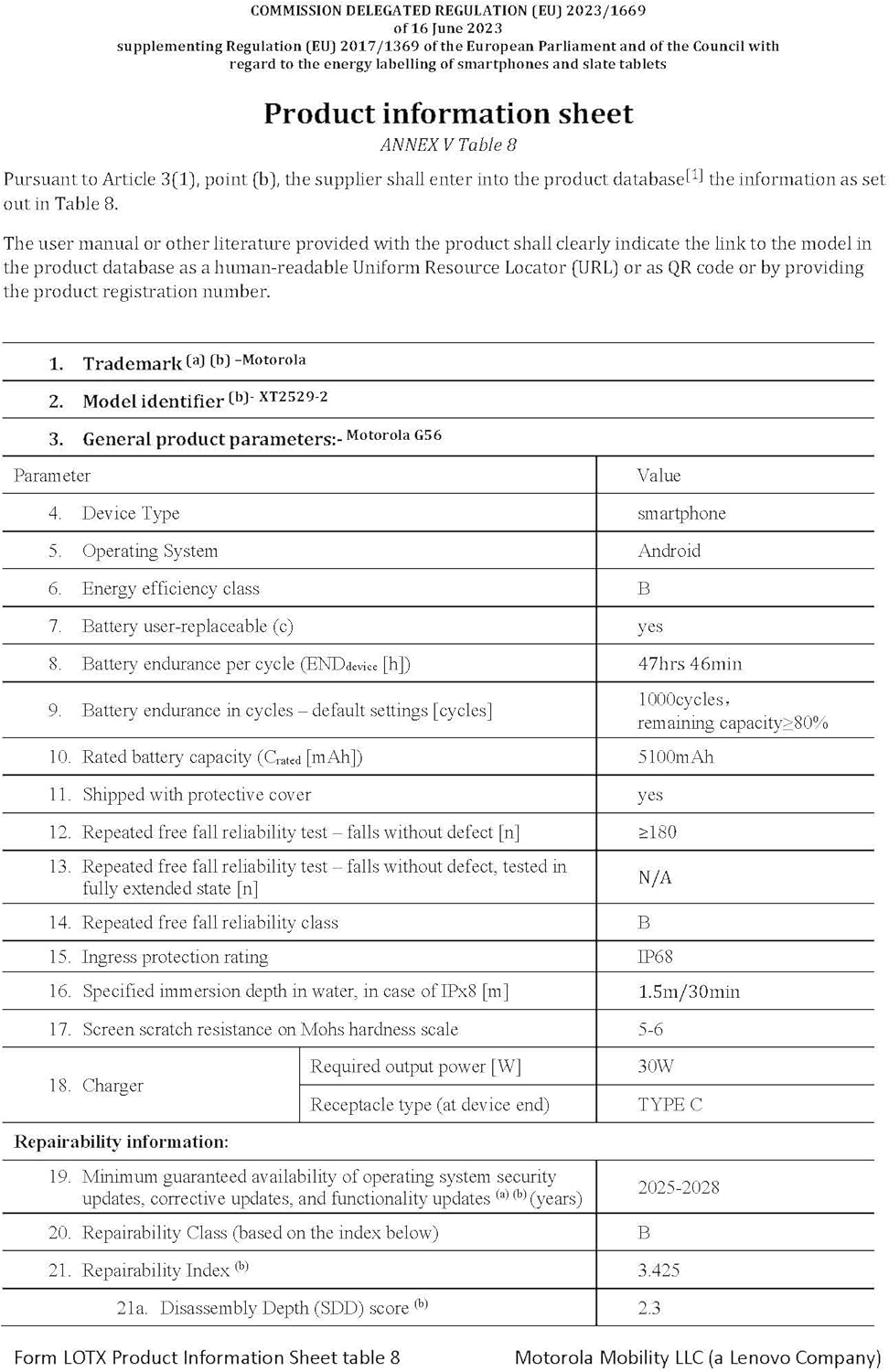
Image: The official product information sheet for the Motorola moto g56 5G, detailing its technical specifications, including battery life, IP rating, and repairability index.
| Өзгөчөлүк | Спецификация |
|---|---|
| Модель аты | moto g56 5G |
| Операция системасы | Android 15 |
| CPU модели | Mediatek Dimensity 7060 |
| CPU ылдамдыгы | 2.6 ГГц |
| RAM | 8 GB (expandable up to 24 GB with RAM extension) |
| Ички сактагыч | 256 ГБ (microSD аркылуу 2 ТБ чейин кеңейтүүгө болот) |
| Дисплей өлчөмү | 6.72 дюйм |
| Display Resolution | 1080 x 2400 (FHD+) |
| Жаңыртуу ылдамдыгы | 120 Гц |
| Башкы камера | 50 MP (Sony LYTIA) |
| Ultrawide камера | 8 депутат |
| Алдыңкы камера | 32 депутат |
| Батарея сыйымдуулугу | 5200 mAh (Rated capacity 5100 mAh) |
| Заряддоо | TurboPower 30W (charger not included) |
| Суу/чаңга туруктуулук | IP68/IP69 |
| Бышыктык стандарты | MIL-STD-810H сертификатына ээ |
| Экранды коргоо | Corning Gorilla Glass 7i |
| Өлчөмдөр | 16.57 x 0.83 x 7.63 см |
| Салмагы | 200 грамм |
6. Кепилдик жана колдоо
Motorola provides support and warranty for your device.
- Программалык камсыздоо жаңыртуулары: Motorola guarantees a minimum of 3 years of operating system security updates, corrective updates, and functionality updates from the device's release date.
- Кепилдик маалыматы: Refer to the warranty card included in your product packaging or visit the official Motorola support webСиздин аймакка тиешелүү деталдуу кепилдик шарттары жана шарттары үчүн сайт.
- Кардарларды колдоо: Кошумча жардам, техникалык колдоо же тейлөө сурамдары үчүн Motorolaнын расмий колдоо бөлүмүнө баш багыңыз webсайтына же кардарларды тейлөө ишеним телефонуна кайрылыңыз.


