Introduction
This manual provides comprehensive instructions for the safe and effective use of your VOCOO Digital Timer (Model 5260) and Visual Timer (Model 6233). Please read this manual thoroughly before operating the devices and retain it for future reference.
Коопсуздук маалыматы
- Keep timers away from water and high humidity.
- Do not expose timers to extreme temperatures or direct sunlight.
- Use only specified battery types (AAA).
- Do not attempt to disassemble or repair the timers. Contact customer support for assistance.
- Батареяларды балдар жетпеген жерде сактаңыз.
Пакеттин мазмуну
Пакетте бардык буюмдар бар экенин текшериңиз:
- 1 x VOCOO Digital Timer (Model 5260)
- 1 x VOCOO Visual Timer (Model 6233)
- 2 x AAA Batteries (for Visual Timer, typically also for Digital Timer)
- 1 x User Manual

Image: Contents of the VOCOO timer package, including the Digital Timer (Model 5260), Visual Timer (Model 6233), AAA batteries, and instruction manual.
Продукт бүттүview
VOCOO Visual Timer (Model 6233)

Image: Diagram of the VOCOO Visual Timer (Model 6233) detailing its dimensions, battery compartment, volume control, and alarm duration switch.
- Таймерди терүү: Used to set the desired time.
- Visual Disk: Red disk that recedes as time passes.
- Батарея бөлүмү: Located on the back, requires 2 x AAA batteries.
- Үн баскычы: Adjusts alarm sound (Mute/Loud).
- Alarm Duration Set: Switches between 3-second and 60-second alarm duration.
- Магниттик арткы: Allows attachment to metal surfaces.
VOCOO Digital Timer (Model 5260)

Image: VOCOO Digital Timer (Model 5260) displaying time, held in a hand in a kitchen setting.
- LED дисплей: Shows time in minutes and seconds.
- Control терүү: Rotates to set time, press to start/stop.
- Кубат/Үнсүз баскычы: Located on the bottom, controls power and mute function.
- Магниттик арткы: Allows attachment to metal surfaces.
Жайгашуу
Батарея орнотуу
Both timers require 2 x AAA batteries (included for the Visual Timer, typically also for the Digital Timer).
- Таймердин артындагы батарея бөлүкчөсүн табыңыз.
- Батарея уясынын капкагын ачыңыз.
- Туура полярдуулукту (+/-) камсыз кылуу менен 2 AAA батарейкасын салыңыз.
- Батарея уясынын капкагын бекем жабыңыз.
Image: Visual Timer's rear view showing the battery compartment and magnet.
Иштөө нускамалары
VOCOO Visual Timer (Model 6233)
- Таймерди коюу: Rotate the timer dial clockwise to the desired time (up to 60 minutes). The red visual disk will appear, indicating the set time.
- Таймерди баштоо: The timer begins counting down immediately after setting. The red disk will gradually disappear as time elapses.
- Ойготкуч: When the red disk completely disappears, the alarm will sound.
- Ойготкучтун үнүн тууралоо: Use the volume button on the side to switch between Mute and Loud settings.
- Сигнализациянын узактыгын тууралоо: Use the alarm duration switch on the side to select between 3 seconds and 60 seconds.
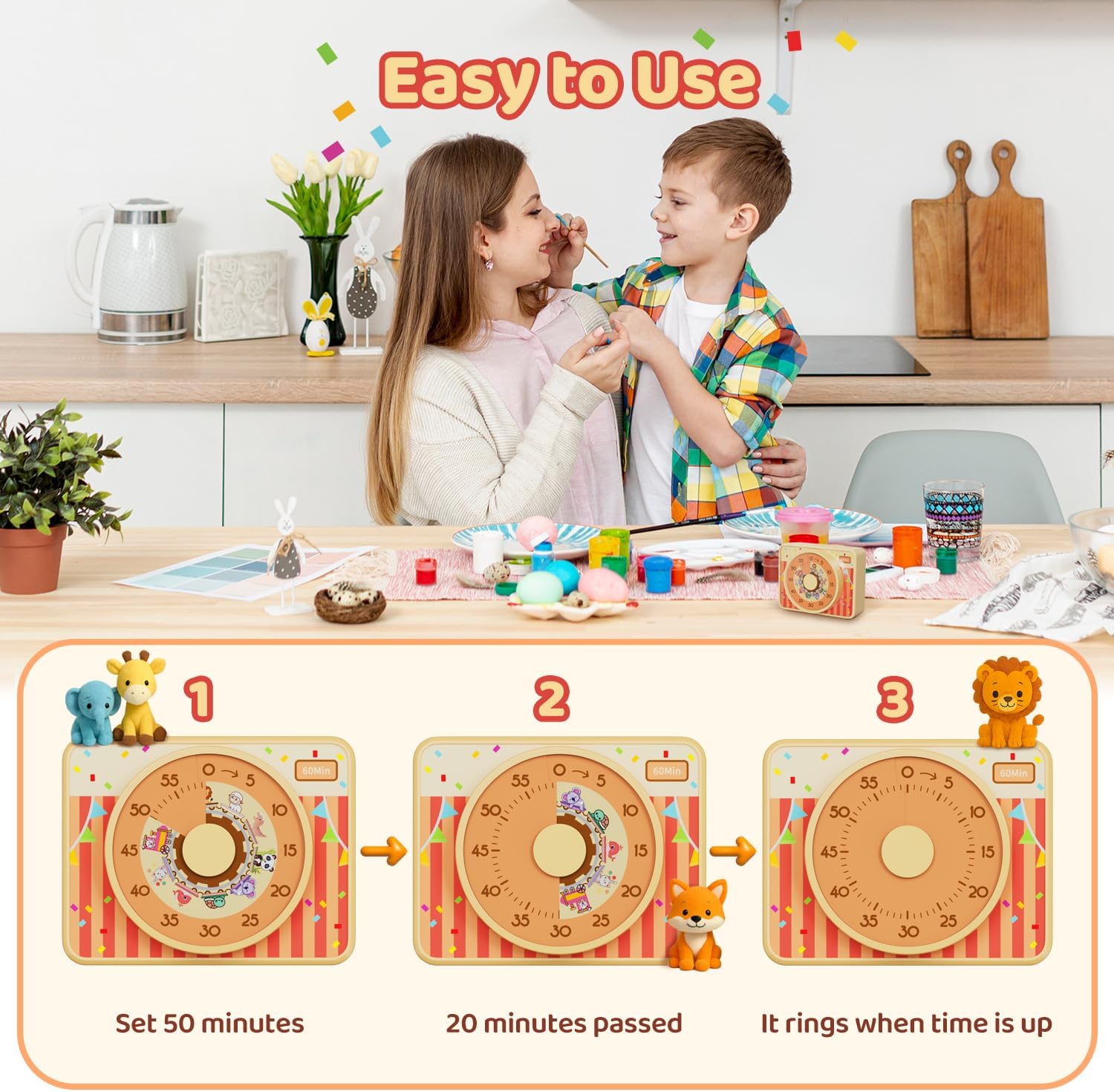
Image: Visual Timer (Model 6233) operation sequence: setting the dial to 50 minutes, showing 20 minutes elapsed, and the alarm sounding at zero.
VOCOO Digital Timer (Model 5260)
- Күйгүзүү/өчүрүү: Press and hold the power button on the bottom to turn the timer on or off.
- Setting Countdown Time: When the timer is paused or reset to 00:00, rotate the control dial clockwise to increase the time or counter-clockwise to decrease the time. The maximum countdown time is 99 minutes and 55 seconds.
- Starting/Pausing Countdown: Press the control dial once to start the countdown. Press it again to pause.
- Resetting Countdown: When the timer is paused, press and hold the control dial for 3 seconds to reset the time to 00:00.
- Count-up Mode: When the timer is at 00:00, press the control dial once to start counting up. The maximum count-up time is 99 minutes and 55 seconds.
- Үнсүз функция: Press the power/mute button on the bottom to toggle between audible alarm and mute mode. In mute mode, the numbers on the display will blink when the alarm triggers.

Image: VOCOO Digital Timer (Model 5260) illustrating both count-up and count-down timing modes.

Image: VOCOO Digital Timer (Model 5260) demonstrating its 2-level volume and mute function, with blinking numbers indicating mute mode.
Техникалык тейлөө
- Тазалоо: Wipe the timers with a soft, dry cloth. Do not use abrasive cleaners or immerse in water.
- Батареяны алмаштыруу: Replace batteries when the display dims or the timer functions become unreliable. Always replace both batteries at the same time.
- Сактагыч: Store the timers in a cool, dry place when not in use for extended periods. Remove batteries if storing for several months.
Проблемаларды чечүү
| Көйгөй | Мүмкүн себеп | Чечим |
|---|---|---|
| Таймер күйбөй жатат. | Батареялар өлүп калган же туура эмес салынган. | Туура полярдуулукту камсыз кылуу менен батарейкаларды жаңы AAA батарейкалары менен алмаштырыңыз. |
| Сигнализация чырылдабай жатат. | Timer is in mute mode or volume is set too low. | For Visual Timer: Check the volume button setting. For Digital Timer: Press the power/mute button to toggle sound. |
| Visual disk does not move. | Timer dial not set correctly or mechanism issue. | Ensure the dial is rotated fully to the desired time. If issue persists, contact support. |
| Digital display is dim or flickering. | Батареянын кубаттуулугу төмөн. | Батареяларды алмаштырыңыз. |
Техникалык шарттар
- Продукт аты: VOCOO Digital and Visual Timer
- Моделдер: 5260 (Digital Timer), 6233 (Visual Timer)
- Кубат булагы: 2 x AAA Batteries (per timer, if applicable)
- Visual Timer Max Time: 60 мүнөт
- Digital Timer Max Time: 99 minutes 55 seconds (Count-up/Count-down)
- Visual Timer Dimensions (approx.): 3.7 дюйм (9.5 см) x 2.95 дюйм (7.5 см) x 1.6 дюйм (4.1 см)
- Digital Timer Alarm Volume: Loud (80-90dB), Soft (60-75dB)
- Visual Timer Alarm Duration: 3 секунд / 60 секунд
- ASIN: B0F7RL6H89
- Биринчи жеткиликтүү болгон күнү: 7-май, 2025-жыл
Кепилдик жана колдоо
VOCOO products are designed for reliability and performance. For warranty information, technical support, or any questions regarding your timer, please contact VOCOO customer service through the retailer's platform or the official VOCOO webсайт.
Please have your product model number (5260 or 6233) and ASIN (B0F7RL6H89) available when contacting support.


