Продукт бүттүview
This manual provides instructions for the Leadfan Car Stereo, an Android 12 system designed for Nissan Altima models from 2008 to 2012 equipped with manual A/C. It features a 9-inch 2.5D IPS touch screen, 4-Core processor, 2GB RAM, and 32GB ROM. Key functionalities include wireless Apple CarPlay, Android Auto, Mirror Link, GPS navigation (online and offline), Wi-Fi connectivity, Bluetooth 5.0, FM radio, and support for a backup camera.
Маанилүү эскертүү: This car stereo does not support factory JBL amplifiers or factory cameras. It is specifically for vehicles with manual A/C controls.

Image: Leadfan Car Stereo after installation in a Nissan Altima dashboard.
Пакеттин мазмуну
Пакетте бардык компоненттер бар экенин текшериңиз:
- Унаа радиосу
- Камера
- Арткы View Кирүү кабели
- RCA кабели
- USB кабели (x2)
- Электр кабели
- GPS антеннасы
- User Manual
- Микрофон (МИК)

Сүрөт: деталдуу view of all included accessories and cables.
Орнотуу жана орнотуу
Кесиптик орнотуу сунушталат. Орнотууну баштоодон мурун унаанын батареясы ажыратылганын текшериңиз.
1. Шайкештикти текшерүү
Confirm your Nissan Altima (2008-2012) has manual A/C controls. This unit is not compatible with vehicles equipped with automatic climate control, factory JBL amplifiers, or factory navigation systems.

Image: Visual guide for compatible manual A/C dashboard vs. incompatible automatic A/C or factory navigation systems.
2. Зымдарды туташтыруу
Connect the provided power cable, RCA cables, USB cables, GPS antenna, and microphone to the corresponding ports on the car stereo unit and the vehicle's wiring harness. Ensure all connections are secure.
- Кубат кабели: Унаанын электр зымына туташтырыңыз.
- RCA кабелдери: For audio output (L/R), AUX input (L/R), subwoofer, and CVBS-IN-1.
- USB кабелдери: For connecting external devices or for CarPlay/Android Auto.
- GPS антеннасы: Тунук жерге орнотуңуз view оптималдуу сигнал кабыл алуу үчүн асман.
- Микрофон: Үнсүз чалуу жана үн буйруктары үчүн туташыңыз.
- Тескери киргизүү: Connect the reversing trigger cable for backup camera functionality.
3. Камдык камераны орнотуу
The included backup camera requires proper wiring for functionality. Connect the camera's power wire to the vehicle's reverse light power source. The video signal cable connects to the "Reverse Input" on the stereo unit.

Image: Wiring diagram for backup camera installation.
Эскертүү: The white plug for the reverse input must be securely connected to the radio; otherwise, Bluetooth and Wi-Fi functionalities may be unavailable.
Иштөө нускамалары
1. Зымсыз Apple CarPlay & Android Auto
Connect your smartphone wirelessly via Bluetooth and Wi-Fi to access Apple CarPlay or Android Auto. This allows integration of phone functions like navigation, music, calls, and messages directly on the stereo screen.
- Apple CarPlay: Supports wired and wireless connection. Use Siri voice assistant for commands.
- Android Auto: Supports wired and wireless connection. Use Google voice assistant for commands.
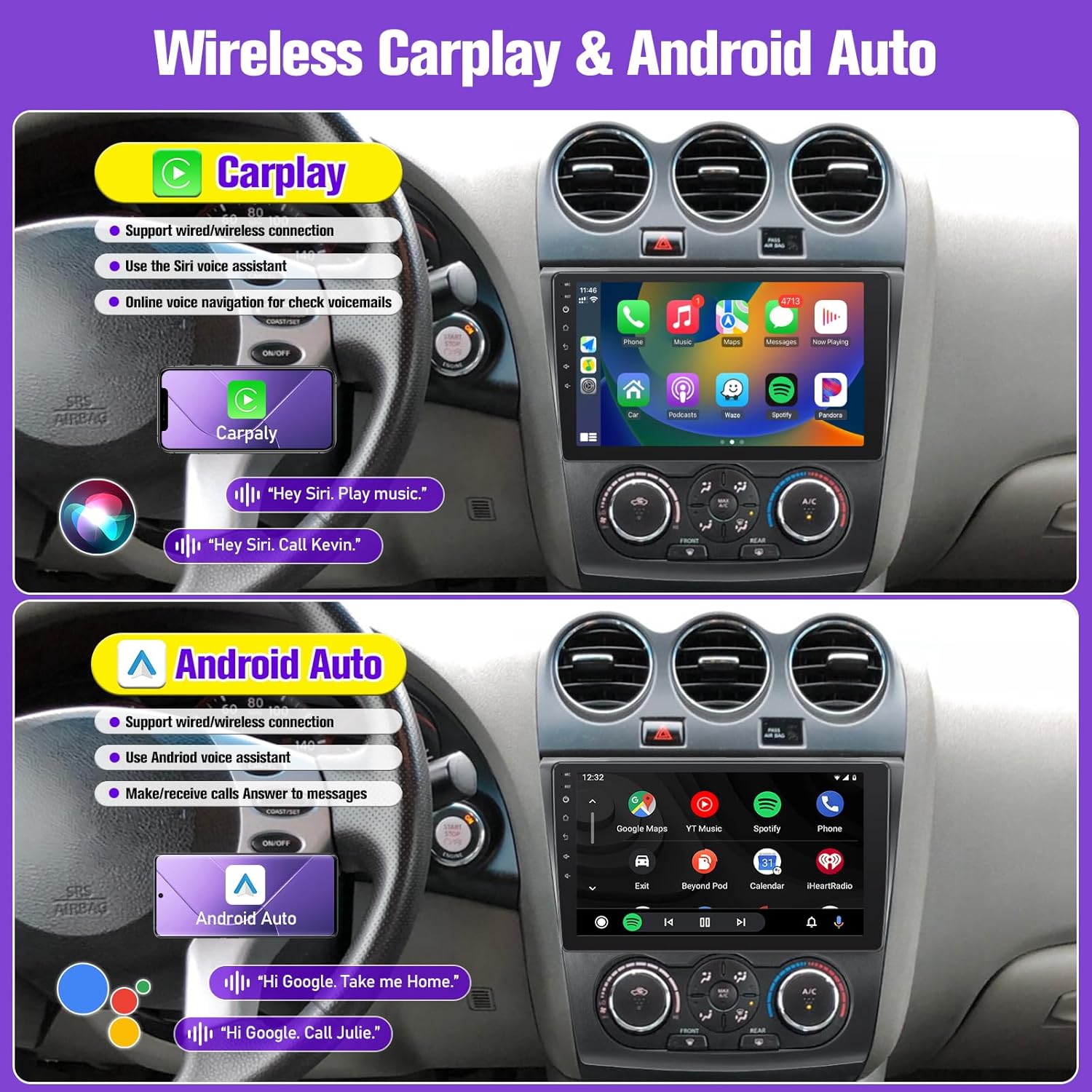
Image: Display of Apple CarPlay and Android Auto interfaces.
2. Mirror Link (IOS/Android)
Mirror your phone's screen onto the car stereo display. For Apple phones, this supports one-way control (from phone to stereo). For Android phones, it supports two-way control (from phone or stereo).

Image: Wireless Phone Mirror Link functionality.
3. GPS навигациясы жана Wi-Fi
The unit has a built-in GPS receiver for both online and offline navigation. Connect to a Wi-Fi hotspot to access online maps, browse the internet, and download applications from the app store (e.g., YouTube, TikTok).

Сүрөт: GPS навигациясы жана Wi-Fi байланыш функциялары.
4. Bluetooth 5.0 & FM Radio
Pair your smartphone via Bluetooth 5.0 for hands-free calls, music streaming, and contact synchronization. The integrated FM radio allows access to local stations with manual and automatic search functions.

Image: Bluetooth 5.0 interface for calls and music.

Image: FM Radio interface and sound effects.
5. Рулду башкаруу элементтери (SWC)
After correct wiring, the unit supports existing steering wheel controls, allowing you to manage calls, music playback, and mode switching without diverting attention from the road.

Image: Steering Wheel Controls functionality.
6. Бөлүнгөн экран функциясы
Utilize the split-screen feature to display two different applications simultaneously, such as navigation on one side and a music player on the other.

Image: Split Screen feature in use.
7. Audio Equalizer (EQ) Settings
Adjust the audio output using the built-in equalizer settings to customize the sound profile сиздин каалооңуз боюнча.

Image: Multiple EQ settings for audio customization.
8. Камеранын резервдик дисплейи
When the vehicle is shifted into reverse gear, the stereo screen will automatically switch to display the rear-view camera feed, providing a 170° wide-angle view коопсуз артка айлануу үчүн.

Image: HD Night Version 1080p Backup Camera display.
Техникалык тейлөө
To ensure the longevity and optimal performance of your Leadfan Car Stereo, follow these maintenance guidelines:
- Экранды тазалоо: Use a soft, lint-free cloth to gently wipe the touchscreen. Avoid abrasive cleaners or solvents that could damage the display.
- Программалык камсыздоо жаңыртуулары: Системанын натыйжалуу иштеп жатканын жана эң акыркы функцияларга ээ экенин текшерүү үчүн, мезгил-мезгили менен программалык камсыздоонун жаңыртууларын текшерип туруңуз.
- Экологиялык шарттар: Аппаратты экстремалдык температурага, түз күн нуруна узак убакытка же ашыкча нымдуулукка дуушар кылуудан алыс болуңуз.
- Кабелдик байланыштар: Бардык кабелдер бекем туташтырылганын текшериңиз. Бошоң туташуулар үзгүлтүккө учурап иштешине алып келиши мүмкүн.
Проблемаларды чечүү
Эгерде сиз унааңыздын стереосу менен көйгөйлөргө туш болсоңуз, төмөнкү жалпы көйгөйлөрдү чечүү кадамдарын караңыз:
| Көйгөй | Мүмкүн себеп | Чечим |
|---|---|---|
| Түзмөк күйбөйт. | Бошоң электр туташуу, күйгөн сактагыч, унаанын аккумуляторунун көйгөйү. | Электр кабелдеринин туташууларын текшериңиз. Унаанын сактагычтарын текшериңиз. Унаанын аккумулятору заряддалганын текшериңиз. |
| Үн жок же бурмаланган аудио. | Динамиктин зымдары туура эмес туташтырылган, үнү өтө төмөн, аудио жөндөөлөрү туура эмес конфигурацияланган. | Verify speaker wiring. Adjust volume. Check EQ settings and audio output mode. |
| Зымсыз CarPlay/Android Auto туташпай жатат. | Bluetooth/Wi-Fi off, incorrect pairing, phone software issue, white plug for reverse input not connected. | Ensure Bluetooth and Wi-Fi are enabled on both devices. Re-pair the devices. Restart phone and stereo. Verify the white plug for reverse input is securely connected. |
| GPS сигналы начар же так эмес. | GPS антеннасы тосулган же туура эмес орнотулган. | GPS антеннасынын таза болушун текшериңиз view асмандын жана коопсуз байланышта. |
| Камдык камера көрсөтүлбөй жатат. | Incorrect wiring, camera malfunction, vehicle not in reverse. | Check camera power and video signal connections. Ensure vehicle is in reverse. |
| Система бузулат же катып калат. | Software issue, excessive background apps, insufficient memory. | Restart the unit. Close unnecessary applications. Perform a factory reset if issues persist (note: this will erase data). |
Бул кадамдар маселени чечпесе, кардарларды колдоо кызматына кайрылыңыз.
Техникалык шарттар
| Өзгөчөлүк | Деталь |
|---|---|
| Операция системасы | Android 12 |
| Процессор | 4-өзөктүү |
| RAM | 2 ГБ |
| ROM (ички сактагыч) | 32 ГБ |
| Дисплей өлчөмү | 9 дюйм |
| Дисплей түрү | 2.5D IPS сенсордук экран |
| Резолюция | 1280*720P (supports 1080P video) |
| Байланыш | Bluetooth 5.0, Wi-Fi, USB |
| Навигация | Built-in GPS (online/offline maps) |
| Радио | FM радиосу |
| Өзгөчөлүктөр | Wireless CarPlay, Android Auto, Mirror Link, Steering Wheel Control (SWC), Split Screen, Voice Control, Backup Camera Input (AHD) |
| Унаа кызматынын түрү | Car (Nissan Altima 2008-2012 with Manual A/C) |
| Элемент Салмагы | 2.92 фунт |
| Пакеттин өлчөмдөрү | 11.85 x 11.06 x 3.82 дюйм |
Кепилдик маалымат
The Leadfan Car Stereo comes with a 1 жылдык кепилдик сатып алынган күндөн тартып. Бул кепилдик өндүрүштүк кемчиликтерди жана нормалдуу колдонуудагы бузулууларды камтыйт. Кепилдик дооматтары үчүн сатып алганыңыздын далилин сактап коюңуз.
Additionally, Leadfan offers a 30-day money-back guarantee and a 12-month replacement warranty, along with lifetime technical support.
Кардарларды колдоо
For any questions regarding installation, operation, or technical support, please contact Leadfan customer service. You can typically find contact information by visiting the seller's page on the product platform and using the "Ask a question" or "Send message to seller" option.
Leadfan is committed to providing satisfactory after-sales service.


