Introduction
This manual provides comprehensive instructions for the M-VAVE 37 Key USB MIDI Keyboard Controller (Model K5). Designed for music production, this versatile controller offers a semi-weighted dynamic keybed, backlit drum pads, and assignable controls for seamless integration with various digital audio workstations (DAWs) and mobile devices. Please read this manual thoroughly to ensure proper use and maximize your creative potential.
Негизги өзгөчөлүктөрү
- 37 Ылдамдыкты сезгич баскычтар: Semi-weighted dynamic keybed for expressive play.
- 16 RGB Backlit Drum Pads: Velocity-sensitive pads for beat production and sampле триггерлөө.
- 8 Assignable Rotary Encoders: For controlling parameters within your music software.
- 2 Capacitive Touch Strips: Dedicated pitch bend and modulation for dynamic control.
- Зымсыз Bluetooth байланышы: Seamless connection to Windows, Mac OS, Android, and iOS devices.
- Камтылган 2,000 мАч батарейка: Provides approximately 16 hours of portable operation.
- USB-C заряддоо: Convenient power and data transfer.
- Smart Chord & Smart Sound Function: Simplifies chord playing and scale selection.
- Wide Software Compatibility: Supports Ableton Live, FL Studio, Cubase, Logic Pro X, Bitwig, Reason, Studio One, GarageBand (iOS), and more.

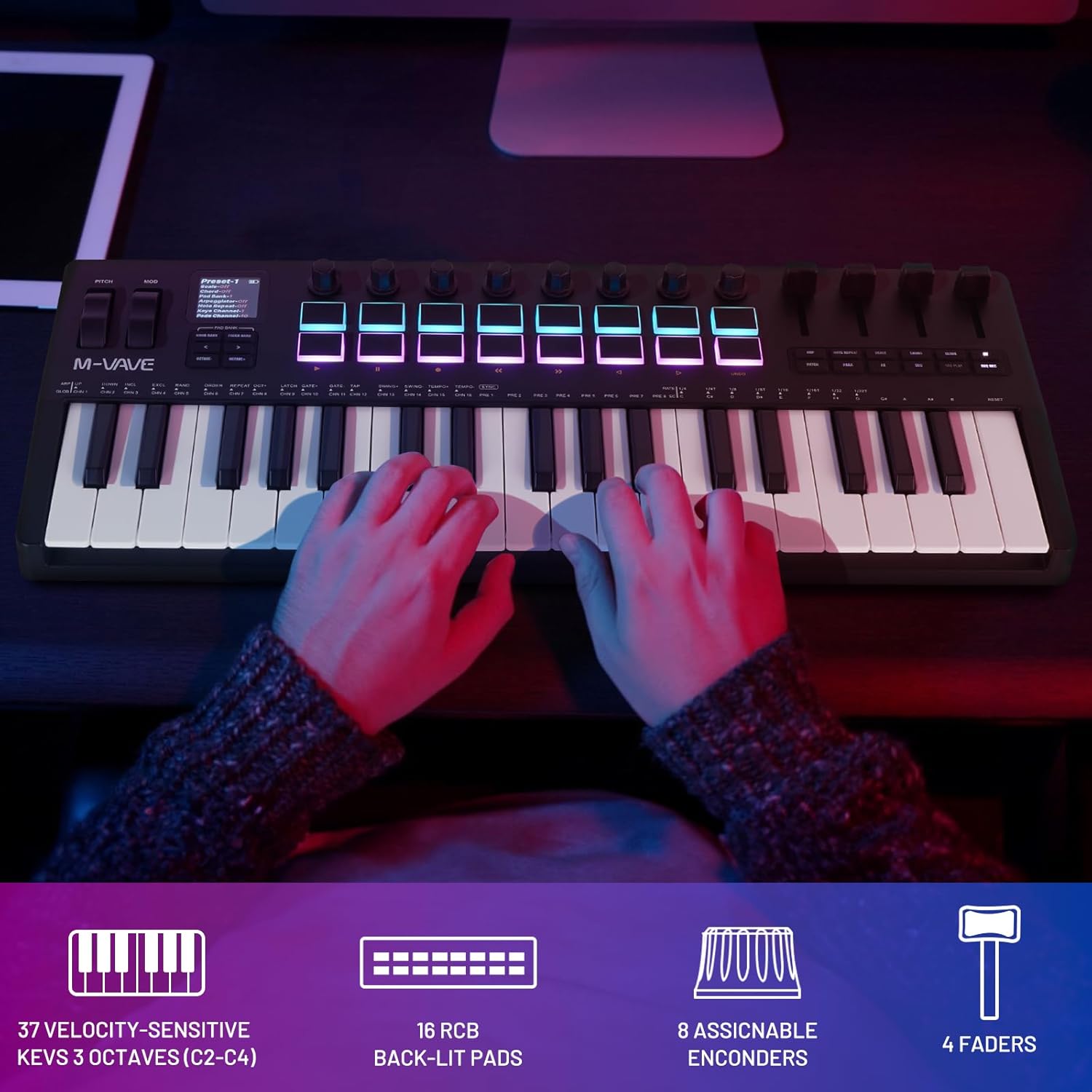
Жогортон ылдый view of the M-VAVE 37 Key USB MIDI Keyboard Controller, showcasing its 37 keys, 16 RGB backlit drum pads, 8 rotary encoders, and pitch/mod touch strips.
Жайгашуу
Күйгүзүлүүдө
The M-VAVE K5 can be powered via its internal rechargeable battery or a USB connection. To power on, locate the power switch on the rear panel and slide it to the 'ON' position. The display will illuminate, indicating the device is ready.
USB туташуу
Connect the keyboard controller to your computer using a standard USB-B cable. The device is class-compliant and typically does not require additional drivers for basic functionality on Windows, Mac OS, iOS, and Android systems. Your Digital Audio Workstation (DAW) should recognize the controller automatically.
Bluetooth туташуу
For wireless operation, ensure the keyboard is powered on. Activate Bluetooth on your host device (computer, tablet, or smartphone). Within your music application (DAW or mobile music app), navigate to the MIDI settings or Bluetooth MIDI devices. Select "SMK25" or "M-VAVE K5" from the list of available devices to establish a wireless connection. Note: Do not attempt to pair via your device's general Bluetooth settings; connect directly within your music application for optimal performance.

A person placing the compact M-VAVE 37 Key USB MIDI Keyboard Controller into a black messenger bag, illustrating its portability for on-the-go music production.
Контроллерди иштетүү
Keys and Pads
The 37 velocity-sensitive keys respond to the force of your touch, allowing for dynamic musical expression. The 16 RGB backlit drum pads are also velocity-sensitive and can be used for finger drumming, triggering samples, or launching clips. The pads offer a good tactile response for precise control.
Encoders and Touch Strips
The 8 assignable rotary encoders can be mapped to various parameters within your DAW, such as volume, pan, filter cutoff, or effect sends. The 2 capacitive touch strips provide smooth control over pitch bend and modulation, enhancing your performance capabilities.
Smart Functions
The K5 features Smart Chord and Smart Sound functions. These allow users to play complex chords with a single key press or stay within a selected musical scale, simplifying composition and performance. Refer to your software's documentation for detailed mapping and configuration of these features.
Программалык камсыздоонун шайкештиги
The M-VAVE K5 is designed for broad compatibility with leading music production software. It integrates seamlessly with applications such as Ableton Live, FL Studio, Cubase, Logic Pro X, Bitwig, Reason, Studio One, and GarageBand (iOS). For advanced customization, a companion software called "Cube Suite" (available for iOS) allows for detailed configuration of pads, knobs, and other controls, including setting LED colors and MIDI command types.
А деталдуу view highlighting the 16 RGB backlit drum pads and 8 assignable rotary encoders on the M-VAVE K5 controller, demonstrating their vibrant illumination.
Техникалык тейлөө
Тазалоо
Башкаргычты тазалоо үчүн жумшак, кургак чүпүрөктү колдонуңуз. Өтө кир болсо, бир аз сүртүңүз.amp cloth with mild soap can be used, followed by a dry cloth. Avoid using abrasive cleaners, solvents, or excessive moisture, as these can damage the device.
Батареяга кам көрүү
The built-in 2,000 mAh Lithium Polymer battery provides extended usage. To prolong battery life, avoid fully discharging the battery frequently. Charge the device regularly, especially if it will be stored for an extended period. Use the provided USB-C cable for charging.
Проблемаларды чечүү
No Connection / Device Not Recognized
- USB: Ensure the USB cable is securely connected to both the controller and your computer. Try a different USB port or cable. Restart your computer and the controller.
- Bluetooth: Verify Bluetooth is enabled on your host device. Ensure you are connecting via your music application's MIDI settings, not the general system Bluetooth settings. If the device is not appearing, try turning the controller off and on again.
- Программалык камсыздоо: Check your DAW's MIDI preferences to ensure the M-VAVE K5 is enabled as an input device.
Keys or Pads Not Responding
- Check the velocity settings within your DAW or the "Cube Suite" app, as low velocity curves might require harder presses.
- Ensure the correct MIDI channel is selected for the instrument you are trying to play.
- If a specific key or pad is unresponsive, contact customer support.
Latency Issues (Bluetooth)
- While Bluetooth MIDI is designed for low latency, ensure your host device's Bluetooth drivers are up to date.
- Minimize other active Bluetooth connections or wireless interference.
- If latency persists, consider using a direct USB connection for critical recording tasks.
Техникалык шарттар
| Өзгөчөлүк | Деталь |
|---|---|
| Модель номери | K5 |
| Ачкычтар | 37 Velocity-Sensitive |
| Төшөктөр | 16 RGB Backlit, Velocity-Sensitive |
| Кодерлор | 8 Assignable Rotary |
| Touch Strips | 2 (Pitch Bend, Modulation) |
| Байланыш | Bluetooth, USB-B |
| Батарея | 2,000 мАч Литий Полимер (кошулган) |
| Иштөө убактысы | Approx. 16 hours (Battery) |
| Шайкеш түзмөктөр | Windows, Mac OS, iOS, Android |
| Өлчөмдөр | 19 x 8.7 x 3 дюйм |
| Салмагы | 3.4 фунт |
| Түс | 37 Кара ачкыч |
Кепилдик жана колдоо
M-Wave products come with a standard one-year warranty from the date of purchase. For technical support, warranty claims, or service inquiries, please visit the official M-Wave webсайтка же кардарларды тейлөө бөлүмүнө кайрылыңыз. Кепилдикти текшерүү үчүн сатып алганыңыздын далилин сактаңыз.
Кошумча ресурстар жана көп берилүүчү суроолор үчүн, сураныч, бул жерге кириңиз M-Wave Store on Amazon.


