1. Киришүү
This manual provides essential information for the safe and efficient use of your DOOGEE Blade 20 Pro Rugged Phone. Designed for durability and high performance, this device features an 11800mAh battery, a 125dB speaker, a 50MP main camera, and runs on Android 15. Please read this manual thoroughly before operating your device.

Сүрөт: алдыңкы жана арткы view of the DOOGEE Blade 20 Pro, showcasing анын бекем дизайны жана негизги спецификациялары.
2. Орнотуу
2.1 Кутудан чыгаруу жана Пакеттин мазмуну
Carefully unpack your DOOGEE Blade 20 Pro. The package should contain the following items:
- 1 x Blade 20 Pro бекем смартфону
- 1 x Type-C USB кабели
- 1 x 18W кубаттагыч
- 1 x Экранга басылган коргоочу пленка (алдын ала колдонулган)
- 1 x SIM картаны алып салуучу ийне
- 1 x User Manual
- 1 x Кепилдик картасы

Image: All items included in the DOOGEE Blade 20 Pro retail package.
2.2 SIM картаны жана сактагычты кеңейтүү
The DOOGEE Blade 20 Pro supports dual 4G SIM cards and expandable storage up to 2TB via a TF card (purchased separately). To install:
- Аппараттын капталындагы SIM карта салгычын табыңыз.
- SIM картаны чыгаруу үчүн ийнени лотоктун жанындагы кичинекей тешикке салыңыз.
- Place your Nano-SIM cards and/or TF card into the designated slots on the tray. Ensure correct orientation.
- Табаны телефондун ичине кылдаттык менен кайра кыстарыңыз.
Маанилүү эскертүү:
- This device does not support Verizon or AT&T networks.
- Verify compatibility with your local carrier's frequency bands before use. Supported bands include: GSM: B2/B3/B5/B8, WCDMA: B1/B2/B4/B5/B8, FDD: B1/2/3/4/5/7/8/18/19/20/25/26/28AB/66, TDD-LTE: B34/B38/B39/B40/B41.
2.3 Алгачкы заряддоо жана күйгүзүү
Before first use, fully charge your device. Connect the Type-C USB cable to the phone and the 18W charger to a power outlet. The 11800mAh battery provides extended usage. Once charged, press and hold the power button on the side of the phone to turn it on.

Image: Visual representation of the phone's large battery capacity and fast charging feature.
3. Аппаратыңызды иштетүү
3.1 Basic Functions and Android 15
The DOOGEE Blade 20 Pro runs on Android 15, offering a fast interface, enhanced privacy features, and efficient app management. Navigate using the touchscreen, and utilize the physical power and volume buttons for basic controls.
3.2 Дисплей
The device features a 6.6-inch HD+ IPS punch-hole screen with a 90Hz refresh rate for smooth visuals. With 380 nits brightness, the display remains readable in various lighting conditions.
3.3 Камеранын функциялары
Көп функциялуу камера системасы менен көз ирмемдерди тартып алыңыз:
- 50MP AI негизги камерасы: For crisp and vibrant photos in daylight.
- 20MP инфракызыл түнкү көрүү камерасы: Allows capturing images in low-light or complete darkness.
- 8MP алдыңкы камера: Селфи жана видео чалуулар үчүн.
The phone supports Widevine L1 certification for high-definition streaming. Various camera modes are available, including Night Mode, EIS Anti-shake, AI Recognition, Multi-frame Noise Reduction, Anti-flicker, Pro Mode, Panoramic Mode, Burst Mode, Beauty Mode, Portrait Mode, and HDR.
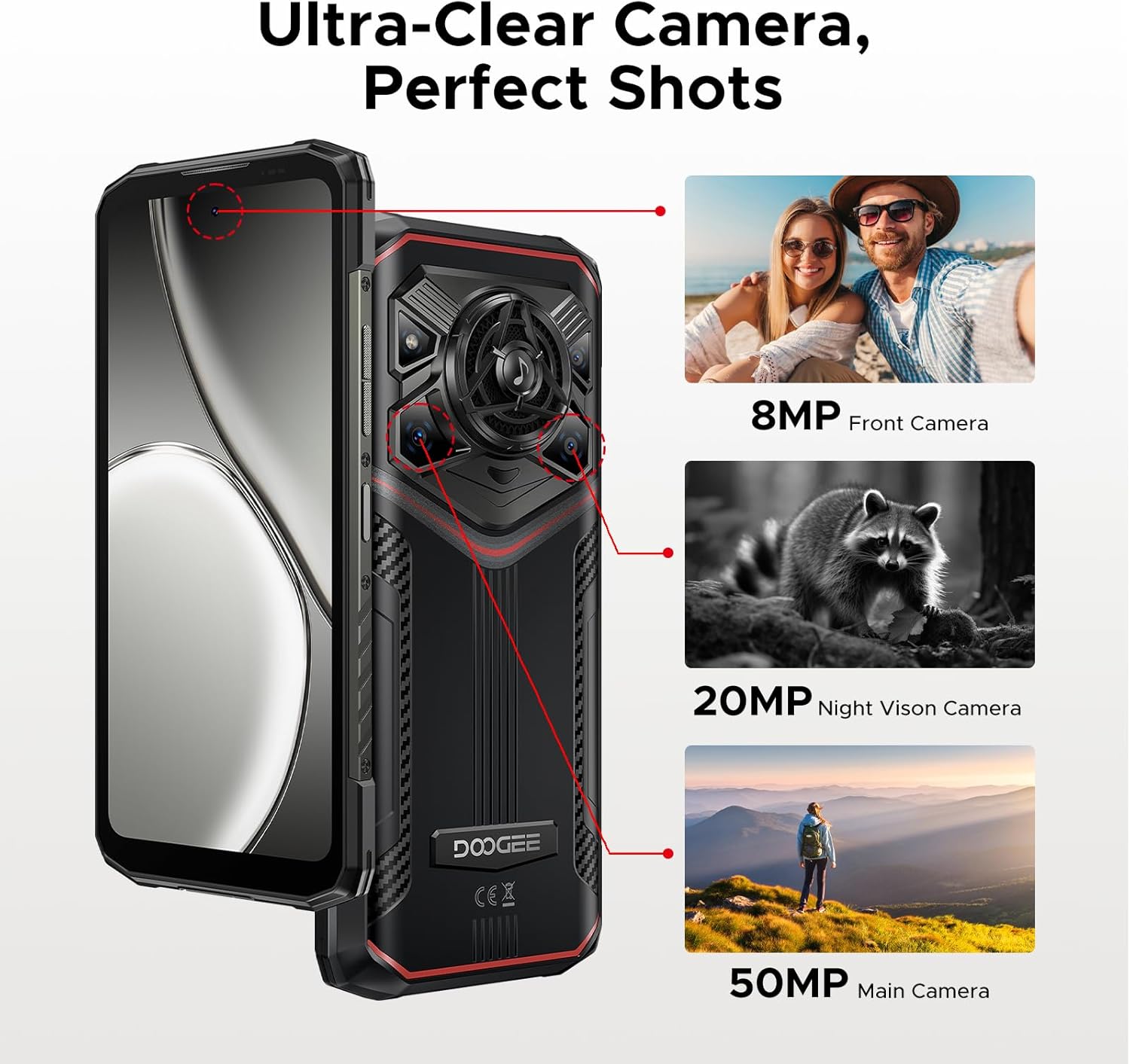
Сүрөт: бүттүview of the DOOGEE Blade 20 Pro's camera system.
3.4 Аудио системасы
Experience powerful audio with the 125dB speaker, featuring a 36mm giant driver and 3.5W high power output. This ensures clear sound even in noisy environments.

Сүрөт: деталдуу view of the phone's high-power speaker components.
3.5 Байланыш жана навигация
The device supports Wi-Fi 6 for fast internet access and NFC for convenient contactless payments and data transfer. For navigation, it includes built-in GPS, Glonass, Galileo, and Beidou systems.
3.6 Коопсуздук өзгөчөлүктөрү
Unlock your phone securely using Face ID or the integrated fingerprint sensor for quick and convenient access.
3.7 Gemini AI интеграциясы
The DOOGEE Blade 20 Pro includes Gemini AI features to assist with various tasks, including content creation, image analysis, code development, language learning, and smart assistant functions.

Сүрөт: бүттүview of the Gemini AI capabilities integrated into the device.
4. Техникалык тейлөө жана туруктуулук
4.1 Rugged Standards
The DOOGEE Blade 20 Pro is built to withstand harsh environments, meeting IP68, IP69K, and MIL-STD-810H standards. This means it is waterproof, dustproof, and shockproof, designed to endure drops, rain, mud, and extreme temperatures.
4.2 Батареяга кам көрүү
The 11800mAh battery is designed for longevity. To maximize battery life, avoid exposing the device to extreme temperatures for prolonged periods. The battery is rated to maintain over 80% health after 1000 charge and discharge cycles, and can survive extreme temperatures from -40°C to 70°C.
5. Кыйынчылыктарды
If you encounter issues with your DOOGEE Blade 20 Pro, consider the following common solutions:
- Тармакка туташуу: Ensure your SIM card is correctly inserted and your carrier's frequency bands are supported by the device. Restarting the phone can often resolve temporary network issues.
- Батареяны төгүү: Close unused applications running in the background. Reduce screen brightness and disable features like Wi-Fi, Bluetooth, or GPS when not in use.
- Аткаруу маселелери: Clear cache from apps, uninstall unnecessary applications, or perform a factory reset (back up your data first) if the device becomes consistently slow.
- Динамиктин үнү: Ensure the volume is turned up and there is no obstruction to the speaker grille.
For persistent issues, refer to the official DOOGEE support webсайтка же кардарларды тейлөөгө кайрылыңыз.
6. Техникалык шарттар
Key technical specifications for the DOOGEE Blade 20 Pro:
| Өзгөчөлүк | Спецификация |
|---|---|
| Модель аты | Blade20Pro |
| Операция системасы | Android 15 |
| Процессор | Unisoc T7200 Octa-Core (12nm) |
| RAM | 24 ГБ (6 ГБ Негизги + 18 ГБ Виртуалдык) |
| Ички сактагыч (ROM) | 256 ГБ (TF картасы менен 2 ТБ чейин кеңейтүүгө болот) |
| Батарея сыйымдуулугу | 11800 мАч литий полимери |
| Заряддоо | 18 Вт тез кубаттоо, 5 Вт OTG тескери кубаттоо |
| Дисплей өлчөмү | 6.6 дюймдук HD+ IPS |
| Резолюция | 720 x 1612 |
| Жаңыртуу ылдамдыгы | 90 Гц |
| Башкы камера | 50 MP AI камерасы |
| Түнкү көрүнүш камерасы | 20 MP Infrared |
| Алдыңкы камера | 8 депутат |
| Баяндамачы | 125 dB, 3.5W Output, 36mm Driver |
| Туруктуулук рейтингдери | IP68, IP69K, MIL-STD-810H |
| Байланыш | 4G, Wi-Fi 6, Bluetooth, NFC, GPS (Glonass, Galileo, Beidou) |
| Коопсуздук | Face ID, Fingerprint Sensor |
| Өлчөмдөр | 3.2 x 0.62 x 6.85 дюйм |
| Элемент Салмагы | 1.37 фунт |

Image: Visual representation of the Unisoc T7200 Octa-core Processor.
7. Кепилдик жана колдоо
7.1 Кепилдик маалыматы
For detailed warranty terms and conditions, please refer to the Warranty Card included in your product package. Keep your proof of purchase for warranty claims.
7.2 Кардарларды колдоо
If you require further assistance, technical support, or have questions not covered in this manual, please contact DOOGEE customer support through their official webсайтына же Кепилдик картасында көрсөтүлгөн байланыш маалыматына кайрылыңыз.


