1. Киришүү
This manual provides detailed instructions for the safe and efficient operation of your SUPVAN E11 Bluetooth Label Maker. Please read this manual thoroughly before using the device and retain it for future reference.
2. Продукт бүтүп калдыview
The SUPVAN E11 is a versatile, portable label maker designed for various labeling needs in home, kitchen, office, and school environments. It supports both direct keyboard input and smart app control via Bluetooth, offering extensive customization options without the need for ink or toner.
Негизги өзгөчөлүктөрү:
- Quick Printing via Keyboard & Smart App: Print directly from the integrated keyboard for frequent labeling tasks or design custom labels using the Bluetooth-enabled app.
- Portable with Rechargeable Battery: Compact (14×7×3 cm) and lightweight (227 g) with a 1200 mAh battery, providing up to 1 month of standby time for mobile and efficient labeling.
- Minimized Print Margins: Prints labels with only 0.5 cm margins, reducing material waste and maximizing efficiency.
- Advanced Editing Functions in the App: Customize labels with over 40 fonts, 50 frames, and 450+ icons. Create and save templates offline, all available for free.
- Compatibility with Various Label Types: Supports continuous, fixed-size, and cable labels, suitable for long texts, batch printing, and cable identification.
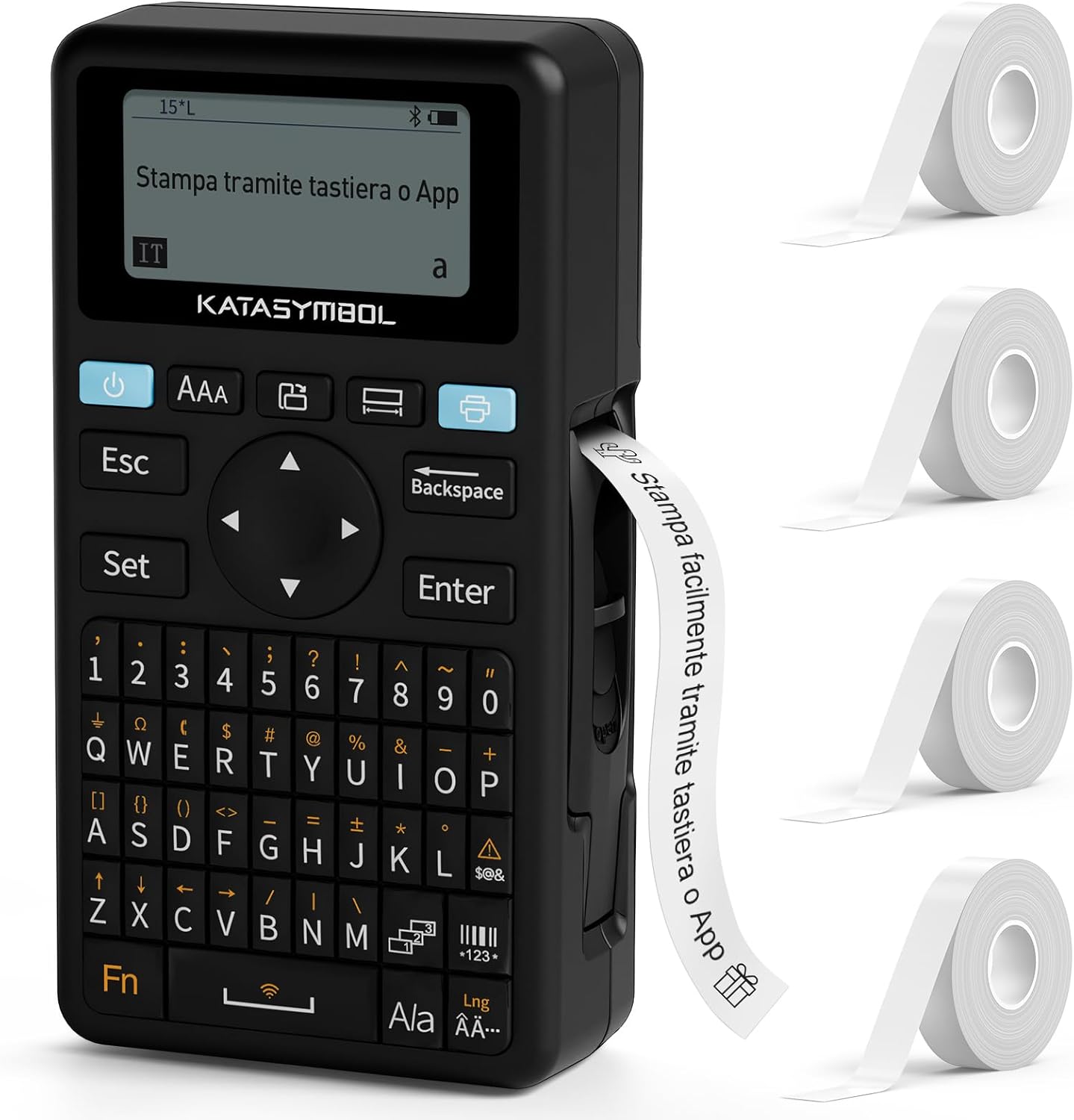
Image: The SUPVAN E11 label maker shown with four rolls of white label tape.

Image: Demonstrates printing using the integrated keyboard and designing labels via a smartphone app connected via Bluetooth.
3. Орнотуу
3.1 Таңгактан чыгаруу жана алгачкы текшерүү
- Бардык компоненттерди таңгактан кылдаттык менен алып салыңыз.
- Таңгактоо тизмесинде саналган нерселердин бардыгы бар экендигин текшериңиз.
- Inspect the device for any signs of damage. If damaged, do not use and contact customer support.

Image: Displays the SUPVAN E11 label maker, four rolls of white label tape, a USB-C charging cable, and the user manual.
3.2 Аппаратты заряддоо
- Connect the provided USB-C cable to the charging port on the label maker and to a compatible USB power adapter (not included).
- The charging indicator will illuminate. Allow the device to fully charge before first use.

Image: Highlights the integrated 1200 mAh rechargeable battery, offering up to one month of standby time.
3.3 Этикетка лентасын орнотуу
- Этикетка бөлүмүнүн капкагын ачыңыз.
- Insert a roll of SUPVAN label tape, ensuring the tape feeds correctly through the guide.
- Бөлүмдүн капкагын бекем жабыңыз.

Image: Illustrates the process of inserting thermal label paper into the SUPVAN E11 label maker, emphasizing that no ink or toner is required.
3.4 Колдонмону орнотуу (милдеттүү эмес)
- Download the official SUPVAN app from your device's app store (Android and iOS compatible).
- Смартфонуңузда же планшетиңизде Bluetooth иштетүү.
- Open the app and follow the on-screen instructions to pair with your E11 label maker.
4. Иштөө нускамалары
4.1 Күйгүзүү/өчүрүү
- Күйгүзүү үчүн, экран күйгөнгө чейин кубат баскычын басып, кармап туруңуз.
- Өчүрүү үчүн, аппарат өчүп калганга чейин кубат баскычын басып, кармап туруңуз.
4.2 Printing from Keyboard
- Энбелги жасоочуну күйгүзүңүз.
- Use the QWERTY keyboard to type your desired text.
- Энбелги басып чыгаруу үчүн "Басып чыгаруу" баскычын басыңыз.
4.3 Printing via App (Bluetooth)
- Ensure the label maker is powered on and paired with the app.
- Open the SUPVAN app on your smartphone/tablet.
- Үлгү тандаңыз же жаңы энбелги дизайнын түзүңүз.
- Utilize the app's editing features (fonts, icons, frames) to customize your label.
- Tap the 'Print' button within the app to send the label to the E11.

Image: Illustrates the two printing methods: direct input via the QWERTY keyboard and advanced editing and printing via the connected smartphone app.

Image: Showcases the app's extensive customization options, including over 40 fonts, 50 frames, 450+ icons, and support for barcodes and QR codes.
4.4 Энбелгилердин түрлөрү жана колдонмолору
The E11 supports various label types for diverse applications:
- Fixed-Size Labels: Ideal for standard item identification (e.g., food containers, office fileс).
- Үзгүлтүксүз энбелгилер: Suitable for longer texts or custom lengths.
- Cable Labels: Designed for organizing and identifying cables.
- Round Labels: Perfect for small items or decorative purposes.

Image: Displays examples of different label types supported by the E11, including cut-to-print, continuous roll, round, and cable labels.

Image: Shows various practical applications of the label maker, such as labeling bottles, office binders, storage boxes, and notebooks.
5. Техникалык тейлөө
5.1 Басып чыгаруу башын тазалоо
- Тазалоодон мурун аппараттын өчүрүлгөнүн текшериңиз.
- Изопропил спиртине нымдалган жумшак, мамыксыз чүпүрөк менен басып чыгаруучу башты акырын сүртүңүз.
- Allow the print head to dry completely before use.
5.2 Батареяга кам көрүү
- Батареянын иштөө мөөнөтүн сактоо үчүн, түзмөк көп колдонулбаса дагы, аны үзгүлтүксүз кубаттап туруңуз.
- Аппаратты экстремалдык температурага тийгизүүдөн сактаңыз.
5.3 Этикеткаларды сактоо
- Store label rolls in a cool, dry place away from direct sunlight to prevent degradation.
6. Кыйынчылыктарды
Жалпы маселелер жана чечимдер:
| Көйгөй | Мүмкүн себеп | Чечим |
|---|---|---|
| Түзмөк күйбөйт | Батареянын аздыгы; Аппараттын бузулушу | Түзмөктү кубаттаңыз; Көйгөй чечилбесе, колдоо кызматына кайрылыңыз |
| Басып чыгаруу сапаты начар | Басып чыгаруу башы кир; Туура эмес этикетка түрү; Батареянын кубаты аз | Clean print head; Ensure correct label tape is used; Charge device |
| Энбелгилер туура эмес азыктандырылган | Improper tape installation; Tape jammed | Reinstall label tape correctly; Clear any jams carefully |
| Bluetooth аркылуу туташуу мүмкүн эмес | Bluetooth off; Device not paired; App issue | Ensure Bluetooth is on; Re-pair device in app; Restart app/device |
7. Техникалык шарттар
- Бренд: СУПВАН
- Модел: E11
- Продукциянын өлчөмдөрү: 17 x 9 x 5.2 см
- Элемент Салмагы: 230 грамм
- Батарея: 1 Литий Полимер (1200 мАч)
- Байланыш технологиясы: Bluetooth
- Басып чыгаруу технологиясы: Термикалык
- Max Paper Size Supported: 15 мм x 6 м
- Max Print Resolution (Black & White): 203 dpi
- Максималдуу басып чыгаруу ылдамдыгы (кара жана ак): 40 Pages per minute (Note: This is a standard printer metric, actual label printing speed may vary)
- Интерфейс: USB-C (кубаттоо үчүн)
- Киргизүү интерфейси: Баскычтоп
- Контроллердин түрү: Android and iOS (via app)
- Өзгөчөлүктөр: Portable, Inkless Printing, Minimized Margins
8. Кепилдик жана колдоо
8.1 Кепилдик маалыматы
Please refer to the warranty card included with your product for specific warranty terms and conditions. Typically, SUPVAN products come with a limited warranty covering manufacturing defects from the date of purchase.
8.2 Кардарларды колдоо
For technical assistance, troubleshooting, or warranty claims, please contact SUPVAN customer support through the official webсайт же продукт таңгагында көрсөтүлгөн байланыш маалыматы. Сиз да зыярат кылсаңыз болот SUPVAN Brand Store көбүрөөк маалымат алуу үчүн.


