Introduction
This manual provides essential information for the safe and effective operation of your 4DRC Foam RC Plane, Model 4D-G6-RED. This remote control aircraft is inspired by the SU-27 fighter jet and features an EPP foam construction for durability, a smart gyroscope for automatic balance, and colorful night lights for enhanced visibility. It is designed to be easy to fly for beginners and experienced users alike.
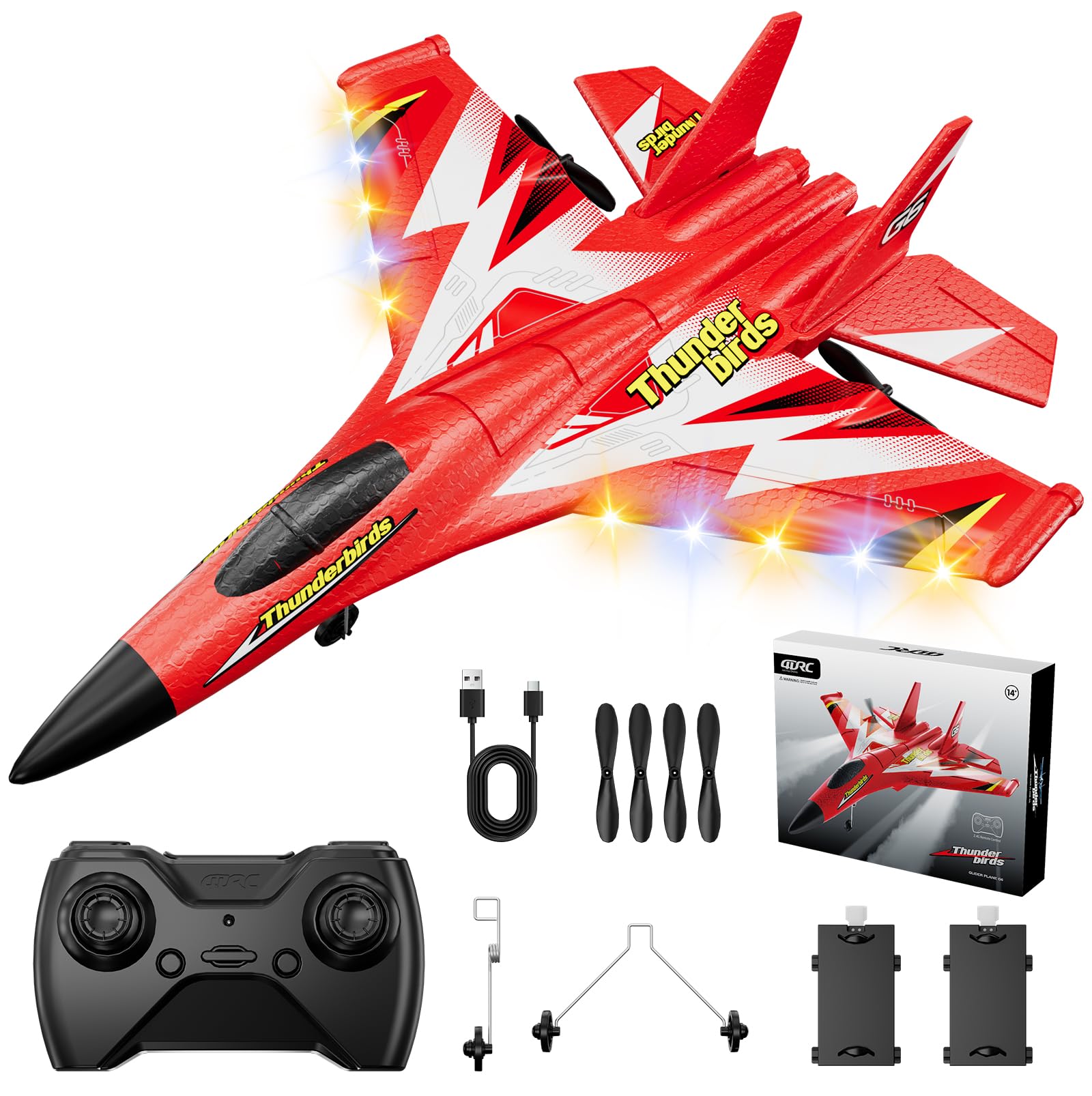
The 4DRC Foam RC Plane, Model 4D-G6-RED, showcasing анын кооз дизайны.
Кутуда эмне бар
Сураныч, бардык буюмдар бар экенине ынануу үчүн пакетиңиздин мазмунун текшериңиз:
- 4D-G6 Airplane x 1
- Бергич x 1
- Батарея x 2
- Extra Propeller Blades x 2
- USB кубаттоо кабели x 1

Image showing all components included in the 4DRC Foam RC Plane package.
Жайгашуу
- Батарея орнотуу: Carefully open the battery compartment on the underside of the aircraft. Connect a fully charged battery to the aircraft's power connector. Ensure the connection is secure. Close the battery compartment.
- Пропеллердин тиркемеси: If the propellers are not pre-installed, gently attach them to the motor shafts. Ensure they are oriented correctly for proper thrust.
- Контроллердин батареялары: Insert the required batteries (not included) into the remote control transmitter.
- Жупташтыруу: Turn on the aircraft, then turn on the remote control. The aircraft and remote control should automatically pair. If not, refer to the troubleshooting section.
For a visual guide on battery installation and initial setup, please refer to the official product video below:
Official product video demonstrating the setup and flight capabilities of the 4DRC RC Plane.
Иштөө нускамалары
- Учуп чыгуу: The aircraft supports two takeoff modes:
- Hand-Throw: Hold the aircraft firmly and gently throw it forward while simultaneously increasing throttle on the remote control.
- Ground Launch: Place the aircraft on a flat surface. Gradually increase throttle, and the aircraft will take off.
- Учууну башкаруу: Use the remote control joysticks to maneuver the aircraft. The smart gyroscope assists in maintaining automatic balance, making it easier to control for beginners. You can control ascent/descent, turn left/right, and hover.
- Түнкү жарыктар: Activate the colorful night lights for enhanced visibility and an exciting flying experience after sunset. Refer to your remote control for the specific button to toggle the lights.
- Учуу диапазону: The aircraft has a flight range of up to 150 meters. Ensure you operate within this range to maintain control.
- Конуу: Gently reduce the throttle to decrease altitude. Guide the aircraft to a clear landing area.

A child demonstrating the use of the 2.4GHz remote control system for the RC plane.
Техникалык тейлөө
- Батареяны заряддоо: Use the provided USB charging cable to recharge the aircraft batteries. A full charge provides up to 30 minutes of flight time. Always allow batteries to cool before recharging.
- Тазалоо: The EPP foam material is durable. If the aircraft gets dirty, gently wipe it with a damp кездеме. Катуу химиялык заттарды колдонуудан алыс болуңуз.
- Пропеллерди алмаштыруу: If propellers become damaged, replace them with the extra propeller blades provided. Ensure correct installation.
- Сактагыч: Store the aircraft and remote control in a cool, dry place away from direct sunlight when not in use.

Image showing the two 250mAh rechargeable batteries, providing up to 30 minutes of playtime.
Проблемаларды чечүү
| Көйгөй | Мүмкүн себеп | Чечим |
|---|---|---|
| Aircraft does not turn on. | Батарея туташкан эмес же заряды бүтө элек. | Ensure battery is securely connected and fully charged. |
| Aircraft does not respond to remote control. | Not paired, out of range, or remote control batteries low. | Re-pair the aircraft and remote. Ensure you are within 150m range. Replace remote control batteries. |
| Aircraft flies erratically. | Damaged propeller or gyroscope calibration issue. | Check and replace damaged propellers. Power cycle the aircraft and remote to reset gyroscope. |
| Кыска учуу убактысы. | Батарея толук заряддала элек же эскирип калган. | Ensure batteries are fully charged. Consider replacing old batteries if performance degrades. |
Техникалык шарттар
- Продукциянын өлчөмдөрү: 15 x 12 x 2 дюйм
- Элемент Салмагы: 11.7 унция
- Модель номери: 4D-G6-RED
- Өндүрүүчүнүн сунуштаган жашы: 8 жаш жана андан жогору
- Батареялар: 2 C batteries required (included for aircraft)
- Материал: EPP Foam, Silicone Head, Carbon-Fiber Blades
- Учуу диапазону: 150 метрге чейин
- Учуу убактысы: 30 мүнөткө чейин (2 батарейка менен)
- Өзгөчөлүктөрү: Smart Gyroscope, Colorful Night Lights, 2 Takeoff Modes
Коопсуздук маалыматы
- Always operate the RC plane in open areas, away from people, animals, buildings, and power lines.
- Катуу шамалда же жагымсыз аба ырайында учпаңыз.
- Keep fingers and loose clothing away from propellers when the aircraft is powered on.
- Жаш колдонуучулар үчүн чоңдордун көзөмөлү сунушталат.
- Do not attempt to modify the aircraft, as this may compromise safety and performance.
- Ensure batteries are charged and handled according to instructions to prevent fire or injury.
Кепилдик жана колдоо
For warranty information, returns, or technical support, please refer to the retailer where you purchased the product or contact 4DRC customer service directly. Keep your purchase receipt as proof of purchase.


