1. Киришүү
Thank you for choosing the Anweller Smart Deadbolt Lock. This manual provides detailed instructions for the installation, operation, and maintenance of your new smart lock. Designed for enhanced security and convenience, the MD1 features multiple unlocking methods, a built-in display screen, and robust construction. Please read this manual thoroughly before installation and use to ensure proper function and safety.
2. Продукт бүтүп калдыview
2.1. Пакеттин мазмуну
The Anweller Smart Deadbolt Lock package includes the following components:
- 1 x 10000mAh Li-ion Battery
- 1 x MD1 Smart Deadbolt Lock (All Parts)
- 1 x Smart Sensor
- 2 x Механикалык ачкычтар
- 4 x RFID карталары
2.2. Негизги өзгөчөлүктөрү
The MD1 Smart Deadbolt Lock offers advanced features for modern home security:
- Exclusive Display Screen: Real-time display of lock modes, date, time, battery level, passcode input, auto-lock countdown, and low battery reminder.
- Enhanced Security and Smart Functions: Magnetic Sensor for auto-lock upon door closure, app reminders for open doors, and smartphone proximity unlock.
- WiFi and Bluetooth Dual-Mode: Built-in WiFi for remote control (2.4GHz only), with an option to switch to Bluetooth mode for power saving.
- 10000mAh кайра заряддалуучу батарея: High-capacity Li-ion battery provides up to 180 days standby time, rechargeable via Type-C in 4 hours.
- High-Security and Durable: Complies with ANSI/BHMA Grade 2 safety standards, made of aluminum alloy and zinc alloy, IP65 Waterproof, and tested for 10+ years of use.
- Өз алдынча орнотуунун оңой жолу: Simple installation with a screwdriver in 15 minutes, no drilling or extra batteries required. Reversible for left and right-handed doors.
- 6 Ways to Unlock: Fingerprint, Passcode, RFID Card, Mobile App, Apple Watch, and Spare Key.
2.3. Продукциянын диаграммасы

The image above shows the main components of the Anweller Smart Deadbolt Lock: the exterior keypad with display, the interior unit with the manual turn knob, and the separate magnetic sensor.
3. Орнотуу жана орнотуу
The Anweller MD1 Smart Deadbolt Lock is designed for easy DIY installation. No drilling is required for standard door preparations.
3.1. Орнотууга чейинки текшерүү
Before beginning installation, ensure your door meets the following specifications:
- Артка: 2-3/8" же 2-3/4" (60мм же 70мм)
- Тешик диаметри: 2-1/8" (54мм) же 1-1/2" (38мм)
- Эшик калыңдыгы: 1-3/8"ден 2-1/8"ге чейин (35ммден 55ммге чейин)
- Suitable for single cylinder deadbolts. Not compatible with mortise locks.
- Reversible for both left-handed and right-handed doors.

This diagram illustrates the necessary door measurements to ensure proper fit and function of the smart deadbolt lock.
3.2. Орнотуу кадамдары
Follow these steps for physical installation. A screwdriver is the only tool required.
- Check Deadbolt Adjustment: Verify if the deadbolt requires adjustment for your door's backset.
- Fix Latch Lock Body: Ensure the "UP" marking on the latch faces upward and the latch is in the unlocked position before inserting into the door.
- Install Front Lock: Position the exterior keypad unit onto the door.
- Install Rear Lock Bracket: Эшиктин ички бетине бекитүүчү пластинаны бекитиңиз.
- Install Rear Lock: Connect the cable from the front lock to the rear lock unit and secure it to the mounting plate.
- Батареяны орнотуу: Insert the 10000mAh Li-ion battery into the interior unit.
- Магниттик сенсорду орнотуу: Attach the magnetic sensor to the door frame, aligning it with the main lock unit. This sensor enables auto-lock and door status detection.
The video above demonstrates the complete installation process, including how to check door dimensions, install the latch, front and rear lock units, battery, and the magnetic sensor. It is highly recommended to watch this video before starting the installation.
3.3. Колдонмону орнотуу
After physical installation, download the eSmartLock app (or similar, based on product details) to configure your smart lock. The app allows for remote control, user management, and access to advanced features. Ensure your home router supports 2.4GHz WiFi for direct connection.

This image illustrates the mobile application interface, highlighting its ability to control the lock remotely via Wi-Fi, manage users, and view lock history.
4. Иштөө нускамалары
4.1. Кулпуну ачуу ыкмалары
The MD1 Smart Deadbolt Lock offers six convenient ways to unlock:
- Манжа изи: Register your fingerprints through the app for quick and secure access.
- Өткөрүүчү код: Create temporary or permanent passcodes via the keypad or app.
- RFID картасы: Use the provided RFID cards for tap-to-unlock convenience.
- Мобилдик колдонмо: Unlock remotely from anywhere using the eSmartLock app (requires WiFi connection).
- Apple Watch: Unlock directly from your Apple Watch for seamless entry.
- Запастык ачкыч: Traditional mechanical keys are provided for emergency backup.

This image visually represents all six unlocking methods available for the Anweller MD1 lock, emphasizing its versatility and user-friendliness.
4.2. Display Screen Functions
The integrated display screen provides real-time information and feedback:
- Дата жана убакыт: Current date and time display.
- Батарея деңгээли: Калган батареянын кубатын көрсөтөт.
- Passcode Input Display: Shows entered digits for verification.
- Дисплей режими: Shows current lock mode (e.g., Passage Mode).
- Auto-Lock Countdown: Displays the countdown before automatic locking.
- Батареянын аздыгы жөнүндө эстеткич: Батарея аз болгондо эскертмелер.
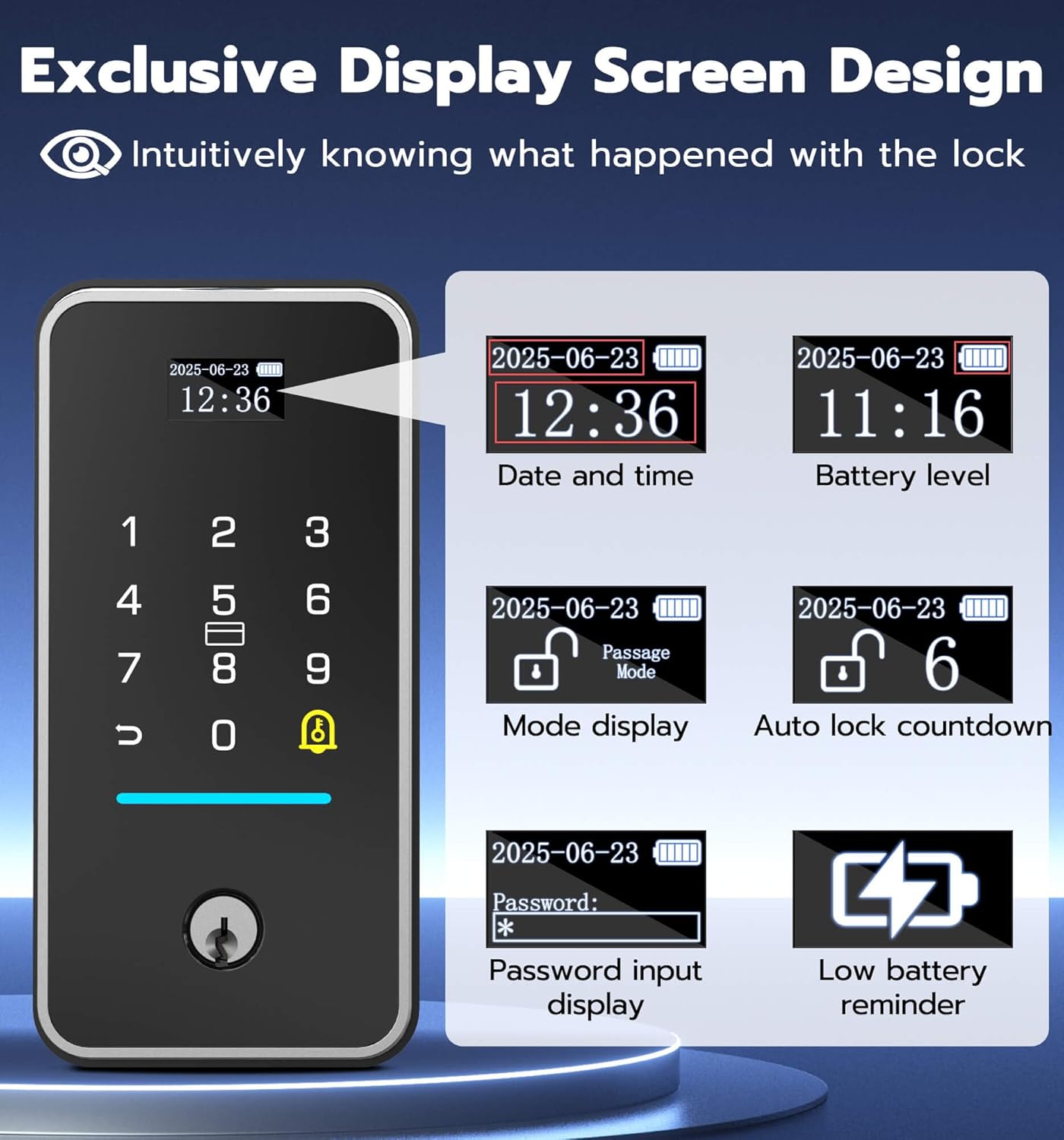
The image above highlights the various pieces of information displayed on the lock's screen, providing users with immediate status updates.
4.3. Smart Sensor and Auto-Lock
The magnetic sensor enhances security and convenience:
- The lock automatically locks when the door is closed.
- The app will send a reminder if the door has been open for over 60 seconds.

This image demonstrates how the smart sensor works, providing both app notifications for open doors and automatic locking when the door is closed.
4.4. Кулпу режимдери
The MD1 offers different operational modes for various needs:
- Кадимки режим: Auto-locks after a set time (15/30/45 seconds).
- Өтүү режими: Keeps the lock continuously unlocked, ideal for high-traffic periods.
- Anti-Unlock Mode: Only the administrator can unlock, providing maximum security.

This image illustrates the different operational modes of the lock, including Normal, Passage, and Anti-Unlock modes, and how they can be selected.
5. Техникалык тейлөө
5.1. Батареяны башкаруу
The MD1 Smart Deadbolt Lock is powered by a 10000mAh rechargeable Li-ion battery, offering extended usage and environmental benefits.
- Батареянын иштөө мөөнөтү: Up to 180 days of standby time on a single charge.
- Заряддоо: Recharge via Type-C port in approximately 4 hours.
- Батареянын аздыгы жөнүндө эскертүү: The display screen will show a low battery reminder.
This image details the lock's rechargeable battery, its capacity, and charging method, along with options for emergency power via a power bank or mechanical key.
5.2. Шашылыш кулпуну ачуу
In case the battery runs out, you can still access your home:
- Механикалык ачкыч: Use one of the provided spare mechanical keys.
- Өзгөчө кырдаалдардын күчү: Connect a power bank via the USB-C port on the lock to temporarily power it and unlock.
5.3. Тазалоо
To maintain the appearance and functionality of your lock, wipe it with a soft, damp кездеме. Абразивдүү тазалагычтарды же эриткичтерди колдонуудан алыс болуңуз.
6. Кыйынчылыктарды
This section addresses common issues you might encounter with your Anweller Smart Deadbolt Lock.
| Көйгөй | Мүмкүн себеп | Чечим |
|---|---|---|
| Lock not responding / No power. | Батарея түгөнүп калды. | Recharge the 10000mAh Li-ion battery using the Type-C port. Use a mechanical key or external power bank for immediate access. |
| Difficulty with app setup or WiFi connection. | Incorrect WiFi credentials, weak 2.4GHz signal, or app synchronization issue. | Ensure you are connecting to a 2.4GHz WiFi network. Verify WiFi password. Try restarting your router and the lock. Re-attempt app pairing. If issues persist, contact customer support. |
| Манжа изи таанылган жок. | Finger not placed correctly, dirty sensor, or fingerprint not properly enrolled. | Ensure your finger covers the sensor completely. Clean the sensor with a soft cloth. Re-enroll your fingerprint in the app, ensuring multiple angles are captured. |
| Lock repeatedly locks/unlocks or makes clicking noises. | Door frame or strike plate misalignment, or deadbolt obstruction. | Check for any obstructions in the door frame or strike plate. Ensure the strike plate is perfectly aligned with the deadbolt. Adjust the strike plate if necessary. |
| Auto-lock not functioning. | Magnetic sensor misalignment or not installed. | Verify the magnetic sensor is correctly installed and aligned with the main lock unit on the door frame. Ensure it is within the recommended distance. Check app settings for auto-lock feature activation. |
7. Продукттун спецификациялары
| Өзгөчөлүк | Деталь |
|---|---|
| Бренд | Анвеллер |
| Модель номери | MD1 |
| Түс | Кара |
| Power Source | Battery Powered (10000mAh Li-ion) |
| Байланыш технологиясы | WiFi (2.4GHz), Bluetooth |
| Шайкеш түзмөктөр | Смартфон |
| Элементтин өлчөмдөрү (L x W x Y) | 2.9 x 1.1 x 6 дюйм |
| Элемент Салмагы | 2.9 фунт |
| Башкаруу ыкмасы | Колдонмо |
| Сунушталган Колдонуулар | Front Doors, Side Doors, Exterior Doors, Garage Door, etc. |
| Батареянын иштөө мөөнөтү | Күтүү режиминде 180 күнгө чейин |
| Камтылган компоненттер | 1 x 10000mAh Li-ion Battery, 1 x MD1 Smart Deadbolt Lock (All Parts), 1 x Smart Sensor, 2 x Mechanical Keys, 4 x RFID Cards |
| Sensor Technology | Магниттик сенсор |
| Туташтыргыч түрү | USB түрү C |
| Материал | Aluminum Alloy, Zinc Alloy |
| Суу өткөрбөйт рейтинги | IP65 |
| Коопсуздук стандарттары | ANSI / BHMA 2-класс |
8. Кепилдик жана Кардарларды колдоо
Anweller жогорку сапаттагы продукцияларды жана эң сонун кардарларды тейлөөнү камсыз кылууга умтулат.
- Кепилдик: Anweller provides an 18-month warranty.
- Техникалык колдоо: Free lifetime technical support is available.
- Replacements/Refunds: Hassle-free replacements or refunds are available within the warranty period.
- Байланыш: For any queries or support, please contact us at hongjdzwj@outlook.com.


